
Get Head-to-Head Games
Get heads to heads between two teams.
SportsHandballGamesSample: h2h
1 credit / call
Unknown
Latency unavailable

# Introduction Welcome to Api-Basketball! You can use our API to access all API endpoints, which can get information about Basketball Leagues & Cups. We have language bindings in C, C#, cURL, Dart, Go, Java, Javascript, NodeJs, Objective-c, OCaml, Php, PowerShell, Python, Ruby, Shell and Swift! You can view code examples in the dark area to the right, and you can switch the programming language of the examples with the tabs in the top right. # Authentication We uses API keys to allow access to the API. You can register a new API key directly on our [dashboard](https://dashboard.api-football.com/register). API-SPORTS : https://v1.basketball.api-sports.io/ Our API expects for the API key to be included in all API requests to the server in a header that looks like the following: > Make sure to replace `XxXxXxXxXxXxXxXxXxXxXxXx` with your API key. REQUESTS HEADERS & CORS The API is configured to work only with GET requests and allows only the headers listed below: * `x-apisports-key` If you make non-GET requests or add headers that are not in the list, you will receive an error from the API. Some frameworks *(especially in JS, nodeJS..)* automatically add extra headers, you have to make sure to remove them in order to get a response from the API. ## API-SPORTS Account If you decided to subscribe directly on our site, you have a dashboard at your disposal at the following url: [dashboard](https://dashboard.api-football.com/register) It allows you to: * To follow your consumption in real time * Manage your subscription and change it if necessary * Check the status of our servers * Test all endpoints without writing a line of code. You can also consult all this information directly through the API by calling the endpoint `status`. > This call does not count against the daily quota. ```json get("https://v1.basketball.api-sports.io/status"); // response { "get": "status", "parameters": [], "errors": [], "results": 1, "response": { "account": { "firstname": "xxxx", "lastname": "XXXXXX", "email": "xxx@xxx.com" }, "subscription": { "plan": "Free", "end": "2020-04-10T23:24:27+00:00", "active": true }, "requests": { "current": 12, "limit_day": 100 } } } ``` ### Headers sent as response When consuming our API, you will always receive the following headers appended to the response: * `x-ratelimit-requests-limit`: The number of requests allocated per day according to your subscription. * `x-ratelimit-requests-remaining`: The number of remaining requests per day according to your subscription. * `X-RateLimit-Limit`: Maximum number of API calls per minute. * `X-RateLimit-Remaining`: Number of API calls remaining before reaching the limit per minute. ### Dashboard 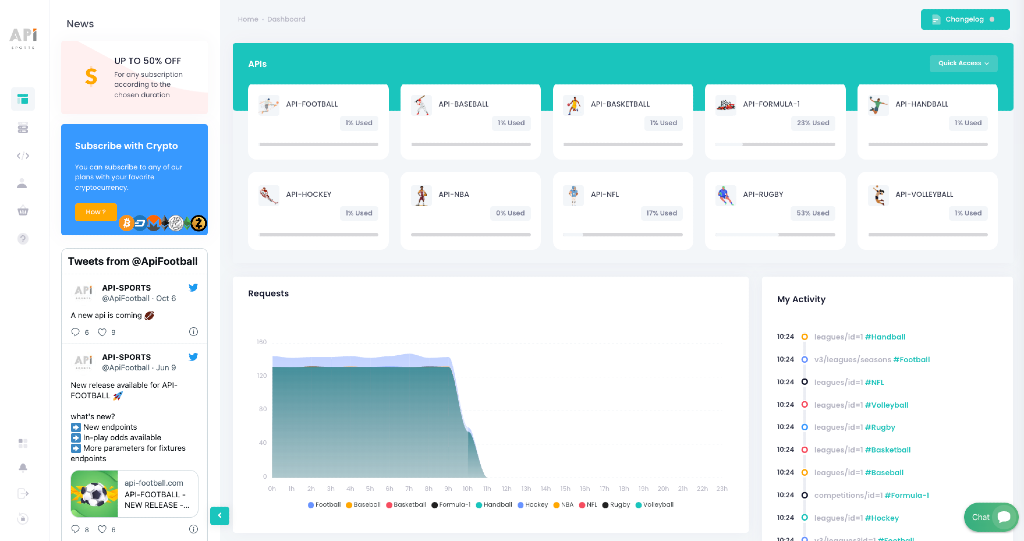 ### Requests 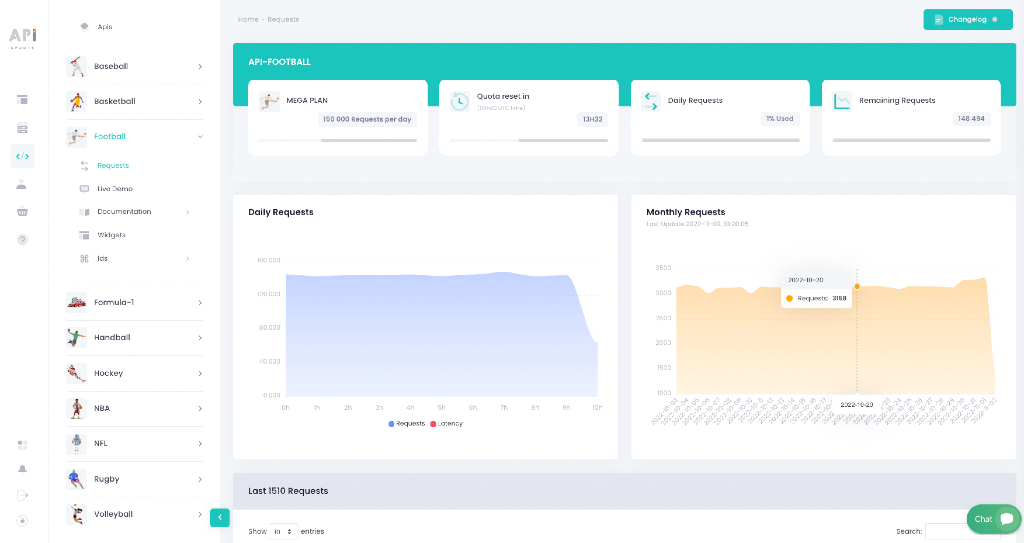 ### Live tester 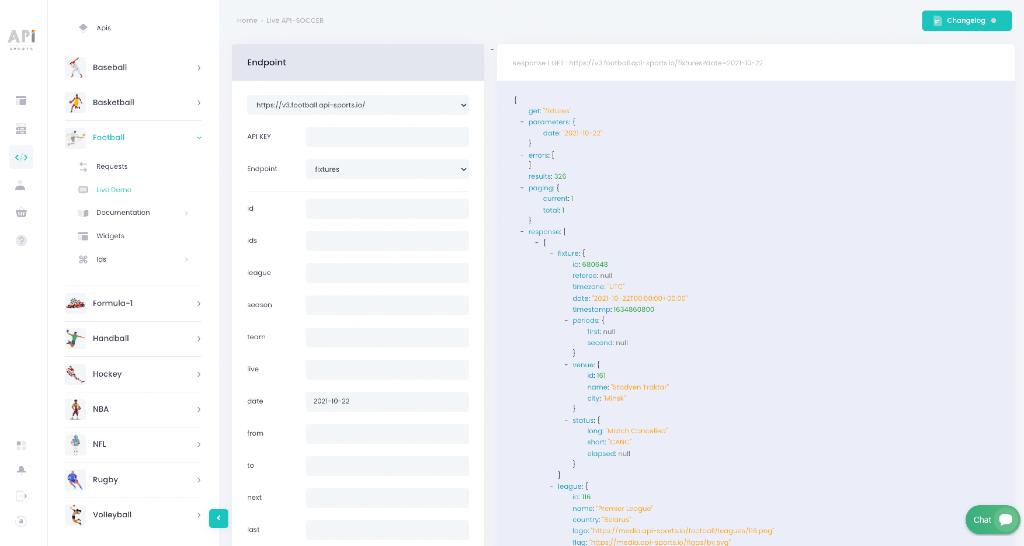 # Architecture  # Logos / Images Calls to logos/images do not count towards your daily quota and are provided for free. However these calls are subject to a rate per second & minute, it is recommended to save this data on your side in order not to slow down or impact the user experience of your application or website. For this you can use CDNs such as [bunny.net](https://bunny.net?ref=8r6al7jhm4). We have a tutorial available [here](https://www.api-football.com/news/post/optimizing-sports-websites-bunnycdn-api-sports-image-storage-guide), which explains how to set up your own media system with BunnyCDN. Logos, images and trademarks delivered through the API are provided solely for identification and descriptive purposes (e.g., identifying leagues, teams, players or venues). We does not own any of these visual assets, and no intellectual property rights are claimed over them. Some images or data may be subject to intellectual property or trademark rights held by third parties (including but not limited to leagues, federations, or clubs). The use of such content in your applications, websites, or products may require additional authorization or licensing from the respective rights holders. You are fully responsible for ensuring that your usage of any logos, images, or branded content complies with applicable laws in your country or the countries where your services are made available. We are not affiliated with, sponsored by, or endorsed by any sports league, federation, or brand featured in the data provided. # Sample Scripts Here are some examples of how the API is used in the main development languages. You have to replace `{endpoint}` by the real name of the endpoint you want to call, like `leagues` or `games` for example. In all the sample scripts we will use the `leagues` endpoint as example. Also you will have to replace `XxXxXxXxXxXxXxXxXxXxXx` with your API-KEY provided in the [dashboard](https://dashboard.api-football.com/). ## C `libcurl` ```shell CURL *curl; CURLcode res; curl = curl_easy_init(); if(curl) { curl_easy_setopt(curl, CURLOPT_CUSTOMREQUEST, "GET"); curl_easy_setopt(curl, CURLOPT_URL, "https://v1.basketball.api-sports.io/leagues"); curl_easy_setopt(curl, CURLOPT_FOLLOWLOCATION, 1L); curl_easy_setopt(curl, CURLOPT_DEFAULT_PROTOCOL, "https"); struct curl_slist *headers = NULL; headers = curl_slist_append(headers, "x-apisports-key: XxXxXxXxXxXxXxXxXxXxXxXx"); curl_easy_setopt(curl, CURLOPT_HTTPHEADER, headers); res = curl_easy_perform(curl); } curl_easy_cleanup(curl); ``` ## C# `RestSharp` ```shell var client = new RestClient("https://v1.basketball.api-sports.io/leagues"); client. Timeout = -1; var request = new RestRequest(Method.GET); request. AddHeader("x-apisports-key", "XxXxXxXxXxXxXxXxXxXxXxXx"); IRestResponse response = client. Execute(request); Console. WriteLine(response. Content); ``` ## cURL `Curl` ```shell curl --request GET \ --url https://v1.basketball.api-sports.io/leagues \ --header 'x-apisports-key: XxXxXxXxXxXxXxXxXxXxXxXx' ``` ## Dart `http` ```dart var headers = { 'x-apisports-key': 'XxXxXxXxXxXxXxXxXxXxXxXx', }; var request = http. Request('GET', Uri.parse('https://v1.basketball.api-sports.io/leagues')); request.headers.addAll(headers); http. StreamedResponse response = await request.send(); if (response.statusCode == 200) { print(await response.stream.bytesToString()); } else { print(response.reasonPhrase); } ``` ## Go `Native` ```go package main import ( "fmt" "net/http" "io/ioutil" ) func main() { url := "https://v1.basketball.api-sports.io/leagues" method := "GET" client := &http. Client { } req, err := http. NewRequest(method, url, nil) if err != nil { fmt. Println(err) return } req. Header. Add("x-apisports-key", "XxXxXxXxXxXxXxXxXxXxXxXx") res, err := client. Do(req) if err != nil { fmt. Println(err) return } defer res. Body. Close() body, err := ioutil. ReadAll(res. Body) if err != nil { fmt. Println(err) return } fmt. Println(string(body)) } ``` ## Java `OkHttp` ```java var myHeaders = new Headers(); myHeaders.append("x-apisports-key", "XxXxXxXxXxXxXxXxXxXxXxXx"); var requestOptions = { method: 'GET', headers: myHeaders, redirect: 'follow' }; ``` `Unirest` ```java Unirest.setTimeouts(0, 0); HttpResponse response = Unirest.get("https://v1.basketball.api-sports.io/leagues") .header("x-apisports-key", "XxXxXxXxXxXxXxXxXxXxXxXx") .asString(); ``` ## Javascript `Fetch` ```javascript var myHeaders = new Headers(); myHeaders.append("x-apisports-key", "XxXxXxXxXxXxXxXxXxXxXxXx"); var requestOptions = { method: 'GET', headers: myHeaders, redirect: 'follow' }; fetch("https://v1.basketball.api-sports.io/leagues", requestOptions) .then(response => response.text()) .then(result => console.log(result)) .catch(error => console.log('error', error)); ``` `jQuery` ```javascript var settings = { "url": "https://v1.basketball.api-sports.io/leagues", "method": "GET", "timeout": 0, "headers": { "x-apisports-key": "XxXxXxXxXxXxXxXxXxXxXxXx", }, }; $.ajax(settings).done(function (response) { console.log(response); }); ``` `XHR` ```javascript var xhr = new XMLHttpRequest(); xhr.withCredentials = true; xhr.addEventListener("readystatechange", function() { if(this.readyState === 4) { console.log(this.responseText); } }); xhr.open("GET", "https://v1.basketball.api-sports.io/leagues"); xhr.setRequestHeader("x-apisports-key", "XxXxXxXxXxXxXxXxXxXxXxXx"); xhr.send(); ``` ## NodeJs `Axios` ```nodejs var axios = require('axios'); var config = { method: 'get', url: 'https://v1.basketball.api-sports.io/leagues', headers: { 'x-apisports-key': 'XxXxXxXxXxXxXxXxXxXxXxXx', } }; axios(config) .then(function (response) { console.log(JSON.stringify(response.data)); }) .catch(function (error) { console.log(error); }); ``` `Native` ```nodejs var https = require('follow-redirects').https; var fs = require('fs'); var options = { 'method': 'GET', 'hostname': 'v1.basketball.api-sports.io', 'path': '/leagues', 'headers': { 'x-apisports-key': 'XxXxXxXxXxXxXxXxXxXxXxXx', }, 'maxRedirects': 20 }; var req = https.request(options, function (res) { var chunks = []; res.on("data", function (chunk) { chunks.push(chunk); }); res.on("end", function (chunk) { var body = Buffer.concat(chunks); console.log(body.toString()); }); res.on("error", function (error) { console.error(error); }); }); req.end(); ``` `Requests` ```nodejs var request = require('request'); var options = { 'method': 'GET', 'url': 'https://v1.basketball.api-sports.io/leagues', 'headers': { 'x-apisports-key': 'XxXxXxXxXxXxXxXxXxXxXxXx', } }; request(options, function (error, response) { if (error) throw new Error(error); console.log(response.body); }); ``` `Unirest` ```nodejs var unirest = require('unirest'); var req = unirest('GET', 'https://v1.basketball.api-sports.io/leagues') .headers({ 'x-apisports-key': 'XxXxXxXxXxXxXxXxXxXxXxXx', }) .end(function (res) { if (res.error) throw new Error(res.error); console.log(res.raw_body); }); ``` ## Objective-c `NSURLSession` ```objectivec #import dispatch_semaphore_t sema = dispatch_semaphore_create(0); NSMutableURLRequest *request = [NSMutableURLRequest requestWithURL:[NSURL URLWithString:@"https://v1.basketball.api-sports.io/leagues"] cachePolicy: NSURLRequestUseProtocolCachePolicy timeoutInterval:10.0]; NSDictionary *headers = @{ @"x-apisports-key": @"XxXxXxXxXxXxXxXxXxXxXxXx", }; [request setAllHTTPHeaderFields: headers]; [request setHTTPMethod:@"GET"]; NSURLSession *session = [NSURLSession sharedSession]; NSURLSessionDataTask *dataTask = [session dataTaskWithRequest: request completionHandler:^(NSData *data, NSURLResponse *response, NSError *error) { if (error) { NSLog(@"%@", error); dispatch_semaphore_signal(sema); } else { NSHTTPURLResponse *httpResponse = (NSHTTPURLResponse *) response; NSError *parseError = nil; NSDictionary *responseDictionary = [NSJSONSerialization JSONObjectWithData: data options:0 error:&parseError]; NSLog(@"%@",responseDictionary); dispatch_semaphore_signal(sema); } }]; [dataTask resume]; dispatch_semaphore_wait(sema, DISPATCH_TIME_FOREVER); ``` ## OCaml `Cohttp` ```ocaml open Lwt open Cohttp open Cohttp_lwt_unix let reqBody = let uri = Uri.of_string "https://v1.basketball.api-sports.io/leagues" in let headers = Header.init () |> fun h -> Header.add h "x-apisports-key" "XxXxXxXxXxXxXxXxXxXxXxXx" in Client.call ~headers `GET uri >>= fun (_resp, body) -> body |> Cohttp_lwt. Body.to_string >|= fun body -> body let () = let respBody = Lwt_main.run reqBody in print_endline (respBody) ``` ## Php `cURL` ```php $curl = curl_init(); curl_setopt_array($curl, array( CURLOPT_URL => 'https://v1.basketball.api-sports.io/leagues', CURLOPT_RETURNTRANSFER => true, CURLOPT_ENCODING => '', CURLOPT_MAXREDIRS => 10, CURLOPT_TIMEOUT => 0, CURLOPT_FOLLOWLOCATION => true, CURLOPT_HTTP_VERSION => CURL_HTTP_VERSION_1_1, CURLOPT_CUSTOMREQUEST => 'GET', CURLOPT_HTTPHEADER => array( 'x-apisports-key: XxXxXxXxXxXxXxXxXxXxXxXx', ), )); $response = curl_exec($curl); curl_close($curl); echo $response; ``` `Request2` ```php <?php require_once 'HTTP/Request2.php'; $request = new HTTP_Request2(); $request->setUrl('https://v1.basketball.api-sports.io/leagues'); $request->setMethod(HTTP_Request2::METHOD_GET); $request->setConfig(array( 'follow_redirects' => TRUE )); $request->setHeader(array( 'x-apisports-key' => 'XxXxXxXxXxXxXxXxXxXxXxXx', )); try { $response = $request->send(); if ($response->getStatus() == 200) { echo $response->getBody(); } else { echo 'Unexpected HTTP status: ' . $response->getStatus() . ' ' . $response->getReasonPhrase(); } } catch(HTTP_Request2_Exception $e) { echo 'Error: ' . $e->getMessage(); } ``` `Http` ```php $client = new http\Client; $request = new http\Client\Request; $request->setRequestUrl('https://v1.basketball.api-sports.io/leagues'); $request->setRequestMethod('GET'); $request->setHeaders(array( 'x-apisports-key' => 'XxXxXxXxXxXxXxXxXxXxXxXx' )); $client->enqueue($request)->send(); $response = $client->getResponse(); echo $response->getBody(); ``` ## PowerShell `RestMethod` ```powershell $headers = New-Object "System. Collections. Generic. Dictionary[[String],[String]]" $headers. Add("x-apisports-key", "XxXxXxXxXxXxXxXxXxXxXxXx") $response = Invoke-RestMethod 'https://v1.basketball.api-sports.io/leagues' -Method 'GET' -Headers $headers $response | ConvertTo-Json ``` ## Python `http.client` ```python import http.client conn = http.client.HTTPSConnection("v1.basketball.api-sports.io") headers = { 'x-apisports-key': "XxXxXxXxXxXxXxXxXxXxXxXx" } conn.request("GET", "/leagues", headers=headers) res = conn.getresponse() data = res.read() print(data.decode("utf-8")) ``` `Requests` ```python url = "https://v1.basketball.api-sports.io/leagues" payload={} headers = { 'x-apisports-key': 'XxXxXxXxXxXxXxXxXxXxXxXx', } response = requests.request("GET", url, headers=headers, data=payload) print(response.text) ``` ## Ruby `Net::HTTP` ```ruby require 'uri' require 'net/http' require 'openssl' url = URI("https://v1.basketball.api-sports.io/leagues") http = Net::HTTP.new(url.host, url.port) http.use_ssl = true http.verify_mode = OpenSSL::SSL::VERIFY_NONE request = Net::HTTP::Get.new(url) request["x-apisports-key"] = 'XxXxXxXxXxXxXxXxXxXxXxXx' response = http.request(request) puts response.read_body ``` ## Shell `Httpie` ```shell http --follow --timeout 3600 GET 'https://v1.basketball.api-sports.io/leagues' \ x-apisports-key:'XxXxXxXxXxXxXxXxXxXxXxXx' \ ``` `wget` ```shell wget --no-check-certificate --quiet \ --method GET \ --timeout=0 \ --header 'x-apisports-key: XxXxXxXxXxXxXxXxXxXxXxXx' \ 'https://v1.basketball.api-sports.io/leagues' ``` ## Swift `URLSession` ```swift import Foundation #if canImport(FoundationNetworking) import FoundationNetworking #endif var semaphore = DispatchSemaphore (value: 0) var request = URLRequest(url: URL(string: "https://v1.basketball.api-sports.io/leagues")!,timeoutInterval: Double.infinity) request.addValue("XxXxXxXxXxXxXxXxXxXxXxXx", forHTTPHeaderField: "x-apisports-key") request.httpMethod = "GET" let task = URLSession.shared.dataTask(with: request) { data, response, error in guard let data = data else { print(String(describing: error)) semaphore.signal() return } print(String(data: data, encoding: .utf8)!) semaphore.signal() } task.resume() semaphore.wait() ``` # Changelog ### (1.5.6) - Endpoint `leagues` - Add field `coverage` - Endpoint `games` - Add endpoint `games/statistics/teams` - Add endpoint `games/statistics/players` - Add field `venue` - Add endpoint `players`
This provider-level handoff preserves only its public ID. No tool or business task is guessed; choose a current tool during rediscovery before setup can be treated as complete.
Get heads to heads between two teams.
Retrieve rugby games with optional filters such as id, date, league, season, team, and timezone.; Get a list of rugby games with optional filtering by id, date, league, season, team, or timezone.
Retrieve a list of basketball games with optional filtering by date, league, team, etc.; Get games with various filters. Requires at least one parameter.; Get games data with at least one parameter such as id, date, league, season, team, or timezone.
Retrieve volleyball games with various filters such as id, date, league, season, team, and timezone.; Get a list of volleyball games with optional filtering by id, date, league, season, team, or timezone.
Return the list of games according to given parameters such as ID, date, league, season, or team.; Return the list of games according to the given parameters.
Retrieve games with various filters such as id, date, league, season, team, or timezone.; Get games by various filters including id, date, league, season, team, and timezone.
Retrieve games with various filters such as id, date, league, season, team, and timezone.; Get a list of handball games with optional filtering by id, date, league, season, team, or timezone.
Retrieve games with various filters including id, date, league, season, team, and timezone.
Retrieve a list of NBA games based on various filters such as date, league, season, team, game ID, live status, or head-to-head matchups. At least one query parameter is required.
Return team scores by quarter for on or several games `id`. Parameters: This endpoint requires at least one of theses parameters : id, ids, date. > This endpoint is updated every 30 seconds
Return team scores by quarter for one or several games.
Return the list of games according to the given parameters. For all requests to games you can add the query parameter `timezone` to your request in order to retrieve the list of games in the timezone of your choice like *“Europe/London“*. In case the timezone is not recognized, empty or is not part of the endpoint `timezone` list, the `UTC` value will be applied by default. To know the list of available timezones you have to use the endpoint `timezone`. Available Status * NS : Not Started * Q1 : 1st Quarter * Q2 : 2nd Quarter * Q3 : 3rd Quarter * Q4 : 4th Quarter * QT : Quarter Time * ER : End Of Regulation * FT : Full Time * HT : Half Time * CANC : Cancelled (Game cancelled and not rescheduled) * PST : Postponed (Game postponed and waiting for a new Game date) Parameters: This endpoint requires at least one of these parameters : id, date, league, season, team. > This endpoint is updated every 30 seconds
For all requests to games you can add the query parameter `timezone` to your request in order to retrieve the list of games in the time zone of your choice like *“Europe/London“* To know the list of available time zones you have to use the endpoint timezone. Available status * NS : Not Started * 1H : First Half (In Play) * 2H : Second Half (In Play) * HT : Half Time (In Play) * ET : Extra Time (In Play) * BT : Break Time (In Play) * PT : Penalties Time (In Play) * AW : Awarded * POST : Postponed * CANC : Cancelled * INTR : Interrupted * ABD : Abandoned * WO : Walkover * AET : After Extra Time (Game Finished) * AP : After Penalties (Game Finished) * FT : Finished (Game Finished) > Games are updated every 15 seconds > This endpoint requires at least one parameter.
For all requests to games you can add the query parameter `timezone` to your request in order to retrieve the list of games in the time zone of your choice like *“Europe/London“* To know the list of available time zones you have to use the endpoint timezone. Available status * NS : Not Started * 1H : First Half (In Play) * 2H : Second Half (In Play) * HT : Half Time (In Play) * ET : Extra Time (In Play) * BT : Break Time (In Play) * PT : Penalties Time (In Play) * AW : Awarded * POST : Postponed * CANC : Cancelled * INTR : Interrupted * ABD : Abandoned * AET : After Extra Time (Game Finished) * FT : Finished (Game Finished) > Games are updated every 15 seconds > This endpoint requires at least one parameter.
For all requests to games you can add the query parameter `timezone` to your request in order to retrieve the list of games in the time zone of your choice like *“Europe/London“* To know the list of available time zones you have to use the endpoint timezone Available status * NS : Not Started * Q1 : Quarter 1 (In Play) * Q2 : Quarter 2 (In Play) * Q3 : Quarter 3 (In Play) * Q4 : Quarter 4 (In Play) * OT : Over Time (In Play) * BT : Break Time (In Play) * HT : Halftime (In Play) * FT : Game Finished (Game Finished) * AOT : After Over Time (Game Finished) * POST : Game Postponed * CANC : Game Cancelled * SUSP : Game Suspended * AWD : Game Awarded * ABD : Game Abandoned > Games are updated every 15 seconds > This endpoint requires at least one parameter.
For all requests to games you can add the query parameter `timezone` to your request in order to retrieve the list of games in the time zone of your choice like *“Europe/London“* To know the list of available time zones you have to use the endpoint timezone Available status * NS : Not Started * IN1 : Inning 1 (In Play) * IN2 : Inning 2 (In Play) * IN3 : Inning 3 (In Play) * IN4 : Inning 4 (In Play) * IN5 : Inning 5 (In Play) * IN6 : Inning 6 (In Play) * IN7 : Inning 7 (In Play) * IN8 : Inning 8 (In Play) * IN9 : Inning 9 (In Play) * POST : Postponed * CANC : Cancelled * INTR : Interrupted * ABD : Abandoned * FT : Finished (Game Finished) > Games are updated every 15 seconds > This endpoint requires at least one parameter.
For all requests to games you can add the query parameter `timezone` to your request in order to retrieve the list of games in the time zone of your choice like *“Europe/London“* To know the list of available time zones you have to use the endpoint timezone. Available status * NS : Not Started * S1 : Set 1 (In Play) * S2 : Set 2 (In Play) * S3 : Set 3 (In Play) * S4 : Set 4 (In Play) * S5 : Set 5 (In Play) * AW : Awarded * POST : Postponed * CANC : Cancelled * INTR : Interrupted * ABD : Abandoned * FT : Finished (Game Finished) > Games are updated every 15 seconds > This endpoint requires at least one parameter.
Return the list of games according to the given parameters. For all requests to games you can add the query parameter `timezone` to your request in order to retrieve the list of games in the time zone of your choice like *“Europe/London“*. In case the timezone is not recognized, empty or is not part of the endpoint `timezone` list, the `UTC` value will be applied by default To know the list of available timezones you have to use the endpoint `timezone`. Available Status * NS : Not Started * Q1 : First Quarter (In Play) * Q2 : Second Quarter (In Play) * Q3 : Third Quarter (In Play) * Q4 : Fourth Quarter (In Play) * OT : Overtime (In Play) * HT : Halftime (In Play) * FT : Finished (Game Finished) * AOT : After Over Time (Game Finished) * CANC : Cancelled (Game cancelled and not rescheduled) * PST : Postponed (Game postponed and waiting for a new game date) Parameters: This endpoint requires at least one of these parameters `id`, `date`, `league`, `team`, `live`, `h2h`. > Games are updated every 30 seconds
Return the list of American football games according to the given parameters. Requires at least one of: id, date, league, team, live, h2h.
For all requests to games you can add the query parameter `timezone` to your request in order to retrieve the list of games in the time zone of your choice like *“Europe/London“* To know the list of available time zones you have to use the endpoint timezone. The `events` field indicates if events are available for this game. It is a Boolen type *“True|False“*. Available status * NS : Not Started * P1 : First Period (In Play) * P2 : Second Period (In Play) * P3 : Third Period (In Play) * OT : Over Time (In Play) * PT : Penalties Time (In Play) * BT : Break Time (In Play) * AW : Awarded * POST : Postponed * CANC : Cancelled * INTR : Interrupted * ABD : Abandoned * AOT : After Over Time (Game Finished) * AP : After Penalties (Game Finished) * FT : Finished (Game Finished) > Games are updated every 15 seconds > This endpoint requires at least one parameter.