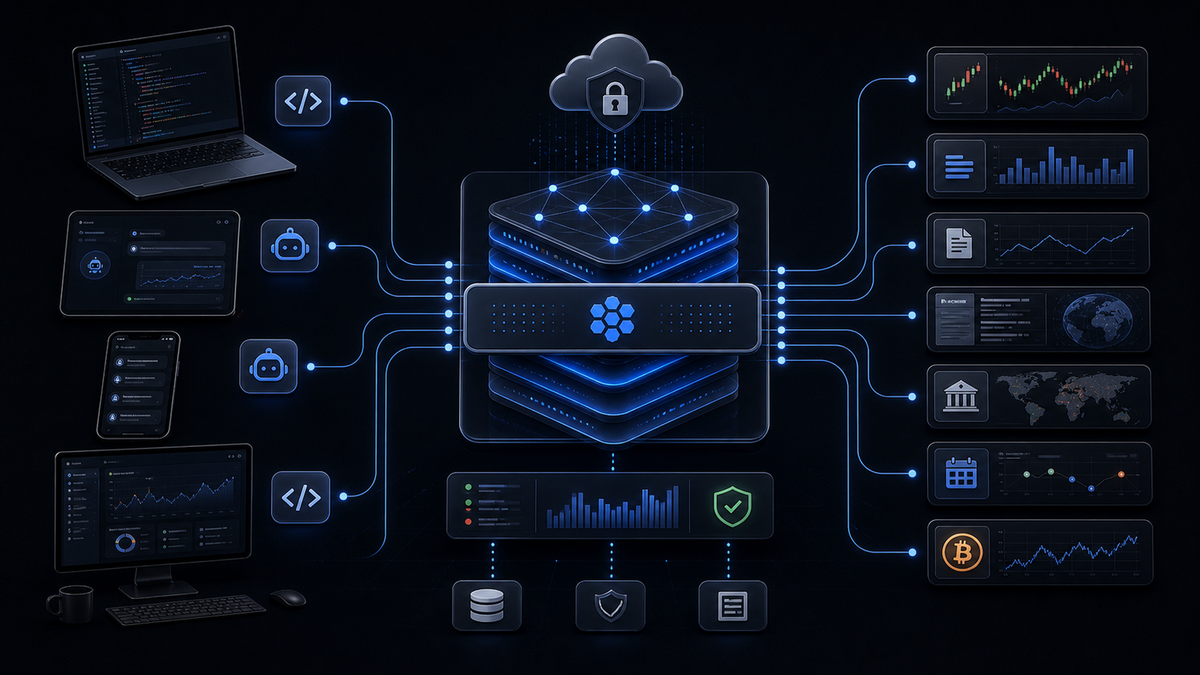
A managed MCP server helps teams adopt the Model Context Protocol without turning every tool integration into an infrastructure project. MCP is becoming a common interface between AI agents and external capabilities, but the protocol does not remove the work of running servers, securing credentials, scaling executions, monitoring failures, and maintaining provider adapters. A self-hosted implementation gives maximum control, yet it also creates a new service that someone must own. Managed MCP infrastructure shifts those operational responsibilities to a platform so developers can focus on agent behavior and product logic. QVeris applies this model to financial AI agents by combining a locally launched MCP adapter with a managed capability network for discovery, inspection, and execution.
What Is a Managed MCP Server?
The Model Context Protocol is an open protocol for connecting AI applications to tools, resources, prompts, and external systems. An MCP client, such as an AI coding or desktop application, discovers the capabilities exposed by an MCP server and invokes them through a standardized message format. This reduces client-specific integration work and gives tool providers a consistent way to describe callable functions.
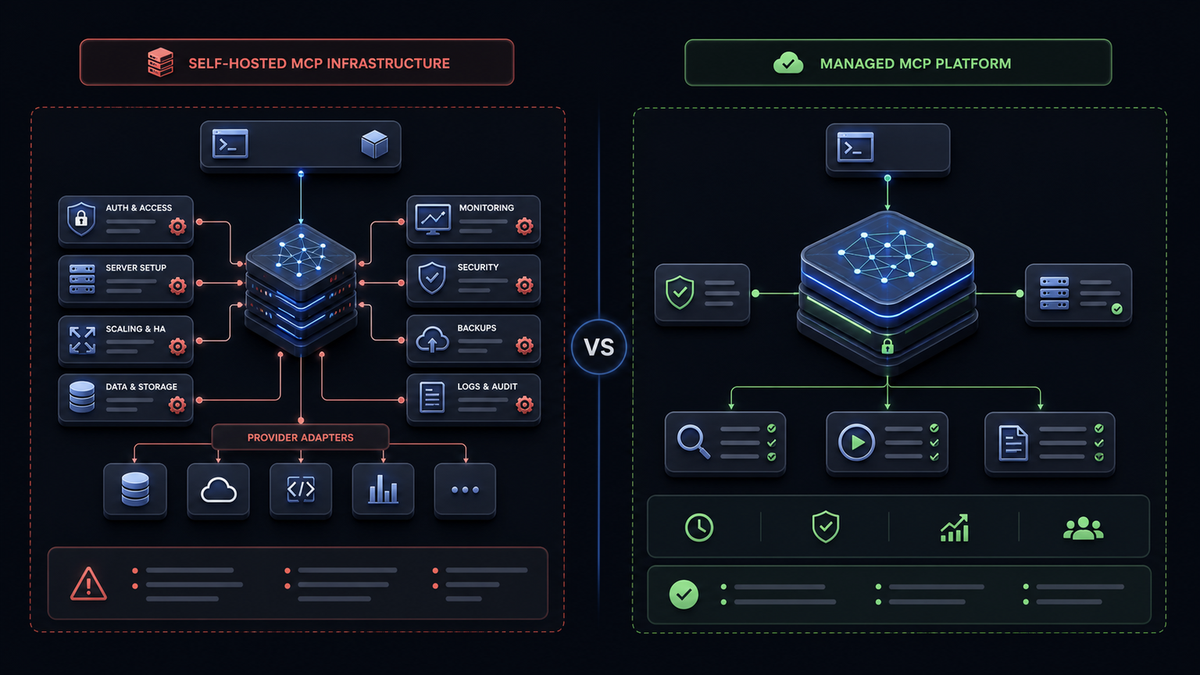
However, MCP standardizes communication rather than operations. A team that builds a server still needs to choose a transport, deploy a runtime, patch dependencies, manage secrets, authenticate users, authorize tools, validate arguments, isolate executions, handle provider rate limits, collect logs, and maintain uptime. If the server fronts several data sources, the team must also normalize their schemas and respond when upstream APIs change.
A managed MCP server or managed MCP platform moves most of that responsibility to a service provider. The platform operates the capability backend, manages provider connections, scales execution, exposes observability, and applies security controls. Developers configure an MCP client or call an API instead of operating every component. The boundary varies by product: some vendors provide a remote hosted endpoint, while others provide a lightweight local adapter backed by a managed cloud service.
npx -y @qverisai/mcp launches a local stdio MCP adapter. QVeris manages the capability catalog and execution backend. A fully remote hosted MCP URL is listed in the official documentation as planned, so teams should not assume that remote endpoint is generally available today.Self-Hosted vs Managed MCP Server Hosting
Neither model is universally better. Self-hosting is appropriate when a company requires complete runtime control, isolated networks, unusual transports, or custom execution policies. Managed MCP server hosting is usually more efficient when a small team needs to ship quickly, connect many tools, or avoid maintaining a new distributed service.
| Dimension | Self-hosted MCP server | Managed MCP server |
|---|---|---|
| Deployment difficulty | Build, package, host, configure transport, and manage environments. | Configure a client or lightweight adapter and connect credentials. |
| Maintenance cost | Your team owns patches, uptime, retries, logs, and provider changes. | Platform handles shared infrastructure and capability operations. |
| Scalability | Capacity planning, queues, concurrency, and regional deployment are internal work. | Execution layer can scale independently of the client. |
| Security | Maximum control, but all authentication, authorization, and secret handling are your responsibility. | Centralized policy and audit features, subject to vendor architecture and controls. |
| Data coverage | Limited to the providers and tools your team integrates. | Shared catalog can expose many providers through one interface. |
| Pricing model | Infrastructure and engineering costs, plus provider subscriptions. | Usually usage, credits, seats, or platform plans. |
For a prototype, startup, research group, or internal agent team, the opportunity cost usually matters more than raw server cost. Two engineers maintaining authentication and provider adapters are not improving the agent's reasoning, workflow, or user experience. A hosted MCP server model can shorten the path from proof of concept to a controlled production pilot. Enterprises may use a hybrid approach: managed capabilities for broad external data, with self-hosted MCP servers for private internal systems.
What to Look for in a Managed MCP Platform
The word “managed” can describe very different products. Before selecting a platform, test the complete workflow from tool discovery to execution and audit rather than evaluating only how quickly the server starts.
Reliability deserves a separate review even when it is not a marketing feature. Ask how the platform reports tool failures, stale data, provider errors, and retries. A managed service should make failures easier to diagnose, not obscure them behind a generic error. Verify data licenses, residency requirements, retention, and whether audit records can be exported to your existing observability stack.
QVeris as a Managed MCP Server for Finance AI Agents
QVeris is a capability routing network designed around AI agent access to financial tools and data. Instead of exposing a fixed list of provider-specific endpoints, it separates tool selection into a three-stage protocol. Discover searches more than 10,000 financial capabilities with a natural-language requirement. Inspect returns a tool's parameters, output contract, provider metadata, latency, success information, and cost. Call executes the selected capability and returns structured JSON.
This workflow matters for MCP agents because a large static tool list can consume context and reduce selection accuracy. An agent can first search for “latest SEC filing with structured facts” or “real-time stock price with exchange timestamp,” inspect only the strongest candidates, and then call one validated tool. The application retains the capability ID and execution metadata for debugging and audit.
QVeris documents integrations for Claude Desktop, Cursor, OpenCode, Python, REST, and command-line workflows. Its managed backend handles the capability catalog and provider execution, while the current npm package starts a local stdio server that presents QVeris tools to the MCP client. This is operationally lighter than hosting a multi-provider MCP service, although the client machine still runs the adapter process.
For enterprise workflows, permissions and call records are especially important. A financial agent may access public quotes, licensed datasets, or sensitive compliance tools under different policies. Centralizing capability access creates a place to apply governance and review usage. QVeris states that Discover and Inspect are free; execution consumes credits. New users currently receive 1,000 registration credits and 100 daily login credits. Confirm current allowances and plan details on the pricing page.
npx -y @qverisai/mcpThe one-line command is the adapter entry point, not the whole architecture. A production deployment must still decide where the client process runs, how it receives secrets, which users may invoke it, and how calls are reviewed.
Getting Started with QVeris Managed MCP Server
The examples below follow the current public QVeris documentation. Package versions and client configuration formats can change, so verify the latest instructions in the QVeris documentation before deployment.
1Create a QVeris account and API key
Register at QVeris and create an API key. Store the key in a password manager, operating-system secret store, or deployment secret manager. Do not commit it to source control or paste it into shared screenshots. Start with a separate development key so experiments do not share credentials with production agents.
2Configure Claude Desktop
Add a server entry to the Claude Desktop MCP configuration. The exact configuration path depends on the operating system. On Windows, QVeris documentation uses cmd /c so the client can launch the npm command reliably.
{
  "mcpServers": {
    "qveris": {
      "command": "cmd",
      "args": ["/c", "npx", "-y", "@qverisai/mcp"],
      "env": {
        "QVERIS_API_KEY": "your_api_key"
      }
    }
  }
}
Restart Claude Desktop after saving the file. The MCP client should launch the local adapter and show QVeris tools. If startup fails, test the npm command in a terminal, confirm Node.js is available, and inspect the client logs before changing tool permissions.
3Configure Cursor or another MCP client
Cursor accepts a similar server definition. Keep the key in an environment variable or secret mechanism supported by your environment. Teams should distribute a configuration template rather than sharing one personal credential.
{
  "mcpServers": {
    "qveris": {
      "command": "npx",
      "args": ["-y", "@qverisai/mcp"],
      "env": {
        "QVERIS_API_KEY": "${env:QVERIS_API_KEY}"
      }
    }
  }
}
Client support for environment interpolation varies, so replace the syntax with the current Cursor format when necessary. The same principle applies to OpenCode: configure the QVeris adapter as an MCP server, scope credentials to the user or workspace, and verify that only intended tools are exposed.
4Use the Python SDK to discover capabilities
Services that do not run an MCP client can use the Python SDK. Discovery should describe the required output, data freshness, and asset class rather than searching only for a provider name.
import asyncio
import os
from qveris import AsyncQVerisClient

async def discover_tools():
    async with AsyncQVerisClient(
        api_key=os.environ["QVERIS_API_KEY"]
    ) as client:
        results = await client.discover(
            query=(
                "real-time US stock quote with price, volume, "
                "exchange timestamp, and structured JSON"
            ),
            limit=5,
        )
        return results

print(asyncio.run(discover_tools()))
Rank the returned tools by task fit, freshness, provider metadata, latency, and cost. Then inspect the selected capability before creating arguments. This prevents the application from guessing parameter names or calling a delayed feed when it needs real-time data.
5Inspect and call a financial capability
The inspection result is the contract. Map its required fields to validated application inputs, then call the capability. The field names below are illustrative; replace them with the current schema returned by Inspect.
async def inspect_and_call(capability_id: str):
    async with AsyncQVerisClient(
        api_key=os.environ["QVERIS_API_KEY"]
    ) as client:
        schema = await client.inspect(
            capability_ids=[capability_id]
        )
        print(schema)

        result = await client.call(
            capability_id=capability_id,
            arguments={"symbol": "AAPL"}
        )
        return result

CAPABILITY_ID = "id_from_discovery"
print(asyncio.run(inspect_and_call(CAPABILITY_ID)))
Production code should validate outputs, store capability and execution IDs, handle timeouts, and distinguish provider errors from genuinely missing data. The model should never invent tool parameters or bypass the inspected schema.
Managed MCP Server Use Cases
A research group can connect Claude or another agent to market data, filings, news, and macro capabilities without operating a server for every feed. Analysts gain a consistent tool workflow while engineering retains execution records and access control.
Quant teams can keep deterministic strategy logic in Python and delegate capability discovery and provider access to the managed layer. The result is less adapter maintenance without asking an LLM to perform authoritative calculations.
A startup can build a prototype with broad data coverage before committing to a permanent provider architecture. Usage-based calls can be easier to evaluate than several subscriptions during an uncertain development phase.
A shared managed MCP platform can become a governed entry point for financial tools used across several agents. Central records help security and platform teams understand which capabilities are being called, by whom, and for which application.
These teams may still self-host servers for private databases, proprietary models, or tightly isolated internal services. Managed and self-hosted MCP are complementary architecture choices, not mutually exclusive commitments.
Production Controls for Managed MCP Server Hosting
A quick installation is only the beginning. Define identity and authorization boundaries before connecting production data. Personal API keys may be acceptable for local testing, but shared agents should use service identities, scoped credentials, rotation, and explicit ownership. Decide which users can discover tools, which can inspect schemas, and which can execute paid or sensitive capabilities.
Monitor the local adapter and the managed backend as separate components. Track process health, startup failures, request latency, provider errors, credit usage, and the age of returned data. A functioning MCP process does not guarantee that an upstream provider returned fresh or complete information. Attach the tool ID, provider, timestamp, and execution record to important outputs.
Plan for degraded operation. If a capability fails, the agent should retry only when the error is transient and the call is safe to repeat. A fallback provider must meet the same licensing, freshness, and schema expectations. Avoid silently switching from real-time to delayed data. When evidence is incomplete, return an explicit partial result or require human review.
Finally, review the vendor boundary. Understand what runs locally, what data leaves the environment, where logs are retained, and whether a remote hosted endpoint is available or merely planned. Document this architecture for security review. Managed MCP reduces operational work, but it does not remove the team's responsibility to validate outputs, govern access, and design safe agent behavior.
Conclusion: Choose Managed MCP Server Hosting Deliberately
A managed MCP server can make MCP adoption significantly easier by centralizing capability discovery, provider integrations, execution, and operational controls. QVeris offers this managed capability model for finance AI agents through a local MCP adapter backed by its Discover → Inspect → Call network. It is a strong fit for teams that want broad financial tool access without owning every server and provider connector. Use self-hosting where complete infrastructure control is essential, and use managed MCP hosting where speed, coverage, and reduced maintenance create more value.
托管 MCP Server 能让团队采用 Model Context Protocol,而不必把每一次工具集成都变成基础设施项目。MCP 正在成为 AI Agent 与外部能力之间的通用接口,但协议本身不会消除服务器运行、凭证安全、执行扩展、故障监控和供应商适配器维护等工作。自建方案提供最大的控制力,也意味着必须有人长期负责新的服务。托管 MCP 基础设施将这些运维职责交给平台,让开发者专注 Agent 行为和产品逻辑。QVeris 面向金融 AI Agent 提供这种模式:本地启动轻量 MCP 适配器,后台由托管能力网络完成发现、检视和执行。
什么是托管 MCP Server?
Model Context Protocol 是用于连接 AI 应用与工具、资源、提示词和外部系统的开放协议。Claude Desktop、Cursor 等 MCP 客户端可以发现 MCP Server 暴露的能力,并通过标准消息格式调用。它减少客户端专属集成工作,也让工具供应商能够用一致方式描述可调用函数。
但 MCP 标准化的是通信,不是运维。自行构建 Server 仍需要选择传输方式、部署运行时、修补依赖、管理密钥、验证用户、控制权限、校验参数、隔离执行、处理供应商限速、收集日志并维持可用性。如果 Server 连接多个数据源,还需要统一 Schema 并应对上游 API 变化。
托管 MCP Server 或托管 MCP 平台会把大部分责任转移给服务商。平台负责能力后台、供应商连接、执行扩展、可观测性和安全控制。开发者只需配置 MCP 客户端或调用 API。不同产品的边界并不相同:有的平台提供远程托管端点,有的平台则提供连接到托管云服务的本地轻量适配器。
npx -y @qverisai/mcp 会启动本地 stdio MCP 适配器,能力目录和执行后台由 QVeris 管理。完整的远程 hosted MCP URL 在官方文档中仍标记为规划功能,因此目前不应默认它已经普遍开放。自建与托管 MCP Server Hosting 对比
两种模式没有绝对优劣。企业需要完全控制运行时、隔离网络、特殊传输方式或自定义执行策略时,自建更合适;小团队需要快速上线、连接大量工具或避免维护分布式服务时,托管 MCP Server Hosting 通常更高效。
| 维度 | 自建 MCP Server | 托管 MCP Server |
|---|---|---|
| 部署难度 | 自行开发、打包、托管、配置传输和环境。 | 配置客户端或轻量适配器并连接凭证。 |
| 维护成本 | 团队负责补丁、可用性、重试、日志和供应商变化。 | 平台负责共享基础设施和能力运维。 |
| 扩展性 | 自行处理容量、队列、并发和多地区部署。 | 执行层可以独立于客户端扩展。 |
| 安全性 | 控制力最高,但认证、授权和密钥处理全部由团队负责。 | 集中策略和审计能力,但需要评估供应商架构。 |
| 数据覆盖 | 仅限团队已经集成的供应商和工具。 | 共享目录可以通过一个接口暴露多个供应商。 |
| 定价模式 | 基础设施、工程成本和供应商订阅。 | 通常按调用、积分、席位或平台方案计费。 |
对于原型、创业公司、研究团队或内部 Agent 项目,机会成本往往比服务器账单更重要。让两名工程师长期维护认证和供应商适配器,并不会改善 Agent 的推理和用户体验。托管方案可以缩短从概念验证到生产试点的路径。企业也可以采用混合架构:外部金融数据使用托管能力,私有内部系统继续使用自建 MCP Server。
选择托管 MCP Platform 时应关注什么
“托管”可能代表完全不同的产品。选择平台时,应测试从工具发现到执行和审计的完整流程,而不是只看 Server 能否快速启动。
可靠性也必须单独评估。平台应明确报告工具失败、陈旧数据、供应商错误和重试,而不是用通用错误隐藏问题。还需要核对数据授权、数据驻留、日志保留以及审计记录能否导出到现有可观测系统。
QVeris:面向金融 AI Agent 的托管 MCP Server
QVeris 是围绕 AI Agent 金融工具访问设计的能力路由网络。它不要求应用提前写死供应商端点,而是把工具选择拆成三步。Discover 用自然语言从 10,000+ 金融能力中搜索;Inspect 返回参数、输出结构、供应商、延迟、成功信息和费用;Call 执行所选能力并返回结构化 JSON。
这对 MCP Agent 很重要,因为庞大的静态工具列表会消耗上下文并降低选择准确率。Agent 可以先搜索“带结构化事实的最新 SEC filing”或“带交易所时间戳的实时报价”,只检视最相关的候选项,然后调用经过验证的工具。应用还能保留能力 ID 和执行元数据用于调试与审计。
QVeris 文档提供 Claude Desktop、Cursor、OpenCode、Python、REST 和 CLI 接入方式。当前 npm 包会在本地启动 stdio Server,并把 QVeris 工具呈现给 MCP 客户端;能力目录和供应商执行由托管后台处理。这比自行托管多供应商 MCP 服务轻量,但客户端设备仍然需要运行适配器进程。
QVeris 表示 Discover 和 Inspect 免费,实际执行消耗积分。新用户目前可获得 1000 注册积分和每日登录 100 积分。请在 定价页面核对最新规则。
npx -y @qverisai/mcp这条命令只是适配器入口,并不代表全部架构。生产部署仍需要决定进程运行位置、密钥注入方式、调用权限以及审计方法。
开始使用 QVeris 托管 MCP Server
下面示例参考当前 QVeris 公开文档。包版本和客户端配置格式可能变化,部署前请查看最新 QVeris 文档。
1创建 QVeris 账号和 API Key
注册并生成 API Key,把密钥保存在密码管理器、系统密钥存储或部署平台的 Secret Manager 中。不要提交到代码仓库,也不要出现在共享截图里。开发和生产环境应使用不同密钥。
2配置 Claude Desktop
在 Claude Desktop MCP 配置中添加 Server。Windows 环境可通过 cmd /c 可靠启动 npm 命令。
{
  "mcpServers": {
    "qveris": {
      "command": "cmd",
      "args": ["/c", "npx", "-y", "@qverisai/mcp"],
      "env": {
        "QVERIS_API_KEY": "your_api_key"
      }
    }
  }
}
保存后重启 Claude Desktop。如果启动失败,先在终端运行 npm 命令,确认 Node.js 可用,再查看客户端日志。
3配置 Cursor 或其他 MCP Client
Cursor 使用类似配置。团队应分发配置模板,而不是共享同一个个人密钥。
{
  "mcpServers": {
    "qveris": {
      "command": "npx",
      "args": ["-y", "@qverisai/mcp"],
      "env": {
        "QVERIS_API_KEY": "${env:QVERIS_API_KEY}"
      }
    }
  }
}
不同客户端对环境变量插值的支持可能不同,需要按当前 Cursor 或 OpenCode 格式调整,并确保只暴露必要工具。
4使用 Python SDK 发现能力
未运行 MCP Client 的服务可以使用 Python SDK。Discover 查询应描述需要的输出、新鲜度和资产类别。
import asyncio
import os
from qveris import AsyncQVerisClient

async def discover_tools():
    async with AsyncQVerisClient(
        api_key=os.environ["QVERIS_API_KEY"]
    ) as client:
        return await client.discover(
            query=(
                "real-time US stock quote with price, volume, "
                "exchange timestamp, and structured JSON"
            ),
            limit=5,
        )

print(asyncio.run(discover_tools()))
按照任务匹配度、数据新鲜度、供应商、延迟和成本排序,再 Inspect 所选能力,不要猜测参数。
5Inspect 并调用金融能力
Inspect 返回结果才是参数契约。下面字段仅用于示例,应替换为当前 Schema 中的真实字段。
async def inspect_and_call(capability_id: str):
    async with AsyncQVerisClient(
        api_key=os.environ["QVERIS_API_KEY"]
    ) as client:
        schema = await client.inspect(
            capability_ids=[capability_id]
        )
        print(schema)

        return await client.call(
            capability_id=capability_id,
            arguments={"symbol": "AAPL"}
        )

print(asyncio.run(
    inspect_and_call("id_from_discovery")
))
生产代码应验证输出、记录能力和执行 ID、处理超时,并区分供应商错误与真实的数据缺失。
托管 MCP Server 的应用场景
无需为每个数据源运行 Server,即可让 Claude 等 Agent 访问行情、财报、新闻和宏观能力,并保留统一工具流程与执行记录。
量化团队把确定性策略保留在 Python 中,将能力发现和供应商访问交给托管层,减少适配器维护,同时不让 LLM 替代权威计算。
创业团队可以先使用广泛数据覆盖构建原型,在需求尚未确定时避免过早锁定复杂的永久供应商架构。
共享托管 MCP 平台可以成为多个 Agent 使用金融工具的统一治理入口,帮助安全和平台团队了解调用者、能力与应用归属。
私有数据库、自有模型或强隔离内部系统仍然可以使用自建 Server。托管与自建 MCP 是可以组合的架构选择。
托管 MCP Server Hosting 的生产控制
快速安装只是开始。生产数据接入前需要定义身份和权限边界。个人 API Key 适合本地测试,共享 Agent 则应使用服务身份、范围化凭证、轮换和明确责任人。还应区分谁可以 Discover、谁可以 Inspect、谁可以执行付费或敏感能力。
本地适配器和托管后台需要分别监控。跟踪进程健康、启动失败、请求延迟、供应商错误、积分使用和返回数据时效。MCP 进程正常并不代表上游数据一定新鲜完整。重要输出应附带工具 ID、供应商、时间戳和执行记录。
还要设计降级策略。能力失败后,只能在错误可重试且调用具有幂等性时重试。备用供应商必须满足相同授权、新鲜度和 Schema 要求,不能从实时数据静默切换到延迟数据。证据不完整时,应明确返回部分结果或要求人工审核。
最后需要审查供应商边界:哪些组件在本地运行、哪些数据离开环境、日志保存在哪里,以及远程 hosted endpoint 是已经可用还是仍在规划。托管 MCP 可以减少运维,但不会消除团队验证输出、治理访问和设计安全 Agent 行为的责任。
总结:有意识地选择托管 MCP Server Hosting
托管 MCP Server 通过集中能力发现、供应商集成、执行和运维控制,可以显著降低 MCP 的采用门槛。QVeris 通过本地 MCP 适配器和 Discover → Inspect → Call 托管网络,为金融 AI Agent 提供这种能力模式。需要广泛金融工具访问、但不希望维护每个 Server 和连接器的团队适合使用托管方案;需要完全基础设施控制的内部系统则可以继续自建。