
ENGINEERING GUIDE工程指南
QVeris CLI: Universal API Access from the TerminalQVeris CLI: Terminal API AccessQVeris CLI:从终端统一访问 API
Discover, inspect, and call 10,000+ APIs from your terminal — in natural language, in under 30 seconds.在 30 秒内用自然语言从终端发现、检查并调用 10,000+ API。
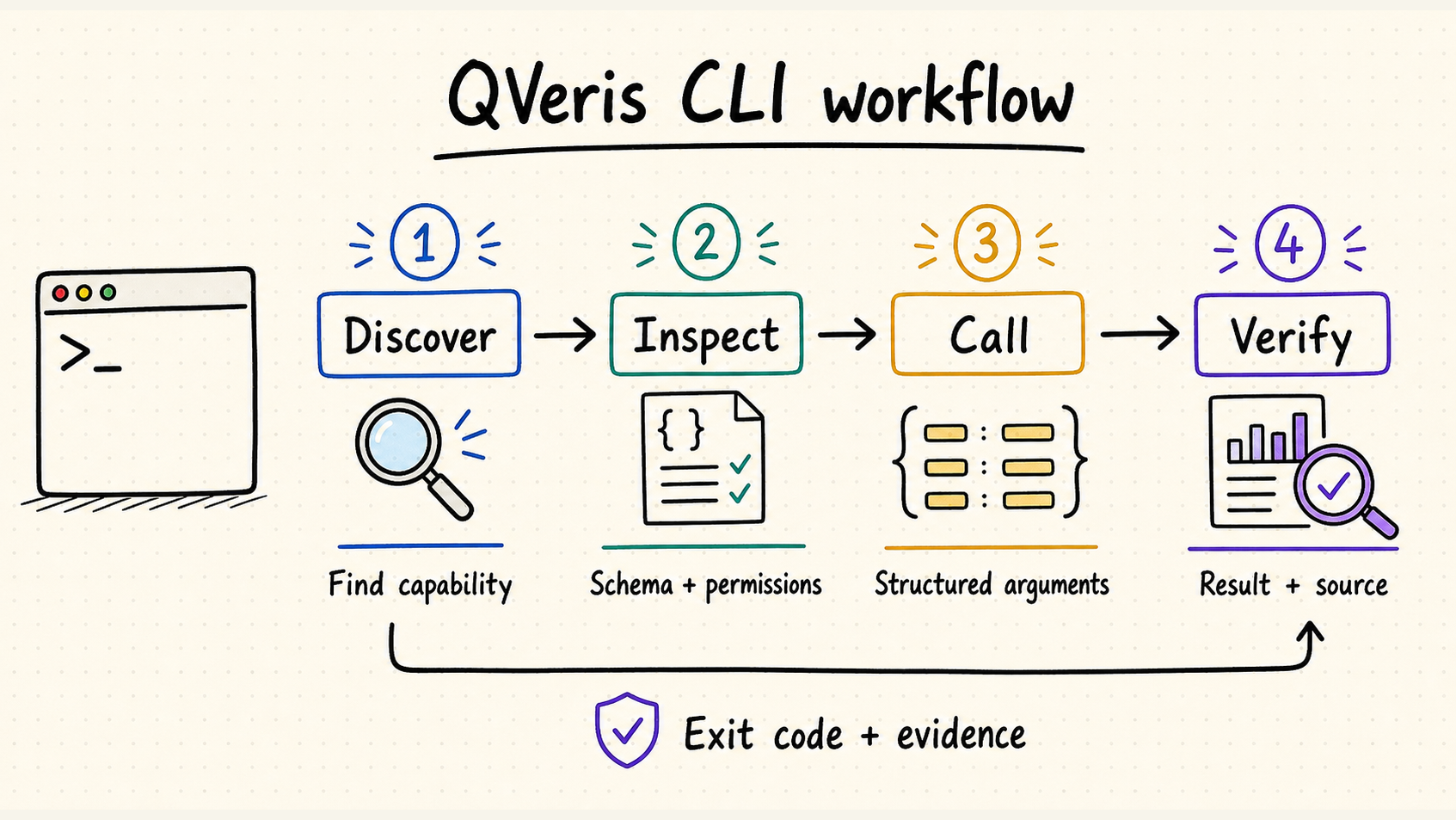
Up and Running in 30 Seconds30 秒快速上手
Install安装
One command. No configuration needed.一条命令即可安装,无需额外配置。
$ npm install -g @qverisai/cliLogin登录
Interactive authentication. One and done.通过一次交互式流程完成身份验证。
$ qveris loginDiscover发现
Search across 10,000+ capabilities.在 10,000+ 项能力中进行搜索。
$ qveris discover "any API you need"Three Commands. Any API. Under 30 Seconds.三个命令,调用任意 API,30 秒内完成
Discover发现
Describe what you need in plain language. QVeris semantic-matches across 10,000+ tools.用自然语言描述需求,QVeris 会在 10,000+ 个 Tool 中进行语义匹配。
$ qveris discover "real-time stock quotes"

Found 6 tools:
  1. finance.stock_quote    Real-time stock quotes   320ms  99.2%
  2. market.live_price      Live market prices       450ms  98.7%
Search is always free — zero credit cost.搜索始终免费,不消耗 Credit。
Inspect检查
Check parameters, success rate, provider notes, and cost before calling.调用前检查参数、成功率、Provider 说明和成本。
$ qveris inspect 1

finance.stock_quote
Provider: MarketData Pro · Avg: 320ms · Success: 99.2%
Parameters:
  symbol    string (required)   Stock ticker symbol
  exchange  string (optional)   Exchange code
Inspection is always free.检查始终免费。
Call调用
Execute and get structured JSON results. Built for automation from day one.执行调用并获得结构化 JSON 结果,从一开始就为自动化而设计。
$ qveris call 1 --params '{"symbol":"AAPL"}'

{
  "symbol": "AAPL",
  "price": 198.52,
  "change": +2.31,
  "volume": 45230100
}
1–100 credits per call. Credits never expire.每次调用消耗 1–100 Credits,Credits 永不过期。
CLI vs MCP Server: Which Should You Use?CLI 与 MCP Server:应该使用哪个?
Both connect your agent to QVeris. The right choice depends on your workflow.两者都能让 Agent 接入 QVeris,正确选择取决于你的工作流。
| CLI | MCP Server | |
|---|---|---|
| Best for适用场景 | Terminal, scripts, agent shell calls终端、脚本和 Agent Shell 调用 | IDE agents (Cursor, Claude Code)IDE Agent(Cursor、Claude Code) |
| Install安装 | One-line npm install一行 npm 命令安装 | IDE configurationIDE 配置 |
| Token costToken 成本 | ~50–100 tokens per command每条命令约 50–100 Tokens | Schema injection scales with tool countSchema 注入量随 Tool 数量增长 |
| Token savingsToken 节省 | Up to 80% vs MCP相比 MCP 最多节省 80% | Baseline基准 |
| Output输出 | Human-friendly + --json可读文本 + --json | MCP protocol formatMCP 协议格式 |
| Interaction交互 | REPL, pipes, scriptsREPL、管道和脚本 | IDE-embedded chatIDE 内嵌对话 |
| Recommended for推荐用于 | Agent automation pipelinesAgent 自动化管道 | Cursor / Claude DesktopCursor / Claude Desktop |
CLI and MCP aren't mutually exclusive — use CLI for automation, MCP for IDE workflows. Both connect to the same QVeris network.CLI 与 MCP 并不互斥:自动化流程使用 CLI,IDE 工作流使用 MCP;两者连接的是同一个 QVeris 网络。
Everything You Need, Nothing You Don't需要的能力一个不少,没有多余负担
Natural Language Search自然语言搜索
Describe what you need. QVeris semantic-matches across 10,000+ tools. No API names to memorize. No documentation hunting.描述你的需求,QVeris 会在 10,000+ 个 Tool 中进行语义匹配;无需记忆 API 名称,也无需翻找文档。
Code Generation代码生成
qveris codegen curl|python|javascript generates ready-to-use API call code for your project in seconds.qveris codegen curl|python|javascript 可在数秒内为项目生成可直接使用的 API 调用代码。
Agent-Optimized针对 Agent 优化
--json output + stdin pipes + structured exit codes. Built for automation from day one — not bolted on as an afterthought.--json 输出、标准输入管道和结构化退出码,从设计之初就面向自动化,而不是后期附加。
Zero-Config Setup零配置安装
One-line npm install. Interactive qveris login. From zero to productive in 30 seconds. No YAML, no config files, no environment variables.一行 npm 命令安装,通过 qveris login 交互登录,30 秒即可投入使用;不需要 YAML、配置文件或环境变量。
Interactive REPL交互式 REPL
qveris interactive opens an exploratory shell to discover and test APIs conversationally — like a playground for API exploration.qveris interactive 会打开探索式 Shell,以对话方式发现和测试 API,就像用于 API 探索的 Playground。
Built-in Diagnostics内置诊断
qveris doctor checks Node.js version, API key validity, and network connectivity in one command. Debug in seconds, not hours.qveris doctor 用一条命令检查 Node.js 版本、API Key 有效性和网络连接,几秒钟即可定位问题。
Built for Every Workflow为各种工作流而构建
Developer Daily Workflow开发者日常工作流
Verify API responses without leaving the terminal. Run codegen to paste production-ready code directly into your project.无需离开终端即可验证 API 响应,并通过 codegen 将生产可用代码直接放入项目。
$ qveris discover "geocoding API"
$ qveris call 1 --params '{"address":"SF"}'
$ qveris codegen python
Agent Automation PipelinesAgent 自动化管道
Let your AI agent discover and call APIs through shell pipes — zero schema injection overhead.让 AI Agent 通过 Shell 管道发现并调用 API,不产生 Schema 注入开销。
$ qveris discover "weather forecast" --json --limit 1 |
  jq -r ".results[0].tool_id" |
  xargs -I {} qveris call {} --json
Batch Data Collection批量数据采集
Combine with shell pipes for batch operations across multiple inputs — one loop, unlimited symbols.结合 Shell 管道对多个输入执行批量操作,一个循环即可处理任意数量的股票代码。
$ for symbol in AAPL GOOGL MSFT; do
    qveris call finance.stock_quote \
      --params "{\"symbol\":\"$symbol\"}" --json
  done | jq -s "."
Command Reference命令参考
| Command命令 | Description说明 | Cost成本 |
|---|---|---|
qveris discover <query> | Natural language API search自然语言 API 搜索 | Free免费 |
qveris inspect <id> | View tool details, params, examples查看 Tool 详情、参数和示例 | Free免费 |
qveris call <id> | Execute a tool and get results执行 Tool 并获得结果 | 1–100 credits1–100 Credits |
qveris interactive | Start interactive REPL启动交互式 REPL | — |
qveris login / logout | Authentication management身份验证管理 | — |
qveris credits | Check remaining balance查看剩余余额 | — |
qveris doctor | Check Node.js, API key, connectivity检查 Node.js、API Key 和连接状态 | — |
qveris codegen | Generate curl/Python/JS snippets生成 curl/Python/JS 代码片段 | — |
qveris usage | View usage audit history查看使用审计历史 | — |
All commands support --json output · --api-key override · --timeout.所有命令均支持 --json 输出、--api-key 覆盖和 --timeout。
For installation and current syntax, use the official npm package and QVeris CLI documentation. Source and releases are available from the QVeris GitHub organization.安装方式和最新语法请参考官方 npm 包与 QVeris CLI 文档;源码与发布记录可在 QVeris GitHub 组织查看。
Frequently Asked Questions常见问题
What is QVeris CLI?什么是 QVeris CLI?
How does QVeris CLI reduce LLM prompt tokens?QVeris CLI 如何减少 LLM Prompt Tokens?
Is QVeris CLI free to use?QVeris CLI 可以免费使用吗?
What's the difference between QVeris CLI and MCP Server?QVeris CLI 与 MCP Server 有什么区别?
Which AI agent frameworks work with QVeris CLI?哪些 AI Agent 框架可以使用 QVeris CLI?
10,000+ APIs. One Command Away.10,000+ API,一条命令即可访问
Free to install. 1,000 credits on signup. No credit card required.免费安装,注册即获 1,000 Credits,无需信用卡。
$ npm install -g @qverisai/cli