AI Agent OrchestrationAI Agent 编排
- Problem: Single AI agents hit capability ceilings on complex, multi-step tasks requiring diverse tools or parallel processing.
- Solution: AI agent orchestration adds a coordination layer that decomposes tasks, delegates to specialized agents, and aggregates results.
- Result: Your team gains multi-agent systems that handle complex workflows—from web research to analysis to reporting—with the coordination of a well-run team.
What is AI Agent Orchestration?
AI agent orchestration is the practice of coordinating multiple AI agents to work together on complex tasks. An orchestration layer manages agent communication, task decomposition, delegation, and result aggregation—enabling multi-agent systems to handle workflows no single agent could complete alone.
Think of orchestration like a project manager for AI agents. When a complex request arrives—like "research Company X's competitive position and draft a market entry memo"—the orchestrator breaks this into subtasks (web research, pricing analysis, market sentiment, competitive positioning, document drafting) and routes each to the appropriate specialized agent.
Without AI agent orchestration, developers must manually coordinate agent interactions, handle communication protocols, and manage result aggregation. Multi-agent orchestration has emerged as one of the key engineering challenges organizations face as they scale AI systems from prototypes to production.
The distinction between orchestration and simple agent chaining matters. A chained system follows a rigid pipeline: Agent A outputs to Agent B to Agent C. An orchestrated system makes dynamic decisions: based on intermediate results, it might route to Agent D, spawn parallel tasks, or loop back for clarification. This flexibility is what makes AI agent orchestration platforms essential for real-world workflows.
How AI Agent Orchestration Works
AI agent orchestration follows a four-phase cycle that handles the complexity of multi-agent workflows. Understanding these phases helps you design more effective orchestrated systems and debug issues when they arise.
Phase 1: Task Decomposition
The orchestrator receives a user request and breaks it into discrete subtasks. This is harder than it sounds—natural language requests are often ambiguous, contain implicit dependencies, or combine multiple objectives that should be handled differently.
For example, "generate a competitive analysis for Company X" might decompose into: fetch product features, retrieve customer reviews, analyze pricing strategy, and draft the competitive report. But the orchestrator must also decide: should these run sequentially or in parallel? Are there dependencies between them? What happens if one fails?
Effective task decomposition significantly reduces the time spent resolving orchestration issues. The decomposition phase is where most orchestration failures originate—a poorly decomposed task leads to cascading errors downstream that are expensive to debug.
Advanced orchestrators use LLM-based decomposition to handle ambiguity. They might prompt the LLM with: "Given this request, identify the subtasks, their dependencies, and potential failure modes." This adds latency but significantly improves reliability for complex requests.
Phase 2: Capability Routing
Once tasks are decomposed, the orchestrator matches each subtask to an appropriate agent. This requires understanding both the task requirements and each agent's capabilities—their tools, memory state, and areas of expertise.
Consider a multi-agent orchestration scenario for a competitive intelligence workflow. The orchestrator receives: "Research competitor X across product features, pricing, market sentiment, and technology stack." It routes: web search to a search agent, pricing data to a pricing agent, social sentiment to a social media agent, and technical analysis to a tech research agent.
The routing decision involves several factors: agent availability (is the agent currently processing another task?), capability match (does the agent have the right tools?), and state context (what does the agent already know from previous interactions?). Poor routing leads to agents working on tasks they're ill-suited for, degrading output quality.
Modern AI agent orchestration platforms like QVeris handle capability routing at scale, maintaining registries of 10,000+ capabilities across web search, maps, weather APIs, document stores, financial data, blockchain, and healthcare systems. This eliminates the need to manually wire each agent to each capability—instead, the orchestrator routes to the right tool dynamically based on task requirements.
This is where capability routing connects to tool calling at scale—instead of hardcoding every API integration, the orchestrator queries available tools and selects the best match for each subtask. This dynamic tool calling approach scales across thousands of capabilities without exploding the number of hardcoded connections.
Phase 3: Agent Delegation and Execution
The orchestrator routes each subtask to the appropriate agent and manages the execution phase. Agents may work in parallel (independent tasks like fetching data from multiple sources simultaneously) or in sequence (where one agent's output feeds another's input).
During execution, the orchestrator must handle several challenges: timeout management (what if an agent takes too long?), rate limiting (preventing API quota exhaustion), context window management (ensuring agents don't exceed their LLM context limits), and streaming responses (providing real-time feedback to users).
For parallel execution, the orchestrator dispatches tasks concurrently and waits for all to complete before proceeding. This can reduce end-to-end latency dramatically—tasks that would take 30 seconds sequentially might complete in 8 seconds when parallelized across 4 agents. The orchestrator must also handle partial failures: if 3 of 4 parallel tasks succeed, what does the orchestrator do?
Sequential execution is simpler but slower. Each agent must complete before the next starts, and the output from each agent feeds directly into the next. This pattern suits linear workflows like "fetch → clean → analyze → report" where later stages depend on earlier outputs.
Phase 4: Result Aggregation
Once agents complete their tasks, the orchestrator collects outputs, resolves conflicts, and synthesizes a final response. This is where orchestration earns its name—the orchestrator must harmonize potentially disparate outputs into a coherent whole.
Result aggregation involves several sub-tasks: validating outputs (did each agent return valid data?), resolving conflicts (if two agents disagree, which takes precedence?), formatting (translating raw outputs into user-facing format), and error handling (when an agent fails or returns unexpected results, determining retry strategies or fallback paths).
For example, if an orchestration workflow fetches data from three different sources and two report stock price as $150 while one reports $148, the aggregator might flag this discrepancy, query the source with the highest reliability rating, or flag the conflict for human review depending on the configured tolerance.
Why AI Agent Orchestration Matters
Single-agent systems hit walls on complex enterprise tasks. AI agent orchestration solves three core problems that limit the effectiveness of isolated AI agents working alone.
- Capability fragmentation: No single agent excels at everything. A research agent knows RAG and document retrieval; a coding agent handles Python; a math agent runs analysis; a writing agent produces polished output. AI agent orchestration lets each agent specialize while the system handles holistic tasks that require combining multiple capabilities.
- Manual handoff overhead: Without multi-agent orchestration, developers write custom logic to chain agents together—error handling, timeout management, result passing, context management. This glue code becomes unmaintainable at scale. Teams report that debugging orchestration issues consumes significant engineering time that could be spent on product development.
- Scaling bottlenecks: A single agent processing sequential tasks hits latency ceilings. AI agent orchestration enables parallel execution where independent tasks run simultaneously, reducing end-to-end latency from minutes to seconds. A workflow fetching data from 10 sources would take 10x the single-source latency sequentially but near-single-source latency in parallel with proper orchestration.
For teams building AI-powered workflows—whether competitive intelligence, customer service, or software development—multi-agent orchestration enables coordinated agents that retrieve data from multiple sources, run analysis, generate outputs, and trigger actions, all coordinated without custom glue code. Platforms like LangGraph and Microsoft AutoGen provide production-grade patterns for this coordination.
If your tasks are simple and single-step, orchestration adds unnecessary complexity. But for any workflow requiring 3+ distinct capabilities or parallel processing, AI agent orchestration is the architectural pattern that makes it manageable and scalable.
Types of AI Agent Orchestration
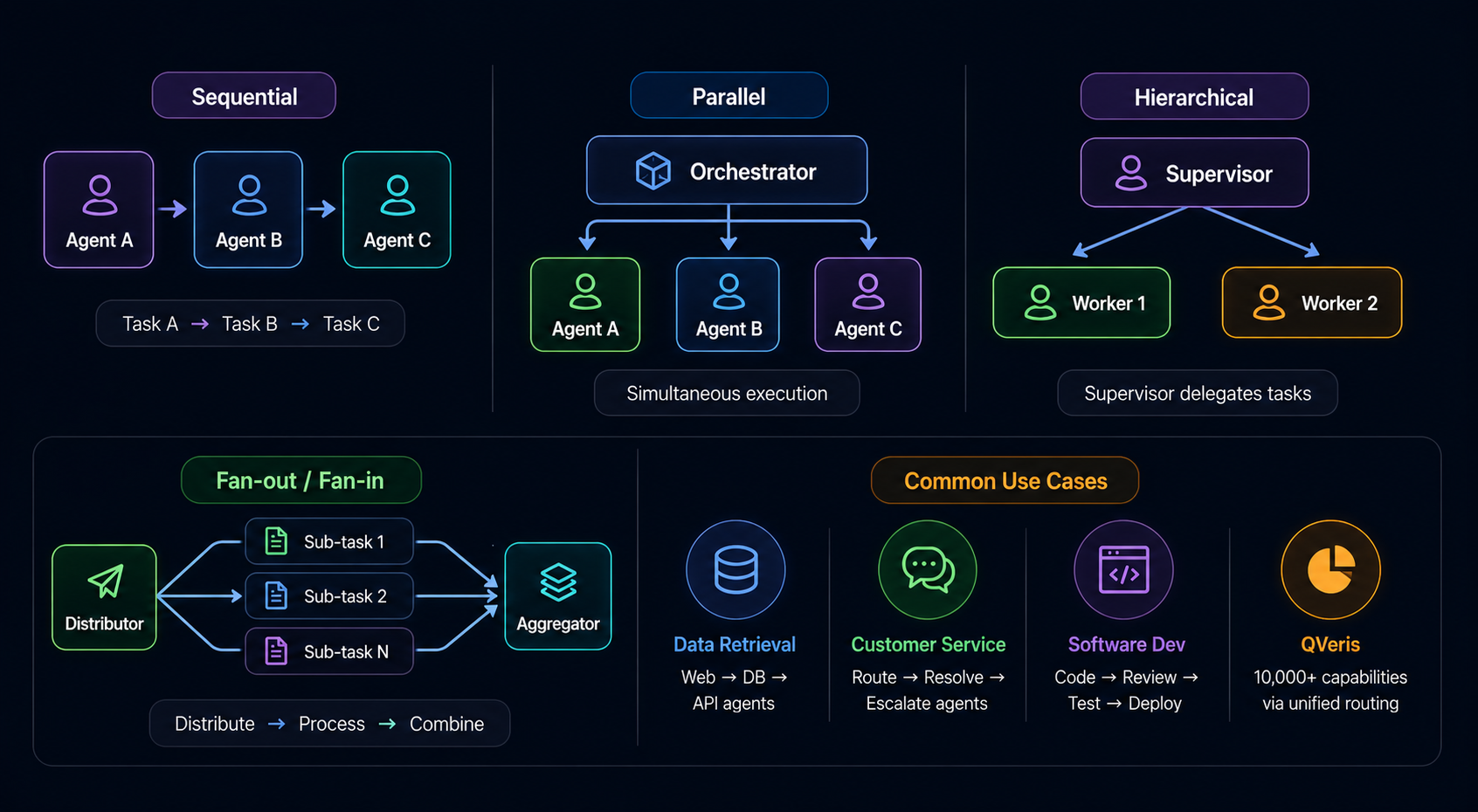
AI agent orchestration patterns fall into four categories, each suited to different workflow characteristics. Understanding these patterns helps you choose the right architecture for your specific use case.
Sequential Orchestration
Agents execute in a defined order, where each agent's output feeds directly into the next. This is the simplest pattern and mirrors traditional pipeline architectures. Best for linear workflows with strict dependencies—like "fetch data from API, clean the data, run analysis, generate report."
Best for: Linear pipelines, workflows requiring strict audit trails, document processing where each stage builds on the previous.
Limitation: Slowest pattern since tasks can't overlap. A failure at any stage stops the entire pipeline.
Parallel Orchestration
Multiple agents execute simultaneously on independent tasks. The orchestrator dispatches all tasks at once and waits for all to complete before proceeding. Best for tasks like "fetch earnings from 10 companies in parallel" where results don't depend on each other.
Best for: Bulk data retrieval, multi-source research, parallel analysis tasks, scenarios where latency matters more than sequential dependency.
Limitation: Requires all tasks to be independent. Can't handle workflows where later tasks depend on earlier outputs.
Hierarchical Orchestration
A supervisor agent delegates subtasks to worker agents, manages their execution, and synthesizes results. The supervisor makes routing decisions dynamically based on task requirements and agent availability. Best for complex tasks requiring dynamic task allocation and conditional branching.
Best for: Complex decision-making, dynamic task allocation, error recovery scenarios, workflows with conditional logic.
Limitation: The supervisor becomes a single point of failure. A poorly designed supervisor can become a bottleneck.
Fan-out/Fan-in Orchestration
One agent distributes work to many sub-agents (fan-out), then collects and aggregates their results (fan-in). This pattern is ideal for parallel analysis followed by synthesis. Best for scenarios like "analyze this document across 10 dimensions simultaneously, then synthesize findings."
Best for: Multi-dimensional analysis, comprehensive reporting, parallel expert opinions, due diligence across multiple criteria.
Limitation: The aggregator must handle conflicts and synthesize potentially contradictory outputs from sub-agents.
Most production systems combine patterns—for example, hierarchical orchestration where supervisor agents fan out tasks in parallel to maximize throughput while maintaining dynamic routing capabilities. Choosing the right AI agent orchestration platform depends on your specific pattern requirements and the flexibility needed for dynamic workflows.
Top AI Agent Orchestration Frameworks Compared
The 2026 choice is no longer a simple three-framework popularity contest. LangGraph is a low-level runtime for durable, stateful workflows; Microsoft Agent Framework is the forward-looking successor to AutoGen and Semantic Kernel; AutoGen remains relevant for existing event-driven and conversational systems; CrewAI offers opinionated crews and flows for role-oriented automation. Choose by execution model, state, recovery, observability, and migration cost—not by a universal “best” label.
| Aspect | LangChain / LangGraph | Microsoft Agent Framework / AutoGen | CrewAI |
|---|---|---|---|
| Orchestration model | Low-level graph runtime with explicit state and edges | Typed graph workflows in Agent Framework; event-driven Core and conversational teams in AutoGen | Role-based crews plus event-driven flows |
| Best fit | Long-running, stateful, custom workflows | Microsoft stack, typed workflows, or planned AutoGen migration | Business automation and fast role-based prototypes |
| Durability and human review | Checkpointing, persistence, streaming, human-in-the-loop | Workflow state and request-response patterns; verify current runtime scope | Use flow state and explicit review steps; test recovery semantics |
| Migration question | LangChain agents run on LangGraph; drop lower only when more control is needed | Microsoft provides an AutoGen-to-Agent-Framework migration guide | Map crews and flows carefully before replacing custom orchestration |
LangChain / LangGraph
LangGraph is the low-level orchestration runtime in the LangChain ecosystem. Its current positioning emphasizes durable execution, persistence, streaming, and human-in-the-loop control for long-running stateful agents. LangChain provides higher-level agent abstractions on top, so teams can start with LangChain and move down to LangGraph when they need explicit nodes, edges, checkpoints, or custom recovery.
Choose LangGraph if: workflow state must survive failures, humans need to inspect or modify state, or branching and replay require precise control. The trade-off is that your team owns more graph design, state schema, idempotency, and operational policy.
Microsoft Agent Framework and AutoGen
Microsoft Agent Framework is now Microsoft's next-generation foundation for agents and workflows, combining ideas from AutoGen and Semantic Kernel. It centers multi-agent orchestration on typed, graph-based workflows and adds session state, middleware, telemetry, hosted tools, and explicit workflow control.
AutoGen still has active AgentChat and Core documentation and remains relevant to deployed systems. However, Microsoft now publishes a dedicated migration guide from AutoGen to Agent Framework. New Microsoft-centric projects should evaluate Agent Framework first; existing AutoGen teams should compare feature parity, distributed-runtime needs, and migration cost before rewriting.
Choose Agent Framework if: you want the current Microsoft direction, typed workflows, provider integrations, or a migration destination from AutoGen/Semantic Kernel. Keep AutoGen for now if: its event-driven Core, distributed patterns, or existing AgentChat implementation are already validated and the replacement lacks a required production feature.
CrewAI
CrewAI remains useful when roles, delegated tasks, and business-process language help a team move quickly. Its crews provide the agent-team abstraction, while flows are better suited to explicit state, events, and control around the agents. Treat the friendly role model as an interface—not a substitute for defining retries, timeouts, approval gates, and durable state.
Choose CrewAI if: a role-based workflow maps naturally to the business process and rapid iteration matters. Before production, test recovery from partial task failure, state persistence, observability, and the cost of repeated agent handoffs.
A capability layer can reduce per-provider integration work, but it does not replace orchestration responsibilities. Regardless of framework, the application must define tool permissions, source provenance, timeout and retry policies, idempotency, human approval boundaries, and acceptance tests for the final result.
主流 AI Agent 编排框架对比
2026 年的选型已经不是简单比较三个框架的热度。LangGraph 是面向持久化、有状态工作流的底层运行时;Microsoft Agent Framework 是 AutoGen 与 Semantic Kernel 的后继方向;AutoGen 对已有事件驱动和对话式系统仍有价值;CrewAI 则通过 Crew 与 Flow 支持基于角色的自动化。应根据执行模型、状态、恢复、可观测性和迁移成本选择,而不是寻找一个放之四海皆准的“最佳框架”。
| 维度 | LangChain / LangGraph | Microsoft Agent Framework / AutoGen | CrewAI |
|---|---|---|---|
| 编排模型 | 显式状态与边的底层图运行时 | Agent Framework 使用类型化图工作流;AutoGen 提供事件驱动 Core 与对话式 Team | 基于角色的 Crew 与事件驱动 Flow |
| 最适合 | 长期运行、有状态、强定制工作流 | 微软技术栈、类型化工作流或 AutoGen 迁移 | 业务自动化与快速角色原型 |
| 持久化与人工复核 | 检查点、持久化、流式处理和人工介入 | 工作流状态与请求—响应模式;需核对当前运行时范围 | 可使用 Flow 状态与显式复核步骤;应测试恢复语义 |
| 迁移问题 | LangChain Agent 运行在 LangGraph 上,仅在需要更多控制时下沉 | 微软提供 AutoGen 到 Agent Framework 的迁移指南 | 替换自定义编排前,应谨慎映射 Crew 与 Flow |
LangChain / LangGraph
LangGraph 是 LangChain 生态中的底层编排运行时。当前定位强调长期有状态 Agent 所需的持久执行、状态持久化、流式处理和人工介入。LangChain 在其上提供更高层的 Agent 抽象,因此团队可以先用 LangChain 快速启动,只有在需要显式节点、边、检查点或自定义恢复时才下沉到 LangGraph。
适合选择 LangGraph 的情况:工作流状态必须跨故障保存、人工需要检查或修改状态,或者分支与重放要求精确控制。代价是团队需要承担更多图设计、状态 Schema、幂等和运维策略。
Microsoft Agent Framework 与 AutoGen
Microsoft Agent Framework 已成为微软面向 Agent 与工作流的下一代基础,结合了 AutoGen 与 Semantic Kernel 的经验。它以类型化、图式工作流为多 Agent 编排核心,并加入会话状态、中间件、遥测、托管工具和显式流程控制。
AutoGen 仍有活跃的 AgentChat 与 Core 文档,对已上线系统仍然重要。不过,微软已经发布 AutoGen 到 Agent Framework 的专门迁移指南。新的微软技术栈项目应优先评估 Agent Framework;现有 AutoGen 团队则应先比较功能覆盖、分布式运行需求和迁移成本,再决定是否重写。
适合选择 Agent Framework 的情况:希望跟随微软当前方向、需要类型化工作流与服务商集成,或正在寻找 AutoGen/Semantic Kernel 的迁移目标。暂时保留 AutoGen 的情况:已经验证其事件驱动 Core、分布式模式或 AgentChat 实现,而替代方案尚未覆盖关键生产能力。
CrewAI
当角色、委派任务和业务流程语言能够帮助团队快速协同时,CrewAI 仍然实用。Crew 提供 Agent 团队抽象,Flow 更适合围绕 Agent 建立显式状态、事件与控制。友好的角色模型只是接口,不能替代重试、超时、审批关口和持久状态设计。
适合选择 CrewAI 的情况:基于角色的流程与业务过程天然匹配,而且快速迭代很重要。进入生产前,应测试部分任务失败后的恢复、状态持久化、可观测性和反复 Agent 交接的成本。
能力层可以减少逐个提供商集成的工作,但不会替代编排责任。无论采用哪个框架,应用都必须定义工具权限、来源追踪、超时与重试、幂等、人工审批边界,以及最终结果的验收测试。
Code Example: AI Agent Orchestration with LangGraph
Here's a practical example of how to orchestrate AI agents using LangGraph. This code demonstrates a competitive intelligence workflow with parallel data retrieval and sequential analysis:
# LangGraph AI Agent Orchestration Example
# Competitive intelligence workflow with parallel + sequential patterns
from langgraph.graph import StateGraph, END
from langchain_openai import ChatOpenAI
from typing import TypedDict, List
# Define the state schema for our orchestration
class ResearchState(TypedDict):
query: str
company: str
news: List[str]
financials: List[str]
analysis: str
report: str
llm = ChatOpenAI(model="gpt-4o")
# Agent 1: Fetch news in parallel with Agent 2: Fetch financials
def fetch_pricing(state: ResearchState) -> ResearchState:
# Parallel retrieval - could fetch from multiple sources simultaneously
pricing_data = f"Pricing analysis for {state['company']}: ..."
return {"news": [pricing_data]}
def fetch_technical(state: ResearchState) -> ResearchState:
# Parallel retrieval - fetches tech stack, integrations, reviews
technical_data = f"Technical analysis for {state['company']}: ..."
return {"financials": [technical_data]}
# Agent 3: Analyze combined data (waits for both parallel tasks)
def analyze_data(state: ResearchState) -> ResearchState:
prompt = f"Analyze: News={state['news']}, Financials={state['financials']}"
analysis = llm.invoke(prompt)
return {"analysis": analysis.content}
# Agent 4: Generate final report
def generate_report(state: ResearchState) -> ResearchState:
prompt = f"Write report based on: {state['analysis']}"
report = llm.invoke(prompt)
return {"report": report.content}
# Build the AI agent orchestration graph
graph = StateGraph(ResearchState)
graph.add_node("fetch_pricing", fetch_pricing)
graph.add_node("fetch_technical", fetch_technical)
graph.add_node("analyze", analyze_data)
graph.add_node("report", generate_report)
# Define orchestration flow: parallel -> sequential
graph.add_edge("fetch_pricing", "analyze")
graph.add_edge("fetch_technical", "analyze")
graph.add_edge("analyze", "report")
graph.add_edge("report", END)
# Compile and execute the orchestrated workflow
app = graph.compile()
result = app.invoke({
"query": "Competitive analysis",
"company": "Competitor X",
"news": [],
"financials": [],
"analysis": "",
"report": ""
})
print(result["report"])
This example demonstrates key AI agent orchestration principles: parallel data fetching (news and financials simultaneously), sequential processing (analysis depends on both fetches completing), and state management across agents. The pattern extends to any workflow requiring coordinated multi-agent execution.
Production Pitfalls and How to Avoid Them
Moving from prototype to production with AI agent orchestration reveals challenges that don't appear in demos. Based on patterns observed across enterprise deployments, here are the most common pitfalls and how to address them.
Debugging Opacity
When a multi-agent workflow fails in production, understanding why is difficult. An agent might receive corrupted context, hit an API rate limit silently, or return malformed output that breaks the downstream agent. Without observability, you're debugging blind.
Solution: Implement structured logging at each orchestration boundary. Log the input to each agent, the agent's output, and the time taken. Use correlation IDs to trace requests across agent boundaries. Consider tools like LangSmith, Weights & Biases, or custom dashboards that visualize agent execution traces.
Token Cost Escalation
Multi-agent workflows consume tokens at multiple stages: each agent's prompt, each agent's context (which may include previous agent outputs), and each agent's response. A workflow that seems inexpensive at prototype scale can become costly at production volumes.
Solution: Profile token consumption early. Implement context pruning—truncate or summarize agent outputs before passing to downstream agents. Set budget alerts and implement circuit breakers that halt expensive workflows when costs exceed thresholds.
Cascading Failures
When one agent fails in a sequential orchestration, the entire workflow fails unless you handle it explicitly. In parallel orchestration, partial failures leave the workflow in an inconsistent state.
Solution: Design for failure. Define retry policies with exponential backoff for transient failures. Implement fallback paths—what should the workflow do if a data source is unavailable? For parallel workflows, decide whether partial success is acceptable and how to handle missing outputs.
Context Window Contention
As orchestration complexity grows, context windows fill up. An agent receiving verbose outputs from multiple previous agents might exceed its context limit, leading to truncated inputs or failed generations.
Solution: Implement aggressive context management. Summarize agent outputs before passing to downstream agents. Use separate context windows for different agent types. Monitor context utilization and alert when approaching limits.
Latency Variance
LLM responses vary in latency based on load, model version, and output length. In parallel orchestration, the slowest agent determines total latency. In sequential orchestration, latency compounds.
Solution: Implement timeout policies for each agent. Use streaming responses to provide early feedback to users. Consider asynchronous orchestration where users receive immediate acknowledgment and webhook notifications when results are ready.
Building a robust AI agent orchestration platform for production requires addressing these pitfalls systematically. Platforms like QVeris handle many of these concerns out-of-the-box—observability, cost management, failure handling—but understanding these challenges helps you design better workflows regardless of your chosen AI agent orchestration framework.
When to Use AI Agent Orchestration (and When Not To)
Complex workflows requiring 3+ distinct capabilities
Tasks that can be parallelized for speed
Multi-source data aggregation and synthesis
Enterprise processes with error handling needs
Scenarios requiring agent specialization
Long-running workflows with checkpoints
Simple single-step tasks (one agent suffices)
Low-latency requirements where orchestration overhead matters
Teams without orchestration framework experience
Prototyping where speed trumps scalability
Cost-sensitive applications with fixed budgets
Highly regulated contexts with strict audit requirements
A practical rule: if the workflow can be described in one sentence and handled by one agent with access to the right tools, AI agent orchestration adds complexity without benefit. If the workflow spans multiple domains (data + analysis + writing + action) or requires handling failures gracefully, orchestration is the right architecture.
AI Agent Orchestration vs Agent Frameworks
These terms are often used interchangeably, but they describe different layers of the AI agent stack. Understanding the distinction helps you choose the right tools and architecture for your use case.
- Agent frameworks (LangGraph, LlamaIndex, CrewAI core): Provide the building blocks for individual agents—memory management, tool use, prompt templating, and agent primitives. Think of these as the agent SDK. They answer: "How do I build a single capable agent?"
- AI agent orchestration: Adds the coordination layer that manages multiple agents, their communication patterns, and workflow sequencing. The orchestrator decides which agent handles which task and how results flow between them. It answers: "How do I coordinate multiple agents working together?"
The distinction matters when evaluating tools. CrewAI, for example, provides both agent primitives (framework) and team orchestration (multi-agent coordination) in one package. LangChain provides flexible primitives that can be composed into orchestration patterns—but the orchestration logic is your responsibility. AutoGen focuses on conversational orchestration, making it ideal for collaborative agent scenarios.
Beyond frameworks, dedicated AI agent orchestration platforms like QVeris take a different approach: they handle capability routing at scale, providing unified access to 10,000+ tools (search, weather, maps, docs, financial data, blockchain, healthcare) without custom integration work. Rather than building orchestration from primitives, you define workflows and the platform handles agent coordination and tool routing.
For teams exploring general-purpose orchestration, the choice between agent framework and orchestration platform depends on your needs: frameworks give you maximum flexibility to build custom logic; orchestration platforms accelerate development by handling tool routing and coordination out of the box. The right AI agent orchestration platform depends on your team's expertise, timeline, and specific workflow requirements.
Build AI Agents with Native Capability Routing
QVeris provides AI-agent native orchestration—coordinated agents with unified access to 10,000+ capabilities across search, maps, docs, financial data, blockchain, healthcare, and more. Browse the QVeris tool catalog or read the MCP Server documentation before designing the routing layer.
Try Agent Orchestration in QVeris →How to Orchestrate AI Agents: A Step-by-Step Guide
Getting started with AI agent orchestration requires understanding both the technical implementation and the workflow design. Here's a practical approach for developers building their first orchestrated multi-agent system.
Before writing code, map out the tasks your workflow requires. Identify: which tasks can run in parallel, which have sequential dependencies, what tools each agent needs, and where error handling matters. A clear task decomposition and agent topology is the foundation of effective AI agent orchestration. Document the expected inputs and outputs for each agent, and identify where data transformations are needed between agents.
Consider the orchestration pattern: does your workflow fit sequential, parallel, hierarchical, or fan-out/fan-in? Many production workflows combine patterns. Start simple—begin with sequential orchestration and add parallelism only where it demonstrably improves performance.
Match the workflow to its control requirements: use LangGraph when durable state and low-level graph control matter; evaluate Microsoft Agent Framework for typed workflows and the current Microsoft ecosystem direction; retain AutoGen where an existing conversational or event-driven implementation is already validated; use CrewAI when crews and flows map clearly to the business process.
Run a small proof of concept with the hardest production condition—not the happiest demo. Test a tool timeout, partial parallel failure, approval pause, process restart, duplicate event, and budget limit. Migration between frameworks is not automatic because state, message, retry, and tool abstractions differ.
应根据工作流的控制需求选型:需要持久状态和底层图控制时使用 LangGraph;需要类型化工作流并跟随微软当前生态方向时评估 Microsoft Agent Framework;已有对话式或事件驱动 AutoGen 实现经过验证时可以继续保留;当 Crew 与 Flow 能清楚映射业务流程时使用 CrewAI。
概念验证应从最难的生产条件开始,而不是只跑最顺利的演示。至少测试工具超时、并行分支部分失败、审批暂停、进程重启、重复事件和预算上限。不同框架的状态、消息、重试与工具抽象并不相同,因此迁移不会自动完成。
Implement your agents and orchestration logic, but build observability from the start. Log agent inputs/outputs, track token consumption, and measure latency at each orchestration boundary. Deploy to production incrementally—start with a subset of traffic, monitor error rates, and scale up as confidence builds.
AI agent orchestration is inherently experimental. Expect to iterate on agent definitions, prompt engineering, and orchestration logic based on production feedback. The teams that succeed treat their first production deployment as a starting point, not a finished product.
FAQ: AI Agent Orchestration
Related Guides
- 问题: 单个AI代理的命中能力 需要不同工具的复杂、多步骤任务的上限,或者 并行处理。
- 解决方案: AI Agent 编排添加了 协调层分解任务,委托给 专门代理,并汇总结果。
- 结果: 您的团队获得多代理系统 处理复杂的工作流程——从网络研究到分析 报告——在运行良好的团队的协调下。
什么是AI Agent 编排?
AI Agent 编排是协调多个代理的实践 AI Agent可以协同完成复杂的任务。编排 层管理代理通信、任务分解、 委托和结果聚合——支持多代理系统 处理单个代理无法完成的工作流程 独自一人。
将编排想象为AI Agent的项目经理。当 收到一个复杂的请求,例如“研究 X 公司的竞争力” 定位并起草市场进入备忘录”——协调者打破 这分为子任务(网络研究、定价分析、市场 情绪、竞争定位、文件起草)和路线 每个都交给适当的专业代理。
如果没有AI Agent 编排,开发人员必须手动 协调代理交互,处理通信协议,以及 管理结果聚合。多Agent 编排已经出现 作为组织面临的关键工程挑战之一 他们将人工智能系统从原型扩展到生产。
编排和简单代理链接之间的区别 很重要。链式系统遵循刚性管道:代理 A 输出到代理 B 到代理 C。精心编排的系统使得 动态决策:根据中间结果,它可能会路由 到代理 D,生成并行任务,或循环返回以进行澄清。 这种灵活性造就了AI Agent 编排平台 对于现实世界的工作流程至关重要。
AI Agent 编排的工作原理
AI Agent 编排遵循四个阶段的循环,处理 多代理工作流程的复杂性。了解这些阶段 帮助您设计更有效的编排系统和调试 问题出现时。
第一阶段:任务分解
协调器接收用户请求并将其分解为 离散子任务。这比听起来更难——自然语言 请求通常是不明确的,包含隐式依赖关系,或者 结合应该以不同方式处理的多个目标。
例如,“为 X 公司生成竞争分析”可能 分解为:获取产品功能、检索客户评论、 分析定价策略,并起草竞争报告。但是 编排器还必须决定:这些是否应该按顺序运行 或并行?他们之间有依赖关系吗?会发生什么 如果失败了?
有效的任务分解大大减少了花费的时间 解决编排问题。分解阶段是 大多数编排失败都源于分解不当的任务 导致下游级联错误,调试成本高昂。
高级编排器使用基于 LLM 的分解来处理 歧义。他们可能会提示法学硕士:“鉴于此请求, 识别子任务、它们的依赖性以及潜在的失败 模式。”这增加了延迟,但显着提高了可靠性 对于复杂的请求。
第 2 阶段:能力路由
一旦任务被分解,编排器就会匹配每个子任务 给适当的代理人。这需要理解任务 需求和每个代理的能力——他们的工具、记忆 国家和专业领域。
考虑一个具有竞争力的多Agent 编排场景 情报工作流程。协调器收到:“研究 竞争对手 X 的产品功能、定价、市场情绪、 和技术堆栈。”它将:网络搜索路由到搜索代理, 定价数据给定价代理,社会情绪给社会 媒体代理,以及技术研究代理的技术分析。
路由决策涉及几个因素: 代理可用性 (代理当前正在处理另一项任务吗?),能力 匹配(代理是否有正确的工具?),以及状态上下文 (代理从之前的交互中已经知道了什么?)。 糟糕的路由会导致座席执行不适合的任务 降低输出质量。
现代AI Agent 编排平台,如 QVeris 处理 大规模路由能力,维护 10,000 多个注册表 跨网络搜索、地图、天气 API、文档的功能 商店、金融数据、区块链和医疗保健系统。这个 无需手动将每个代理连接到每个代理 能力 - 相反,编排器会路由到正确的工具 根据任务要求动态地进行。
这是功能路由连接到工具调用的地方 规模——而不是对每个 API 集成进行硬编码, Orchestrator 查询可用工具并选择最佳匹配 对于每个子任务。这种动态工具调用方法可以扩展 数以千计的功能,而数量不会激增 硬编码连接。
第三阶段:代理委托和执行
协调器将每个子任务路由到适当的代理并 管理执行阶段。代理可以并行工作 (独立任务,例如从多个来源获取数据 同时)或按顺序(其中一个代理的输出馈送 另一个人的输入)。
在执行过程中,协调器必须应对几个挑战: 超时管理(如果代理花费太长时间怎么办?)、速率 限制(防止 API 配额耗尽)、上下文窗口 管理(确保代理不会超出他们的LLM背景 限制)和流响应(提供实时反馈 用户)。
对于并行执行,编排器调度任务 并发并等待所有完成后再继续。这个 可以显着减少端到端延迟——任务需要 连续 30 秒可能会在 8 秒内完成 跨 4 个代理并行。协调器还必须处理 部分失败:如果 4 个并行任务中的 3 个成功,那么会发生什么? 协调器做什么?
顺序执行更简单,但速度较慢。每个代理人必须 在下一个开始之前完成,以及每个代理的输出 直接进入下一个。这种模式适合线性工作流程 就像“获取→清理→分析→报告”,其中后续阶段取决于 关于早期的输出。
第四阶段:结果聚合
一旦代理完成任务,协调器就会收集 输出、解决冲突并综合最终响应。 这就是编排的得名之处——编排者必须 将可能不同的产出协调成一个连贯的整体。
结果聚合涉及几个子任务: 验证输出 (每个代理是否返回有效数据?),解决冲突(如果两个代理 代理人不同意,哪个优先?),格式(翻译 原始输出转换为面向用户的格式)和错误处理(当 代理失败或返回意外结果,确定重试 策略或后备路径)。
例如,如果编排工作流程从三个 不同的消息来源,其中两人报告股价为 150 美元,而另一人报告股价为 150 美元 报告 148 美元,聚合器可能会标记此差异,请查询 具有最高可靠性评级的来源,或标记 人工审查冲突取决于配置的容差。
为什么 AI Agent 编排很重要
单代理系统在复杂的企业任务上遇到了障碍。人工智能 Agent 编排解决了限制代理的三个核心问题 孤立的AI Agent单独工作的有效性。
- 能力碎片化: 没有单一代理人 凡事擅长。研究代理了解 RAG 和文档 检索;编码代理处理 Python;数学代理运行 分析;书写剂产生抛光的输出。AI Agent 编排让每个代理都可以专业化,而系统 处理需要组合多个的整体任务 能力。
- 手动切换开销: 无需多代理 编排,开发人员将自定义逻辑写入链代理 一起——错误处理、超时管理、结果传递、 上下文管理。此粘合代码变得无法维护 规模。团队报告调试编排问题消耗 可以花费在产品上的大量工程时间 发展。
- 扩展瓶颈: 单一代理加工 顺序任务达到了延迟上限。 AI Agent 编排 启用独立任务运行的并行执行 同时,将端到端延迟从几分钟缩短到 秒。从 10 个来源获取数据的工作流程将花费 10 倍的时间 单源延迟按顺序但接近单源 延迟与适当的编排并行。
适用于构建人工智能驱动的工作流程的团队——无论是否具有竞争力 情报、客户服务或软件 开发——多Agent 编排实现协调代理 从多个来源检索数据、运行分析、生成 输出和触发动作,无需定制胶水即可协调 代码。平台如 郎图 和 微软自动生成器 为这种协调提供生产级模式。
如果您的任务简单且单步,那么编排会增加 不必要的复杂性。但对于任何需要 3 个以上不同的工作流程 能力或并行处理,AI Agent 编排是 使其可管理和可扩展的架构模式。
AI Agent 编排的类型
AI Agent 编排模式分为四类,每类 适合不同的工作流程特点。了解这些 模式可帮助您为您的特定情况选择正确的架构 用例。
顺序编排
代理按定义的顺序执行,其中每个代理的输出 直接进入下一个。这是最简单的模式 反映了传统的管道架构。最适合线性 具有严格依赖关系的工作流程——例如“从 API 获取数据, 清理数据、运行分析、生成报告。”
最适合: 线性管道,工作流程需要 严格的审计跟踪、每个阶段构建的文档处理 上一个。
局限性: 最慢的模式,因为任务不能 重叠。任何阶段的故障都会导致整个管道停止运行。
并行编排
多个代理同时执行独立任务。的 Orchestrator 立即分派所有任务并等待所有任务完成 在继续之前完成。最适合“获取收入”等任务 来自 10 家公司并行”,结果不依赖于 彼此。
最适合: 批量数据检索,多源 研究、并行分析任务、延迟场景 比顺序依赖更重要。
局限性: 要求所有任务都 独立。无法处理后续任务所依赖的工作流程 较早的输出。
分层编排
主管代理将子任务委托给工作代理,管理 他们的执行,并综合结果。主管使 根据任务需求动态路由决策 代理可用性。最适合需要动态的复杂任务 任务分配和条件分支。
最适合: 复杂决策、动态任务 分配、错误恢复场景、带条件的工作流程 逻辑。
局限性: 主管成为单身 故障点。设计不当的主管可能会成为 瓶颈。
扇出/扇入编排
一个代理将工作分配给许多子代理(扇出),然后 收集并汇总他们的结果(扇入)。这个图案是 非常适合并行分析和综合。最适合 诸如“跨 10 个维度分析此文档”之类的场景 同时,然后综合研究结果。”
最适合: 多维度分析, 综合报告、平行专家意见、尽职调查 跨越多个标准。
局限性: 聚合器必须处理 冲突并综合潜在矛盾的输出 子代理。
大多数生产系统结合了模式——例如,层次结构 主管代理并行地扇出任务的编排 最大化吞吐量,同时保持动态路由 能力。选择合适的AI Agent 编排平台 取决于您的具体图案要求和灵活性 动态工作流程所需的。
主流AI Agent 编排框架对比
2026年的选型已经不是简单比较三个框架的热度了。LangGraph 是面向持久化、有状态工作流的底层运行时;Microsoft Agent Framework 是 AutoGen 与 Semantic Kernel 的后继方向;AutoGen 对已有事件驱动和对话式系统价值增加;CrewAI 则通过 Crew 与 Flow 支持基于角色的自动化。应根据执行模型、状态、恢复、可启动性和迁移成本进行选择,而不是寻找一个放之四海皆准的“最佳框架”。
| 维度 | LangChain/LangGraph | 微软代理框架/AutoGen | 船员人工智能 |
|---|---|---|---|
| 编排模型 | 显式状态与边的底层图运行时 | Agent Framework 使用类型化图工作流;AutoGen 提供事件驱动 核心与对话式团队 | 基于角色的 Crew 与事件驱动流程 |
| 最适合 | 长期运行、有状态、强定制工作流 | Microsoft 技术栈、类型化工作流或 AutoGen 迁移 | 业务自动化与快速角色原型 |
| 持久化与人工复核 | 检查点、持久化、流式处理和人工介入 | 工作流状态与请求—响应模式;需核对当前运行时范围 | 可使用流程状态与显式复核步骤;应测试恢复语义 |
| 迁移问题 | LangChain Agent在LangGraph上运行 上,仅在需要更多控制时下沉 | Microsoft 提供 AutoGen 到 Agent Framework 的迁移指南 | 替换自定义编排前,应路由映射 Crew 与 Flow |
LangChain/LangGraph
郎图 是LangChain生态中的底层编排运行时。当前定位增强长期有状态 代理 所需的持久执行、状态持久化、流式处理和人工介入。LangChain 在其上提供更高层的Agent Abstract,因此团队可以先使用LangChain 快速启动,只有在需要显着式节点、边、检查点或自定义时恢复时才下沉到 LangGraph。
适合选择 LangGraph 的情况:工作流状态必须跨故障保存、需要人工检查或修改状态,或者分支与重放要求精确控制。代价是团队需要承担更多的图设计、状态 Schema、幂等和运维策略。
Microsoft 代理框架与 AutoGen
微软代理框架 已成为面向微软代理和工作流的下一代基础,结合了 AutoGen 和 Semantic Kernel的经验。它以类型化、图式工作流为多Agent 编排核心,并加入会话状态、中间件、遥测、托管工具和显式流程控制。
AutoGen 激活的 AgentChat 与 Core 文档,对已上线系统仍然很重要。不过,微软已经将 AutoGen 发布到 Agent Framework 的专门迁移指南。新的微软技术栈项目应优先评估 Agent框架;现有AutoGen 团队则应先比较功能覆盖、循环需求和迁移成本,再决定是否重写。
适合选择Agent框架的情况:希望跟随微软当前方向、需要类型化工作流与服务商集成,或者正在寻找 AutoGen/Semantic Kernel 的迁移目标。暂时保留 AutoGen 的情况:已经验证其事件驱动Core、多种模式或AgentChat 实现,而替代方案尚未覆盖关键生产能力。
船员人工智能
当角色、委派任务和业务流程语言能够帮助团队快速相处时,CrewAI 仍然实用。Crew 提供 Agent 团队抽象,Flow 更适合围绕 Agent 建立显式状态、事件与控制。友好的角色模型只是接口,不能替代重试、超时、铂关口和持久状态设计。
适合选择CrewAI的情况:基于角色的流程与业务流程自然匹配,而且迭代很快。进入生产前,应测试部分任务失败后的、状态持久化、可恢复性和反复 代理交接的成本。
能力层可以减少逐个提供商集成的工作,但不会替代编排责任。无论采用哪个框架,应用都必须定义工具权限、来源追踪、超时与重试、幂等、人工审批边界,以及最终结果的验收测试。
代码示例:使用 LangGraph 进行 AI Agent 编排
这是如何使用编排 AI Agent的实际示例 郎图。此代码展示了竞争情报 并行数据检索和顺序分析的工作流程:
# LangGraph AI Agent 编排示例
# 具有并行+顺序模式的竞争情报工作流程
从 langgraph.graph 进口 StateGraph, END
从 langchain_openai 进口 ChatOpenAI
从 typing 进口 TypedDict, List
# 为我们的编排定义状态模式
班级 研究状态(TypedDict):
询问: str
公司: str
消息: List[str]
财务状况: List[str]
分析: str
报告: str
llm = ChatOpenAI(model=“gpt-4o”)
# 代理 1:与代理 2 并行获取新闻:获取财务信息
定义 获取定价(state: ResearchState) -> ResearchState:
# 并行检索 - 可以同时从多个源获取
pricing_data = f“{state['company']} 的定价分析:...”
返回 {“消息”: [pricing_data]}
定义 获取技术(state: ResearchState) -> ResearchState:
# 并行检索 - 获取技术堆栈、集成、评论
technical_data = f“{state['company']} 的技术分析:...”
返回 {“财务”: [technical_data]}
# Agent 3:分析组合数据(等待两个并行任务)
定义 分析数据(state: ResearchState) -> ResearchState:
prompt = f“分析:新闻={state['news']},金融={state['financials']}”
analysis = llm.invoke(prompt)
返回 {“分析”: analysis.content}
# Agent 4:生成最终报告
定义 生成报告(state: ResearchState) -> ResearchState:
prompt = f“根据:{state['analysis']}编写报告”
report = llm.invoke(prompt)
返回 {“报告”: report.content}
# 构建AI Agent 编排图
graph = StateGraph(ResearchState)
graph.add_node(“获取定价”, fetch_pricing)
graph.add_node(“获取_技术”, fetch_technical)
graph.add_node(“分析”, analyze_data)
graph.add_node(“报告”, generate_report)
# 定义编排流程:并行 -> 顺序
graph.add_edge(“获取定价”, “分析”)
graph.add_edge(“获取_技术”, “分析”)
graph.add_edge(“分析”, “报告”)
graph.add_edge(“报告”, END)
# 编译并执行编排的工作流程
app = graph.compile()
result = app.invoke({
“询问”: 「竞品分析」,
“公司”: “竞争对手X”,
“消息”: [],
“财务”: [],
“分析”: "",
“报告”: ""
})
print(result[“报告”])
此示例演示了关键的 AI Agent 编排原则: 并行数据获取(同时获取新闻和金融数据), 顺序处理(分析取决于两个提取 完成),以及跨代理的状态管理。图案 扩展到任何需要协调多代理的工作流程 执行。
生产陷阱以及如何避免它们
通过 AI Agent 编排从原型转向生产 揭示演示中未出现的挑战。基于模式 根据在企业部署中观察到的情况,以下是最常见的 陷阱以及如何解决它们。
调试不透明度
当多代理工作流程在生产中失败时,了解 为什么很难。代理可能会收到损坏的上下文,点击 静默地限制 API 速率,或者返回格式错误的输出 破坏下游代理。如果没有可观察性,你就 盲目调试。
解决方案: 在每个位置实施结构化日志记录 编排边界。记录每个代理的输入,代理的 输出和所花费的时间。使用关联 ID 进行追踪 跨代理边界的请求。考虑像 LangSmith 这样的工具, 权重和偏差,或可视化代理的自定义仪表板 执行痕迹。
代币成本上升
多代理工作流程在多个阶段消耗令牌:每个阶段 座席的提示、每个座席的上下文(可能包括之前的座席) 代理输出)以及每个代理的响应。看起来的工作流程 在原型规模上便宜可能在生产中变得昂贵 卷。
解决方案: 及早分析代币消费情况。 实施上下文修剪——截断或汇总代理输出 在传递给下游代理商之前。设置预算提醒和 实施断路器,在以下情况下停止昂贵的工作流程 成本超过阈值。
级联故障
当一个代理在顺序编排中失败时,整个 除非您明确处理它,否则工作流程将失败。并行 编排,部分失败使工作流程处于 不一致的状态。
解决方案: 为失败而设计。定义重试 对于暂时性故障具有指数退避的策略。 实施后备路径——如果数据 来源不可用?对于并行工作流程,决定是否 部分成功是可以接受的,以及如何处理丢失的输出。
上下文窗口争用
随着编排复杂性的增加,上下文窗口会被填满。安 代理从多个先前代理接收详细输出 可能超出其上下文限制,导致输入被截断或 失败的一代人。
解决方案: 实施积极的环境 管理。在传递到下游之前汇总代理输出 代理。对不同的代理类型使用单独的上下文窗口。 监控上下文利用率并在接近限制时发出警报。
延迟方差
LLM 响应的延迟因负载、模型版本和 输出长度。在并行编排中,最慢的代理 确定总延迟。在顺序编排中,延迟 化合物。
解决方案: 为每个实施超时策略 代理。使用流式响应来提供早期反馈 用户。考虑用户接收的异步编排 结果出现时立即确认和 webhook 通知 准备好了。
为生产构建强大的 AI Agent 编排平台 需要系统地解决这些陷阱。平台如 QVeris 开箱即用地处理许多这些问题——可观察性、 成本管理、故障处理——但要了解这些 挑战可以帮助您设计更好的工作流程,无论您的情况如何 选择AI Agent 编排框架。
何时使用 AI Agent 编排(以及何时不使用)
复杂的工作流程需要 3 种以上不同的功能
可以并行化以提高速度的任务
多源数据聚合与综合
有错误处理需求的企业流程
需要代理专业化的场景
具有检查点的长时间运行的工作流程
简单的单步任务(一个代理就足够了)
低延迟要求需要编排开销 事情
没有编排框架经验的团队
速度胜过可扩展性的原型设计
具有固定预算的成本敏感型应用程序
具有严格审计要求的高度监管环境
一条实用的规则:工作流程是否可以用一句话来描述 由一名能够使用正确工具的代理(AI Agent)处理 编排增加了复杂性,但没有带来任何好处。如果工作流程 跨越多个领域(数据+分析+写作+行动)或 需要优雅地处理故障,编排是正确的 架构。
AI Agent 编排与代理框架
这些术语经常互换使用,但它们描述了 AI Agent堆栈的不同层。了解 区别可以帮助您选择正确的工具和架构 您的用例。
- 代理框架 (郎图, 骆驼指数,CrewAI核心):为个人提供构建块 代理——内存管理、工具使用、提示模板和代理 基元。将它们视为代理 SDK。他们回答:“如何 我要建立一个有能力的特工吗?”
- AI Agent 编排: 添加协调性 管理多个代理及其通信的层 模式和工作流程排序。协调者决定 哪个代理处理哪个任务以及结果如何在之间流动 他们。它回答:“我如何协调多个代理的工作 一起吗?”
在评估工具时,这种区别很重要。 CrewAI,对于 例如,提供代理原语(框架)和团队 编排(多代理协调)在一个包中。浪链 提供灵活的原语,可以组合成 编排模式——但编排逻辑是你的 责任。 AutoGen 专注于对话编排, 使其成为协作代理场景的理想选择。
除了框架之外,还有专用的AI Agent 编排平台,例如 QVeris 采用不同的方法:它们处理功能路由 大规模提供对 10,000 多种工具(搜索、 天气、地图、文档、财务数据、区块链、医疗保健) 无需定制集成工作。而不是建造 从基元进行编排,您定义工作流程和 平台处理代理协调和工具路由。
对于探索通用编排的团队来说,选择 代理框架和编排平台之间的关系取决于您的 需求:框架为您提供最大的灵活性来构建自定义 逻辑;编排平台通过处理加速开发 开箱即用的工具路由和协调。合适的AI Agent 编排平台取决于您团队的专业知识、时间表、 以及具体的工作流程要求。
使用本机功能路由构建 AI Agent
QVeris 提供 AI Agent本机编排 - 协调代理 统一访问 10,000 多种搜索、地图、 文档、财务数据、区块链、医疗保健等。 浏览 QVeris 工具目录 或阅读 MCP 服务器文档 在设计路由层之前。
在 QVeris 中尝试Agent 编排 →如何编排 AI Agent:分步指南
开始使用 AI Agent 编排需要了解 技术实现和工作流程设计。这是 开发人员构建他们的第一个实用方法 精心策划的多智能体系统。
在编写代码之前,先规划出您的工作流程所需的任务。 识别:哪些任务可以并行运行,哪些任务可以顺序运行 依赖关系、每个代理需要哪些工具以及错误在哪里 处理事宜。清晰的任务分解和代理拓扑 是有效的AI Agent 编排的基础。文件 每个代理的预期输入和输出,并确定 代理之间需要数据转换的地方。
考虑编排模式:您的工作流程是否适合 顺序、并行、分层还是扇出/扇入?很多 生产工作流程结合了模式。从简单开始——从 顺序编排并仅在需要时添加并行性 明显提高了性能。
应根据工作流的控制需求选型:需要持久状态和底层图控制时使用 LangGraph;需要类型化工作流并跟随微软当前生态方向时评估 Microsoft Agent Framework;已有对话式或事件驱动 AutoGen 实现经过验证时可以继续保留;当Crew与Flow 使用 CrewAI 时能够清晰映射业务流程。
概念验证应从最难的生产条件开始,而不是只跑最顺利的演示。至少测试工具超时、并行分支部分失败、审批暂停、进程重启、重复事件和预算上限。不同框架的状态、消息、重试与工具抽象并不相同,因此迁移不会自动完成。
实施您的代理和编排逻辑,但构建 从一开始就具有可观察性。记录代理输入/输出、跟踪 令牌消耗,并测量每个编排的延迟 边界。增量部署到生产——从一个子集开始 流量、监控错误率并扩大置信度 构建。
AI Agent 编排本质上是实验性的。期望 迭代代理定义、提示工程,以及 基于生产反馈的编排逻辑。那些团队 成功将他们的第一次生产部署作为一个开始 点,不是成品。
