
The Longer You Use Codex, the More You Need to Save Tokens

I am an old-school programmer. After leaving large tech companies, I have spent years in startups, and I am still writing AI-related backend code on the front line. I keep more complete technical notes on the WeChat Official Account “字与码”: pitfalls I have hit, tradeoffs when switching stacks, and detours I have taken over the years. I post there from time to time. If this article is useful to you, feel free to follow it.
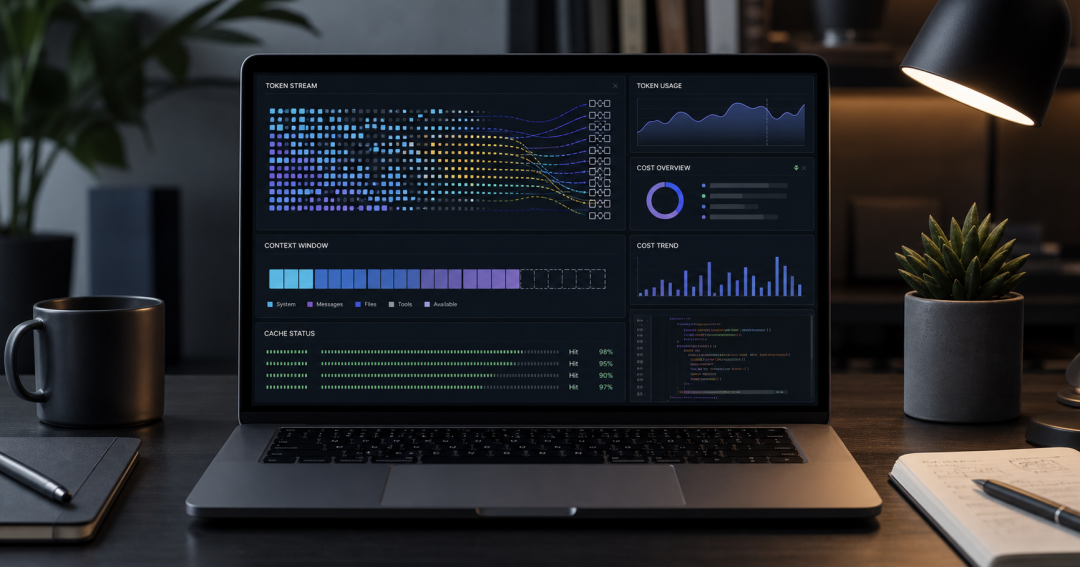
I recently did a full accounting of a very long Codex session. The result was a little surprising: the expensive part was not the final few replies, but the context the model repeatedly carried through every loop in order to complete the task.
That session lasted an entire day and covered many typical engineering tasks: reading docs, checking logs, changing code, resolving conflicts, opening PRs, deploying, and debugging CI. In the end, the main session consumed 119,743,174 tokens, roughly 15% of my Codex weekly usage at the time. Estimated using standard GPT-5.5 API pricing, the raw cost was about $79.28. Output accounted for only 219,381 tokens, less than 0.2% of the total. The bulk was input, especially cached input repeatedly reused in a long session.
One point needs to be emphasized first: the dollar amounts in this article are only “raw cost estimates” based on public API pricing. They are not the marginal cost I actually paid for Codex. Subscription plans, quotas, caching, server-side scheduling, and platform pricing are a different accounting system. The actual cost allocated to an individual user is usually far lower than this number. This article is not meant to create anxiety that “Codex is expensive.” It is meant to make the token flow in long sessions visible. Once you can see it clearly, you can tell which optimizations matter and which ones are just self-imposed friction.
This is the cost profile of coding agents like Codex: they are not like ordinary chat, where you “ask one question and get one answer.” Codex reads files, runs commands, inspects logs, changes code, and verifies again. Every step continues reasoning with task context attached. The longer the context and the more loops there are, the more easily tokens creep upward.
The conclusion first
If I had to remember only four things, I would remember these:
First, long sessions are not free memory. Even when prompt caching has a high hit rate, cached input is still billed, just at a lower unit price.
Second, the most expensive conversations are often not the ones with the most text, but the ones that cross repositories, systems, and require multiple rounds of tool calls. Examples include debugging production issues, handling PR conflicts, migrating deployment configuration, and scanning issues in bulk.
Third, the key to saving tokens is not making answers shorter, but making task boundaries clearer: split sessions when appropriate; use handoff summaries between sessions; put large logs in files and let the model read them on demand; consolidate stable rules into AGENTS.md, skills, or local config instead of pasting them every time.
Fourth, do not make your workflow awkward just to save tokens. Codex itself is usable enough. What is truly worth optimizing is obviously wasteful input: entire logs, irrelevant history, repeatedly pasted fixed rules, and too many unrelated tasks stuffed into one request. Frequently interrupting your working state just to spend a few fewer tokens is usually not worth it.
How this accounting was calculated
This accounting comes from token_count records in local Codex session logs. The pricing basis uses public GPT-5.5 API prices:
| Type | Unit price |
|---|---|
| Uncached input | $5.00 / 1M tokens |
| Cached input | $0.50 / 1M tokens |
| Output | $30.00 / 1M tokens |
The formula is simple:
uncached_input = input_tokens - cached_input_tokenscost = uncached_input / 1,000,000 * 5.00 + cached_input / 1,000,000 * 0.50 + output_tokens / 1,000,000 * 30.00
There are two easy mistakes here. First, reasoning_output_tokens is already included in output_tokens, so it must not be added again. Second, this is only a raw API-side price estimate, not the true marginal cost of a subscription product. For individual users, the more useful reference point is often “what share of weekly usage did it consume”: this full-day long session accounted for about 15% of weekly usage; generating this article itself accounted for about 1% of weekly usage.
OpenAI’s model documentation shows GPT-5.5 text token pricing as input $5.00, cached input $0.50, and output $30.00. It also has a 1,050,000-token context window and a maximum output of 128,000 tokens. The documentation also notes that if a single GPT-5.5 input exceeds 272K tokens, it enters the long-context pricing tier. In the session analyzed here, the largest single input was about 238,871 tokens, so that surcharge rule was not triggered.
Prompt caching is also worth calling out separately. OpenAI’s prompt caching documentation is clear: cache hits depend on an “exactly matching prefix.” Stable system prompts, tool definitions, and historical context are easier to reuse. Static content should be placed at the front of the prompt, and dynamic content at the end. Caching can significantly reduce latency and input cost, but it is not free quota.
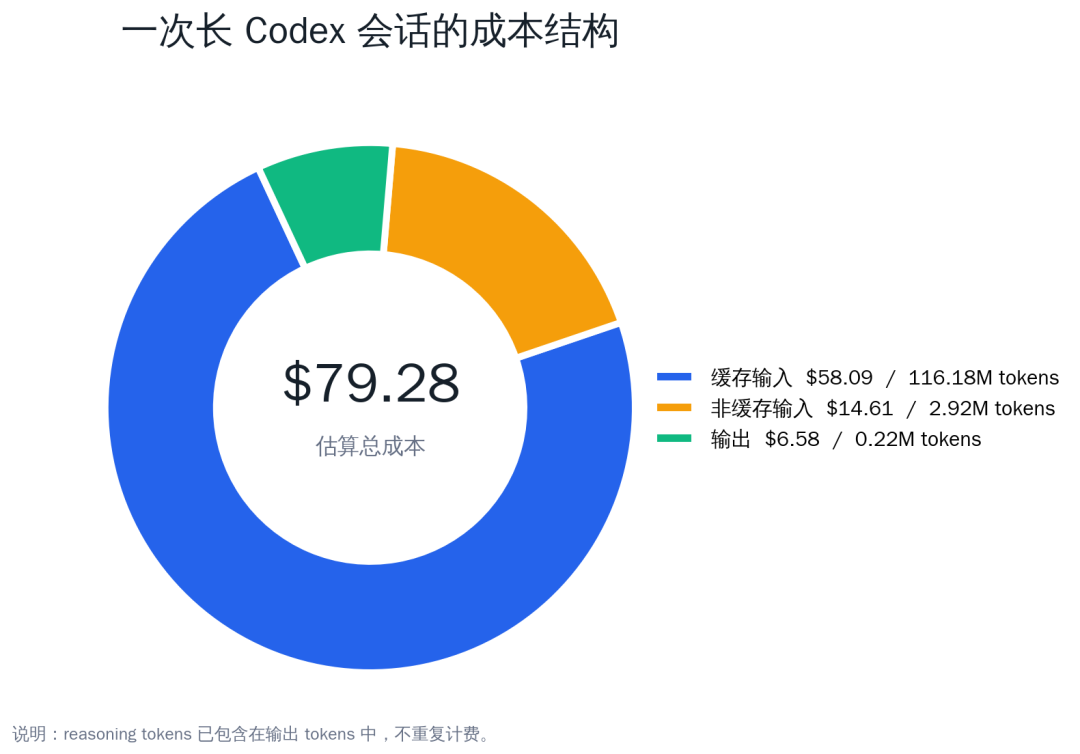
As the chart shows, cached input had the largest token count and the largest cost. Its unit price is only one tenth of uncached input, but the volume is so large that it still becomes the main cost.
Why even a short question can be expensive
When people first look at an agent’s token bill, they often have one misconception: I clearly only asked one sentence, so why did this turn consume so much?
The reason is that “this one sentence” is not sent to the model in isolation. For Codex, a request usually includes:
-
system and developer rules;
-
a context summary of the current repository;
-
conversation history;
-
recent tool call results;
-
available tool definitions;
-
the user’s latest task;
-
and possibly fragments of opened files, error logs, and test output.
So a question that appears to contain only a dozen words may actually have hundreds of thousands of tokens of input. More importantly, an agent task is often not one model call, but a chain of calls: analyze first, then read files, then modify code, then run tests, then handle failures, then summarize. Every loop consumes part of the context again.
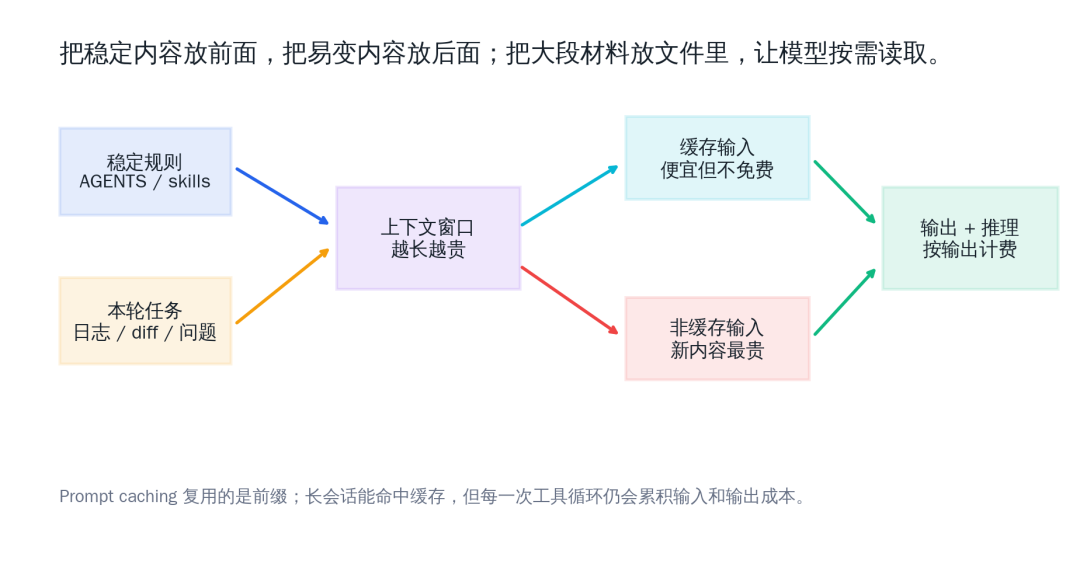
This is why “making the final answer shorter” only saves a little output cost and does not solve the root problem. What really needs to be saved is repeatedly carried context and material that the model never needed to see in full.
Which conversations consume the most tokens
I pulled out the 10 most expensive interactions from that main session. The result matched everyday intuition: the more a task crosses systems and repositories and requires repeated verification, the more expensive it is.
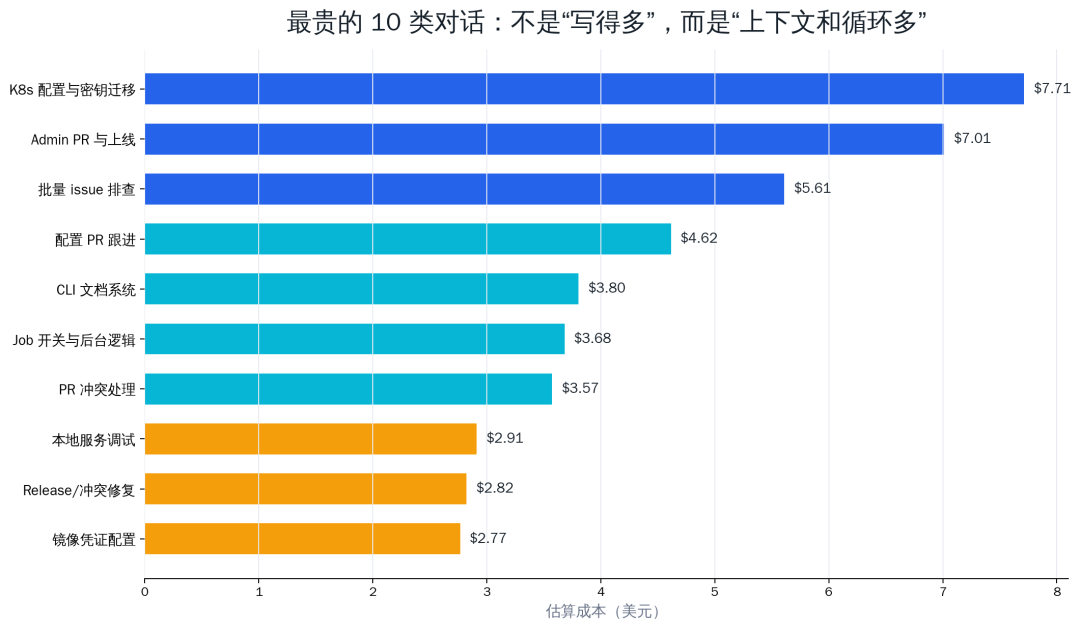
What those 10 interactions actually did is also representative.
| Rank | Estimated cost | What this turn was roughly doing | Why it was expensive |
|---|---|---|---|
| 1 | $7.71 | Migrating the Kubernetes deployment method for a backend service while handling image registry credentials, cluster configuration, secret management, and deployment verification. | It touched the code repository, configuration repository, production machines, K8s resources, and CI workflows at the same time; every step needed confirmation that existing services would not be affected. |
| 2 | $7.01 | Opening a backend service PR, following up on deployment, and verifying whether the new image and workflow took effect. | It needed to organize local changes, inspect PR status, read build logs, and check deployment results, making it a high-frequency tool-calling task. |
| 3 | $5.61 | Scanning a batch of issues assigned to me, judging whether each still existed, fixing what could be fixed, and commenting or closing issues that were already resolved. | There were many issues, and each required checking context, code, historical PRs, and sometimes actual verification. |
| 4 | $4.62 | Following up after a configuration repository PR passed, confirming whether the configuration could enter the deployment pipeline. | On the surface this is just “the PR passed,” but in reality it requires returning to the deployment design to confirm how the next step should be triggered. |
| 5 | $3.80 | Introducing an MkDocs-based documentation system for a CLI and organizing command documentation and the online docs structure. | Documentation tasks read a lot of existing commands, configuration, and site structure, so the input material is large. |
| 6 | $3.68 | Debugging a local Job Platform page, adding toggles, linking a run list, and checking backend logic. | Both frontend and backend changed, and it required repeatedly inspecting logs, page state, and service behavior. |
| 7 | $3.57 | Resolving conflicts in an existing PR, judging whether the PR content had already landed in the test branch, then fixing conflicts. | Conflict resolution usually requires reading both histories, the current branch state, and the target branch content. |
| 8 | $2.91 | Debugging a local service management panel and investigating why a service status, log, or startup method was wrong. | Local processes, ports, logs, and configuration files all needed inspection, with many verification loops. |
| 9 | $2.82 | Merging current changes into an existing PR, resolving conflicts, and preparing a release. | When PR and release work are mixed together, change notes, test results, and branch relationships all need to be preserved at once. |
| 10 | $2.77 | Bringing image registry pull credentials into configuration management and converting them into a reusable encrypted Secret. | It involved security boundaries, naming, encryption method, and deployment compatibility; it was not just a one-line config change. |
These interactions can be roughly grouped into five categories.
The first category is deployment and configuration migration. These tasks usually require reading READMEs, inspecting Kubernetes or CI configuration, checking production environments, modifying workflows, and verifying deployment results. The expensive part is not any one answer, but “figuring it out” and “confirming nothing else was affected.”
The second category is bulk issue triage. The user gives Codex a dozen or more issues at once and asks it to determine whether they still exist, whether they can be fixed, and whether they should be closed after fixing. Each issue requires looking at context, code, PRs, and sometimes tests. A single issue may not be expensive, but a batch adds up.
The third category is multi-repository PR and release work. One repository changes code, another updates dependencies, and a third changes deployment configuration. In between, conflicts must be resolved, PR descriptions updated, and CI rerun. Every repository crossed lengthens both the context and the tool loop.
The fourth category is long-log debugging. When users paste hundreds or even thousands of lines of logs, the model can indeed read them, but the whole log is counted as input. The actually useful part may be only 20 lines.
The fifth category is documentation generation. Reading Lark documents, combining them with code, and generating long documentation looks like a “writing task,” but in practice it includes reading, summarizing, rewriting, formatting, and multiple rounds of correction.
Another long session from the same day confirmed the same conclusion. Roughly grouped by task type, code/PR/release work and Q&A/debugging accounted for the vast majority of cost, while ordinary data statistics were tiny.
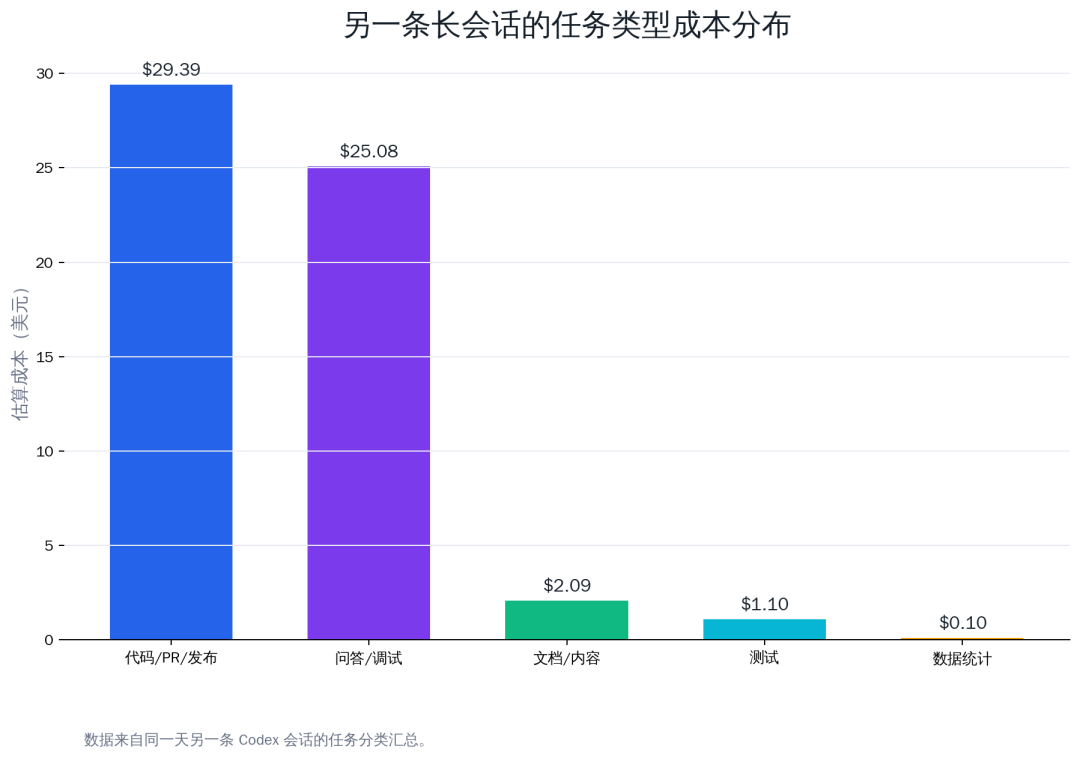
| Task type | Estimated cost | Share |
|---|---|---|
| Code / PR / release | $29.39 | 50.9% |
| Q&A / debugging | $25.08 | 43.4% |
| Docs / content | $2.09 | 3.6% |
| Testing | $1.10 | 1.9% |
| Data statistics | $0.10 | 0.2% |
This ratio also aligns with findings from a study on token consumption in agentic coding: the cost of agentic coding tasks is often driven by input tokens rather than output tokens, and token consumption for the same task can vary substantially. In other words, an agent’s cost is not determined only by how hard the task looks. It depends more on how many steps it takes, how much material it reads, and how much trial and error it goes through.
Prompt caching helps, but do not treat it as a free lunch
Prompt caching is an important reason long sessions can run at all. Without caching, fully processing hundreds of thousands of tokens every time would make both cost and latency much harder to accept.
But caching is more like “discounting a repeated prefix,” not “making context free.” That leads to several engineering lessons:
| Practice | Impact |
|---|---|
| Put stable rules at the front | Makes prefix cache hits more likely |
| Put volatile input at the end | Avoids breaking the prefix |
| Do not frequently change system-level rules | Reduces cache invalidation |
| Do not paste large logs directly | Reduces uncached input |
| Split long tasks into multiple sessions | Reduces history carried in each turn |
This is especially obvious in Codex. Content such as AGENTS.md, skills, tool instructions, and fixed workflows is suitable as stable prefix material. A one-off error log, a PR diff, or a temporary SQL snippet should be read on demand through files and commands.
My token-saving workflow
The following practices are not theoretical prompt engineering. They are habits left over from using Codex for engineering tasks over a long period.
1. One session should ideally cover one topic
The easiest way for a session to get out of control is to do a dozen unrelated things in the same conversation: fix CI in the morning, query a database in the afternoon, write a blog post at night, and insert a few PR reviews in between. The session context gets thicker and thicker, and every later sentence pays for earlier history.
A better approach is to split by deliverable:
-
one PR, one session;
-
one production incident, one session;
-
one document, one session;
-
one data analysis, one session.
If a task needs to continue, ask Codex to generate a handoff summary and copy it to the beginning of a new session. A summary is usually a few hundred to one or two thousand tokens, far cheaper than continuing with hundreds of thousands of tokens of history.
This does not mean every small question needs a new window. In my experience, as long as the task is still within the same deliverable, such as the same PR, the same production issue, or the same document, it is fine to continue in the same session. After Codex automatically compacts the context, a long session can still work; it compresses the history into a summary. This capability is practical and does not need to be avoided too aggressively.
What really deserves a new session is a “topic switch”: you were fixing backend deployment and suddenly need to write a blog post; you were querying a database and suddenly need to review a frontend PR; you were working on a production issue and suddenly need to research a completely unrelated new technology. This kind of switch not only increases tokens, but also pollutes the model’s judgment of current task priorities.
2. It does not have to be one session per repository, but it should preferably be one session per deliverable
“One session per repository” sounds clean, but many real tasks naturally cross repositories. A feature may require changing the backend, frontend, and deployment config at the same time. A release issue may require checking the business repository, CLI repository, and configuration repository. Forcing that into three sessions can lose useful context.
I recommend splitting by deliverable, not by repository:
| Scenario | Recommendation |
|---|---|
| Small single-repository change | Finish it in one session |
| One PR touches multiple repositories | Coordinate in one session, but handle each repository in phases |
| Multiple unrelated PRs | Split into multiple sessions |
| One production incident crosses multiple services | Keep incident context in one session |
| Many issues processed on the same day | First create a triage session, then split complex issues out separately |
The key in a multi-repository session is to make the current phase clear to Codex: which repository to look at now, which class of files to modify, and what to verify next. Otherwise the model can jump back and forth between directories, increasing both tokens and time.
3. Start a new session for uncommon tasks when possible
Some tasks are “uncommon”: briefly researching an unfamiliar library, checking a rarely used cloud service, writing an article on a completely different topic, or analyzing material unrelated to the current project. If these tasks are inserted into a long-running engineering session, they create two problems.
First, they pollute the semantic background of the current session. When you later return to the original engineering task, the model may still carry that unfamiliar material in history.
Second, they do not help caching. Prompt caching depends on a stable prefix. A long-running engineering session usually has a relatively stable prefix, but suddenly inserting a large amount of heterogeneous material, even if it does not completely break caching, makes later context heavier.
So my practice is: uncommon tasks, one-off research, and writing unrelated to the current project get their own sessions. Afterward, only bring back a conclusion summary, not the entire process.
4. Use caching better: stable content early, temporary content late
Prompt caching matters for agents, but users cannot manually “toggle” it. What we can do is improve the chance that the stable prefix is hit.
A few simple principles:
-
Put stable rules in
AGENTS.md, skills, README, or local config instead of pasting them temporarily every time; -
In the same session, do not repeatedly change system-level requirements and working style;
-
Put temporary logs, diffs, SQL, and CSV files in files, and let Codex read them on demand;
-
In long prompts, put stable background first and volatile input later;
-
If a piece of material is only useful for one task, do not bring it into a long-running session.
This is also why I dislike pasting a large block of “how you should work” into every request. Stable rules should be consolidated; temporary material should be isolated.
5. Provide only key log sections, and put full logs in files
Do not paste complete logs directly into the chat window. A better request is:
The log is at /tmp/deploy.log. Please first use rg to search for ERROR, Traceback, exit code, and failed, then read only the relevant context. Do not output the entire log to me.
This makes the model locate the problem with tools instead of swallowing the entire log. For CI logs or service logs with thousands of lines, the difference is huge.
Another practical approach: if you already know roughly where the error is, paste only 30 to 80 lines around it. For a CI failure, you usually only need the last part of the failed job, the stack trace, the triggering command, and a summary of environment variables. The full log can be left at a path for Codex to read if needed.
6. For data analysis, define the metric before running the full query
Statistics tasks are prone to rework. For example, “count a provider’s calls over the last 7 days” sounds simple, but the data source may include MongoDB, Postgres, historical tables, and billing tables. The metric could be raw calls, billable results, successful calls, or search impressions.
I now ask first:
Do not run the full query yet. First explain which tables, fields, time window, and success/billing criteria you plan to use.
Confirming the metric before execution avoids many invalid queries and useless context.
If the data volume is large, ask Codex to produce SQL or a script first, then write the results to a temporary file. In the chat, show only the top N, anomaly samples, and conclusions. Keep the full result in CSV, JSON, or Markdown files.
7. Let Codex use files instead of using the chat box to move files
Large configuration blocks, SQL, JSON, and CSV are better placed in files. The user only needs to tell Codex the path and the goal.
The data is in /tmp/provider_stats.csv. Please read it and generate a top 20 comparison table. Do not output the raw CSV.
This has two benefits: first, chat history is not polluted by large files; second, Codex can process the data with scripts, and the model only needs to read the summarized result.
8. Consolidate stable preferences into rules
Some information is repeated every time, wasting tokens and easy to forget:
-
PR titles must be in Chinese;
-
release branch rules for a specific repository;
-
how to start local services;
-
which group IDs are fixed;
-
how to run a certain type of test;
-
how to release a specific product.
This kind of content should go into AGENTS.md, skills, the project README, or local config. Then the model can read it on demand, and consistency is easier to maintain.
9. Set explicit output limits
Often, what you really need is the conclusion, not the full process.
| Original wording | More token-efficient wording |
|---|---|
| See why this run failed | Extract only the failed job, key error, most likely cause, and suggested fix |
| Analyze these issues | At most 5 lines per issue: whether it exists, evidence, recommended action |
| Summarize this PR | List only behavior changes, risks, and tests; do not restate every diff |
| Generate a report | List only the top 20; write the full result to a file |
| Read the logs | First rg for keywords, then read the matching context |
Shorter output does save output tokens, but more importantly it helps the model take fewer wrong turns.
10. Do not treat compacting as a failure
When Codex compacts by itself, it means the context is approaching the window limit and history needs to be compressed into a summary. This is not a bad thing. For long tasks, compacting lets the session continue and preserves the overall thread.
But compacting is not omnipotent. It loses some details, especially early edge constraints, specific changes to a file, and small clues in an old command output. So after a long task is compacted, I usually do two things:
-
ask Codex to restate the current goal, completed items, and remaining items;
-
if a key detail is important, write it into a file, issue, PR description, or handoff summary.
Do not expect conversation history to be preserved perfectly forever. Truly important things should be put somewhere searchable.
11. Multiple windows are fine, but they need boundaries
Having multiple Codex session windows open is normal. I usually split them like this:
-
mainline window: the most important current PR, release, or incident;
-
research window: temporary research and option comparison;
-
documentation window: writing articles, organizing Lark documents, generating reports;
-
verification window: running tests, checking logs, and doing one-off data analysis.
The risk of multiple windows is that conclusions become scattered. The solution is to generate a handoff summary at the end of each window, clearly stating “the conclusion that can be brought back to the mainline.” Do not move the complete histories of multiple windows into one another. That only spends the tokens you just saved.
12. Let Codex plan before executing
For complex tasks, directly saying “help me fix it” is of course possible, but it can make the model start by reading many files and running many commands. A cheaper and more reliable approach is:
Do not modify code yet. First explain which files you will inspect, possible causes, and how you will verify the fix.
The planning phase is usually not expensive, but it avoids going in the wrong direction later. After the direction is confirmed, letting it execute is often cheaper overall.
A practical checklist
| High-cost signal | Better approach |
|---|---|
| One session has crossed multiple topics | Generate a handoff summary and start a new session |
| A user message includes a long log | Provide a file path and ask Codex to search key lines |
| One request asks for many issues / PRs | Process in batches, or first create a priority list |
| Many documents need to be read | Specify chapters or target questions instead of reading everything broadly |
| Database statistics need to be run | Confirm the metric before executing queries |
| Fixed rules are repeated again and again | Put them in AGENTS.md or a skill |
| Output is often very long | Specify top N, ask only for differences, and avoid full dumps |
| The task requires long verification | Split into “implementation,” “verification,” and “release” sessions |
Do not turn token optimization into a new burden
At this point, it is easy to get the wrong impression: using Codex requires being constantly careful and calculating tokens all the time. My actual experience is the opposite.
Codex’s quota is enough for everyday engineering use. What really matters is not “saving a little on every sentence,” but avoiding obvious waste: pasting entire logs, mixing a dozen topics into one session, repeatedly pasting fixed rules, and letting the model run for a long time in the wrong direction. These optimizations also improve work quality; they are not just about saving tokens.
If you break an otherwise smooth workflow into fragments just to save tokens, constantly opening new windows, copying summaries, and re-explaining background, you have gone too far. Engineering efficiency comes first. My rule of thumb is simple:
| Situation | Worth optimizing? |
|---|---|
| You are handling a continuous task, and session context is still useful | No rush to split |
| The session already contains several unrelated topics | Worth splitting |
| You are only worried about compacting | Not necessary |
| You are about to paste a large log, CSV, or JSON into the chat box | Worth changing to a file path |
| One-off uncommon research | Worth starting a new session |
| Fixed rules are repeated every time | Worth consolidating into rules or a skill |
So a more accurate phrase is not “save tokens,” but “reduce useless context.” Useful context should be kept. Useless context should be removed.
For teams, token optimization is really process optimization
If an individual uses Codex only occasionally, token cost may not be very visible. But once a team starts using Codex for everyday work such as PR review, CI debugging, releases, data analysis, and documentation generation, tokens become an engineering budget.
That budget should not be controlled by “using it less.” The truly effective approach is to design the process well:
-
rules are stable and reusable;
-
data flows through files and scripts;
-
conversations are split by task boundary;
-
long logs and large documents are not pasted directly into chat;
-
the model explains the metric before large-scale execution;
-
important tasks end with handoff summaries.
This is not about pinching pennies. It is about making Codex’s working style more reliable. Long context is powerful, but it is not an infinitely free whiteboard. A truly useful agent workflow should let the model spend its effort on judgment and decisions, not repeatedly rereading the same pile of historical material.
References
-
OpenAI Prompt Caching documentation
[1] -
OpenAI GPT-5.5 model documentation
[2] -
OpenAI: Introducing GPT-5.5
[3] -
How Do AI Agents Spend Your Money? Analyzing and Predicting Token Consumption in Agentic Coding Tasks
[4]
Appendix: How many tokens this article cost to write
This section was written before article generation was completed, so it does not include the final reply after the last build verification. This avoids “generating new statistics just to account for the statistics themselves.”
As of this writing, this round of writing-related model requests totaled 26 calls plus 1 context compaction record not counted as interface cost, consuming 3,517,666 tokens in total, about 1% of my Codex weekly usage at the time. Estimated using standard GPT-5.5 API pricing, the raw cost was about **$4.1587**. Again, this is only a raw estimate under API unit pricing, not the true amortized cost under a subscription plan.
| Metric | Value |
|---|---|
| Input tokens | 3,501,200 |
| Cached input tokens | 3,075,840 |
| Uncached input tokens | 425,360 |
| Output tokens | 16,466 |
| Reasoning output tokens | 1,683 |
| Cache hit share of input | 87.9% |
| Estimated cost (raw API price basis) | $4.1587 |
The per-request model call breakdown is below. The description column is a phase label based on the operation order in this round. Pricing is still estimated using the GPT-5.5 standard API formula above.
| # | Call description | Input | Cached input | Output | Reasoning output | Estimated cost |
|---|---|---|---|---|---|---|
| 1 | Read task and writing rules, confirm blog repository structure | 203,042 | 4,480 | 478 | 170 | $1.0094 |
| 2 | Search OpenAI prompt caching, GPT-5.5, and agent token materials | 215,467 | 202,624 | 258 | 97 | $0.1733 |
| 3 | Read Lark source document and site article style examples | 215,525 | 208,768 | 37 | 0 | $0.1393 |
| 4 | Organize the main-session accounting basis from the source document | 219,938 | 215,424 | 442 | 87 | $0.1435 |
| 5 | Confirm chart plan and article structure | 223,147 | 219,520 | 284 | 8 | $0.1364 |
| 6 | Generate/organize hero image and chart data | 233,349 | 223,104 | 393 | 47 | $0.1746 |
| 7 | Structured reasoning before drafting the article body | 232,197 | 208,768 | 2,072 | 225 | $0.2837 |
| 8 | Context compaction record; not an actual model interface cost | 0 | 0 | 0 | 0 | - |
| 9 | Restore compacted context and confirm task status | 68,151 | 53,632 | 295 | 50 | $0.1083 |
| 10 | Check blog repository, frontmatter, and image directories | 76,401 | 67,968 | 471 | 101 | $0.0903 |
| 11 | Generate PNG charts and handle Chinese font issues | 77,671 | 70,016 | 97 | 21 | $0.0762 |
| 12 | Add official references and external research reference | 77,845 | 77,184 | 355 | 23 | $0.0525 |
| 13 | Write article draft and image references | 85,012 | 77,696 | 95 | 8 | $0.0783 |
| 14 | Check session log location and token accounting method | 85,154 | 84,864 | 2,320 | 9 | $0.1135 |
| 15 | Parse token_count event structure | 93,960 | 84,864 | 80 | 19 | $0.0903 |
| 16 | Locate the window containing the current user message | 94,311 | 93,568 | 1,969 | 12 | $0.1096 |
| 17 | Aggregate token details for this round | 112,143 | 94,080 | 4,552 | 369 | $0.2739 |
| 18 | Check actual chart rendering | 114,949 | 96,128 | 263 | 38 | $0.1501 |
| 19 | Run Astro build verification | 115,259 | 114,560 | 93 | 6 | $0.0636 |
| 20 | Wait for build completion and read results | 115,457 | 115,072 | 202 | 17 | $0.0655 |
| 21 | Prepare to write token statistics explanation for this round | 115,848 | 115,072 | 209 | 9 | $0.0677 |
| 22 | Generate final token detail table | 116,837 | 115,584 | 281 | 17 | $0.0725 |
| 23 | Recheck article and image assets after build | 119,278 | 116,608 | 544 | 58 | $0.0880 |
| 24 | Summarize the latest accounting basis | 120,697 | 119,168 | 176 | 53 | $0.0725 |
| 25 | Generate statistics summary before writing into the body | 121,498 | 120,192 | 335 | 224 | $0.0767 |
| 26 | Read build output and prepare final patch | 123,955 | 53,632 | 92 | 8 | $0.3812 |
| 27 | Output detail table for insertion into the article | 124,109 | 123,264 | 73 | 7 | $0.0680 |
This table is more useful than the total cost because it helps infer how to optimize next time.
The most obvious point is call 1: input was 203,042 tokens, cached input was only 4,480 tokens, the cache hit rate was about 2.2%, and the single-call cost reached $1.0094. The reason is not complicated: this blog-writing task was temporarily split out from a long-running engineering session, so the model had to absorb the writing task, site structure, workspace rules, Lark document handling method, image requirements, and a whole set of background information again. For an uncommon writing task, this is normal. But if blog writing and WeChat Official Account synchronization happen often in the future, it would be worth creating a dedicated “blog writing and publishing” session.
That dedicated session could keep the following stable context over time:
-
blog repository location, article directory, image directory, and frontmatter rules;
-
cover image and illustration dimensions, style, and the constraint against using SVG;
-
common build commands and publishing / WeChat Official Account synchronization workflow;
-
article style preferences: less AI tone, no internal links, preserve the voice of personal technical retrospection;
-
common handling of reference material: Lark documents are source material, not text to copy directly.
If this task is not done every day, the window does not need to stay open forever. A better approach is to keep this dedicated session and resume it when writing a blog post. That preserves stable prefixes and cache benefits without mixing blog-writing material into the main engineering session.
Calls 2 through 7 already show a clear improvement in cache hits, mostly between 89% and 98%. This means once the writing context stabilized, caching started to help with further research, source document reading, structure organization, and chart generation. The optimization focus here is not to split the session, but to avoid frequently changing writing rules midway. For example, do not ask for a WeChat Official Account style, then an academic paper style, then a product announcement style. A stable style means a more stable prefix.
Call 11, “Generate PNG charts and handle Chinese font issues,” was not expensive, but it exposed another optimization opportunity: the chart generation script can be consolidated as a site tool. Right now Codex temporarily writes matplotlib scripts, handles fonts, and checks PNG output every time. If articles with charts become common, the blog repository could include a scripts/render_blog_charts.py template, or the skill could record Chinese fonts, dimensions, color palette, and output paths. Then the model only needs to fill in the data instead of re-deriving the chart engineering details every time.
Calls 14 through 17 parsed the current session log and calculated the token cost of writing this article itself. The output and reasoning increased noticeably there, especially call 17 with 4,552 output tokens. This was valuable, but it should not be reinvented for every article. A better approach is to turn “parse Codex session token usage” into a fixed script: input a user message fragment or turn ID, output a Markdown table and cost estimate. Then future articles of this kind only need to run the script, not have the model repeatedly explain and manually aggregate in chat.
Calls 19 through 25 were mostly build, review, and preparation for writing statistics into the article. Cache hits were good and costs were low. This shows verification steps should not be skipped just to save tokens. One build can catch frontmatter, image path, and Markdown table issues, and that benefit is worth far more than the token cost.
Call 26 was unusual: input was 123,955 tokens, cached input was only 53,632 tokens, the cache hit rate was about 43.3%, and cost suddenly rose to $0.3812. It happened while reading build output and preparing the final patch. The optimization here is not to avoid running the build, but to control how build output enters context: keep only whether it succeeded, the failure summary, and relevant errors. For a successful build, there is no need to carry hundreds of lines of route generation logs into the next turn. Command output can be limited more tightly, or only the new article path and final Complete can be grepped.
So, looking only at the writing process for this article, the most concrete optimization suggestions are:
| Observation | What to do next time |
|---|---|
| Call 1 had a very low cache hit rate, showing a cold start for writing context | Create a dedicated “blog writing / WeChat publishing” session and resume it as needed |
| Writing style, directories, and image rules had to be reconfirmed each time | Consolidate these rules into a blog skill or repository notes |
| Chart scripts were generated temporarily each time | Prepare a fixed PNG chart template and let the model only fill in data |
| Token accounting logic relied on temporary scripts and chat reasoning | Turn it into a fixed statistics script that outputs Markdown snippets |
| Successful build logs were long | Keep only build result summaries and new page paths |
| Source documents and article repository belong to two different domains | Separate writing sessions from main engineering sessions to avoid polluting mainline cache |
In other words, optimization is not about splitting writing into even smaller pieces. It is about fixing the reusable writing environment. The ideal workflow for the next similar article should be: resume the blog session, provide the Lark document or source path, then directly generate the article, charts, build verification, and WeChat Official Account draft. This reduces cold-start cost and keeps writing context from polluting the main engineering session.