
Add Playwright MCP
to Claude CodeClaude Code 接入
Playwright MCP
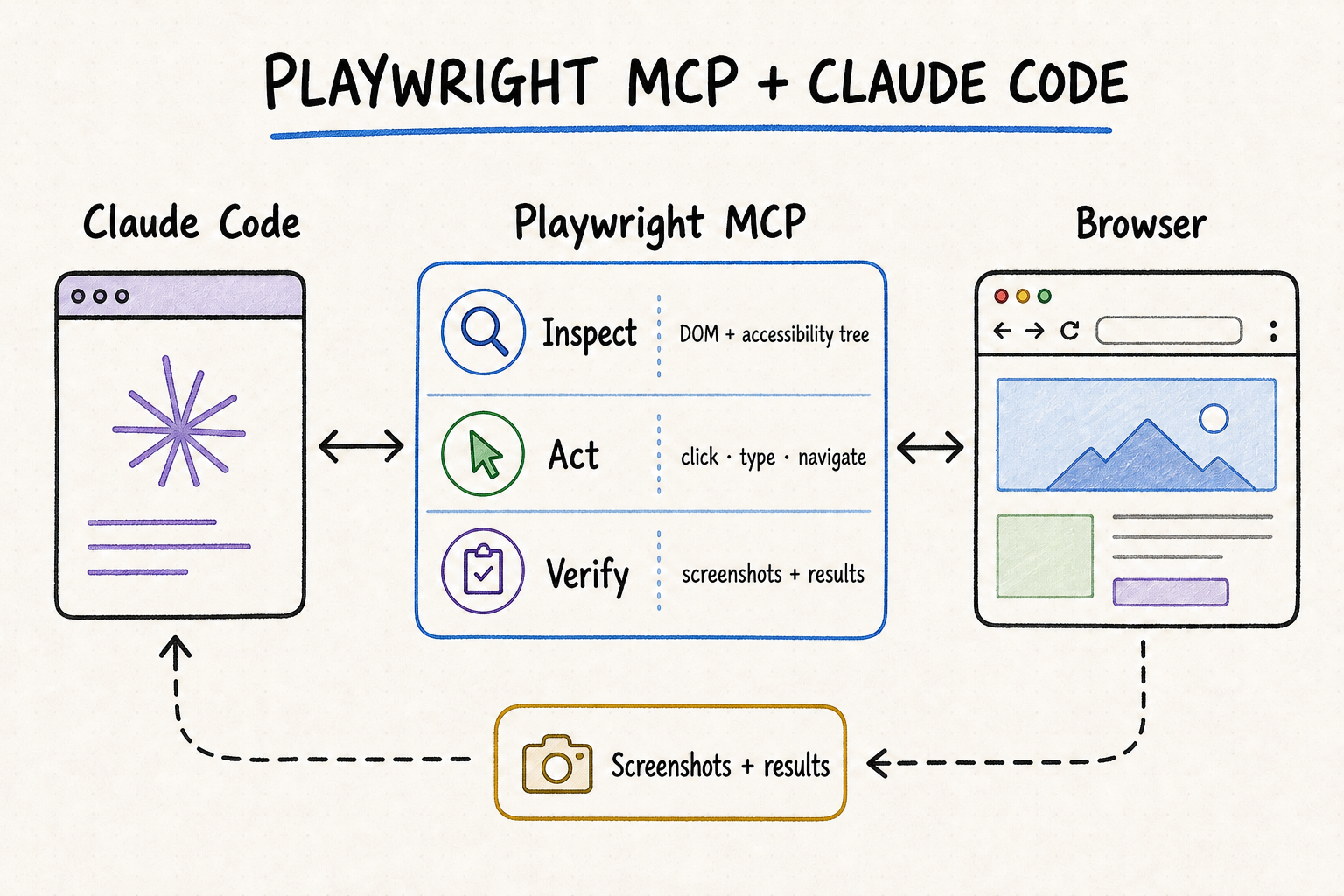
Install Playwright MCP in Claude Code with the official command, confirm the server is connected, and start a controlled browser automation workflow.
使用官方命令为 Claude Code 安装 Playwright MCP,确认服务器连接正常,并开始可控的浏览器自动化工作流程。
TL;DR核心摘要
Verify node, npx, and claude in the same terminal before writing any MCP configuration.
Register Playwright as a local stdio server and separate Claude options from the npx command with --.
Start with local scope; use project scope only for a reviewed team configuration stored in .mcp.json.
“Added” means saved, not connected. Check the list, inspect server details, approve if required, and run a public-page smoke test.
写入 MCP 配置前,先在同一终端确认 node、npx 和 claude 都能运行。
把 Playwright 注册为本地 stdio 服务器,并用 -- 分隔 Claude 参数与 npx 命令。
首次安装优先 local;只有团队已经审查配置时,才使用写入 .mcp.json 的 project。
“Added”只代表已保存。还要检查列表和详情、完成必要审批,再运行公开页面冒烟测试。
The safest installation path is deliberately small: validate the three command-line tools, add the official package at local scope, confirm Claude Code reports a healthy connection, and open one public page without changing it. Only then add shared project configuration, persistent browser state, extra capabilities, proxies, or production accounts.
最稳妥的安装路径应保持精简:先验证三项命令行工具,再以 local 作用域添加官方软件包,确认 Claude Code 报告连接正常,最后打开一个公开页面并保持只读。完成这些步骤后,才考虑团队共享配置、持久化浏览器状态、附加能力、代理或生产账号。
Add Playwright MCP to Claude Code为 Claude Code 添加 Playwright MCP
1. Verify Node.js, npx, and Claude Code together第一步:在同一终端验证 Node.js、npx 与 Claude Code
The official Playwright MCP repository currently lists Node.js 18 or newer. Run node --version, npx --version, and claude --version in the exact shell where you will add the server. If any command is missing, fix PATH or update the tool before continuing. On Windows, reopening PowerShell or the terminal after installing Node.js is often necessary; on macOS and Linux, verify that the shell is using the intended Node version manager environment.
官方 Playwright MCP 仓库当前要求 Node.js 18 或更高版本。请在准备添加服务器的同一个终端中运行 node --version、npx --version 和 claude --version。任何一项无法识别,都应先修复 PATH 或升级工具。Windows 安装 Node.js 后通常需要重新打开 PowerShell 或终端;macOS 与 Linux 使用版本管理器时,要确认当前 shell 载入的是预期 Node 环境。
2. Add the server at local scope first第二步:先以 local 作用域添加服务器
From the target project directory, run claude mcp add --transport stdio --scope local playwright -- npx @playwright/mcp@latest. This declares a local-process MCP server named playwright. The double dash separates Claude Code options from the command and arguments passed to the server; keeping that boundary explicit prevents Playwright flags from being parsed as Claude CLI options. Local scope is private to you and loads only for the current project, which makes it the safest place to validate the setup.
进入目标项目目录后,运行 claude mcp add --transport stdio --scope local playwright -- npx @playwright/mcp@latest。该命令会注册一个名为 playwright 的本地进程型 MCP 服务器。双横线用于分隔 Claude Code 自身参数和传给服务器的命令参数,明确这个边界可以避免 Playwright 选项被 Claude CLI 误解析。local 配置只属于当前用户,并且只在当前项目加载,因此最适合先验证安装。
3. Choose project scope only when the team needs it第三步:只有团队需要时才改用 project
Project scope writes the server definition to .mcp.json in the project root so it can be reviewed and versioned with the repository. Use claude mcp add --transport stdio --scope project playwright -- npx @playwright/mcp@latest only after the team agrees to the package, command, and browser access. A project configuration should contain no personal paths, cookies, or secrets. Claude Code supports environment-variable expansion for machine-specific values, but credentials should remain outside version control.
project 作用域会把服务器定义写入项目根目录的 .mcp.json,便于团队审查并随代码版本管理。只有团队已经认可软件包、启动命令和浏览器访问范围时,才运行 claude mcp add --transport stdio --scope project playwright -- npx @playwright/mcp@latest。共享配置中不应包含个人路径、Cookie 或密钥。Claude Code 支持用环境变量处理机器差异,但凭据仍应保留在版本库之外。
- Local: current project, private to the user, stored under the project entry in
~/.claude.json. - Project: current project, shared through
.mcp.json, subject to workspace trust and server approval. - User: every project for that user; convenient, but too broad for an experimental browser integration.
- Local:只在当前项目加载,仅当前用户可见,保存在
~/.claude.json对应项目条目中。 - Project:只在当前项目加载,通过
.mcp.json共享,并受工作区信任和服务器审批控制。 - User:该用户的所有项目均可使用;虽然方便,但对实验性浏览器集成通常过宽。
Read the effective configuration, not only the file you edited检查实际生效配置,不要只看刚编辑的文件
A project entry places the server under the mcpServers object, uses playwright as the key, declares stdio as the type, and separates the npx command from its package arguments. Keep browser options in the arguments array and machine-specific values in reviewed environment variables. Do not place tokens, personal profile paths, or storage-state contents in the shared file. Claude Code resolves duplicate server names by scope precedence and uses one complete definition rather than merging fields, so a local entry named playwright can override the project entry you are inspecting. Use claude mcp get playwright to confirm which definition actually won.
project 配置会把服务器放在 mcpServers 对象中,以 playwright 作为键名,声明 stdio 类型,并将 npx 命令与软件包参数分开。浏览器选项应放在参数数组中,机器差异则通过经过审查的环境变量处理;共享文件中不能出现令牌、个人配置路径或 storage state 内容。Claude Code 遇到跨作用域同名服务器时,会按优先级采用一整套定义,而不会合并字段,因此本地同名条目可能覆盖你正在检查的 project 配置。应使用 claude mcp get playwright 确认最终生效的是哪一项。
Choose a version policy for team installations团队安装要明确版本策略
The official quick-start command uses @latest, which is convenient for an individual evaluation. A team may prefer a reviewed package version so every developer and CI environment starts the same release. Test the upgrade in local scope, inspect release changes, rerun the connection and browser smoke tests, and then update the shared project definition. Whichever policy you choose, document it; an unexplained mixture of floating and pinned versions makes browser differences difficult to reproduce.
官方快速命令使用 @latest,适合个人快速评估。团队则可以固定经过审查的软件包版本,让所有开发者和 CI 环境运行同一版本。升级时先在 local 作用域验证,查看版本变化,重新执行连接检查与浏览器冒烟测试,最后再更新共享 project 定义。无论采用自动跟随还是固定版本,都应写清策略;混用浮动版本和固定版本,会让浏览器差异难以复现。
4. Verify saved configuration and runtime health第四步:分别验证配置保存与运行状态
The add command’s confirmation proves only that the configuration was written. Run claude mcp list and confirm the server reports Connected. Use claude mcp get playwright to inspect the effective command, scope, and any issue detail. Then open Claude Code in the intended project and run /mcp. A project-scoped server may show Pending approval until you trust the workspace and approve the definition interactively.
添加命令的成功提示只证明配置已经写入。随后运行 claude mcp list,确认服务器状态为 Connected;再用 claude mcp get playwright 检查实际生效的命令、作用域和故障详情。最后在目标项目中打开 Claude Code,通过 /mcp 查看会话内状态。project 服务器在工作区获得信任并完成交互式审批前,可能显示为 Pending approval。
5. Keep a clean rollback path第五步:保留清晰的回退方法
If the server name already exists at the same scope, inspect it before replacing anything. Remove the unwanted entry with claude mcp remove playwright in the relevant project and scope, then add it again with the intended command. For a shared project configuration, review the .mcp.json diff before committing. After removal, confirm the server no longer appears in claude mcp list or the in-session MCP panel; separately delete retained browser profiles or artifacts only when you know they are no longer needed.
如果同一作用域中已经存在同名服务器,应先查看详情,不要直接覆盖。可在对应项目与作用域中运行 claude mcp remove playwright 删除错误条目,再用正确命令重新添加。共享 project 配置还应在提交前检查 .mcp.json 的差异。删除后,确认 claude mcp list 和会话内 MCP 面板都不再显示该服务器;浏览器配置文件与产物应另行确认无用后再清理。
Verify the first browser workflow验证第一个浏览器工作流
Begin with a read-only smoke test从只读冒烟测试开始
Ask Claude Code to open a public page, return the final URL and title, identify one visible heading, and name one link without clicking it. Then permit one reversible navigation and request the new URL and heading. This proves that the MCP process launches, the browser starts, the accessibility snapshot is readable, a tool call returns, and page state can be reacquired. Do not introduce login state until this baseline passes.
先让 Claude Code 打开一个公开页面,返回最终网址和页面标题,识别一个可见标题,并说出一个链接名称但不点击;随后只允许一次可逆跳转,并要求返回新网址与标题。这样可以同时验证 MCP 进程、浏览器启动、无障碍快照、工具返回和页面状态刷新。基线通过前,不要接入登录状态。
Add browser options one at a time每次只增加一个浏览器选项
The official package exposes options for browser engine, headless mode, isolated sessions, storage state, persistent user data, output directory, viewport, device emulation, proxy, console level, and timeouts. Add only the option required by the next test, then rerun the same smoke test. For example, use --isolated when every run should discard browser state, or a controlled --output-dir when evidence files must be retained. A change in behavior is much easier to attribute when only one variable changed.
官方软件包支持浏览器引擎、无头模式、隔离会话、storage state、持久化用户数据、输出目录、视口、设备模拟、代理、控制台级别和超时等选项。每次只加入下一项测试真正需要的参数,然后重复同一冒烟测试。例如,需要每次丢弃浏览器状态时使用 --isolated;需要保留证据文件时设置受控的 --output-dir。一次只改变一个变量,出现差异后才容易定位原因。
Diagnose the layer that failed按失败层定位问题
- Command missing: verify PATH and versions in the same shell; restart the terminal after installing or updating Node.js.
- Package launch fails: run
npx @playwright/mcp@latestdirectly and inspect the first error before changing Claude configuration. - Pending approval: open the project interactively, trust the workspace, and review the project-scoped server command.
- Browser start fails: check the installed browser, executable permissions, sandbox policy, proxy, and whether another process owns the profile.
- Connection is healthy but tools fail: inspect the current page state, browser permissions, domain redirects, and the specific tool error.
- Only authenticated pages fail: test with a dedicated profile or storage state and confirm the session is not being reused concurrently.
- 找不到命令:在同一终端核对 PATH 和版本;安装或更新 Node.js 后重新打开终端。
- 软件包启动失败:直接运行
npx @playwright/mcp@latest,先查看第一条错误,再修改 Claude 配置。 - 等待审批:以交互方式打开项目,信任工作区,并审查 project 服务器命令。
- 浏览器启动失败:检查浏览器安装、可执行权限、沙箱策略、代理,以及配置文件是否被其他进程占用。
- 连接正常但工具失败:检查当前页面状态、浏览器权限、域名跳转和具体工具错误。
- 只有登录页面失败:使用专用配置或 storage state 测试,并确认同一会话没有被并发复用。
Understand profile conflicts before retrying重试前先处理配置文件冲突
A persistent browser profile can be owned by only one browser instance at a time. Two Claude Code sessions using the same workspace may therefore collide. Close the existing browser process, use --isolated for the second run, or assign a distinct user-data directory. Do not solve a lock conflict by copying a live profile or disabling unrelated security controls. If you load storage state into an isolated session, treat that file as sensitive because it can contain authenticated cookies and local storage.
一个持久化浏览器配置文件同一时间只能由一个浏览器实例占用,因此两个使用同一工作区的 Claude Code 会话可能发生冲突。可以关闭已有浏览器进程,为第二次运行使用 --isolated,或指定不同的 user data 目录。不要通过复制正在使用的配置文件,或关闭无关安全控制来绕过锁冲突。把 storage state 加载到隔离会话时,也要把该文件视为敏感资料,因为其中可能包含登录 Cookie 和本地存储数据。
Move from smoke test to controlled task从冒烟测试过渡到受控任务
The first real task should still be reversible. State the start URL, allowed domain, desired visible result, forbidden actions, and evidence to return. Ask Claude Code to inspect first, perform one bounded action, inspect again, and stop. For form work, populate values but pause before submission. For a saved change, require explicit approval, then confirm both the success message and the persisted value after reload. The related Playwright MCP workflow guide covers this operating model in depth.
第一个真实任务仍应保持可逆。写明起始网址、允许域名、用户可见的目标结果、禁止操作和需要返回的证据;要求 Claude Code 先检查页面,执行一次边界明确的动作,再次检查并停止。处理表单时,只填写内容并在提交前暂停;保存修改前必须明确审批,保存后既要确认成功提示,也要刷新页面验证数据仍然存在。相关的 Playwright MCP 工作流指南会进一步说明这种运行方式。
Safety and debugging practices安全与调试实践
Review project configuration as executable code把项目配置当作可执行代码审查
A project-scoped .mcp.json can start local processes when the workspace is trusted and the server is approved. Review the package name, command, arguments, environment-variable references, file paths, and any network or browser permissions before accepting it. A cloned repository cannot safely approve its own server definition; make the trust decision interactively. If the team changes the command later, review the new diff rather than assuming an earlier approval covers it.
project 作用域的 .mcp.json 在工作区获得信任并批准服务器后,可以启动本地进程。接受前应审查软件包名称、命令、参数、环境变量引用、文件路径以及网络和浏览器权限。克隆下来的代码仓库不能替用户批准自身服务器定义,信任决定必须由用户交互完成。团队后续修改启动命令时,也应重新审查差异,不能把早期批准视为永久授权。
Keep secrets and browser state outside shared files不要把密钥和浏览器状态放进共享文件
- Use dedicated test accounts or profiles instead of personal daily browser state.
- Keep passwords, API keys, cookies, recovery codes, and storage-state files out of version control.
- Restrict local file access to the workspace unless a reviewed task needs another directory.
- Review every upload by exact source path, filename, and destination.
- Require approval immediately before messages, publishing, purchasing, permission changes, uploads, or deletion.
- 使用专用测试账号或配置文件,不要直接复用个人日常浏览器状态。
- 密码、API Key、Cookie、恢复码和 storage state 文件不得进入版本库。
- 本地文件访问应限制在工作区内,只有经过审查的任务才开放其他目录。
- 每次上传前核对准确来源路径、文件名和目标位置。
- 发送消息、发布、购买、修改权限、上传或删除前必须即时审批。
Origin allowlists can reduce accidental reach, but the Playwright MCP documentation explicitly notes that they are not a security boundary and do not control redirects. Keep account isolation, least privilege, and approval checkpoints even when origin filters are configured. Do not disable the browser sandbox or enable unrestricted file access merely to make a failing setup appear connected.
来源允许列表可以减少误访问,但 Playwright MCP 官方文档明确说明,它并不是完整安全边界,也无法约束重定向。即使配置了来源过滤,仍要保留账号隔离、最小权限和审批检查点。不要为了让失败的安装看起来“能连接”,就关闭浏览器沙箱或开放无限制文件访问。
Where QVeris fits after Playwright MCP is installedPlaywright MCP 安装后,QVeris 如何协同
Live QVeris searches did not return an exact Tool or Provider that installs Playwright MCP in Claude Code. This page therefore uses QVeris Docs and the QVeris Playground as honest next steps instead of assigning a weakly related provider to the CTA.
实时检索 QVeris 后,没有发现能够直接为 Claude Code 安装 Playwright MCP 的精确 Tool 或 Provider。因此,本页把 QVeris 文档和 QVeris Playground 作为后续入口,不会为了填充 CTA 而加入弱相关供应商。
- Use Playwright MCP for rendered page state, interface-only controls, and exploratory browser work.
- Use QVeris when a verified API or tool can perform the structured step with typed inputs and predictable outputs.
- Combine them by preparing or validating data through an API, then using the browser only for the UI-specific action and visual evidence.
- Keep a human approval boundary before any browser action that creates an external consequence.
- 渲染页面状态、界面专属控件和探索式浏览器任务使用 Playwright MCP。
- 经过核验的 API 或工具能以类型明确的输入和可预测输出完成结构化步骤时,使用 QVeris。
- 可以先通过 API 准备或校验数据,再让浏览器只完成界面专属操作和视觉取证。
- 任何会产生外部影响的浏览器操作前,都要保留人工审批边界。
QVeris does not install the local package, manage .mcp.json, approve workspace trust, or own the browser profile. If installation is the whole task, use the Microsoft and Anthropic instructions above. QVeris becomes relevant only when the larger agent workflow also needs structured external capabilities that should not be implemented through fragile page interaction.
QVeris 不负责安装本地软件包、管理 .mcp.json、批准工作区信任或维护浏览器配置文件。如果任务仅限安装,应直接遵循上面的 Microsoft 与 Anthropic 官方说明。只有当更完整的智能体流程还需要调用不应通过脆弱网页交互实现的结构化外部能力时,QVeris 才开始发挥作用。
FAQ常见问题
--?It separates Claude Code options from the stdio command. Everything after it is passed to npx and the Playwright MCP package.
Start with local. Use project only when the team has reviewed the command and wants a versioned .mcp.json.
Project-scoped servers require workspace trust and interactive approval. Inspect the definition, open Claude Code in the project, and approve it there.
“Added” confirms only that configuration was saved. Use mcp list, mcp get, and /mcp to verify process health.
Not concurrently. Close the other browser, use isolated mode, or provide a distinct user-data directory for each session.
Remove the server in the relevant scope, verify it disappears from the list, and separately review whether retained profiles or artifacts should be deleted.
--?它用于分隔 Claude Code 参数与 stdio 命令。后面的内容都会传给 npx 和 Playwright MCP 软件包。
首次安装选 local;团队已经审查命令并希望版本管理 .mcp.json 时才选 project。
project 服务器需要工作区信任和交互式批准。先检查定义,再在目标项目中打开 Claude Code 完成批准。
Added 只证明配置已经保存;还要通过 mcp list、mcp get 和 /mcp 检查进程状态。
不能并发共用。应关闭另一个浏览器、使用隔离模式,或为每个会话指定不同 user data 目录。
在对应作用域删除服务器,确认它从列表中消失,再单独判断是否需要清理留存的配置文件和产物。