Use QVeris to help AI agents discover, inspect, and call verified capabilities for PDF parsing, OCR, document extraction, invoice processing, and structured document automation.
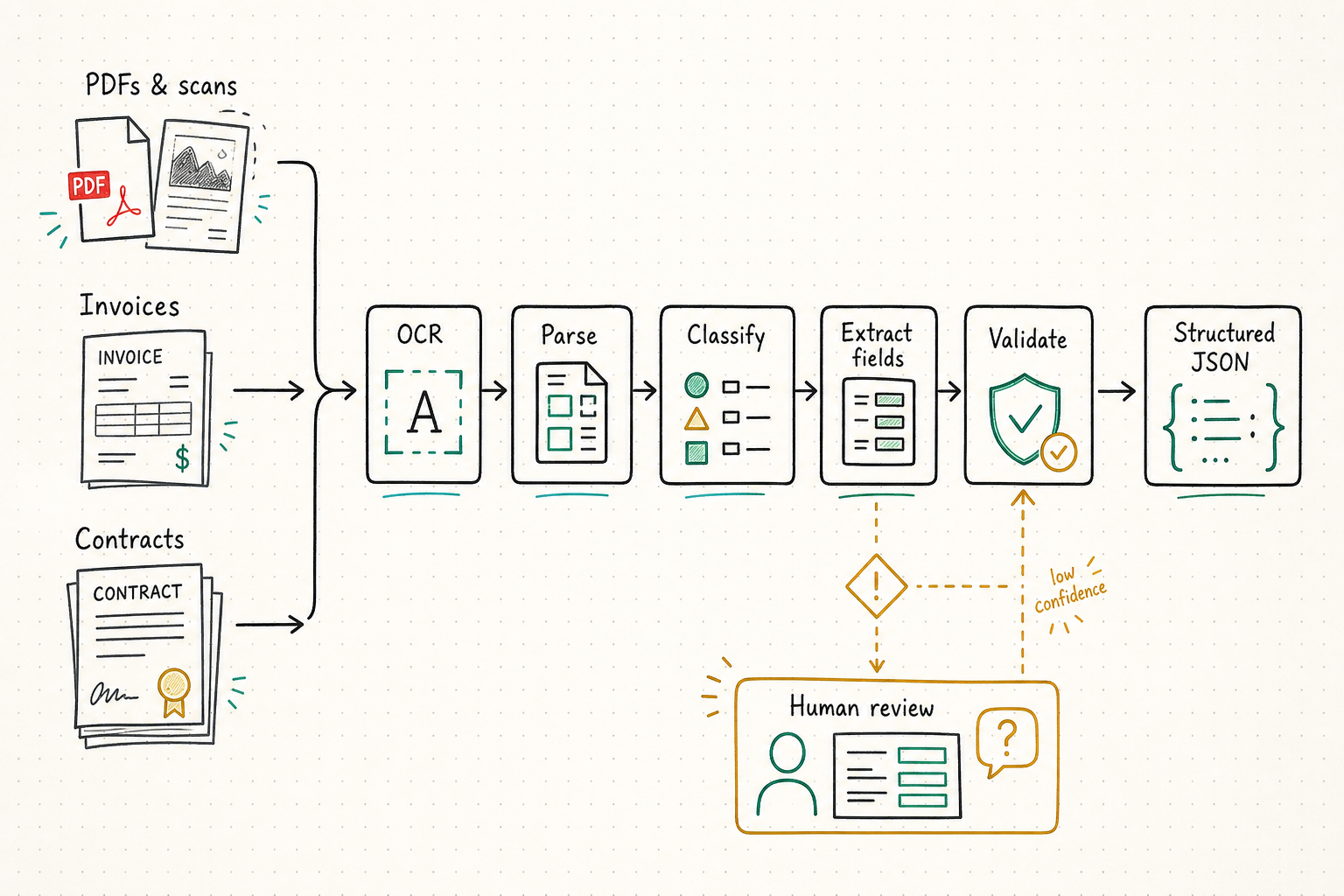
AI agents can summarize and reason over text, but document processing workflows often require external tools to parse files, read scans, extract structured fields, and validate outputs. A document processing agent may need PDF parsing, OCR, image understanding, table extraction, invoice extraction, contract field extraction, document summarization, and structured output generation.
QVeris gives agents one capability layer for discovering, inspecting, and calling relevant document tools without hardcoding every OCR, PDF, or extraction provider.
Four core challenges that make document automation agent development complex and fragile.
PDFs, scans, screenshots, receipts, contracts, reports, forms, and research papers all have different layouts, structures, and extraction requirements — no single parser handles every case.
Before calling a document capability, agents need to understand supported file types, required inputs, output fields, provider behavior, and cost signals — not guess at execution time.
Manually reading files, copying fields, checking totals, and formatting extracted results slows down repeatable document workflows and introduces errors.
Different document tasks may require different parsing, OCR, extraction, or vision capabilities. Hardcoding one provider can make workflows brittle when new document types appear.
The right pipeline depends on what the file already contains and what the downstream system must trust. Sending every document through one generic extractor adds cost and can discard useful structure.
Converts pixels into text and coordinates. Use it for scans, photos, handwriting, or image-only PDFs. OCR does not decide that a number is an invoice total or that two cells belong to the same table row.
Best signal: no reliable text layerReads an existing text layer, headings, links, tables, form fields, and metadata. Prefer it for born-digital PDFs when preserving document structure matters more than visual recognition.
Best signal: machine-readable structure existsCombines classification, OCR or parsing, extraction, validation, routing, and human review. Use it when a document must become a trustworthy business record or trigger another workflow.
Best signal: output drives a decision or actionInspect MIME type, text-layer availability, language, orientation, page count, layout complexity, handwriting, and document class before choosing a capability. Preserve the original file and page coordinates so every extracted value can be traced back to its source.
正确管线取决于文件已经包含什么,以及下游系统需要信任什么。把所有文档都交给同一个通用提取器,不仅增加成本,还可能丢失原有结构。
把像素转换为文本和坐标,适合扫描件、照片、手写内容或纯图片 PDF。OCR 本身不能判断某个数字是否为发票总额,也不能理解两个单元格属于同一表格行。
判断信号:没有可靠文本层读取已有文本层、标题、链接、表格、表单字段和元数据。对于数字化 PDF,如果需要保留文档结构,通常应优先使用原生解析。
判断信号:存在机器可读结构把分类、OCR 或解析、字段提取、校验、路由和人工复核组合起来,适用于文档必须成为可信业务记录或触发下游流程的场景。
判断信号:输出会影响决策或动作选择能力前检查 MIME 类型、文本层、语言、方向、页数、版式复杂度、手写内容和文档类别。保留原文件与页码坐标,确保每个提取值都能追溯到原文位置。
The agent searches QVeris for relevant capabilities such as PDF parsing, OCR, document extraction, image-to-text processing, table extraction, or structured summarization.
The agent inspects schema, supported inputs, response format, required parameters, cost signals, and provider information before execution — no blind calls.
The agent calls selected capabilities and turns returned outputs into structured fields, summaries, review notes, database records, or workflow actions.
Eight concrete document processing workflows powered by AI agents and QVeris capabilities.
Extract text, sections, tables, metadata, and structured fields from PDF documents for review or downstream automation — without custom PDF library code.
Read scanned documents, screenshots, receipts, images, and other non-selectable text sources through discoverable OCR capabilities.
Extract fields such as vendor, date, amount, currency, line items, tax, and notes for human review or workflow routing — without templating every format.
Identify parties, dates, obligations, renewal terms, risk notes, and key clauses from contract documents through structured extraction capabilities.
Extract titles, abstracts, authors, methods, findings, references, and structured notes from academic or technical documents for literature review.
Summarize long reports, filings, manuals, PDFs, or internal documents into structured briefs and actionable next steps.
Turn form-like documents into structured records with fields that can be reviewed, exported, or inserted into another system or database.
Route extracted information into review queues, dashboards, databases, reports, notifications, or agent-driven downstream workflows.
An illustrative workflow showing how an AI agent uses QVeris for document processing. Not extracted from a real private document.
The agent receives a document processing task — extract fields from invoices, parse a PDF, or run OCR on scanned files.
The agent uses QVeris to find capabilities for PDF parsing, OCR, document extraction, or structured summarization.
Before calling, the agent inspects supported file types, required parameters, output structures, and billing signals.
The agent executes selected OCR, PDF, or extraction capabilities and receives structured responses.
The agent organizes extracted fields, summaries, and review notes into a structured format for human validation.
A reviewer checks low-confidence fields, compares extracted data with the source document, and validates before downstream use.
This is an illustrative example. It does not represent real private documents, customer invoices, contracts, or personal data. All extracted outputs should be reviewed and verified before use in financial, legal, or compliance workflows.
Confidence becomes useful only when it is attached to a field, calibrated on real documents, and combined with business impact. A 92% vendor address may be acceptable for search; a 92% bank account or payment amount may still require review.
The field meets a validated threshold, required evidence is present, and deterministic checks agree. Export can continue only for document classes already approved for straight-through processing.
Show the source crop, extracted value, confidence, validation message, and proposed correction together. A reviewer—not name similarity—selects the matching vendor or account.
Pause downstream writes when totals do not reconcile, required signatures or dates are absent, or invoice number, vendor, amount, and date resemble an existing record.
Track exact and normalized field match, table-row accuracy, missing-field precision, false acceptance, reviewer correction rate, and straight-through processing by language, template, scan quality, and provider version. Average document confidence can hide one dangerous field.
只有当置信度对应到具体字段、用真实文档校准,并与业务影响结合时,它才有操作意义。92% 置信度的供应商地址可能足以用于搜索,但 92% 的银行账号或付款金额仍可能必须复核。
字段达到已验证阈值,必需证据存在,确定性检查结果一致。只有已经批准直通处理的文档类别,才能继续自动导出。
同时展示原文区域、提取值、置信度、校验信息和建议修正。匹配的供应商或账户必须由审核人选择,不能只靠名称相似度。
总额无法对账、必要签名或日期缺失,或发票号、供应商、金额和日期与已有记录相似时,应暂停下游写入。
按语言、模板、扫描质量和 provider 版本跟踪字段精确匹配与标准化匹配、表格行准确率、缺失字段识别、错误放行、审核修正率和直通处理率。整份文档的平均置信度可能掩盖一个危险字段。
| Requirement | Manual document processing | Hardcoded document APIs | QVeris for document agents |
|---|---|---|---|
| Document tool discovery | Users manually choose tools and copy content between systems | Developers choose fixed OCR or PDF providers in advance | ✓Agents can discover relevant document capabilities based on the task |
| Workflow flexibility | Flexible but slow and difficult to repeat | Repeatable but limited to predefined providers and formats | ✓Reusable Discover, Inspect, Call pattern across document capabilities |
| Schema understanding | No structured schema for repeatable agent workflows | Developers maintain provider-specific documentation | ✓Agents inspect schema, supported inputs, parameters, and cost signals before execution |
| Structured output | Often copied text, spreadsheets, or unstructured notes | Structured only where integrations are designed | ✓Structured outputs can be routed into review queues, databases, dashboards, or workflows |
| Usage visibility | Hard to track which tools were used and when | Usage spread across multiple provider dashboards | ✓Usage can be reviewed through QVeris usage history and credits ledger |
Invoices, contracts, applications, and reports can contain personal data, credentials, malicious instructions, links, scripts, or embedded files. The extraction pipeline must treat every document as untrusted input.
Begin read-only. Compare extracted records with ground truth. Expand straight-through processing only for document classes and fields that meet explicit accuracy, duplicate-prevention, review-capacity, security, and recovery thresholds.
发票、合同、申请和报告可能包含个人数据、凭据、恶意指令、链接、脚本或嵌入文件。提取管线必须把每份文档都视为不可信输入。
先保持只读,把提取记录与真值比较。只有明确满足准确率、重复防护、复核容量、安全和恢复阈值的文档类别与字段,才能逐步扩大直通处理。
Developers building OCR, PDF parsing, extraction, and document-to-workflow automation products with structured data needs.
Teams processing invoices, receipts, forms, contracts, reports, or internal business documents who want to reduce manual data entry.
Users who need to extract and summarize information from PDFs, reports, papers, manuals, and long-form documents at scale.
Builders who need a flexible capability layer for document tools instead of wiring multiple OCR and parsing APIs manually.
Browse the complete catalog of AI agent tools, platforms, and document processing capabilities.
Discover top MCP platforms for connecting agents to document tools and extraction services.
Explore how AI agents access financial capabilities for stock screening and company research.
Explore competitor monitoring, product research, and market analysis workflows.
Use QVeris to give AI agents access to document capabilities for PDF parsing, OCR, extraction, summarization, and structured automation workflows.
