Build an AI Earnings Analysis Agent: Developer Guide
An AI earnings analysis agent helps developers process the flood of quarterly results without forcing analysts to open every release, filing, transcript, and spreadsheet manually. During earnings season, thousands of public companies publish results within compressed windows. A well-designed agent can retrieve reported metrics, compare history and consensus, detect unusual changes, and produce a structured report for human review. This guide shows how to build that workflow with QVeris, Python, and Claude.
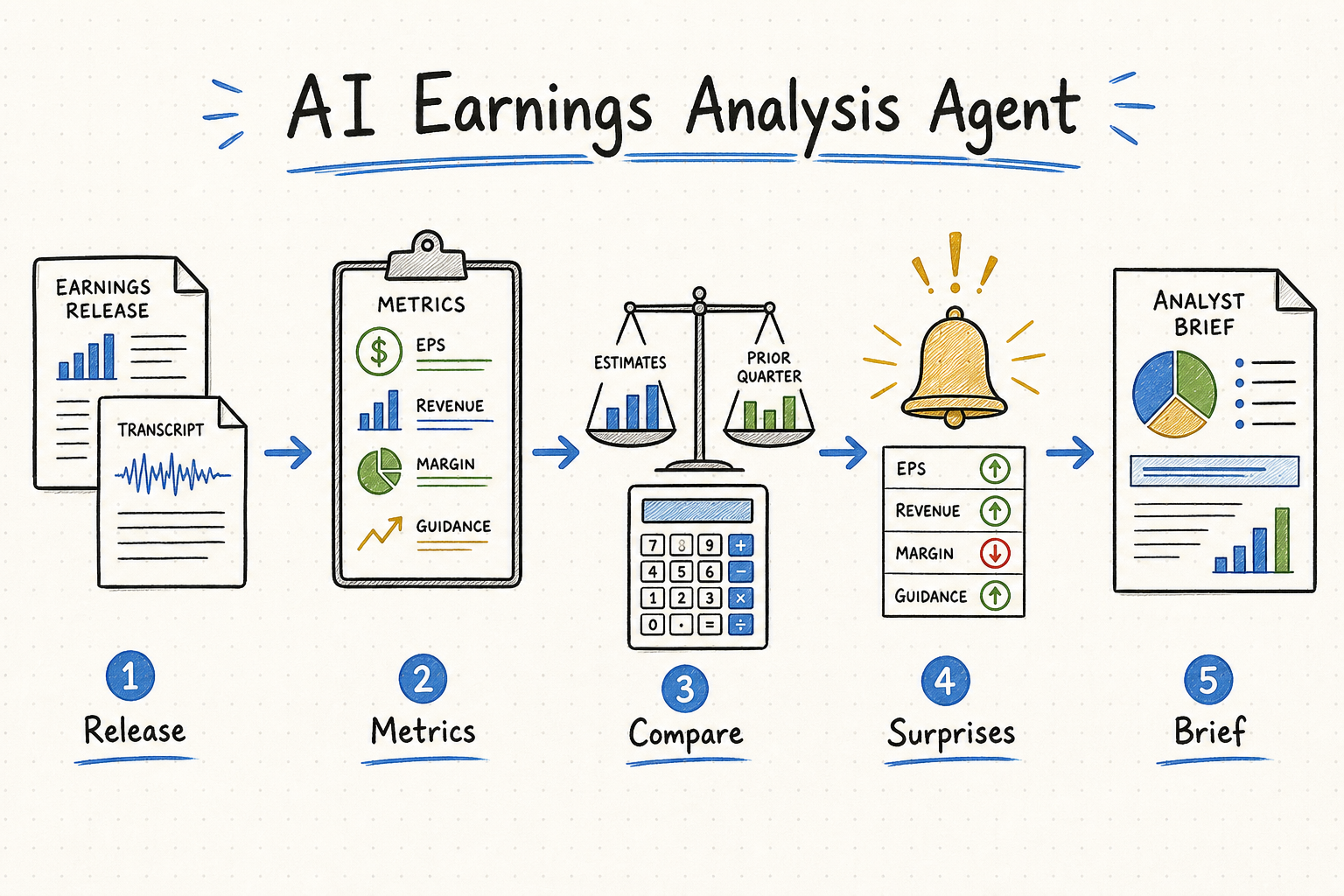
Discover an earnings capability, Inspect its schema, Call it for structured data, normalize reported and expected values in Python, ask Claude to write a cited analysis, then schedule the pipeline around filing and earnings events.
What Is an AI Earnings Analysis Agent?
An earnings analysis agent is a software system that automatically acquires, parses, validates, and analyzes company results. It combines deterministic data processing with an LLM. The data layer retrieves reported results and supporting evidence; Python calculates changes and surprise values; the model explains the evidence in a consistent report.
A useful agent can extract EPS, revenue, gross margin, operating income, free cash flow, segment performance, and management guidance. It can compare those values with prior quarters, year-over-year periods, and analyst expectations. It can flag anomalies such as revenue growth with deteriorating cash conversion, a guidance cut despite an EPS beat, or a margin change that does not match management commentary.
The final output should be structured rather than a free-form paragraph. A production report may include reported values, consensus, surprise percentages, historical deltas, management guidance, notable transcript statements, risks, citations, and confidence. JSON output lets another service store the report, rank surprises, trigger alerts, or render a user interface.
Developers build an earnings analysis AI agent when they need control over the universe, schedule, evidence, calculations, prompts, and destination. Existing research products are often faster for interactive human analysis. A custom agent is justified when the process must cover hundreds of tickers, run automatically, integrate with proprietary models, or produce an application-specific schema.
Key Capabilities for an AI Earnings Analysis Agent
The quality of the report cannot exceed the quality and compatibility of its inputs. Five capability groups form the minimum useful foundation.
Real-Time Earnings Results
Retrieve reported EPS, revenue, margins, segment metrics, and guidance as soon as practical. Preserve publication timestamps and whether a value came from a release, filing, transcript, or normalized provider field.
Historical Financial Comparisons
Use consistent fiscal periods and units to calculate quarter-over-quarter and year-over-year changes. Corporate calendar quarters do not always align with fiscal quarters, so period metadata must remain explicit.
Analyst Expectations
Consensus EPS and revenue estimates make beats and misses measurable. Record the estimate timestamp and contributor methodology because consensus can change shortly before an announcement.
News and Sentiment Context
Company news, transcript language, and market reaction explain why a numerical beat may still disappoint investors. Sentiment should support interpretation, not replace source evidence.
Structured JSON for LLM Processing
Normalize values, currencies, periods, and source identifiers before sending data to the model. A stable schema reduces prompt complexity and enables validation after generation.
Also define freshness and failure rules. If consensus is unavailable, the agent should say so rather than treating zero as the estimate. If two providers disagree, retain both values, identify their sources, and route the discrepancy for human review.
Why QVeris Supports Automated Earnings Analysis
QVeris provides a unified Discover → Inspect → Call protocol across more than 10,000 capabilities. Instead of maintaining independent adapters for Alpha Vantage, Finnhub, Polygon.io, filing systems, news feeds, and other providers, a developer can search by intent and inspect candidate schemas before execution.
Discover finds relevant capabilities using natural language. Inspect returns parameters, examples, available statistics, and billing information without consuming execution credits. Call runs the selected capability and returns a typed response with structured results and execution metadata. The official asynchronous Python SDK also exposes usage and ledger methods for auditing calls and charges.
QVeris supports MCP for Claude Code, Cursor, OpenCode, and compatible clients, plus Python SDK, REST API, and CLI integrations. Discover and Inspect are currently free. Signup includes 1,000 credits and daily login provides 100 credits under the current program; verify production costs on the pricing page.
This does not eliminate provider-specific considerations. Developers must still validate licensing, exchange entitlements, freshness, field definitions, and coverage. QVeris is the routing and execution foundation; application code remains responsible for normalization, calculations, review policy, and investment-use controls.
Step-by-Step: Build an Earnings Analysis Agent
Install the official packages with pip install qveris anthropic. QVeris SDK methods are asynchronous, so the examples use asyncio. Store both API keys in environment variables.
Create the Client and Research Configuration
Define the ticker, required metrics, and report destination before searching for tools.
import asyncio
import json
import os
from datetime import datetime, timezone

from qveris import QverisClient

TICKER = "AAPL"
REQUIRED_METRICS = ["eps", "revenue", "gross_margin", "guidance"]

async def create_client():
    # QverisClient reads QVERIS_API_KEY from the environment.
return QverisClient()Discover Earnings Capabilities
Search for the outcome rather than a hard-coded provider. Save the search ID because later Inspect and Call requests can use it for correlation.
async def discover_earnings_tools(client):
    query = (
        "earnings per share, revenue, gross margin, "
        "analyst estimates, and company guidance for US stocks"
    )
    discovered = await client.discover(query, limit=10)

    if not discovered.results:
        raise RuntimeError("No earnings capabilities found")

    for tool in discovered.results:
        print(tool.tool_id, tool.name)
return discoveredInspect Parameters and Output Metadata
Inspect candidate tools and select one only when its required fields and description match the research contract. In production, score multiple tools by coverage, freshness, cost, latency, and success rate.
async def inspect_earnings_tool(client, discovered):
    candidate_ids = [tool.tool_id for tool in discovered.results[:3]]
    inspected = await client.inspect(
        candidate_ids,
        search_id=discovered.search_id,
    )

    for tool in inspected.results:
        print("TOOL:", tool.tool_id)
        print("PARAMS:", [p.model_dump() for p in tool.params])
        print("BILLING:", tool.billing_rule)

    # Replace this simple selection with your own policy.
return inspected.results[0]Call the Tool for AAPL Earnings Data
Use inspected sample parameters when available, then override company-specific fields. Parameter names differ by capability, so do not assume every tool uses ticker.
async def fetch_latest_earnings(client, tool, search_id):
    params = {}
    if tool.examples and tool.examples.sample_parameters:
        params.update(tool.examples.sample_parameters)

    # Confirm these names against tool.params after Inspect.
    params.update({"ticker": TICKER, "limit": 4})

    response = await client.call(
        tool.tool_id,
        params,
        search_id=search_id,
        max_response_size=50_000,
    )
    if not response.success:
        raise RuntimeError(response.error_message)

    return {
        "execution_id": response.execution_id,
        "data": response.result,
        "cost": response.cost,
        "remaining_credits": response.remaining_credits,
}Generate a Structured Claude Analysis
Ask Claude to use only supplied evidence and return JSON. Deterministic calculations should happen before the prompt whenever the source schema permits.
from anthropic import Anthropic

def analyze_with_claude(packet):
    claude = Anthropic(api_key=os.environ["ANTHROPIC_API_KEY"])
    prompt = f"""
Analyze the earnings evidence below for {TICKER}.
Use only supplied data. Do not invent estimates or guidance.
Return valid JSON with:
summary, reported_metrics, surprises, historical_changes,
guidance, anomalies, risks, missing_data, and citations.

Evidence:
{json.dumps(packet["data"], default=str)}
"""
    message = claude.messages.create(
        model="claude-sonnet-4-5",
        max_tokens=2500,
        temperature=0,
        messages=[{"role": "user", "content": prompt}],
    )
return message.content[0].textRun Automatically During Earnings Season
A simple loop is portable and easy to understand. Production teams should use a durable scheduler or queue with idempotency, retries, and monitoring.
async def run_once():
    client = await create_client()
    try:
        discovered = await discover_earnings_tools(client)
        tool = await inspect_earnings_tool(client, discovered)
        packet = await fetch_latest_earnings(
            client, tool, discovered.search_id
        )
        report = analyze_with_claude(packet)
        print(datetime.now(timezone.utc).isoformat(), report)
    finally:
        await client.close()

async def scheduler():
    while True:
        await run_once()
        # Run every six hours; replace with event-driven scheduling.
        await asyncio.sleep(6 * 60 * 60)

if __name__ == "__main__":
    asyncio.run(scheduler())
Keep a last-processed filing or event identifier so repeated runs do not publish duplicate reports. Store raw evidence, execution IDs, normalized metrics, prompt versions, and generated output. Audit credit outcomes through QVeris usage or ledger methods, and never treat a successful capability call as proof that the financial interpretation is correct.
Normalize and Validate Before the LLM
Convert currencies and units, align fiscal periods, distinguish GAAP from non-GAAP EPS, and calculate surprises with explicit formulas. Reject impossible values and label missing fields. This validation layer is what turns a demo into a dependable automated earnings analysis pipeline.
Production Architecture for Automated Earnings Analysis
Use Events When Available, Polling When Necessary
The best trigger is a filing, earnings-release, or provider webhook with a unique event identifier and publication timestamp. Event-driven execution reduces unnecessary calls and shortens the delay between publication and analysis. Polling remains useful when a source has no webhook, but the scheduler should use an earnings calendar, market timezone, and last-processed state instead of querying every company continuously.
Make every run idempotent. Build a key from the ticker, fiscal period, event type, and source identifier. If an event arrives twice, update the existing record instead of creating a second alert. Keep separate states for data collected, normalized, analyzed, and reviewed so a failed LLM request can be retried without buying the same financial data again.
Preserve Point-in-Time Data
Consensus estimates and company guidance change over time. Store both the value and the timestamp at which the agent observed it. A backtest that compares reported EPS with today's revised consensus introduces look-ahead bias. The same rule applies to restatements: preserve the original observation and append revisions with explicit version metadata.
Maintain raw and normalized layers. Raw responses support audits and reprocessing after normalization code changes. The normalized layer gives factor pipelines and models stable fields. Never overwrite source evidence with an LLM summary.
Control Concurrency, Cost, and Failure Recovery
Earnings cluster after market close, so hundreds of companies may trigger at once. Use a queue and bounded workers rather than unlimited coroutines. Set per-capability timeouts, retry only transient errors, and apply exponential backoff with jitter. Send invalid parameters and unsupported tickers to a dead-letter queue for investigation.
Track discovery, execution, model, storage, and notification costs separately. Set a maximum cost per company and stop optional enrichment when the budget is exhausted. A concise report based on core evidence is better than an expensive report with redundant news and repeated calls.
Evaluate Facts, Not Stock Direction
Create a historical evaluation set containing releases, estimates available before publication, filings, and expected calculations. Test whether the agent extracted correct numbers, calculated surprise consistently, cited the correct source, identified missing data, and followed the output schema. Do not grade the system by whether the stock later rose or fell.
Add adversarial cases such as conflicting EPS definitions, currencies in thousands versus millions, fiscal-year changes, preliminary releases, restatements, and empty guidance. A production agent should fail clearly on ambiguous evidence instead of producing a confident unsupported conclusion.
Real-World AI Agent Financial Analysis Use Cases
Hedge Fund Earnings Monitor
Monitor 500 portfolio and watchlist names, rank the largest estimate surprises and guidance changes, then deliver only high-priority exceptions to analysts. Human reviewers verify material conclusions before trading decisions.
Quantitative Factor Pipeline
Extract standardized EPS surprise, revenue growth, margin change, and guidance direction for factor research. Preserve point-in-time timestamps to prevent look-ahead bias in backtests.
Fintech Earnings Summaries
Generate concise, source-linked summaries for users immediately after results. A structured schema supports cards, notifications, search, and accessibility while keeping product language consistent.
Personal Developer Research Tool
Track a focused watchlist, save historical reports, and create alerts for selected metrics. This is a practical way to learn agent design without building a full research terminal.
Each use case needs different latency and licensing. A personal delayed-data workflow is not equivalent to an institutional real-time product. Confirm redistribution rights, provider terms, and exchange entitlements before exposing results to customers.
Advanced Features for an Earnings Analysis AI Agent
Parallel Multi-Stock Analysis
Use bounded asyncio concurrency to process many tickers while respecting provider and platform limits.
Industry Benchmarking
Compare growth, margins, valuation, and guidance against a carefully selected peer group with aligned fiscal periods.
Anomaly Alerts
Combine deterministic thresholds with historical distributions to flag unusual metrics without asking the LLM to perform all detection.
Historical Trend Visualization
Store normalized time series and render revenue, EPS, margin, surprise, and guidance trends in a dashboard.
Additional production features include source-level confidence, fallback tools, transcript citation extraction, human feedback, prompt regression tests, and evaluation sets from historical earnings. Measure factual accuracy and citation validity rather than whether the stock later moved in the predicted direction.
Launch Checklist for an Earnings Analysis AI Agent
Before release, verify that every reported metric includes a period, currency, unit, source, and observation timestamp. Confirm that consensus data was available before the earnings event and that surprise calculations use one documented formula. Test duplicate events, missing estimates, restated results, provider timeouts, malformed JSON, and model responses that do not match the required schema.
Review data licenses for internal analysis, customer display, storage, and redistribution. Add role-based access to expensive or restricted capabilities, redact secrets from logs, and establish a maximum call and model budget per report. Finally, define who reviews high-impact alerts, how corrections are issued, and how long raw evidence is retained. These operational decisions are part of the product, not optional infrastructure work after the agent is launched.
Deploy an AI Earnings Analysis Agent Responsibly
To build an earnings analysis agent, define the research schema, discover and inspect appropriate capabilities, retrieve evidence, normalize calculations, generate a structured narrative, and schedule the process with audit logs. QVeris reduces multi-provider integration work, while Python and Claude handle application logic and explanation.
A reliable AI earnings analysis agent should accelerate review without hiding uncertainty. Preserve sources, validate numbers, disclose missing data, and keep humans responsible for investment decisions.
Start Your Automated Earnings Analysis
Explore QVeris capabilities, inspect schemas for free, and prototype the workflow with a small watchlist.