
Blender MCP with
Claude CodeClaude Code
接入 Blender MCP
Connect Claude Code to Blender through MCP, then build, inspect, and refine 3D scenes with controlled tool calls.
通过 MCP 将 Claude Code 接入 Blender,
以受控工具调用创建、检查并迭代三维场景。
TL;DR核心摘要
“Blender MCP” is a category, not one official server. Pick a maintained repository and follow its exact add-on, launcher, and port instructions.
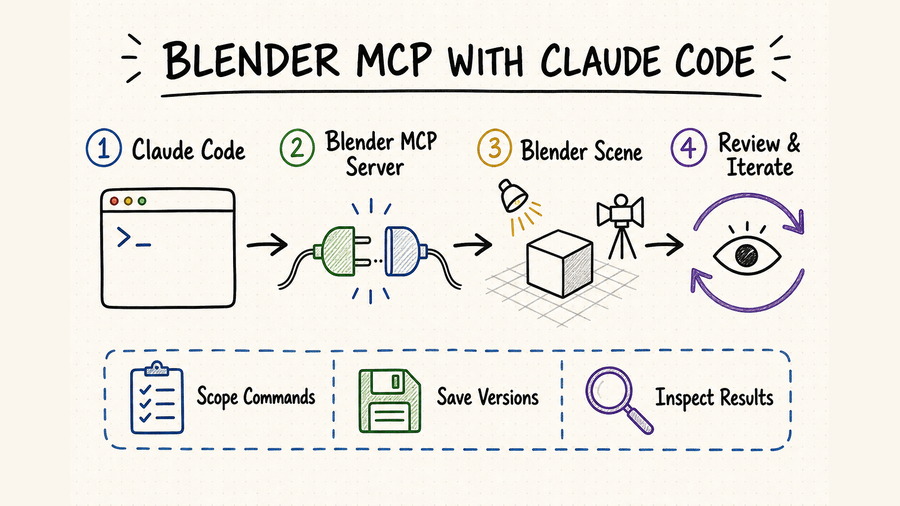
Claude Code launches an MCP server, while a Blender add-on bridges tool calls into the live Blender application.
Work on a copy, name objects and collections, apply one logical change, inspect scene state, save a checkpoint, then render a preview.
Any tool that executes arbitrary Blender Python can modify scenes, files, add-ons, and system-accessible resources. Review it before running.
“Blender MCP”是一类工具,并非单一官方服务器。应选择仍在维护的仓库,并严格采用其插件、启动器和端口说明。
Claude Code 启动 MCP 服务器,Blender 插件再把工具调用转发到正在运行的 Blender。
处理文件副本,统一对象与集合命名,每次执行一组逻辑修改,检查场景、保存节点,再渲染预览。
任意 Blender Python 可能修改场景、文件、插件和系统可访问资源,执行前必须审查。
The reliable pattern is: select one documented implementation, prove the local bridge on a disposable scene, expose only the tools needed for the current task, and make every scene change observable through object state plus a saved file or preview render. Do not begin by granting arbitrary Python against an important .blend file.
可靠做法是:选定一个文档完整的实现,先用可丢弃场景验证本地桥接,只开放当前任务需要的工具,并通过对象状态、保存文件或预览渲染让每次修改都可检查。不要一开始就在重要 .blend 文件上开放任意 Python 执行。
Set up Blender MCP with Claude Code配置 Claude Code 与 Blender MCP
Commands, ports, authentication, and tool names vary across Blender MCP repositories. This guide uses the community BlenderMCP repository as a concrete example because it documents a Blender add-on, a uvx-launched MCP server, Claude Code setup, scene inspection, viewport screenshots, and local socket behavior. It is not affiliated with the Blender Foundation, so verify the current repository instructions before installing.
不同 Blender MCP 仓库的命令、端口、鉴权方式和工具名称并不相同。本指南以社区维护的 BlenderMCP 仓库作为具体示例,因为它提供 Blender 插件、通过 uvx 启动的 MCP 服务器、Claude Code 配置、场景检查、视口截图和本地 socket 说明。该项目不隶属于 Blender Foundation,安装前仍应核对仓库中的最新说明。
For this implementation, confirm a supported Blender release, compatible Python, uv/uvx, and current Claude Code. Run uvx --version and claude --version in the same terminal. If a GUI-launched client cannot find uvx, use the full executable path and relaunch the client.
Download the add-on file from the selected repository, install it through Blender Preferences, enable “Interface: Blender MCP,” open the 3D View sidebar, and use the BlenderMCP panel to start the connection. Test on a new scene, not an existing production asset.
Add the server in the target project with claude mcp add --transport stdio --scope local blender -- uvx blender-mcp. The double dash keeps Claude Code options separate from the server launcher. Use local scope until the integration and permissions are understood.
Blender must be open with the add-on connected, and Claude Code must show the blender server as healthy. Check claude mcp list, claude mcp get blender, and the in-session /mcp panel before requesting any scene mutation.
以本示例为准,需要确认受支持的 Blender 版本、兼容 Python、uv/uvx 和当前 Claude Code。在同一终端运行 uvx --version 与 claude --version。GUI 客户端找不到 uvx 时,应使用完整可执行路径并重新启动客户端。
从所选仓库下载插件文件,通过 Blender Preferences 安装,启用“Interface: Blender MCP”,打开 3D View 侧栏,再从 BlenderMCP 面板建立连接。首次验证使用新场景,不要直接打开正式资产。
在目标项目运行 claude mcp add --transport stdio --scope local blender -- uvx blender-mcp。双横线会把 Claude Code 参数与服务器启动器分开。理解集成方式和权限前,先使用 local 作用域。
Blender 必须保持打开且插件已连接,Claude Code 也要把 blender 服务器显示为正常。修改场景前依次检查 claude mcp list、claude mcp get blender 和会话内 /mcp 面板。
Keep the add-on and MCP package in sync让插件与 MCP 软件包保持同步
The selected project documents a paired Blender add-on and MCP package. When upgrading, update both sides together, restart Blender and Claude Code, reconnect the add-on, and repeat a read-only scene inspection before editing. A version mismatch can appear as missing tools, malformed responses, timeouts, or calls that reach the server but not Blender. Record the working add-on and package versions with the project so another machine can reproduce the environment.
该示例项目由 Blender 插件和 MCP 软件包共同组成。升级时应同时更新两端,重新启动 Blender 与 Claude Code,重新连接插件,并先完成一次只读场景检查再继续编辑。版本不一致可能表现为工具缺失、返回格式异常、超时,或调用到达服务器却没有进入 Blender。应在项目记录中写明可用的插件与软件包版本,方便其他机器复现环境。
A reliable scene-building workflow可靠的场景构建流程
| Step步骤 | Main action主要操作 | Check检查重点 | Guardrail保护措施 |
|---|---|---|---|
| Contract定义任务 | State the file, units, allowed collection, object names, dimensions, and final deliverable.写明文件、单位、允许修改的集合、对象名称、尺寸与交付结果。 | An ordered task contract with explicit exclusions.有顺序的任务约定,并明确禁止事项。 | Never rely on “make it better” alone.不要只给“做得更好”这类模糊指令。 |
| Baseline记录基线 | Inspect the scene and save a versioned copy before mutation.修改前读取场景并保存带版本号的副本。 | Collections, objects, active mode, camera, and output path.集合、对象、当前模式、相机与输出路径。 | Keep the original file untouched.原始文件保持不动。 |
| Execute分步执行 | Apply one logical change such as geometry, material, lighting, or camera setup.每次只完成几何、材质、灯光或相机中的一类修改。 | Tool result and changed object names.工具返回结果与被修改的对象名称。 | Do not batch unrelated destructive edits.不要把无关的破坏性操作合并执行。 |
| Inspect结构检查 | Read object state after the change.修改后重新读取对象状态。 | Names, transforms, hierarchy, materials, modifiers, and camera settings.名称、变换、层级、材质、修改器与相机设置。 | Do not accept a success message as evidence.不要把成功提示当成完成证据。 |
| Preview视觉预览 | Capture the viewport or render a low-cost preview.截取视口,或生成低成本预览图。 | Composition, scale, clipping, shadows, and visible artifacts.构图、比例、穿插、阴影与可见瑕疵。 | Structural checks do not prove visual quality.结构正确并不代表视觉结果合格。 |
| Checkpoint保存节点 | Save or export only after the named checks pass.只有指定检查通过后才保存或导出。 | New file exists, output format is correct, and the previous version remains recoverable.新文件存在、格式正确,且上一版本仍可恢复。 | Require approval before overwrite or final export.覆盖文件或最终导出前要求人工确认。 |
Give Claude Code a scene contract先给 Claude Code 一份场景约定
A useful prompt reads more like a production brief than a chat request. Identify the starting .blend file, the collection Claude may change, the coordinate and unit assumptions, required object names, target dimensions, material intent, camera framing, output resolution, and the checkpoint that ends the step. Add negative constraints such as “do not delete existing lights,” “do not apply modifiers,” and “do not overwrite the source file.” These details reduce ambiguity and make the resulting scene easier to inspect with Blender's own object and collection model.
有效提示词更接近制作任务书,而不是随口提出的要求。应写清起始 .blend 文件、允许 Claude 修改的集合、坐标和单位约定、对象命名、目标尺寸、材质方向、相机构图、输出分辨率,以及本步骤结束时要保存的检查点。同时加入“不得删除现有灯光”“不得应用修改器”“不得覆盖源文件”等禁止条件。信息越明确,歧义越少,也越容易按照 Blender 的对象与集合结构核验结果。
Prompt pattern: “Open the working copy, inspect the scene, and report the active camera and objects in Product_Set. Add one object named Pedestal_A at the stated dimensions without changing other collections. Report its transform and material slots, capture a viewport preview, then stop before saving.”
提示词示例:“打开工作副本,先读取场景,报告活动相机以及 Product_Set 集合中的对象。按给定尺寸新增一个名为 Pedestal_A 的对象,不得修改其他集合。完成后报告它的变换与材质槽,截取视口预览,然后停止,不要保存。”
Increase autonomy in stages分阶段提高自动化权限
Start with read-only inspection. Next, create a disposable primitive, modify one named object, add a material or light, generate a preview, and only then test versioned save or export. Each level proves a different part of the bridge. If the first request combines modeling, asset downloads, Python execution, rendering, and overwriting a file, a failure provides little evidence about which layer broke.
先从只读检查开始,再依次测试创建可删除的基础几何体、修改一个指定对象、添加材质或灯光、生成预览,最后才验证带版本号的保存或导出。每一级都在验证桥接中的不同环节。如果第一次请求就同时包含建模、下载素材、执行 Python、渲染和覆盖文件,失败后很难判断究竟是哪一层出了问题。
Verify structure and appearance separately结构与画面要分开验收
Scene inspection should confirm exact object names, transforms, collection membership, modifier order, material slots, camera settings, render engine, resolution, and output path. A viewport screenshot or preview render then checks composition, occlusion, surface response, lighting, and obvious artifacts. Keep both forms of evidence: a plausible image can hide incorrect hierarchy or dimensions, while a correct object report can still produce a poor frame.
场景结构检查需要确认对象名称、变换数值、所属集合、修改器顺序、材质槽、相机设置、渲染引擎、分辨率和输出路径;视口截图或预览渲染则用于判断构图、遮挡、表面效果、灯光和明显瑕疵。两类证据都要保留:画面看起来合理,不代表层级和尺寸正确;对象报告完全正确,也可能得到一张不合格的画面。
Safety and troubleshooting practices安全实践与故障排查
Work on a versioned copy, keep autosave available, and grant only the tools needed for the current task. Require a pause before saving over an existing file, deleting collections, installing an add-on, downloading an asset, or exporting a final deliverable.
The example server exposes arbitrary Blender Python. Such code can do more than edit geometry: it runs with the permissions of the Blender process and may reach files or network resources available to that process. Read generated code, narrow the task, and avoid using unknown scripts on valuable scenes.
The selected implementation uses a local socket between its MCP process and Blender add-on. Its documented remote mode can listen on all interfaces and does not add authentication, so use it only on a trusted isolated network. Never expose that listener directly to the public internet.
If optional asset or material services are enabled, store their credentials in the supported local configuration rather than prompts, screenshots, or project notes. Give each service the narrowest practical permissions and remove unused keys.
始终处理带版本号的副本,保留自动保存,只开放当前任务所需工具。覆盖现有文件、删除集合、安装插件、下载资产或导出最终成果前,都应暂停并要求确认。
示例服务器允许执行任意 Blender Python。此类代码不仅能修改几何体,还会继承 Blender 进程权限,可能访问该进程可用的文件和网络资源。应先阅读生成代码、缩小任务范围,且不要在重要场景上运行来源不明的脚本。
本示例通过本地 socket 连接 MCP 进程与 Blender 插件。其文档中的远程模式可以监听所有网络接口,但没有附加鉴权,因此只能用于可信且隔离的网络,绝不能直接暴露到公网。
如果启用可选的资产或材质服务,应把凭据存入该服务支持的本地配置,不要写进提示词、截图或项目说明。每项服务只授予必要权限,并及时移除停用密钥。
Troubleshoot from Claude Code toward Blender从 Claude Code 一端开始逐层排查
Run claude mcp list and inspect claude mcp get blender. Confirm the project scope, launcher command, executable path, and server startup output. A process that never starts cannot reach the Blender add-on.
Open Blender normally, confirm the add-on is enabled, open its sidebar panel, start the connection, and verify that both sides use the same host and port. Restart both processes after changing either package version.
Report Blender's current mode, selected object, active object, and collection. Many Blender operations depend on context; an edit that works in Object Mode may fail or affect another target in Edit Mode.
Split the request into smaller sequential changes and inspect after each one. Reduce preview resolution and samples while iterating. A timeout is not permission to repeat a potentially destructive call without checking whether Blender already applied it.
运行 claude mcp list,再查看 claude mcp get blender。检查项目作用域、启动命令、可执行文件路径和服务器启动输出。进程没有成功启动,就不可能连接 Blender 插件。
正常打开 Blender,确认插件已启用,在侧栏面板启动连接,并核对两端的主机和端口一致。任一侧软件包版本变更后,都应重启两个进程。
先报告 Blender 当前模式、选中对象、活动对象与所在集合。许多 Blender 操作依赖上下文;在对象模式下可用的编辑,在编辑模式中可能失败或作用到错误目标。
把请求拆成更小的顺序步骤,每一步完成后重新检查;迭代阶段降低预览分辨率和采样数。发生超时后不要直接重复可能具有破坏性的调用,应先确认 Blender 是否已经执行。
Where QVeris fits in an MCP workflowQVeris 在 MCP 工作流中的位置
Blender MCP handles scene state and mutations inside Blender. QVeris complements it when the same agent needs structured external capabilities. The current QVeris catalog does not expose an exact Blender MCP tool or provider record, so this page links to QVeris Docs and the Playground instead of claiming an unsupported one-click integration.
Blender MCP 负责读取和修改 Blender 内部场景;同一个 Agent 需要调用结构化外部能力时,可以再使用 QVeris。当前 QVeris 目录中没有完全对应的 Blender MCP 工具或供应商条目,因此本页仅提供 QVeris 文档和 Playground,不会把尚未存在的能力描述成一键集成。
- Use Blender MCP for object inspection, scene mutation, viewport capture, and Blender-specific execution.
- Use QVeris for complementary external API or tool calls that have a verified catalog record and a clear input/output contract.
- Keep the handoff explicit: validate external data before importing it, then require human approval before overwriting, publishing, or final export.
- 对象检查、场景修改、视口截图与 Blender 专用执行交给 Blender MCP。
- 只有在目录条目和输入输出约定都明确时,才通过 QVeris 调用补充性的外部 API 或工具。
- 把能力交接写清楚:外部数据导入前先校验,覆盖、发布或最终导出前再由人工确认。
FAQ常见问题
No. “Blender MCP” refers to community implementations. This guide uses one documented repository as an example; review its maintainer, releases, code, issues, and installation steps before use.
For the example implementation, yes. Claude Code launches the MCP process, but the enabled add-on must connect to a running Blender application for scene tools to work.
Write-capable tools can change an open scene, but begin with a versioned copy. Define allowed collections and require inspection plus approval before saving over any existing file.
It can orchestrate tools exposed by the chosen server, including previews or renders when supported. Quality still depends on assets, scene constraints, render settings, and visual review.
Usually the MCP process did not start, was registered in another scope, cannot find uvx, or uses a mismatched package. Check Claude Code first, then the Blender add-on connection.
Use it for a separate structured capability with a verified source and schema. Keep actual scene mutations in Blender MCP, and validate external results before they enter the scene.
不是。“Blender MCP”通常指社区实现。本指南只选择一个文档较完整的仓库作为示例,使用前仍应检查维护者、版本、代码、问题记录与安装说明。
对本示例实现而言必须打开。Claude Code 会启动 MCP 进程,但 Blender 也要保持运行、启用插件并建立连接,场景工具才能工作。
可写工具能够修改已打开场景,但应从带版本号的副本开始,限定可修改集合,并在覆盖任何已有文件前完成检查和人工确认。
如果所选服务器提供相应工具,它可以编排预览或渲染;最终质量仍取决于资产、场景约束、渲染设置和视觉验收。
常见原因是 MCP 进程未启动、注册到了其他作用域、找不到 uvx,或两端版本不一致。先查 Claude Code,再查 Blender 插件连接。
当任务需要来源和结构都已验证的独立外部能力时再使用。实际场景修改仍交给 Blender MCP,外部结果进入场景前先完成校验。
References and next steps参考资料与下一步
BlenderMCP repository
Blender Manual
Claude Code MCP documentation