
Build an AI Investment Research Agent with QVeris
An AI investment research agent can turn a sequence that normally requires repeated searches, spreadsheet work, and manual monitoring into a scheduled, testable workflow. Fiscal.ai is a capable research platform for investors, with a terminal, curated financial data, APIs, MCP access, filings, transcripts, estimates, and company KPIs. QVeris complements that experience by helping developers discover and orchestrate financial capabilities for batch jobs, alerts, proprietary applications, and autonomous research pipelines.
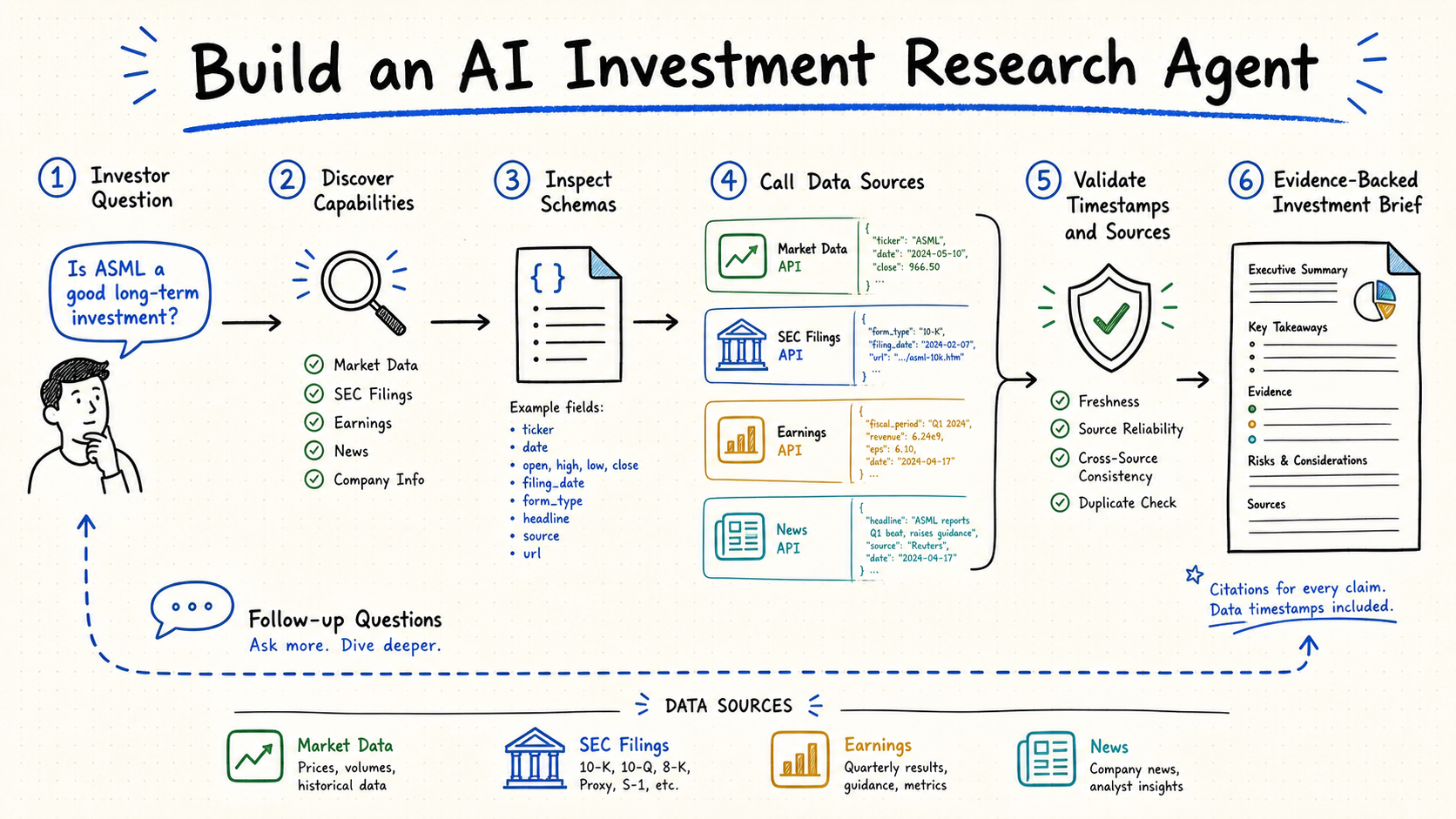
Use QVeris Discover to find a suitable capability, Inspect to validate its schema, Call to retrieve structured financial data, and an LLM such as Claude or GPT to synthesize evidence into a report with citations and clear uncertainty.
What Fiscal.ai Does Well for AI Investment Research
Fiscal.ai combines a research terminal with structured financial data. Its official materials describe coverage across global public companies, funds, ETFs, market prices, macroeconomic data, filings, transcripts, estimates, and more than 2,300 standardized company KPIs. Investors can ask natural-language questions, compare peers, inspect statements, review management commentary, and follow source links without assembling every dataset manually.
It is important to describe the platform accurately: Fiscal.ai is no longer only a manual interface. It offers a REST API, an official MCP connector for clients such as Claude and Cursor, and webhooks for filing-related events. Its principal strength remains a curated research environment and a consistent Fiscal.ai data model. A human analyst can move quickly from a company page to a chart, filing, transcript, or comparison while retaining source context.
That makes Fiscal.ai useful for discretionary research and for applications that primarily need its dataset. The developer question is not whether Fiscal.ai supports code; it does. The question is whether one curated source is sufficient, or whether the workflow needs capability discovery across multiple financial tools and providers.
Why Developers Build Finance AI Agent Workflows
Interactive research tools optimize for a person sitting at a screen. A quantitative team often needs a process that runs even when nobody is present. It may evaluate hundreds of tickers after each reporting cycle, detect a new 8-K, compare margin changes across an industry, or notify a portfolio manager when price action conflicts with fundamental news.
- Batch scale: one analyst can inspect several companies carefully; software can apply the same documented procedure to hundreds, then route only unusual cases for human review.
- Scheduled monitoring: a job can run before market open, after earnings releases, or every fifteen minutes without waiting for a user to open a terminal.
- Composable data: research may combine statements, filings, quotes, transcripts, economic series, ownership, and news from different sources.
- Embedded output: structured findings can flow into an internal dashboard, portfolio system, Slack alert, database, or client-facing product.
- Reproducibility: prompts, schemas, tool calls, evidence, and model outputs can be logged and evaluated instead of remaining an undocumented browsing session.
QVeris adds value at this orchestration boundary. Its capability routing network gives an agent a shared Discover → Inspect → Call protocol rather than requiring the developer to build a unique discovery layer for every API. Direct provider integrations still matter, but the agent can select capabilities according to the research task.
What You Can Build with a Financial Research AI Agent
A useful agent should automate a bounded research procedure, not attempt to make unconstrained investment decisions. The following four workflows reproduce common research-terminal outcomes while adding batch execution and monitoring.
Automated Filing Analysis Agent
Watch for new 10-K and 10-Q filings, retrieve relevant sections, extract changes in revenue, margins, cash flow, debt, risks, and guidance, then compare them with the prior period. The agent can process a watchlist overnight and produce a ranked exception report.
Real-Time Market Monitoring Agent
Poll or stream price and volume data, calculate deviations from historical behavior, and enrich anomalies with recent filings or news. The output should explain why an alert fired, which source supplied each fact, and whether data freshness meets the strategy.
Peer Comparison Agent
Define a comparable-company universe, normalize fiscal periods and currencies, retrieve common metrics, and generate a table covering growth, profitability, valuation, and balance-sheet quality. Human analysts can review peer selection and outliers before distribution.
News Sentiment Monitoring Agent
Track company and sector news, group duplicate stories, classify event types, and relate the narrative to price movement and known fundamentals. Sentiment should be treated as one signal with source attribution, not as an unsupported trading recommendation.
These patterns can share one research state: ticker, time horizon, portfolio context, accepted data freshness, source preference, and output schema. This makes the system easier to test than four unrelated scripts. It also enables a review queue where the agent flags missing data, contradictory sources, or low-confidence conclusions.
Define the Research Contract Before Choosing Tools
Before implementation, write a research contract for each workflow. Define the securities and exchanges in scope, accepted reporting periods, currency treatment, required sources, maximum data age, calculation rules, and the exact structure of the final report. A filing-analysis contract might require the latest annual filing, the previous annual filing, four years of statements, and management commentary. A market-monitoring contract may require a quote no older than sixty seconds and a corporate-news window of twenty-four hours.
The contract prevents the model from silently changing the task when data is unavailable. If a required source is missing, the agent should return an incomplete status rather than substituting a different metric without explanation. It should also distinguish reported values from calculated values and model interpretations. This discipline matters because two providers may use different fiscal periods, adjustment policies, or definitions for the same financial label.
Separate Collection, Calculation, and Narrative
Use tools to collect evidence, deterministic Python code to calculate ratios and changes, and an LLM to organize the narrative. For example, calculate year-over-year revenue growth, margin deltas, and valuation multiples in code after normalizing units. Then ask the model to explain those results using filing excerpts and cited news. This separation makes numerical tests possible and reduces the chance that a fluent report contains incorrect arithmetic.
Step-by-Step: Build a Finance AI Agent with QVeris
The examples below illustrate the architecture. QVeris SDK interfaces can evolve, so verify exact method names and authentication against the current official documentation before deploying.
Create an Account and Load the API Key
Register with QVeris, create an API key, and keep it in a secret manager or environment variable. The current program advertises 1,000 signup credits and 100 daily login credits; check the pricing page because promotions and execution costs can change.
import os
from qveris import QVeris

client = QVeris(api_key=os.environ["QVERIS_API_KEY"])
watchlist = ["NVDA", "MSFT", "AMD"]Use Discover to Find Financial Capabilities
Describe the required outcome rather than hard-coding a provider immediately. Include the instrument, document, time range, and freshness requirement. Store the returned capability identifiers so the team can review which tools the agent considered.
query = """
Find capabilities for annual and quarterly filings,
income statements, earnings transcripts, company news,
and end-of-day prices for US public companies.
"""

candidates = client.discover(query)
for item in candidates[:5]:
print(item["capability_id"], item["name"])Inspect Schemas Before Execution
Inspect converts an ambiguous tool name into a contract. Validate required fields, ticker format, supported exchanges, date conventions, pagination, units, and returned fields. Production code should reject a capability when its schema cannot satisfy the research specification.
selected_id = candidates[0]["capability_id"]
tool = client.inspect(selected_id)

required = tool["input_schema"].get("required", [])
print("Required fields:", required)
print("Output schema:", tool["output_schema"])Call the Capability and Normalize Results
Execute calls with explicit parameters and preserve provider metadata. Add retries for transient failures, cache stable filings, and apply concurrency limits. Normalize monetary units and periods before comparing companies.
def fetch_research_packet(ticker, capability_id):
    return client.call(
        capability_id,
        {
            "ticker": ticker,
            "period": "annual",
            "limit": 4
        }
    )

packets = {
    ticker: fetch_research_packet(ticker, selected_id)
    for ticker in watchlist
}Generate the Report with Claude or GPT
Pass only the evidence required for analysis and request a structured response. The model should separate facts from interpretation, cite source identifiers, identify missing information, and avoid inventing figures. The function below is intentionally provider-neutral.
def build_prompt(ticker, packet):
    return {
        "role": "investment_research_analyst",
        "instructions": [
            "Use only the supplied evidence.",
            "Separate facts, calculations, and interpretation.",
            "Cite every material claim with its source ID.",
            "Return risks, uncertainties, and missing data."
        ],
        "ticker": ticker,
        "evidence": packet,
        "output_schema": {
            "summary": "string",
            "key_changes": ["string"],
            "risks": ["string"],
            "citations": ["string"]
        }
    }

# report = llm.generate(build_prompt("NVDA", packets["NVDA"]))
Schedule the pipeline with a queue or workflow engine and store every tool selection, input, response hash, prompt version, and report. Add deterministic calculations outside the LLM whenever possible. Before using outputs in investment decisions, establish human review, data licensing controls, and regression tests for factual accuracy.
Add Reliability Controls for Production Research
A production agent needs more than a successful notebook run. Cache immutable documents such as historical filings, but assign short expiration times to quotes and breaking news. Use idempotency keys so a retry does not create duplicate alerts. Apply exponential backoff to temporary provider failures, and define a fallback only when the alternative source has comparable licensing, freshness, and field definitions.
Track operational metrics for each capability: success rate, latency, empty-result rate, schema changes, credit consumption, and provider coverage. Track research metrics separately: citation validity, numerical accuracy, completeness, duplicate findings, and reviewer acceptance. A tool can be operationally healthy while still producing data that is unsuitable for a specific investment question.
Evaluate the Agent with Historical Research Cases
Create a test set from past earnings releases, filings, price anomalies, and news events. Record the evidence that was available at the time and the conclusions a competent analyst should have been able to make. Run each prompt and tool configuration against the same cases, then compare factual accuracy, missed risks, false alerts, and unsupported claims. Do not score an agent by whether a stock later rose or fell; score whether it followed the research procedure faithfully using information available at the evaluation timestamp.
AI Investment Research Agent: QVeris vs Fiscal.ai
| Dimension | Fiscal.ai | QVeris-Based Agent |
|---|---|---|
| Primary use | Curated terminal and direct access to Fiscal.ai data | Programmable orchestration across financial capabilities |
| Typical user | Investor, analyst, research team, or developer using its API/MCP | Developer, quantitative team, fintech product, or automation engineer |
| Automation | API, MCP, webhooks, and platform workflows | Custom schedules, batches, routing rules, alerts, and embedded outputs |
| Data model | Consistent, curated Fiscal.ai ecosystem | Capability layer that can span multiple tools and sources |
| Pricing logic | Terminal subscriptions and API usage tiers | Free discovery/inspection and credit-based execution |
| Best choice | Fast sourced research in one integrated environment | Custom multi-step agent systems and product integration |
A practical architecture can preserve both experiences. Analysts may use Fiscal.ai to investigate companies interactively and verify source-linked data, while scheduled QVeris workflows monitor a larger universe and send exceptions into the team's review queue. When an alert arrives, the analyst can open the underlying sources, challenge the model's interpretation, and document the final conclusion. This division gives software the repetitive work and keeps judgment with the research team.
Deploy an AI Investment Research Agent Responsibly
To build a finance AI agent, start with one repeatable workflow, define its evidence and output schema, then automate capability discovery, execution, analysis, and review. Fiscal.ai remains valuable for curated, source-linked research and direct API or MCP access. QVeris is useful when the workflow must coordinate broader capabilities, run in batches, trigger on a schedule, or feed a proprietary product.
A reliable AI investment research agent should make research faster without hiding uncertainty. Log its sources, test calculations, monitor data freshness, and keep humans responsible for investment decisions. That approach lets automation supplement analyst judgment instead of pretending to replace it.
Start Building Your Financial Research AI Agent
Explore QVeris capabilities, review pricing, and prototype Discover, Inspect, and Call with a small research watchlist.