
Claude Code: Add the
Supabase MCP Server在 Claude Code 中添加
Supabase MCP 服务
Connect Claude Code to a Supabase project, verify the available tools, and keep database access intentionally scoped.
将 Claude Code 连接到 Supabase 项目,验证可用工具,
并有意识地限定数据库访问范围。
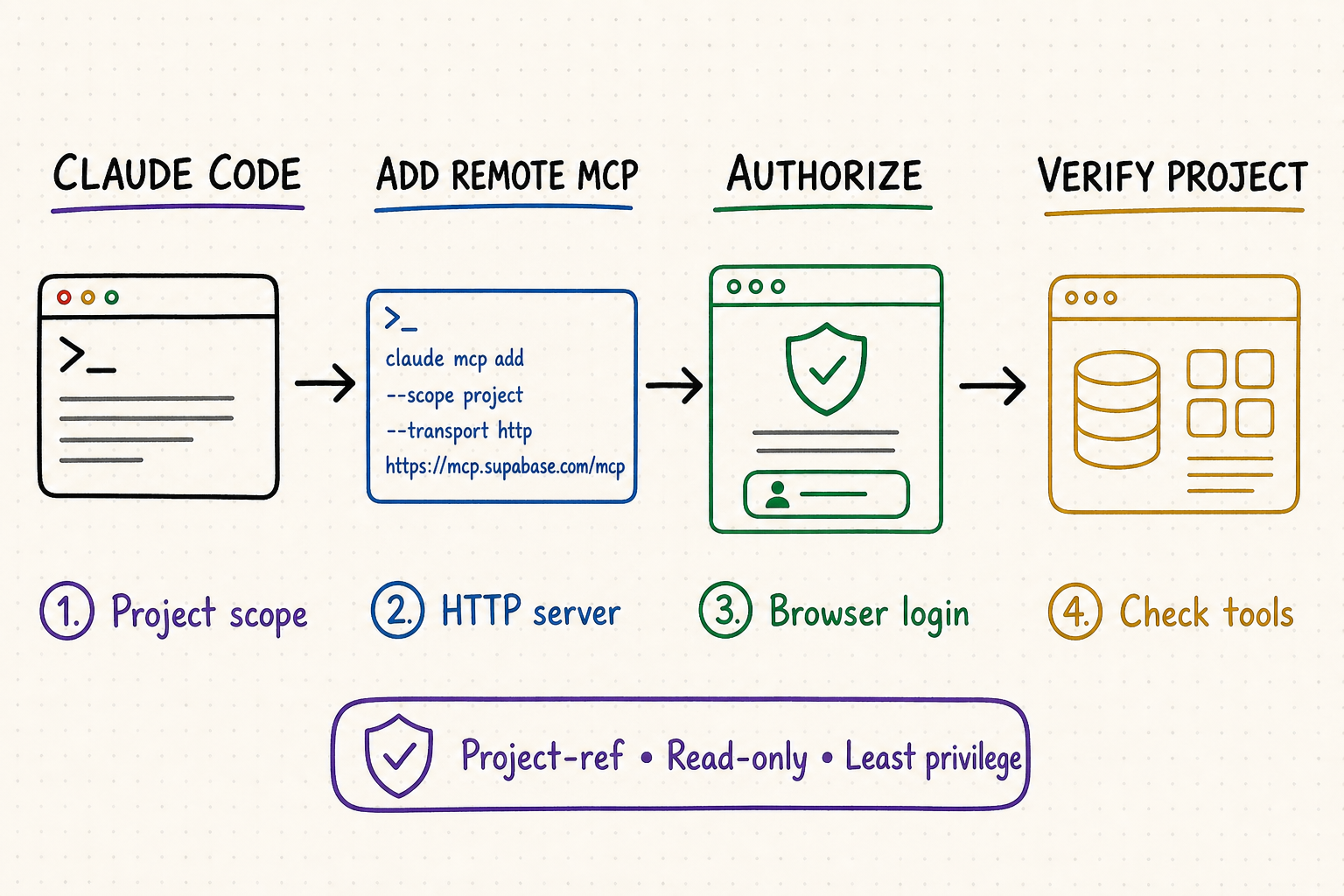
TL;DR核心摘要
Connect Claude Code to Supabase's official remote HTTP endpoint and complete browser-based OAuth instead of creating a personal access token for normal interactive use.
Bind the URL to one development project, turn on read-only mode first, and expose only the feature groups needed for the task.
Confirm server health and tool visibility, then inspect tables or documentation before requesting SQL, migrations, function deployment, or branching operations.
Database rows and logs can contain prompt injection. Review tool names, parameters, SQL, target project, and expected effect before every consequential call.
Claude Code 通过远程 HTTP 连接 Supabase 官方端点,日常交互式使用直接完成浏览器 OAuth,无需再创建个人访问令牌。
把地址绑定到一个开发项目,首次开启只读模式,并且只开放任务确实需要的功能组。
确认服务状态和工具可见后,先读取数据表或文档,再考虑 SQL、迁移、函数部署或分支操作。
数据库内容和日志可能包含提示注入。重要调用前应核对工具、参数、SQL、目标项目和预期影响。
The safe default is a project-scoped connection to a development environment with read_only=true and a small features list. Authenticate in a regular terminal, reload Claude Code, inspect the server and its tools, and run a read-only metadata request. Supabase explicitly describes its MCP server as a development and testing tool; do not connect it to production data simply because setup is easier.
安全的默认方案是:连接到单个开发项目,设置 read_only=true,并把 features 缩减到少量必要功能组。在普通终端完成授权,重新加载 Claude Code,检查服务和工具清单,再执行一次只读元数据查询。Supabase 明确将该 MCP 服务定位为开发与测试工具,不能因为接入方便就直接连接生产数据。
Prepare Claude Code and Supabase first先准备好 Claude Code 与 Supabase
Open the repository that should own the MCP configuration, update Claude Code, and select a Supabase development project containing only synthetic, test, or properly obfuscated data. Record its project reference from the Supabase dashboard. Project scope is useful when a team wants the server definition in .mcp.json, but every teammate must still review that shared configuration and authenticate with an appropriate Supabase account.
先打开需要保存 MCP 配置的代码仓库,更新 Claude Code,并选择一个只包含模拟数据、测试数据或已妥善脱敏数据的 Supabase 开发项目。随后从 Supabase 控制台记录项目引用。团队可以使用 project 作用域把服务定义写入 .mcp.json,但每位成员仍需审查这份共享配置,并使用权限合适的 Supabase 账户完成授权。
Use a disposable project or development branch. Do not point the first connection at production, customer data, payment records, authentication tables, or another sensitive environment.
docs supports documentation search; database covers tables, SQL, and migrations; debugging exposes logs and advisors; development covers project URL, keys, and type generation. Leave functions, branching, account, and storage disabled unless the task needs them.
Plan one harmless request such as listing table names or searching documentation. Write down the expected project reference and schemas so an empty or surprising response can be identified immediately.
使用可丢弃项目或开发分支。第一次连接不要指向生产环境、客户数据、支付记录、认证表或其他敏感环境。
docs 用于检索文档;database 包含数据表、SQL 与迁移;debugging 提供日志和顾问;development 涵盖项目地址、密钥与类型生成。任务没有明确需要时,不要启用 functions、branching、account 或 storage。
预先安排一个无副作用请求,例如列出表名或搜索文档,并记录预期项目引用与数据库模式,这样结果为空或异常时可以立即发现。
The current Supabase MCP guide is the source of truth for endpoint options and tool groups. Supabase changes quickly, so regenerate the command from its configuration panel when revisiting the setup rather than copying an old URL from a blog post.
当前的 Supabase MCP 指南才是端点参数和工具分组的依据。Supabase 更新较快,日后重新接入时应从官方配置面板重新生成命令,不要复制旧博客中的地址。
Add the Supabase MCP server to Claude Code在 Claude Code 中添加 Supabase MCP 服务
For the official hosted server, use remote HTTP transport. Replace YOUR_PROJECT_REF with the development project reference and begin with a narrow feature set. The following example permits documentation, database inspection, debugging, and development helpers while making database queries read-only:
官方托管服务使用远程 HTTP 传输。把 YOUR_PROJECT_REF 替换为开发项目引用,并从较小的功能范围开始。下面的示例开放文档、数据库检查、调试与开发辅助,同时让数据库查询保持只读:
claude mcp add --scope project --transport http supabase "https://mcp.supabase.com/mcp?project_ref=YOUR_PROJECT_REF&read_only=true&features=docs,database,debugging,development"
claude mcp add --scope project --transport http supabase "https://mcp.supabase.com/mcp?project_ref=YOUR_PROJECT_REF&read_only=true&features=docs,database,debugging,development"
Confirm the host is exactly mcp.supabase.com, the project reference matches the intended development project, read_only=true is present, and the feature list contains no unnecessary group. Project scoping also disables account-management tools.
Run the command from the repository root. Project scope creates a team-shareable definition, so inspect the resulting .mcp.json before committing it. The URL may identify a project, but it must not contain a personal access token.
Start Claude Code, run /mcp, choose supabase, select Authenticate, and finish the browser flow with the organization that owns the selected project. A personal access token is no longer required for normal hosted authentication.
Restart or reload the Claude Code session if tools do not appear after authorization. Then use claude mcp list, claude mcp get supabase, and /mcp to confirm configuration, status, and authentication.
确认域名严格为 mcp.supabase.com,项目引用对应目标开发项目,包含 read_only=true,并且功能列表没有多余分组。绑定项目后,账户管理工具也会被禁用。
从代码仓库根目录运行命令。project 作用域会创建团队可共享的配置,因此提交前要检查生成的 .mcp.json。地址可以包含项目标识,但不得包含个人访问令牌。
启动 Claude Code,运行 /mcp,选择 supabase 和 Authenticate,再使用目标项目所在组织完成浏览器授权。正常托管授权已经不需要个人访问令牌。
如果授权后工具未出现,请重启或重新加载 Claude Code 会话。随后使用 claude mcp list、claude mcp get supabase 和 /mcp 核对配置、状态与授权。
When manual credentials are justified什么情况下才需要手动凭据
Manual authentication is mainly for non-interactive CI or clients that cannot complete dynamic OAuth registration. In CI, use a purpose-specific personal access token with the necessary scopes, inject it as an environment secret, and reference it through an authorization header. Never commit the token to .mcp.json, shell history, screenshots, or documentation. Keep CI attached only to isolated development resources and rotate the token when the job or owner changes.
手动授权主要用于无法打开浏览器的 CI,或不支持动态 OAuth 注册的客户端。CI 中应创建用途明确、权限足够但不过宽的个人访问令牌,通过环境密钥注入,再由授权请求头引用。不要把令牌提交到 .mcp.json、命令历史、截图或文档中。CI 只能连接隔离的开发资源,任务或负责人变化时应及时轮换令牌。
Verify the connection before real work执行真实任务前先验证连接
| Check检查项 | Expected evidence预期证据 | If it fails失败时怎么查 |
|---|---|---|
| Registration注册 | claude mcp get supabase shows HTTP transport and the reviewed URL.claude mcp get supabase 显示 HTTP 传输与已审查地址。 | Check repository root, scope, name, and .mcp.json.检查仓库根目录、作用域、名称和 .mcp.json。 |
| Reachability可访问性 | The endpoint responds and Claude reports an authentication state rather than a startup failure.端点有响应,Claude 显示授权状态而非启动失败。 | Check proxy, TLS inspection, DNS, firewall, and service status.检查代理、TLS 检查、DNS、防火墙和服务状态。 |
| Authorization授权 | /mcp reports Supabase connected under the intended organization./mcp 显示已通过目标组织连接 Supabase。 | Repeat OAuth in a regular terminal and reload the session.在普通终端重新完成 OAuth,并重新加载会话。 |
| Scope范围 | Only the intended project and selected feature groups are available.只能看到目标项目和已选择功能组。 | Compare project_ref, features, and current account permissions.核对 project_ref、features 与当前账户权限。 |
| Smoke test冒烟测试 | A table-list or documentation request returns the expected project context without mutation.表清单或文档查询返回预期项目上下文,且没有修改数据。 | Check schema, branch, role, read-only mode, and tool arguments.检查模式、分支、角色、只读设置和工具参数。 |
Have Claude state the server name, project context, enabled feature groups, and whether the connection is read-only. This makes an accidental organization or project mismatch visible before any query.
Ask for table names in a known schema or search the official documentation for a specific topic. Compare the result with the dashboard rather than accepting a plausible answer.
Before any SQL or migration call, ask Claude to show the selected tool and arguments. Review identifiers, query text, project, and whether the operation can write or deploy.
让 Claude 先说明服务名称、项目上下文、已启用功能组以及当前是否只读。这样可以在查询前发现组织或项目选错的问题。
查询某个已知模式中的表名,或搜索一个明确的官方文档主题,再与控制台结果比对,不要只接受看起来合理的回答。
任何 SQL 或迁移调用前,都让 Claude 展示所选工具和参数,核对标识符、查询文本、项目,以及操作是否会写入或部署。
Move from inspection to schema work deliberately从检查进入结构修改要有明确关卡
When read-only verification passes, do not simply remove the flag and ask for a broad feature. First have Claude explain the desired schema change, produce the SQL or migration plan, identify dependencies and rollback steps, and stop for review. Apply approved changes only to a disposable project or development branch. Afterwards, inspect the migration history, run security and performance advisors, execute focused tests, and compare the resulting schema with the plan before merging through the team's normal database workflow.
只读验证通过后,不要直接删除参数并提出一个笼统功能需求。先让 Claude 解释目标结构变更,生成 SQL 或迁移计划,列出依赖与回滚步骤,然后停下来等待审查。获批变更只能应用到可丢弃项目或开发分支;完成后检查迁移记录,运行安全与性能顾问,执行有针对性的测试,并将实际结构与计划逐项对照,最后再按团队既有数据库流程合并。
Keep Supabase MCP access safe安全管理 Supabase MCP 访问
MCP makes database tools easier for an agent to invoke; it does not turn developer-level access into a safe end-user API. The Supabase server operates with the authenticated developer's permissions, so application RLS and UI restrictions should not be assumed to contain every MCP action. Do not expose this integration to customers or let an unattended agent use it as a backend for user requests.
MCP 让智能体更容易调用数据库工具,但不会把开发者权限自动变成安全的终端用户 API。Supabase MCP 按已授权开发者的权限运行,因此不能假设应用层 RLS 和界面限制一定能约束所有 MCP 操作。不要把该集成直接开放给客户,也不要让无人值守的智能体把它当作用户请求的后端。
Rows, logs, function source, issue text, and imported content may include instructions aimed at the model. Treat them as data, not commands. Keep manual approval on and reject tool calls whose purpose changed after reading external content.
read_only=true prevents database writes through the read-only Postgres role, but readable sensitive data can still be exposed in model context or output. Use only non-production or obfuscated data and restrict schemas through the project design.
Project scoping limits which project is reachable; feature groups limit which classes of tools are visible. Use both. Remove functions, branching, storage, account, or debugging groups when the current task does not require them.
Record who authorized the connection, the reviewed configuration, prompts, selected tools, parameters, SQL, approvals, results, migrations, and affected environment. Rotate any token that appears in source control, logs, chat, or screenshots.
数据行、日志、函数源码、工单文本和导入内容中都可能藏有面向模型的指令。它们只能作为数据,不能当作命令。保持人工审批;如果读取外部内容后工具调用的目标发生变化,应直接拒绝。
read_only=true 会通过只读 Postgres 角色阻止数据库写入,但可读取的敏感数据仍可能进入模型上下文或输出。只使用非生产或脱敏数据,并在项目设计中进一步限制可见模式。
项目绑定限制可访问项目,功能组限制可见工具类型,两者必须同时使用。当前任务不需要时,应移除 functions、branching、storage、account 或 debugging 分组。
记录授权人、已审查配置、提示词、所选工具、参数、SQL、批准过程、结果、迁移和受影响环境。任何令牌一旦出现在源码、日志、聊天或截图中,都要立即轮换。
Use QVeris when the agent needs more than Supabase当智能体需要 Supabase 之外的能力时使用 QVeris
Supabase MCP gives Claude Code a focused path into one backend platform. A live search of the QVeris Tool and Provider directories found no exact Supabase record, so this page links to QVeris Docs and the Playground instead of claiming a direct catalog integration.
Supabase MCP 为 Claude Code 提供连接单一后端平台的专用通道。经实时检索,QVeris 的 Tool 与 Provider 目录中暂时没有完全对应的 Supabase 条目,因此本页提供 QVeris 文档和 Playground,不会把目录外能力描述成直接集成。
- Keep schema inspection, SQL review, migrations, logs, advisors, and project-specific operations inside the official Supabase MCP boundary.
- Use QVeris only for a separate external capability returned by current discovery, then inspect its provider, schema, constraints, and cost before calling it.
- Validate external results before writing them to Supabase, and require human approval at the boundary between external data and database mutation.
- 结构检查、SQL 审查、迁移、日志、顾问和项目专用操作继续留在官方 Supabase MCP 权限边界内。
- 只有当前检索确实返回独立外部能力时才使用 QVeris,并在调用前检查供应商、参数结构、约束与成本。
- 外部结果写入 Supabase 前必须校验;从外部数据进入数据库修改的边界上保留人工确认。
FAQ常见问题
Not for normal interactive hosted setup. Supabase uses browser-based OAuth with dynamic client registration. A PAT is mainly for non-interactive CI and must stay in a secret store.
Usually no. Use the current command generated by Supabase. Project scope creates .mcp.json; review that file before sharing it, but do not add credentials to it.
Confirm the endpoint responds, complete OAuth from a regular terminal, verify the selected organization, and reload Claude Code. Then inspect status with /mcp.
The features parameter may exclude their group, storage is disabled by default, project scope disables account tools, or the client may need a restart after authorization.
No. It reduces database writes but does not prevent sensitive reads, prompt injection, or disclosure through model context. Supabase recommends development and testing projects instead.
First produce and review a plan, SQL, dependencies, rollback, and target environment. Remove read-only only for an isolated development branch, approve each mutation, test, and merge normally.
正常交互式托管接入不需要。Supabase 使用支持动态客户端注册的浏览器 OAuth;PAT 主要用于非交互式 CI,而且必须保存在密钥系统中。
通常不需要,应使用 Supabase 当前生成的命令。project 作用域会创建 .mcp.json,共享前要审查,但不要向其中加入凭据。
先确认端点有响应,在普通终端完成 OAuth,核对所选组织并重新加载 Claude Code,随后用 /mcp 查看状态。
features 可能没有包含对应分组;storage 默认关闭;项目绑定会关闭账户工具;授权后客户端也可能需要重启。
不能。它减少数据库写入,却不能阻止敏感读取、提示注入或模型上下文泄露。Supabase 建议使用开发与测试项目。
先生成并审查计划、SQL、依赖、回滚和目标环境;只在隔离开发分支移除只读,逐项批准修改、测试,再按常规流程合并。
References and next steps参考资料与下一步
Supabase MCP guide
Supabase MCP repository
Claude Code MCP documentation