
Claude Code Browser MCP
Setup, Tools & SafetyClaude Code 浏览器 MCP
配置、工具与安全实践
Connect Claude Code to browser tools through MCP, choose the right server, and run inspect, act, and verify workflows with clear safety boundaries.
通过 MCP 为 Claude Code 接入浏览器工具,选择合适的服务器,并在清晰的安全边界内执行“检查—执行—验证”工作流程。
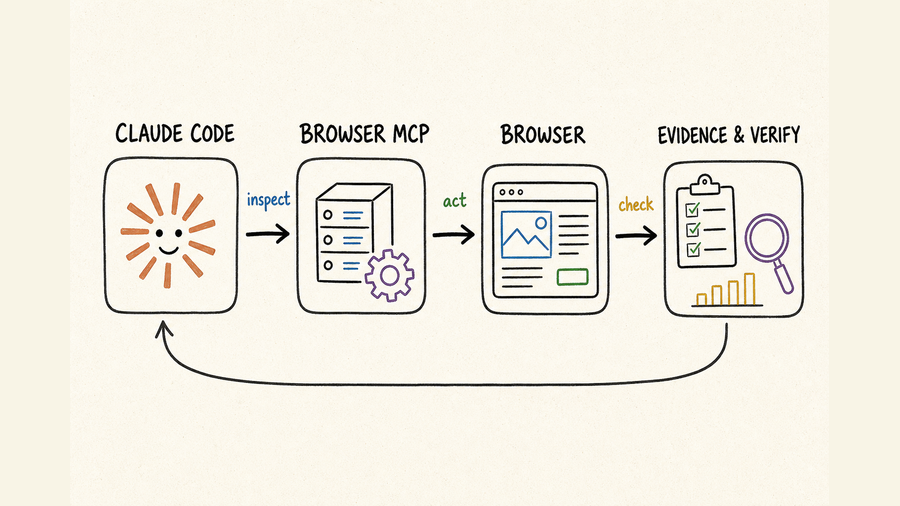
TL;DR核心摘要
Pick a browser MCP by session model, inspection output, evidence support, permissions, and maintenance—not by tool count alone.
Begin on a public page. Confirm Claude Code can inspect the URL, identify a control, perform one reversible action, and read the resulting state.
Inspect first, act once, inspect again, and save evidence. Reacquire page references after navigation, refreshes, or modal changes.
Use isolated sessions and least privilege. Require approval before messages, purchases, publishing, permission changes, uploads, or deletion.
不要只比较工具数量,还要看会话方式、页面检查结果、证据能力、权限边界和维护状态。
从公开页面开始,确认 Claude Code 能识别网址和控件、执行一次可逆操作,并读取操作后的页面状态。
先检查、再执行一次动作、重新检查并保留证据。导航、刷新或弹窗变化后,必须重新获取页面引用。
使用隔离会话和最小权限。发送消息、购买、发布、修改权限、上传或删除前必须人工确认。
The practical answer is simple: a browser MCP is useful when Claude Code must understand and operate a rendered interface, but reliability comes from narrow tasks and observable checkpoints. If the required result is available through a stable API, use the API for the structured step and reserve the browser for UI-only work or final visual verification.
实际判断并不复杂:当 Claude Code 必须理解并操作渲染后的网页界面时,浏览器 MCP 很合适;但要想稳定,任务必须足够具体,而且每一步都要有可观察的检查点。如果同样的结果可以通过稳定 API 获得,应优先用 API 完成结构化步骤,只把浏览器留给界面专属操作或最终视觉验证。
Choose and connect a browser MCP server选择并连接浏览器 MCP 服务器
Define the browser job before choosing a server先定义浏览器任务,再选择服务器
“Use a browser” is not a sufficient requirement. Write down whether Claude Code needs public-page research, an authenticated workflow, form completion, download handling, network inspection, screenshots, or repeatable test generation. A local Playwright-based server can be a good fit for controlled development work, while a remote managed session may be easier when the workflow needs disposable browsers, remote execution, or session-level options. A browser-extension approach can reuse an existing profile, but it also brings more personal state and a larger permission surface into scope.
“使用浏览器”还不能算明确需求。先写清楚 Claude Code 要完成的是公开网页调研、登录后操作、表单填写、文件下载、网络请求检查、截图取证,还是生成可重复运行的测试。基于 Playwright 的本地服务器适合受控的开发任务;如果需要一次性浏览器、远程执行或会话级配置,托管会话可能更省事。浏览器扩展可以复用已有账号状态,但也会把更多个人数据和权限带入任务范围。
Compare the capabilities that affect reliability比较真正影响稳定性的能力
- Inspection model: prefer semantic roles, accessible names, text, and structured snapshots over coordinate-only clicking.
- Session model: decide whether each task needs a clean session, persistent cookies, a named profile, or a remote session identifier.
- Evidence: check whether the server can return the current URL, page text, screenshots, console output, downloads, or network information needed to prove success.
- Control surface: confirm domain restrictions, permission prompts, headless or headed operation, timeout controls, and the ability to stop a session.
- Operational fit: review installation complexity, browser dependencies, release activity, and how failures are surfaced to Claude Code.
- 页面检查方式:优先选择能返回语义角色、可访问名称、文本和结构化快照的方案,不要只依赖坐标点击。
- 会话机制:明确每次任务需要全新会话、持久化 Cookie、指定配置文件,还是远程会话 ID。
- 证据能力:确认服务器能否返回当前网址、页面文本、截图、控制台输出、下载结果或网络信息,以便证明任务完成。
- 控制边界:检查是否支持域名限制、权限提示、有头或无头模式、超时设置以及主动终止会话。
- 运维适配:评估安装复杂度、浏览器依赖、版本维护情况,以及错误能否清楚反馈给 Claude Code。
For a Playwright-oriented implementation, review the official Playwright MCP repository for the currently documented configuration and tool behavior. For Claude Code, use Claude Code docs as the source of truth for current MCP registration and permission controls. Keep the first configuration minimal; add persistent profiles, proxies, downloads, or broad domain access only after the basic path works.
如果采用 Playwright 路线,应以官方 Playwright MCP 仓库中的当前配置和工具说明为准;Claude Code 的 MCP 注册方式与权限控制,则应查阅 Claude Code 文档。首次配置应尽量精简,先跑通基本流程,再按需要加入持久化配置文件、代理、下载能力或更宽的域名范围。
Run a read-only smoke test先做只读冒烟测试
Use a public page that requires no login. Ask Claude Code to report the final URL, page title, one visible heading, and one named link without clicking anything. Next, allow one reversible navigation and ask it to report the new URL and heading. This isolates connection, tool discovery, browser startup, inspection, and navigation before credentials or mutable data are involved.
选择一个无需登录的公开页面,先让 Claude Code 在不点击的情况下返回最终网址、页面标题、一个可见标题和一个具名链接。随后只允许一次可逆的页面跳转,并要求它报告新网址与新标题。这样可以在接触账号凭据和可修改数据前,分别验证连接、工具发现、浏览器启动、页面检查和导航是否正常。
Use an inspect, act, and verify workflow采用“检查—执行—验证”工作流程
Give Claude Code an executable task contract把任务写成可执行约定
A reliable instruction names the start URL, desired outcome, allowed domains, permitted actions, forbidden actions, and visible success evidence. Replace “update the account” with a bounded request such as: inspect the profile page, report the current organization name, propose the exact replacement, and stop before saving. The agent now has a clear stopping point and the human can review the proposed mutation.
可靠的指令要写明起始网址、目标结果、允许访问的域名、可以执行的动作、禁止事项,以及可见的成功证据。不要只说“更新账号”,而应限定为:检查个人资料页、报告当前组织名称、给出准备替换的内容,并在保存前停止。这样智能体就有明确的停止点,人工也能先审查即将发生的修改。
Inspect before every meaningful action重要操作前都要重新检查
- Confirm the current URL and whether an unexpected redirect, consent screen, login wall, or interstitial appeared.
- Read the accessible page structure and locate controls by role, visible name, label, or stable test identifier.
- Perform one bounded action, then wait for the expected state change instead of chaining speculative clicks.
- After navigation, refresh, modal changes, or dynamic updates, reacquire the live page structure before acting again.
- Record the final URL and the page evidence that directly demonstrates the requested result.
- 确认当前网址,并检查是否出现意外跳转、Cookie 同意页、登录墙或中间提示页。
- 读取页面的可访问结构,通过角色、可见名称、标签或稳定的测试标识定位控件。
- 一次只执行一个边界明确的动作,然后等待预期状态变化,不要连续猜测式点击。
- 导航、刷新、弹窗变化或动态更新后,重新获取实时页面结构再继续操作。
- 记录最终网址,以及能够直接证明任务结果的页面证据。
Define evidence before the run执行前先定义成功证据
Success should be observable, not inferred from the absence of an error. For research, evidence might be the final URL plus quoted page fields. For form entry, it could be the populated field values before submission. For a saved change, require a confirmation message and a reloaded view showing the persisted value. For visual checks, define the viewport and the exact component or state that must appear in a screenshot.
成功必须可以观察,不能仅凭“没有报错”来推断。网页调研可以用最终网址和页面字段作为证据;填写表单时,可在提交前核对各字段值;保存修改后,应同时看到确认提示,并在重新加载页面后验证数据仍然存在;视觉检查则要提前约定视口尺寸,以及截图中必须出现的组件或状态。
Use a five-part prompt instead of a vague command用五部分提示词替代模糊命令
A reusable browser prompt contains five parts: context, outcome, scope, checkpoints, and evidence. Context tells Claude Code which account, environment, and starting page it is dealing with. Outcome describes the user-visible result rather than a sequence of guessed clicks. Scope lists allowed domains and actions, plus anything that must not happen. Checkpoints say where the agent must pause for review. Evidence specifies what it should return when the task succeeds or fails. This format remains useful even when the website changes because it constrains intent and proof, not fragile page coordinates.
可复用的浏览器提示词可以分成五部分:背景、结果、范围、检查点和证据。背景说明使用哪个账号、环境和起始页面;结果描述用户最终应该看到什么,而不是预先猜一串点击步骤;范围列出允许访问的域名和操作,同时明确禁止事项;检查点规定智能体必须在哪里暂停等待复核;证据则说明成功或失败后需要返回哪些信息。即使网站结构变化,这种写法仍然有效,因为它约束的是任务意图和验收方式,而不是脆弱的页面坐标。
- Context: “Use the staging account and begin at the project settings URL.”
- Outcome: “Prepare the new webhook configuration and show the completed form.”
- Scope: “Stay on the approved domain; do not submit, delete, or change permissions.”
- Checkpoint: “Stop before the final save and report the exact values.”
- Evidence: “Return the final URL, field summary, and any validation message.”
- 背景:“使用测试环境账号,从项目设置页开始。”
- 结果:“准备好新的 Webhook 配置,并展示填写完成的表单。”
- 范围:“只访问获准域名,不要提交、删除或修改权限。”
- 检查点:“在最终保存前停止,并报告所有字段的确切值。”
- 证据:“返回最终网址、字段摘要和页面校验信息。”
Recover from common browser failures处理常见浏览器故障
When a tool reports a missing element, first inspect again; the reference may be stale or the control may have moved into a modal or frame. If an action times out, check whether the page is still loading, waiting for a popup, blocked by authentication, or downloading a file. Do not repeat submissions blindly: inspect for confirmation, duplicate records, or a changed URL before retrying. When the workflow becomes repeatable and stable, move the deterministic portion into a committed test; the related Playwright MCP guide explains that narrower implementation path.
工具提示找不到元素时,应先重新检查页面:旧引用可能已经失效,控件也可能进入弹窗或 iframe。操作超时后,要判断页面是否仍在加载、是否等待新窗口、是否被登录状态阻断,或是否正在下载文件。不要盲目重复提交;重试前先检查确认提示、重复记录和网址变化。当流程已经稳定且需要重复执行时,应把确定性部分沉淀为正式测试;可参考相关的 Playwright MCP 指南。
Safety and debugging practices安全与调试实践
Separate observation, reversible actions, and consequences区分观察、可逆操作与高影响操作
Use three action levels. Read-only observation can usually proceed within an allowlisted domain. Reversible actions—opening filters, drafting text, populating an unsent form—should stop at a review checkpoint. Consequential actions require explicit approval immediately before execution: sending a message, publishing, placing an order, accepting terms, changing access, uploading private files, or deleting data. The approval should describe the exact target and payload, not merely ask whether to “continue.”
可以把浏览器操作分为三级。只读检查通常可以在允许访问的域名内直接进行;打开筛选器、起草内容、填写但不提交表单等可逆操作,应在复核点暂停;发送消息、发布、下单、接受条款、修改访问权限、上传私密文件或删除数据等高影响操作,则必须在执行前再次取得明确授权。授权提示要写清目标对象和具体内容,不能只笼统询问“是否继续”。
Isolate credentials and session state隔离凭据和会话状态
- Prefer a dedicated test account or browser profile over a personal daily-use profile.
- Keep passwords, API keys, recovery codes, and raw cookies out of prompts, screenshots, and retained logs.
- Allow only the domains needed for the task and treat third-party login redirects as a separate approved scope.
- Use short-lived sessions for untrusted or one-off work; close remote sessions after collecting the required evidence.
- Review downloads and uploads by exact filename and destination before transfer.
- 优先使用专用测试账号或浏览器配置文件,不要直接使用日常个人配置。
- 密码、API Key、恢复码和原始 Cookie 不应出现在提示词、截图或长期保留的日志中。
- 只开放任务所需域名;跳转至第三方登录站点时,应将其视为需要单独授权的新范围。
- 不可信或一次性任务使用短期会话;收集完证据后及时关闭远程浏览器。
- 上传或下载前,按确切文件名和目标位置进行复核。
Log enough to debug without exposing secrets保留可调试证据,但不要泄露敏感信息
A useful run record includes timestamps, tool names, sanitized inputs, URLs, state transitions, approvals, and final evidence. Redact credentials and personal fields before retaining screenshots or logs. If a run fails, preserve the last known URL, visible error, console message when available, and the action that preceded it. This is enough to distinguish selector drift, authentication loss, page timing, blocked navigation, and an actual product error.
有效的执行记录应包含时间、工具名称、脱敏后的输入、访问网址、状态变化、人工授权和最终证据。截图或日志需要长期保存时,应先遮盖凭据与个人字段。任务失败后,保留最后访问的网址、可见错误、可用的控制台信息,以及错误前执行的动作;这些信息通常足以区分元素定位变化、登录失效、页面时序问题、导航受阻和真实的产品故障。
Where QVeris fits in a browser MCP stackQVeris 在浏览器 MCP 工具链中的作用
QVeris can complement Claude Code’s local MCP configuration with a structured browser-session capability. The verified Start Browser Session tool allocates an Anchor Browser session and exposes session options such as idle timeout and optional browser services. The Anchor Browser provider page identifies the underlying supplier.
QVeris 可以用结构化的浏览器会话能力,补充 Claude Code 的本地 MCP 配置。已核验的 启动浏览器会话工具可创建 Anchor Browser 会话,并提供空闲超时及可选浏览器服务等会话参数;对应的 Anchor Browser 供应商页用于确认底层服务来源。
Choose the layer that owns the task根据任务归属选择执行层
- Use Claude Code with a local browser MCP when the task is part of an interactive development session and needs direct repository context.
- Use a QVeris browser-session tool when an agent workflow needs a structured, remotely allocated browser session with explicit inputs and returned session data.
- Use a direct API through QVeris when the same data or operation is available without rendering a page; this reduces dependence on selectors, timing, and visual state.
- Combine the layers when structured data preparation happens through an API, a UI-only step happens in the browser, and both outputs are retained as evidence.
- 如果任务属于交互式开发过程,而且需要直接利用代码仓库上下文,可在 Claude Code 中连接本地浏览器 MCP。
- 如果智能体流程需要通过明确输入远程创建浏览器,并获得结构化会话信息,可使用 QVeris 浏览器会话工具。
- 如果同一数据或操作可以直接通过 API 完成,应优先在 QVeris 中调用 API,减少对元素定位、页面时序和视觉状态的依赖。
- 也可以组合使用:通过 API 准备结构化数据,在浏览器中完成界面专属步骤,并分别保留两层输出作为证据。
The browser-session tool does not install or configure a Claude Code MCP server for you, and it does not remove the need to design permissions and approval checkpoints. It is a better fit when remote session allocation is itself part of the agent workflow. For repository-local exploration or repeatable CI tests, a local MCP server or committed Playwright suite may remain the simpler choice.
浏览器会话工具不会替你安装或配置 Claude Code 的 MCP 服务器,也不能取代权限设计和人工审批。只有当“远程创建会话”本身就是智能体流程的一部分时,它才更合适。对于围绕本地代码仓库的探索,或需要在 CI 中重复执行的测试,本地 MCP 服务器或正式的 Playwright 测试通常更简单。
Know when browser automation is the wrong layer明确哪些任务不该交给浏览器
Do not use a browser merely because the same information is visible on a page. A documented API is usually better for high-volume retrieval, typed inputs, predictable error handling, or workflows that must run unattended. A committed test is better for a stable assertion that belongs in every build. Manual review is better when a decision depends on legal meaning, irreversible financial impact, sensitive personal data, or ambiguous visual judgment. Browser MCP earns its place when rendered state, UI-only controls, or exploratory interaction is essential—not as a default replacement for every other integration method.
不要因为信息能在网页上看到,就默认使用浏览器。如果任务涉及批量获取、类型明确的输入、可预测的错误处理,或需要长期无人值守运行,正式 API 通常更可靠;如果某项稳定断言需要在每次构建中执行,应写成代码库内的自动化测试;如果决策涉及法律含义、不可逆的资金影响、敏感个人数据或模糊的视觉判断,则应由人工复核。只有在必须读取渲染状态、操作界面专属控件或进行探索式交互时,浏览器 MCP 才真正有价值,而不是替代所有集成方式的默认方案。
FAQ常见问题
No. Browser MCP is useful for agent-led exploration and changing tasks. Move stable, repeated assertions into committed tests so they can run deterministically in CI and be reviewed with the code.
Yes, if the server supports a persistent profile or authenticated session. Use a dedicated account, narrow the allowed domains, and avoid exposing raw cookies or credentials to the prompt.
The page may have replaced its DOM, opened a new context, or changed the accessible structure. Inspect again and acquire a fresh reference instead of retrying the stale target.
Use local execution for repository-connected development and easy debugging. Use a remote session when isolation, disposable environments, centralized controls, or remote orchestration matter more.
Prefer an API when it offers stable authentication, typed fields, predictable responses, and the required operation. Keep the browser for UI-only steps and rendered-state evidence.
Approve the exact payload immediately before any message, purchase, publication, permission change, private upload, legal acceptance, or deletion—not at the beginning of the run.
不会。浏览器 MCP 适合智能体驱动的探索和变化较多的任务。已经稳定、需要反复检查的断言,应写入正式测试,以便在 CI 中确定性运行并随代码审查。
如果服务器支持持久化配置或登录会话,就可以使用。建议采用专用账号、限制可访问域名,并避免在提示词中暴露原始 Cookie 或凭据。
页面可能已经替换 DOM、打开新的浏览上下文,或改变了可访问结构。应重新检查并获取新引用,不要重复操作失效目标。
需要结合代码仓库开发和快速调试时,优先本地执行;更看重隔离、一次性环境、集中控制或远程编排时,可选择远程会话。
如果 API 提供稳定鉴权、类型明确的字段、可预测响应和所需操作,应优先调用 API;浏览器只承担界面专属步骤和渲染结果取证。
发送消息、购买、发布、修改权限、上传私密文件、接受法律条款或删除数据前,都要针对确切目标和内容即时审批,而不是在任务开始时一次性授权。