
Claude Code Figma MCP
Setup & WorkflowClaude Code Figma MCP
配置与工作流
Connect Claude Code to structured Figma context, then inspect, implement, and verify interfaces without reducing design files to screenshots.
让 Claude Code 读取结构化的 Figma 设计上下文,
再检查、实现并验证界面,而非仅把设计文件当作截图处理。
Claude Code Figma MCP in briefClaude Code Figma MCP 核心摘要
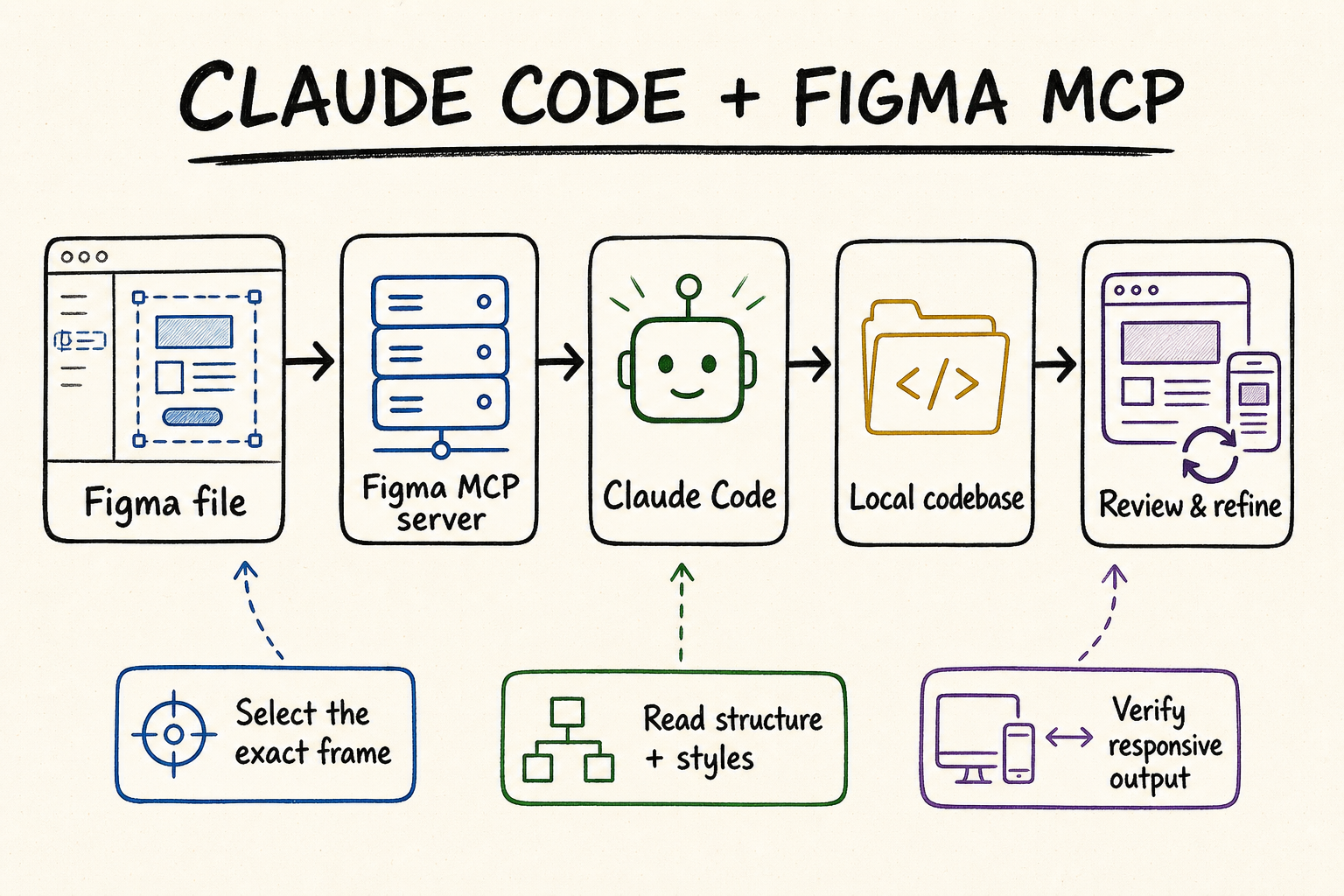
For most Claude Code users, install Figma's official plugin and use the remote MCP server. Then work from one exact frame or layer link, not an entire file. Ask Claude Code to inspect the repository, retrieve structured design context and a screenshot, map Figma components and variables to existing code, propose a bounded diff, implement it, and verify the rendered result at the required breakpoints. Figma MCP supplies context and canvas tools; Claude Code still owns the final code decisions.
对多数 Claude Code 用户,建议安装 Figma 官方插件并使用远程 MCP。实际实现时从一个准确的画框或图层链接开始,不要直接处理整个文件。先让 Claude Code 检查代码库,再读取结构化设计上下文和截图,将 Figma 组件与变量映射到现有代码,提出边界清晰的修改方案,完成实现后按目标断点核对渲染结果。Figma MCP 提供设计上下文和画布工具,最终代码决策仍由 Claude Code 与项目规则共同决定。
Figma recommends the remote server for most users. Its Claude Code plugin bundles the MCP configuration with skills for common design-to-code workflows.
A frame or layer link gives the remote server the node ID it needs. Smaller targets reduce context waste and make visual comparison practical.
The MCP response may look React-like, but Figma describes it as structured design input. Claude Code must adapt it to the repository's framework and conventions.
Check code quality, responsive behavior, accessibility, and tests in the repository, then compare screenshots and states with the selected Figma design.
Figma 建议多数用户使用远程服务器。Claude Code 官方插件同时包含 MCP 配置和常用设计到代码技能。
画框或图层链接会向远程服务器提供所需的节点 ID。目标越小,上下文浪费越少,也越容易做视觉核对。
MCP 返回内容可能呈现为类似 React 的结构,但 Figma 将其定位为设计输入;Claude Code 仍需按项目框架和规范改写。
在代码库中检查质量、响应式、无障碍和测试,再把实际截图与 Figma 目标节点的各个状态逐项比较。
How the Claude Code and Figma MCP loop worksClaude Code 与 Figma MCP 如何形成闭环
The useful mental model is “design evidence into a governed code change,” not “turn a picture into code.” Figma can return frames, components, layout data, variables, styles, screenshots, assets, and Code Connect mappings. Claude Code combines that evidence with the actual component library, routes, state model, tests, and project instructions. The quality of the result depends on how well those two sources are reconciled.
更准确的理解是“把设计证据转化为受控的代码变更”,而不是“把图片转成代码”。Figma 可以返回画框、组件、布局数据、变量、样式、截图、素材和 Code Connect 映射;Claude Code 再结合真实组件库、路由、状态模型、测试和项目说明完成实现。结果质量取决于设计信息与代码库事实能否正确对齐。
| Stage阶段 | Claude Code actionClaude Code 操作 | Evidence to keep保留的证据 | Stop condition停止条件 |
|---|---|---|---|
| Scope限定范围 | Resolve one Figma URL, node ID, variant, and target route.确认一个 Figma URL、节点 ID、状态变体和目标路由。 | File, page, frame, variant, and required breakpoints文件、页面、画框、变体和目标断点 | The link points to a page or ambiguous selection.链接只指向页面或目标不唯一。 |
| Inspect检查 | Read repository structure, design system, routes, and tests.读取仓库结构、设计系统、路由和测试。 | Existing components, tokens, patterns, and ownership现有组件、令牌、模式和归属 | No approved component or target location is identifiable.无法确认获批组件或目标位置。 |
| Retrieve获取设计 | Get design context, variables, screenshot, and mappings.获取设计上下文、变量、截图和映射。 | Node IDs, hierarchy, styles, assets, and visual reference节点 ID、层级、样式、素材和视觉参考 | The response is truncated, oversized, or for the wrong variant.响应被截断、过大或对应错误变体。 |
| Map映射 | Match Figma instances and variables to repository primitives.把 Figma 实例和变量对应到仓库基础组件。 | Code Connect, imports, token names, and fallback decisionsCode Connect、导入、令牌名称和回退决策 | Mapping would create a duplicate component system.映射会导致重复组件体系。 |
| Implement实现 | Apply the smallest approved diff and preserve behavior.执行最小范围的已批准差异,并保留既有行为。 | Changed files, component API, states, and asset sources修改文件、组件 API、状态和素材来源 | The design requires an unapproved API or architecture change.设计要求未经批准的 API 或架构变更。 |
| Verify验证 | Run tests and compare rendered states at each breakpoint.运行测试,并在各断点比较实际渲染状态。 | Screenshots, dimensions, interactions, accessibility, and test output截图、尺寸、交互、无障碍和测试结果 | A mismatch is hidden with a one-off override.通过临时覆盖掩盖不一致。 |
If get_design_context is too large or truncated, retrieve sparse metadata first, choose the relevant child nodes, and request context only for those nodes. Do not keep retrying the entire page and consume tool limits without narrowing the problem.
Structured context explains hierarchy and properties; get_screenshot shows the visual result. Keep both. A correct component tree can still have the wrong crop, wrapping, density, or responsive behavior.
Use Code Connect mappings when available, then search the repository for the mapped component and its supported variants. If no mapping exists, document the closest approved primitive and why it is preferable to creating a duplicate.
A desktop frame alone does not specify every breakpoint. Ask which dimensions are authoritative, how Auto Layout should translate, and what happens for hover, focus, loading, empty, error, and long-content states before implementation.
如果 get_design_context 返回过大或被截断,先获取稀疏元数据,选出真正相关的子节点,再逐个读取上下文。不要反复请求整个页面,白白消耗工具限额。
结构化上下文说明层级和属性,get_screenshot 展示实际视觉。两者都要保留,因为组件树正确,并不代表裁切、换行、密度和响应式表现一定正确。
存在 Code Connect 映射时先使用映射,再检查仓库中的真实组件及可用变体。没有映射时,应说明最接近的获批基础组件,以及为什么不应另建重复实现。
单个桌面画框无法定义所有断点。实现前应确认哪些尺寸具有约束力、Auto Layout 如何转换,以及 hover、focus、加载、空态、错误和长内容状态如何处理。
Reusable implementation prompt: “Use the Figma node at [URL] as design evidence for [route/component]. Inspect the repository first. Retrieve design context, variables, Code Connect mappings, and a screenshot for the exact variant. Reuse components from [path] and tokens from [path]; do not create parallel primitives or hardcode values without approval. Propose the file-level diff and unresolved states before editing. After approval, implement and verify at [breakpoints].”
可复用实现提示词:“把 [URL] 对应的 Figma 节点作为 [路由/组件] 的设计依据。先检查代码库,再获取准确变体的设计上下文、变量、Code Connect 映射和截图。优先复用 [路径] 中的组件及 [路径] 中的令牌;未经批准不得另建基础组件或硬编码数值。修改前先展示文件级差异和未明确状态,批准后再实现,并在 [断点] 下验证。”
Choose and configure the right Figma MCP server选择并配置合适的 Figma MCP 服务器
Figma's Claude Code setup guide recommends the official plugin and remote server. The remote endpoint is available across Figma seats and plans, although read-tool limits depend on seat and plan. The desktop server requires a Dev or Full seat on a paid plan and is intended for narrower organization or enterprise scenarios.
Figma 的 Claude Code 配置指南推荐使用官方插件和远程服务器。远程端点可用于各类 Figma 席位与套餐,但读取工具限额会随席位和套餐变化;桌面服务器则要求付费套餐中的 Dev 或 Full 席位,主要面向较窄的组织或企业场景。
| Connection连接方式 | Main job主要作用 | Best for适合场景 | Boundary使用边界 |
|---|---|---|---|
| Remote plugin远程插件 | Installs https://mcp.figma.com/mcp plus Figma skills.安装 https://mcp.figma.com/mcp 及 Figma 技能。 | Recommended Claude Code onboarding and broadest workflow coverage.Claude Code 推荐接入方式,工作流覆盖最完整。 | Organization policy may block plugin installation; OAuth is required.组织策略可能阻止插件安装,并且需要 OAuth。 |
| Remote manual手动远程连接 | Registers the same hosted endpoint without bundled skills.注册同一托管端点,但不附带技能。 | Teams that manage MCP configuration separately.单独管理 MCP 配置的团队。 | You must supply project instructions and workflow rules yourself.需要自行提供项目说明和工作流规则。 |
| Desktop server桌面服务器 | Uses http://127.0.0.1:3845/mcp from the Figma desktop app.使用 Figma 桌面应用提供的 http://127.0.0.1:3845/mcp。 | Selection-based local work in eligible organization environments.符合条件的组织环境中的本地选区工作流。 | Narrower feature set, desktop app dependency, paid-plan seat requirement.功能较窄,依赖桌面应用,并有付费套餐席位要求。 |
Run claude plugin install figma@claude-plugins-official. If installation is blocked, ask the Claude administrator whether plugins are disabled globally or whether Figma is specifically denied; do not substitute an unverified package.
Restart Claude Code, open /plugin, select the installed Figma entry, and begin authorization. Check the Figma identity and requested access before allowing it, then confirm the plugin displays as connected.
Use the available identity tool to confirm the authenticated email, plans, and seat types. Inspect the runtime tool list rather than assuming every remote-only or write-to-canvas capability is enabled for the current account and client.
Copy a link to one harmless frame or layer. Ask for its node ID, metadata, variables, and screenshot without changing code or Figma. Compare the response with the source design and record which tool calls consume plan limits.
运行 claude plugin install figma@claude-plugins-official。如果安装被阻止,应向 Claude 管理员确认是全局禁用插件还是单独禁用 Figma,不要改装未经核验的软件包。
重启 Claude Code,打开 /plugin,选择已安装的 Figma 项并开始授权。允许访问前核对 Figma 身份和请求权限,完成后确认插件显示为已连接。
使用身份工具确认授权邮箱、所属套餐和席位类型。应查看运行时工具列表,不要假设当前账号和客户端自动拥有全部远程专用或写入画布能力。
复制一个无敏感内容的画框或图层链接,只要求返回节点 ID、元数据、变量和截图,不修改代码或 Figma。将结果与源设计核对,并记录哪些工具调用会消耗套餐限额。
| Symptom现象 | Likely cause常见原因 | Safe next check安全排查动作 |
|---|---|---|
| Plugin installation fails插件安装失败 | Claude organization policyClaude 组织策略 | Confirm the official marketplace and ask the administrator about plugin controls.确认官方插件市场,并向管理员核对插件控制策略。 |
| Authentication loops反复要求授权 | Wrong account or stale OAuth state账号错误或 OAuth 状态过期 | Disconnect, reconnect, and verify the browser identity and organization.断开后重新连接,并核对浏览器身份和所属组织。 |
| File cannot be accessed无法访问文件 | Invalid link, identity, plan, seat, or file permission链接、身份、套餐、席位或文件权限问题 | Check the selection link, identity result, and permission on the file's plan.核对选区链接、身份结果及文件所属套餐中的权限。 |
| Context is too large上下文过大 | Whole page or heavy frame请求整个页面或复杂画框 | Use metadata to identify child nodes, then request only the needed context.先用元数据定位子节点,再只读取所需上下文。 |
| Code looks generic代码过于通用 | Missing repository rules, mappings, or framework prompt缺少仓库规则、映射或框架要求 | Provide component paths, tokens, Code Connect labels, and the target framework.补充组件路径、令牌、Code Connect 标签和目标框架。 |
| Rate limit is reached达到调用限额 | Seat/plan limit or repeated broad reads席位/套餐限额或重复宽范围读取 | Stop retries, narrow nodes, and review current Figma access limits.停止重试,缩小节点范围,并核对当前 Figma 访问限额。 |
Where QVeris fits beside Claude Code Figma MCPQVeris 如何补充 Claude Code Figma MCP 工作流
Figma MCP is the direct integration for design context and canvas operations. A current QVeris catalog search did not surface an exact Figma Tool or Provider record; a name-only result belonged to an unrelated test API and was rejected. This page therefore uses QVeris Docs and the QVeris Playground rather than implying a native QVeris-to-Figma connection.
Figma MCP 才是读取设计上下文和执行画布操作的直接集成。当前 QVeris 目录没有检索到准确的 Figma Tool 或 Provider;唯一名称沾边的结果实际属于无关测试 API,已被排除。因此本页只使用 QVeris 文档和 QVeris Playground,不会暗示存在原生 QVeris-to-Figma 连接。
- Use Figma for design truth. Components, variables, layout, screenshots, assets, and canvas edits should remain inside the Figma permission and evidence boundary.
- Add QVeris only for a separate external job. Examples include discovering a data provider for content that appears in the interface or evaluating a callable capability outside Figma and the repository.
- Validate before crossing systems. Inspect provider identity, tool inputs, returned fields, constraints, and provenance before external output becomes UI copy, fixtures, or a design artifact.
- Approve every mutation independently. Permission to read Figma does not authorize a repository edit; approval of a code diff does not authorize an external call or a write back to the canvas.
- 由 Figma 承担设计事实来源。组件、变量、布局、截图、素材和画布修改,都应留在 Figma 的权限与证据边界内。
- 只有出现独立外部任务时才增加 QVeris。例如,为界面内容查找数据服务商,或评估 Figma 与代码库之外的可调用能力。
- 跨系统前先验证。外部结果成为 UI 文案、测试数据或设计内容前,应检查服务商身份、输入、返回字段、限制和来源。
- 每类变更单独批准。允许读取 Figma 不等于允许修改仓库;批准代码差异也不等于批准外部调用或回写画布。
FAQ常见问题
No. It returns structured design context and a code-oriented representation. Claude Code must translate that input into the repository's framework, components, state model, and standards.
Use remote for most Claude Code work and the broadest feature set. Choose desktop only when its local, selection-based workflow, seat requirements, and narrower capabilities fit your organization.
The remote server supports native canvas creation and modification for eligible accounts and clients. Confirm runtime tools, file edit permission, target node, and proposed layer changes before writing.
Figma uses a React-like format because agents can interpret it effectively. It is framework-agnostic design context, not a requirement to use React or Tailwind in the final project.
Inspect the repository first, use Code Connect mappings, point Claude Code to approved component and token paths, and require an explanation before any new primitive is introduced.
Use metadata to obtain a sparse node map, select the relevant children, then request design context and screenshots for those nodes. Avoid repeated full-page retrieval.
不是。它返回结构化设计上下文和面向代码的表达;Claude Code 仍需按仓库框架、组件、状态模型和规范完成转换。
多数 Claude Code 工作应使用功能更完整的远程服务器。只有本地选区流程、席位要求和较窄能力符合组织环境时,才选择桌面方案。
远程服务器可为符合条件的账号和客户端创建或修改原生画布内容。写入前要核对运行时工具、文件编辑权限、目标节点和拟修改图层。
Figma 使用类似 React 的格式,是因为智能体更容易理解。它仍是框架无关的设计上下文,并不要求最终项目使用 React 或 Tailwind。
先检查代码库,使用 Code Connect 映射,向 Claude Code 指定获批组件和令牌路径;新增基础组件前必须说明理由。
先用元数据取得稀疏节点图,再选择相关子节点,并分别请求设计上下文和截图。避免反复读取整个页面。
References and next steps参考资料与下一步
Figma Claude Code setup guide
Figma MCP server guide
Figma MCP tools and prompts
Figma file structure guidance
Figma MCP access and limits
Claude Code MCP documentation
QVeris Docs
QVeris Playground
Figma Claude Code 配置指南
Figma MCP 服务器指南
Figma MCP 工具与提示词
Figma 文件结构指南
Figma MCP 访问权限与限额
Claude Code MCP 文档
QVeris 文档
QVeris Playground