
Claude Code MCP Figma
Setup & TroubleshootingClaude Code MCP Figma
配置与故障排查
Connect Claude Code to Figma through the official remote server, prove that design context is available, and isolate authentication, permission, link, or response failures without guessing.
通过官方远程服务器把 Claude Code 接入 Figma,先验证设计上下文确实可读,
再按顺序定位授权、权限、链接或响应问题。
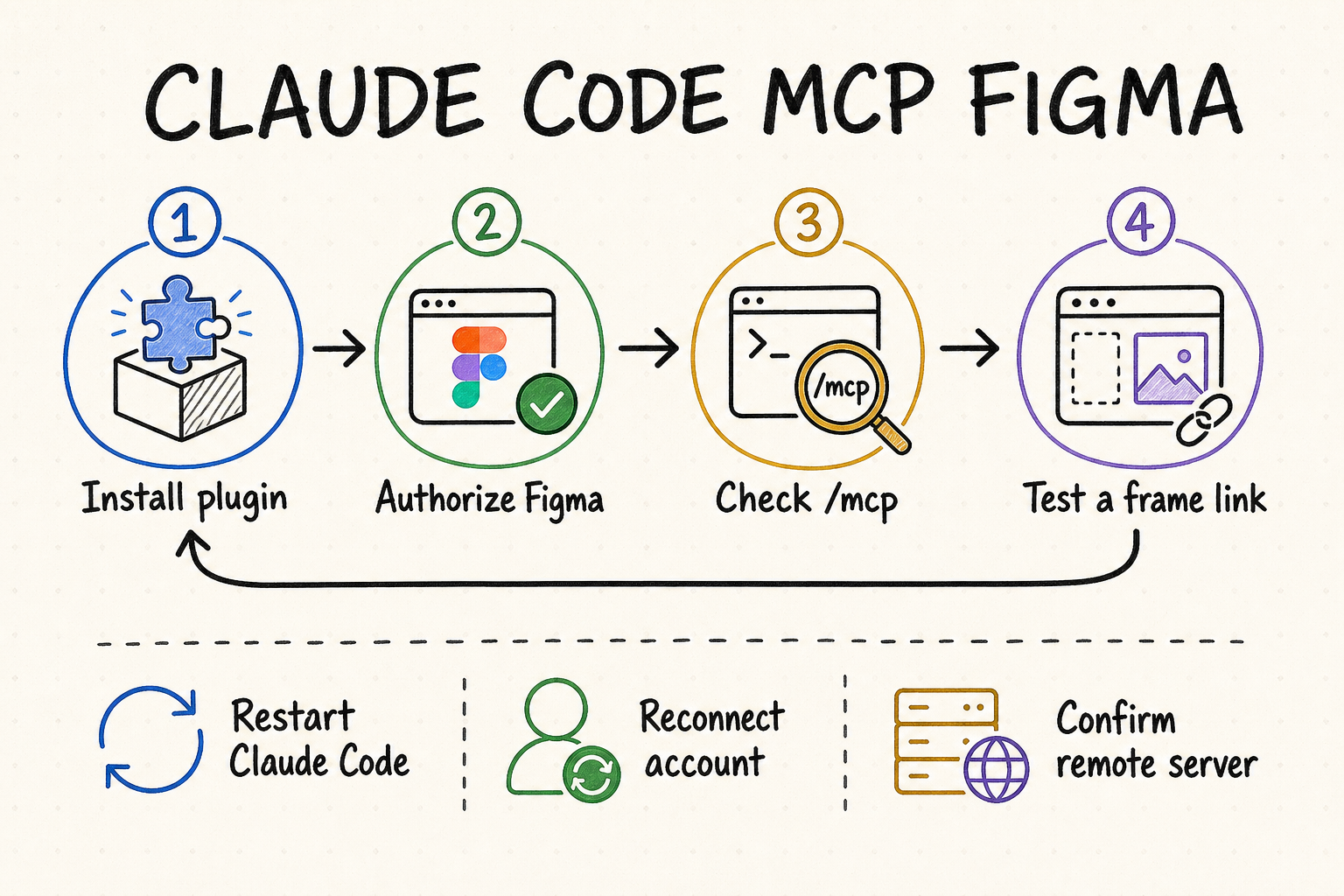
The reliable way to connect Claude Code and Figma稳定连接 Claude Code 与 Figma 的方法
The shortest supported route is the official Claude Code plugin backed by Figma's remote MCP server. Install the plugin, restart Claude Code, complete browser authorization, inspect the server state with /mcp, and test one precise frame URL. That last test matters: a green connection only proves that the transport and account handshake worked; it does not prove the selected account can read the target file or that the link identifies useful design context.
最省事且受官方支持的方式,是安装 Claude Code 官方 Figma 插件,并使用 Figma 托管的远程 MCP 服务器。完整流程包括安装插件、重启 Claude Code、在浏览器中完成授权、用 /mcp 查看连接状态,再拿一个准确的画框链接做小范围测试。最后一步不能省:显示“已连接”只说明传输与账号握手成功,并不能证明当前账号有权读取目标文件,也不能证明链接指向了有效的设计上下文。
Use the official plugin and remote server unless your organization explicitly requires the desktop endpoint. It has the broadest tool coverage and does not depend on keeping one desktop file open.
A successful setup produces three signals: Figma is connected in /mcp, the authorized user can open the file, and Claude Code can summarize one linked frame.
Ask for a component, typography, color, and spacing inventory before requesting edits. This exposes missing context while keeping repository changes out of the test.
Change one layer at a time: process, server registration, authorization, Figma permission, node link, then payload size. Otherwise a retry may hide the real cause.
除非组织明确要求使用桌面端点,否则优先选择官方插件与远程服务器。它的工具覆盖更完整,也不要求某个 Figma 文件始终在桌面应用中打开。
可靠的配置应同时满足三点:/mcp 显示 Figma 已连接、授权账号能够打开文件、Claude Code 可以概括指定画框。
先让 Claude Code 列出组件、字体、颜色与间距,不要一开始就改代码。这样既能暴露上下文缺失,也不会在测试阶段产生仓库改动。
按照进程、服务器注册、账号授权、文件权限、节点链接、载荷大小逐层检查,每次只改变一个变量,才能确定故障真正来自哪里。
Choose the connection before editing configuration先选连接方式,再动配置
Figma documents both a hosted remote endpoint and a desktop endpoint. They solve the same broad problem but have different operational assumptions. The remote server at https://mcp.figma.com/mcp is the default for most teams. The desktop server at http://127.0.0.1:3845/mcp is local to the machine and depends on Figma desktop availability, eligible access, and the current canvas context.
Figma 同时提供托管式远程端点和桌面端点,两者都能向 Claude Code 提供设计上下文,但运行前提不同。对多数团队来说,默认应使用 https://mcp.figma.com/mcp。桌面端点 http://127.0.0.1:3845/mcp 只在本机可用,还依赖 Figma 桌面应用、符合要求的席位以及当前画布状态。
| Option方案 | How it connects连接方式 | Choose it when适用情况 | Check first先检查 |
|---|---|---|---|
| Official plugin官方插件 | Installs Figma's remote MCP settings and packaged skills with one Claude Code command.通过一条 Claude Code 命令安装远程 MCP 配置及配套技能。 | You want the supported default and the least manual configuration.希望使用官方默认路径,并尽量减少手工配置。 | Plugin installation, restart, browser authorization.插件是否安装、是否重启、浏览器授权是否完成。 |
| Manual remote手动远程连接 | Registers the hosted Figma URL directly as an HTTP MCP server.把 Figma 托管地址直接注册为 HTTP MCP 服务器。 | Your environment manages MCP registrations explicitly or cannot use plugins.环境统一管理 MCP 注册项,或无法使用插件。 | Exact endpoint, transport type, OAuth completion.端点是否准确、传输类型是否正确、OAuth 是否完成。 |
| Desktop server桌面服务器 | Claude Code calls a localhost endpoint exposed by the running Figma desktop app.Claude Code 调用由 Figma 桌面应用开放的本机端点。 | A local workflow or organization policy specifically requires it.本地工作流或组织策略明确要求使用桌面模式。 | Desktop app state, seat eligibility, selected frame, local port.桌面应用状态、席位资格、当前选区和本地端口。 |
Run claude plugin install figma@claude-plugins-official from a normal shell. Let the command finish, then fully exit and reopen Claude Code so the process loads the new server registration.
Open the MCP or plugin view and start the connection. Finish the Figma browser consent flow using the account that can actually open the design file. Signing in with a second personal account is a common source of later permission errors.
Run /mcp and inspect the Figma entry. If it is absent, stay at the registration layer; repeating authorization will not fix a plugin that the running Claude Code process never loaded.
In Figma, select the intended frame or component and copy its direct link. Ask Claude Code to identify the node name, visible states, design variables, and major child elements. A file-level homepage URL is a weaker test because it may omit the node identifier.
在普通终端中运行 claude plugin install figma@claude-plugins-official。命令结束后彻底退出并重新打开 Claude Code,让新进程加载服务器注册信息。
在 MCP 或插件界面发起连接,并在浏览器中完成 Figma 授权。务必选择真正拥有目标文件访问权限的账号;误用另一个个人账号,是后续出现权限错误的常见原因。
运行 /mcp 并查看 Figma 条目。如果列表里根本没有 Figma,就应继续检查注册与进程加载,而不是反复授权;未加载的插件不会因为重新登录而出现。
在 Figma 中选中目标画框或组件并复制直达链接,让 Claude Code 返回节点名称、可见状态、设计变量和主要子元素。只提供文件首页链接通常缺少节点标识,不能作为可靠测试。
Verify the connection with a four-layer test用四层测试确认连接真的可用
Do not treat one status icon as end-to-end proof. A useful verification moves from transport to identity, then from design retrieval to semantic quality. Stop at the first failed layer. This keeps the diagnosis small and prevents a vague “Figma is not working” report.
不要把一个状态图标当成端到端成功的证据。有效验证应从传输层开始,依次检查身份、设计读取以及语义质量,并在第一个失败点停下来。这样可以把问题范围压到最小,避免只得到“Figma 不能用”这种无法行动的结论。
| Layer层级 | Test测试 | Passing evidence通过证据 | If it fails失败时 |
|---|---|---|---|
| Transport传输 | Inspect Figma in /mcp.在 /mcp 中查看 Figma。 | The server is listed and connected.服务器已列出并显示连接成功。 | Restart, then inspect plugin or server registration.先重启,再检查插件或服务器注册。 |
| Identity身份 | Open the target file with the authorized account.用授权账号打开目标文件。 | The file and linked node are visible.文件及链接节点均可查看。 | Reauthorize the correct account or request access.重新授权正确账号,或申请文件权限。 |
| Retrieval读取 | Request metadata for one small frame.请求一个小画框的元数据。 | Claude Code returns the expected node and children.Claude Code 返回正确节点及子元素。 | Copy a direct node link and reduce the selection.重新复制节点直链,并缩小选区。 |
| Meaning语义 | Ask for components, variables, states, and screenshot agreement.核对组件、变量、状态与截图。 | Structured context matches the visible design.结构化信息与可见设计一致。 | Improve file structure or narrow the requested scope.改善文件结构,或缩小请求范围。 |
Reusable connection test: “Read this Figma frame without changing the repository. Return the frame name, dimensions, component instances, text styles, color variables, spacing patterns, and visible interaction states. Flag anything you cannot retrieve.” This prompt separates connection quality from implementation quality.
可复用测试提示词:“读取这个 Figma 画框,但不要修改仓库。返回画框名称、尺寸、组件实例、文字样式、颜色变量、间距规律和可见交互状态;无法读取的内容请明确标出。”这段提示词能把“连接是否可靠”与“代码实现是否正确”分开验证。
Troubleshoot by symptom, not by random reinstall按症状排查,不要无目的重装
Most connection failures belong to a specific layer. Capture the exact symptom, the server mode, the account used for authorization, and one reproducible node link before changing anything. A clean diagnostic record is especially useful when team members have different Figma seats or Claude Code versions.
大多数连接故障都能归到某一层。开始修改前,先记录准确症状、服务器模式、授权账号以及一个可复现的节点链接。团队成员使用不同 Figma 席位或 Claude Code 版本时,这份记录尤其重要。
| Symptom症状 | Likely layer可能层级 | Check in order依次检查 |
|---|---|---|
No Figma entry in /mcp/mcp 中没有 Figma | Installation or process loading安装或进程加载 | Plugin install result → full restart → active Claude Code environment → registration.插件安装结果 → 完整重启 → 当前 Claude Code 环境 → 注册项。 |
| Listed but disconnected已列出但未连接 | Authorization or endpoint授权或端点 | OAuth completion → correct remote URL → proxy/firewall → stale session.OAuth 完成状态 → 远程地址 → 代理或防火墙 → 过期会话。 |
| Connected but access denied已连接但无权访问 | Figma identity and file permissionFigma 身份与文件权限 | Authorized email → team membership → file sharing → seat or plan limits.授权邮箱 → 团队成员关系 → 文件共享设置 → 席位或套餐限制。 |
| Wrong or empty context上下文错误或为空 | Link and selection链接与选区 | Direct node URL → node still exists → correct page → smaller frame.节点直链 → 节点是否仍存在 → 页面是否正确 → 缩小画框。 |
| Slow or truncated response响应很慢或内容截断 | Request scope and payload请求范围与载荷 | One frame → metadata first → targeted context → screenshot only when needed.单个画框 → 先取元数据 → 再取目标上下文 → 必要时才取截图。 |
| Desktop localhost error桌面端 localhost 错误 | Local server availability本地服务器可用性 | Figma desktop running → MCP enabled → port 3845 → local security software.Figma 桌面端运行状态 → MCP 是否启用 → 3845 端口 → 本机安全软件。 |
Permissions, limits, and production hygiene权限、限额与正式环境规范
- Authorize the least-privileged Figma account that can read the required files. Do not solve a sharing issue by broadly exposing a design library.
- Figma access and rate limits vary by plan and seat. When a workflow works for one teammate but not another, compare entitlement before changing configuration.
- Use small node-scoped requests during diagnosis. Large pages can consume more context, take longer, and blur whether the fault is transport or payload size.
- Keep repository mutation out of the connection test. First prove read access; then review the implementation plan before allowing code changes.
- 使用能够读取目标文件的最低权限账号完成授权,不要为了绕过共享问题而把整个设计库开放给更多人。
- Figma 的可用能力与调用限额会受套餐和席位影响。如果同一配置只对部分同事有效,应先比较账号权益,再改动配置。
- 排错时使用小范围节点请求。一次读取整页不仅更慢、占用更多上下文,也会让人难以区分是连接问题还是载荷过大。
- 连接测试阶段不要让 Claude Code 修改仓库。先证明读取稳定,再审查实现计划并授权代码变更。
Use QVeris after the Figma boundary is clear明确 Figma 边界后再接入 QVeris
The live QVeris catalog does not currently expose an exact Figma Tool or Provider profile, so this page does not invent a product match. Figma MCP should remain responsible for Figma-native design context. When the broader agent workflow needs other APIs or live data, use QVeris Docs to review the integration model and test candidate capabilities in the QVeris Playground.
目前 QVeris 在线目录中没有与 Figma 完全对应的 Tool 或 Provider 页面,因此这里不会为了放链接而虚构匹配项。Figma 原生设计上下文仍应由 Figma MCP 负责;当更大的智能体流程还需要其他 API 或实时数据时,可以先阅读 QVeris 文档 了解接入方式,再到 QVeris Playground 验证候选能力。
- Keep the Figma connection isolated and testable instead of routing unrelated data calls through the same server.
- Document which system owns design retrieval, repository changes, external API calls, and human approvals.
- Validate every additional capability independently before composing it with the design-to-code workflow.
- 保持 Figma 连接职责单一且可独立测试,不要把无关的数据调用混入同一个服务器。
- 明确记录设计读取、仓库修改、外部 API 调用和人工审批分别由谁负责。
- 每项外部能力都应先独立验证,再与设计转代码流程组合。
Claude Code MCP Figma FAQClaude Code MCP Figma 常见问题
Use the remote server for the normal Claude Code workflow. Choose the desktop endpoint only when local canvas selection or an organization-specific requirement makes it necessary.
The running Claude Code process probably did not load the plugin or registration. Confirm installation, exit completely, reopen Claude Code, and inspect /mcp before retrying OAuth.
Connection state and file permission are separate. Verify which Figma account completed authorization and confirm that exact account can open the file and linked node.
Copy a direct link after selecting the target frame or component. A node-scoped URL gives Claude Code a clearer retrieval target than a general file or project link.
The selection may be too large, poorly structured, or missing reusable variables and components. Start with metadata, narrow the frame, then request only the context needed for the next decision.
No. It proves access to design context. Accurate implementation still requires repository inspection, component mapping, responsive-state checks, and visual verification.
常规 Claude Code 工作流优先使用远程服务器。只有确实需要本地画布选区,或组织策略明确要求时,才选择桌面端点。
通常是当前 Claude Code 进程没有加载插件或注册项。先确认安装结果,彻底退出后重新打开,再检查 /mcp,不要一上来反复做 OAuth。
连接状态与文件权限是两回事。请确认完成授权的是哪个 Figma 账号,并验证该账号确实能打开目标文件和对应节点。
选中目标画框或组件后复制直达链接。带节点信息的 URL 比普通文件首页或项目链接更容易让 Claude Code 找到准确上下文。
选区可能过大、文件结构不清晰,或缺少可复用变量与组件。先读取元数据,再缩小画框,只请求下一步真正需要的上下文。
不能。连接成功只证明设计上下文可访问;准确实现还需要检查现有仓库、映射组件、核对响应式状态并进行视觉验证。
References and next steps参考资料与下一步
Figma Claude Code setup
Figma MCP server guide
Figma MCP tools and prompts
Figma MCP access and permissions
Claude Code MCP documentation
QVeris Docs
QVeris Playground
Figma Claude Code 配置
Figma MCP 服务器指南
Figma MCP 工具与提示词
Figma MCP 访问权限与席位
Claude Code MCP 文档
QVeris 文档
QVeris Playground