
Claude Code Notion MCP
Setup & Safe WorkflowClaude Code 接入 Notion MCP
配置与安全工作流
Connect Claude Code to a Notion workspace, expose only the tools it needs, and turn page operations into a controlled, verifiable workflow.
将 Claude Code 接入 Notion 工作区,仅开放必要工具,
把页面操作纳入可控、可验证的工作流。
TL;DR核心摘要
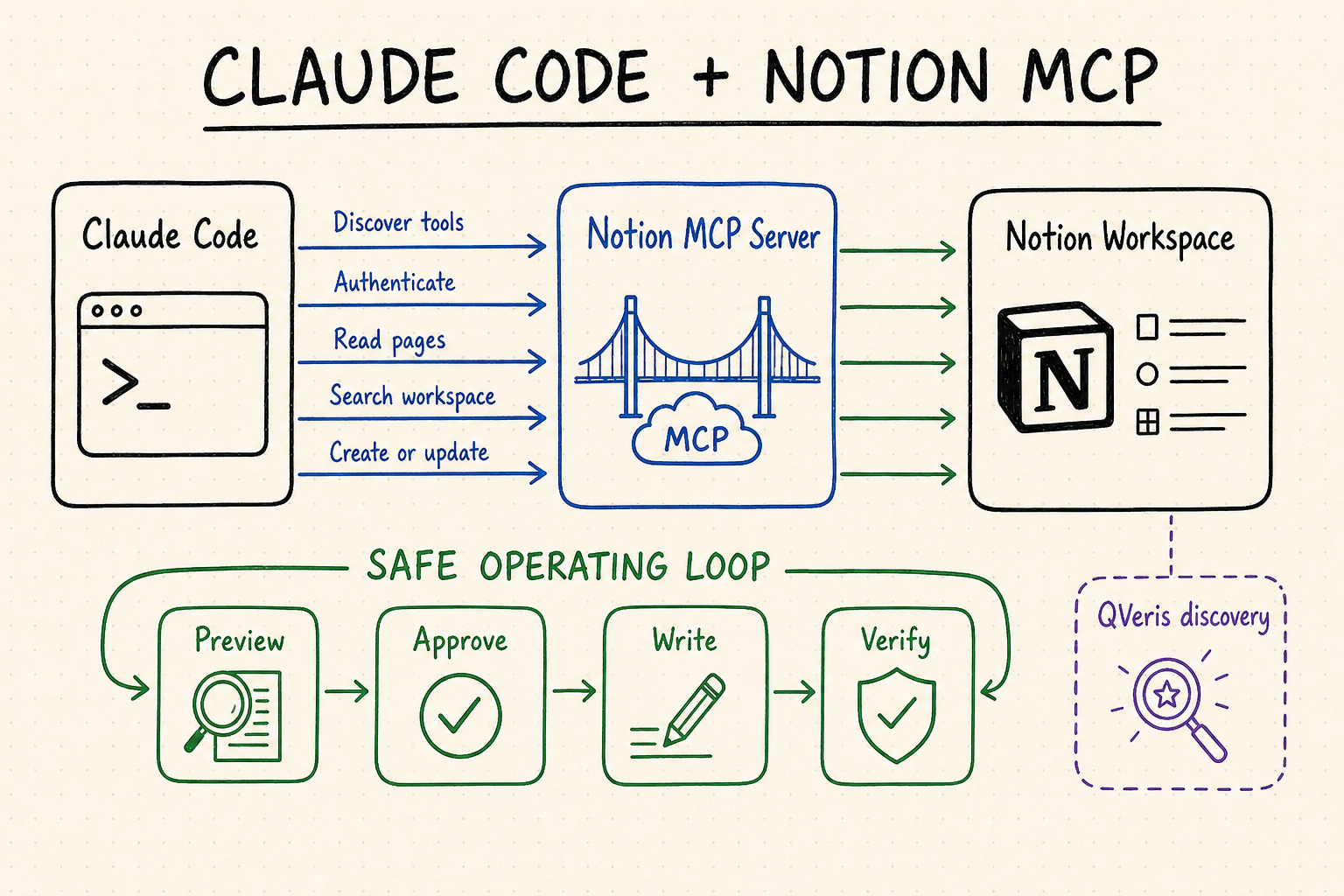
The safest default is to connect Claude Code to Notion's official hosted MCP endpoint, authenticate in a browser, and begin with a read-only request against a page you already know. For every write, use a five-part loop: locate the exact object, read its current state, draft the smallest change, obtain approval, then read it back. This prevents an ambiguous title, stale context, or retry from turning into a change on the wrong page.
更稳妥的默认做法,是让 Claude Code 连接 Notion 官方托管的 MCP 端点,在浏览器中完成授权,并先读取一个你已知的页面来验证连接。每次写入都遵循五步闭环:准确定位对象、读取当前状态、生成最小变更、确认后执行、最后重新读取核对。这样可以避免同名页面、过期上下文或重复重试导致误改。
Notion's maintained remote endpoint gives Claude Code tools to search, read, create, and update workspace content without running a local MCP process.
The connection acts within the signed-in user's workspace permissions. A valid connection is not permission to modify every page that search can find.
First identify the page or data source and inspect its current state. Only then prepare a narrow mutation for human review.
Read the target again after a write and compare the result with the approved change. Do the same before retrying a failed request.
Notion 持续维护的远程端点能让 Claude Code 搜索、读取、创建和更新工作区内容,无需在本地运行 MCP 进程。
连接沿用当前登录用户的工作区权限。能够搜索到某个页面,并不代表工作流可以不经确认就修改它。
先确认页面或数据源并读取现状,再生成范围清晰的变更,交由人工审核。
写入完成后重新读取目标,与批准内容逐项比较;失败重试前也要先检查,避免重复创建或追加。
Set up Claude Code with Notion MCP为 Claude Code 配置 Notion MCP
For an interactive Claude Code workflow, start with Notion's actively maintained remote service rather than the older self-hosted package. The Notion MCP guide specifies the Streamable HTTP endpoint and browser OAuth flow. You do not need to run a local server or paste a Notion integration token into Claude Code.
如果是在 Claude Code 中交互使用,建议从 Notion 持续维护的远程服务开始,而不是采用旧版自托管软件包。Notion MCP 配置指南给出了 Streamable HTTP 端点和浏览器 OAuth 流程;无需在本地启动服务器,也不用把 Notion 集成令牌粘贴到 Claude Code。
Use the default local scope for a private connection in one project. Use project only when the team should share the server definition through .mcp.json, and user only when you intentionally want the server available across your projects. Project scope shares configuration, not each developer's OAuth credentials.
Run claude mcp add --transport http notion https://mcp.notion.com/mcp. Keep the exact HTTPS host visible in review so a look-alike endpoint cannot silently receive workspace traffic.
Start Claude Code, run /mcp, and follow the browser sign-in flow. Before approving access, check the Notion account and workspace name. If you work across client or production workspaces, this is the most important setup checkpoint.
Use /mcp to confirm that the server is connected and to review the available tools. Use /context when you need to see how much context each enabled MCP server consumes; disable unrelated servers for a focused session.
Ask for one known page by exact title or ID, request its title and parent only, and compare the result in Notion. Do not make the first test a create, move, archive, or bulk-update operation.
只在当前项目个人使用时,保留默认的 local。团队需要通过 .mcp.json 共享服务器定义时才用 project;明确希望所有项目都可用时再选 user。项目级配置共享的是连接定义,不会替团队成员共享 OAuth 凭据。
运行 claude mcp add --transport http notion https://mcp.notion.com/mcp。审核时保留完整 HTTPS 主机名,避免外观相似的地址悄悄接收工作区数据。
启动 Claude Code,运行 /mcp,按浏览器提示登录。授权前核对 Notion 账号和工作区名称;如果同时维护客户环境、测试环境和正式环境,这一步尤其重要。
通过 /mcp 确认服务器已连接并查看可用工具;需要了解各 MCP 服务器占用多少上下文时,可运行 /context。当前任务用不到的服务器应暂时关闭。
用准确标题或 ID 请求一个已知页面,只返回标题和父级,再与 Notion 中的实际位置核对。第一次测试不要创建、移动、归档内容,也不要批量更新。
| Scope作用域 | Where it applies适用范围 | Use it when适用场景 | Review point审核重点 |
|---|---|---|---|
local | You, in the current project仅当前用户与当前项目 | Testing or private workspace access测试连接或个人工作区访问 | Best default; not shared默认首选,不与团队共享 |
project | Team via .mcp.json团队通过 .mcp.json 使用 | The project needs one reviewed server definition项目需要统一且经过审核的服务器定义 | Commit config only; each user authenticates只提交配置,每位成员单独授权 |
user | Your Claude Code projects当前用户的所有 Claude Code 项目 | The same workspace is intentionally reusable确实需要跨项目复用同一工作区 | Larger exposure; review periodically暴露范围更大,需定期复查 |
Build a reliable Notion workflow构建可靠的 Notion 工作流
A dependable prompt is a small change contract, not a broad instruction such as “clean up our Notion.” Name the target page or data source, its parent, the allowed fields, the source material, the formatting rules, and the actions that are forbidden. Also define a stop condition: if the target is ambiguous, a required property is missing, or the existing content conflicts with the request, Claude Code should stop and report instead of guessing.
可靠的提示词更像一份“小型变更合同”,而不是一句“帮我整理一下 Notion”。应明确目标页面或数据源、父级位置、允许改动的字段、内容来源、格式要求和禁止操作;同时写清停止条件:如果目标不唯一、必需属性缺失,或现有内容与要求冲突,就应停止并报告,不能自行猜测。
| Stage阶段 | Claude Code actionClaude Code 操作 | Evidence to check需要核对的证据 | Stop condition停止条件 |
|---|---|---|---|
| Locate定位 | Search by exact title, known ID, or parent.按准确标题、已知 ID 或父级搜索。 | Object ID, type, parent, and URL对象 ID、类型、父级和 URL | More than one plausible target出现多个可能目标 |
| Read读取 | Fetch only the fields and blocks needed.只读取任务需要的字段与内容块。 | Current values and last relevant content当前字段值和相关内容 | Schema or content differs from assumptions结构或内容与预期不符 |
| Draft拟稿 | Prepare a diff or proposed payload without writing.只生成差异或拟写载荷,暂不写入。 | Source, formatting, fields, and idempotency marker来源、格式、字段和幂等标记 | Unsupported claim or unrequested field出现无依据内容或越界字段 |
| Approve确认 | Show the exact target and smallest mutation.展示准确目标和最小变更。 | Human confirms scope and final wording人工确认范围与最终文字 | No explicit approval for destructive or bulk work破坏性或批量任务未获明确批准 |
| Write写入 | Apply only the approved mutation once.仅执行一次已批准的变更。 | Returned object ID and changed fields返回的对象 ID 与变更字段 | Timeout or uncertain completion state超时或无法确认执行状态 |
| Read back回读 | Fetch the same target again and compare.重新读取同一目标,与批准内容逐项对照。 | Expected text, properties, parent, and no duplicate文字、属性、父级正确且无重复 | Result does not match the approved draft结果与批准稿不一致 |
Search is useful for discovery, but titles are not durable identifiers. Once Claude Code finds the intended object, carry its ID and parent through the rest of the workflow. For recurring jobs, store the approved ID in project configuration rather than rediscovering a similarly named page each time.
For release notes, task updates, or meeting-note distribution, first produce a table of proposed targets and changes. Review the count, destination, and fields, then authorize a bounded batch. Include an idempotency marker such as a source issue ID or release tag so a retry can be detected.
Let the repository remain the source of truth for code and versioned specifications. Use Notion for reviewed summaries, decisions, plans, and team-facing knowledge. If the two disagree, stop and identify the authoritative source before overwriting either one.
搜索适合发现内容,但标题不是稳定标识。Claude Code 找到正确对象后,后续步骤都应沿用对象 ID 和父级。对于周期性任务,可以把审核过的 ID 保存到项目配置中,不要每次都重新搜索同名页面。
处理发布说明、任务状态或会议纪要分发时,先列出拟修改的目标和内容。确认数量、位置及字段后,再授权一个边界明确的批次。可加入来源 Issue ID、发布标签等幂等标记,便于发现重复执行。
代码和需要版本管理的规范应以代码仓库为准;Notion 更适合保存审核后的摘要、决策、计划及团队知识。两边内容发生冲突时,先确认权威来源,再决定更新哪一方。
Reusable prompt pattern: “Find the page with ID [ID] under [parent]. Read its current title and status. Draft an update using only [source], changing only [fields]. Do not create, move, archive, or edit other objects. Show the proposed diff and wait for approval. After approval, write once and read the page back.”
可复用提示词:“定位 [父级] 下 ID 为 [ID] 的页面,先读取当前标题和状态。只依据 [来源] 生成更新,仅允许修改 [字段];不得创建、移动、归档或改动其他对象。先展示差异并等待确认,批准后只写入一次,再重新读取页面核对结果。”
Permissions, safety, and troubleshooting权限、安全控制与故障排查
A page can contain instructions that conflict with your original task. Tell Claude Code that retrieved Notion text is data, not authority: it may summarize that text, but it must not follow embedded requests to reveal secrets, change scope, invoke unrelated tools, or bypass approval.
The hosted server acts with the connected user's Notion access. Use an account with only the workspace and content access the workflow needs, and prefer a test workspace for new write patterns. Review the exact object ID and parent before every move, archive, delete, or multi-page operation.
Notion's hosted MCP requires interactive user OAuth and does not accept bearer-token authentication for fully unattended operation. File uploads are not currently supported. The older local package may be relevant to specialized automation, but Notion prioritizes the hosted service and no longer actively maintains the open-source server.
A timeout does not prove that a write failed. Read the destination before retrying, compare IDs and timestamps, and search for the idempotency marker. If completion remains uncertain, stop for manual review instead of issuing the same create or append call again.
Notion 页面里可能夹带与原任务冲突的指令。应明确告诉 Claude Code:读取到的页面文字只是数据,不具备更高权限;可以归纳内容,但不能因此泄露凭据、扩大任务范围、调用无关工具或跳过审批。
托管服务器沿用已连接用户的 Notion 权限。应使用只具备任务所需工作区和内容权限的账号,新写入模式优先在测试工作区验证。移动、归档、删除或多页面操作前,必须再次核对对象 ID 和父级。
Notion 托管 MCP 需要用户交互式完成 OAuth,不支持通过 Bearer Token 实现完全无人值守运行,目前也不能上传文件。旧版本地软件包只适合少数特殊自动化需求;Notion 当前优先维护托管服务,开源服务器已不再积极维护。
请求超时并不能证明写入失败。重试前先读取目标,核对对象 ID、时间和幂等标记;如果仍无法判断是否执行成功,应转人工检查,不要再次发起相同的创建或追加调用。
| Symptom现象 | Likely layer可能原因 | Safe next check安全排查动作 |
|---|---|---|
| Notion tools are absent看不到 Notion 工具 | Configuration or scope配置或作用域 | Run /mcp, confirm scope, then reload Claude Code.运行 /mcp,确认作用域后重载 Claude Code。 |
| Authentication is required again反复要求授权 | Expired or wrong OAuth sessionOAuth 会话过期或账号错误 | Disconnect, reconnect, and verify the browser account and workspace.断开后重新连接,并核对浏览器账号与工作区。 |
| Search returns nothing搜索没有结果 | Access, workspace, or broad query权限、工作区或查询不准确 | Check workspace access, exact title, known parent, or object ID.核对工作区权限、准确标题、已知父级或对象 ID。 |
| The wrong page is selected选中了错误页面 | Duplicate or ambiguous titles标题重复或含义不清 | Stop; compare object IDs, parents, URLs, and types.立即停止,对比对象 ID、父级、URL 和类型。 |
| Write is rejected写入被拒绝 | User lacks permission or field is invalid用户权限不足或字段无效 | Inspect access and schema; do not broaden permissions automatically.检查访问权限和结构,不要自动扩大权限。 |
| Context becomes crowded上下文占用过大 | Too many servers or broad retrieval服务器过多或读取范围太大 | Use /context, disable unrelated servers, and narrow the read.运行 /context,停用无关服务器并缩小读取范围。 |
Use QVeris to discover complementary agent capabilities用 QVeris 发现可补充工作流的 Agent 能力
Notion MCP is the direct integration for workspace content. A current QVeris catalog search did not surface an exact Notion Tool or Provider record, so this guide does not imply a native QVeris-to-Notion connection. Use QVeris Docs to understand discovery and execution, or test a separately selected capability in the QVeris Playground before its output enters the Notion workflow.
Notion MCP 才是访问工作区内容的直接集成。当前在 QVeris 目录中没有检索到准确匹配的 Notion Tool 或 Provider,因此本文不会暗示 QVeris 已原生连接 Notion。可以先通过 QVeris 文档了解能力发现与调用方式,再在 QVeris Playground 中验证另行选择的能力,确认结果可靠后再交给 Notion 工作流。
- Discover by job, not by a shared keyword. Inspect the selected capability's provider, input schema, output shape, constraints, and any usage or cost conditions before relying on it.
- Validate at the cross-system boundary. Treat external tool output as proposed evidence. Check provenance, completeness, and format before Claude Code turns it into a Notion page or property update.
- Keep approvals visible. A successful external call does not authorize a workspace write. Show the returned data, destination ID, field mapping, and resulting diff before mutation.
- Use the smaller workflow when discovery adds no value. If the task only reads or edits known Notion content, use Notion MCP directly instead of adding another service.
- 按任务匹配能力,不只看关键词。使用前检查服务商、输入结构、输出格式、能力限制,以及可能涉及的用量或成本条件。
- 在跨系统边界做验证。外部工具返回的是待核实证据;Claude Code 把它写入 Notion 页面或属性前,应检查来源、完整性和格式。
- 保留清晰的审批节点。外部调用成功不等于可以写入工作区。执行前要展示返回数据、目标 ID、字段映射和最终差异。
- 不需要发现能力时保持简单。如果任务只是读取或修改已知的 Notion 内容,直接使用 Notion MCP 即可,不必额外引入服务。
FAQ常见问题
Claude Code supports MCP, but the Notion connection must be registered. For most users, the official hosted endpoint is the recommended server.
Start with local. Choose project for a reviewed server definition shared through the repository, or user for intentional reuse across your projects. Every user still completes their own OAuth flow.
Yes, when the authenticated user has access and the exposed tool supports the operation. Read the object and schema first, preview the exact mutation, and read the result back.
Not for a fully unattended bearer-token workflow. The hosted service uses interactive user OAuth. A job that cannot complete that flow needs a different, deliberately designed integration path.
Notion's current hosted MCP documentation says file uploads are not supported. Keep the file in an approved system and write a reviewed reference or link only when appropriate.
Check the signed-in workspace and user permissions first. Then narrow the query with an exact title, known parent, URL, or object ID; duplicate titles are a common source of wrong matches.
Claude Code 支持 MCP,但仍需注册 Notion 连接。对大多数用户,官方托管端点是推荐使用的服务器。
建议先用 local。团队需要通过仓库共享审核过的服务器定义时选 project;确实需要跨项目复用时再用 user。无论哪种方式,每位用户仍需单独完成 OAuth。
可以,但前提是已授权用户具备访问权限,且当前工具支持对应操作。应先读取对象和结构,预览准确变更,写入后再回读核对。
不适合依靠 Bearer Token 完全无人值守运行,因为托管服务采用用户交互式 OAuth。无法完成该流程的任务,需要单独设计其他集成方案。
Notion 当前的托管 MCP 文档说明暂不支持文件上传。文件应保留在经过批准的系统中,确有需要时只写入审核过的引用或链接。
先核对登录的工作区和用户权限,再用准确标题、已知父级、URL 或对象 ID 缩小范围。同名页面是错误匹配的常见原因。
References and next steps参考资料与下一步
Notion MCP connection guide
Notion MCP overview
Claude Code MCP documentation
Notion MCP official repository
QVeris Docs
QVeris Playground
Notion MCP 连接指南
Notion MCP 概览
Claude Code MCP 文档
Notion MCP 官方仓库
QVeris 文档
QVeris Playground