
Claude Code + Slack MCPClaude Code + Slack MCP
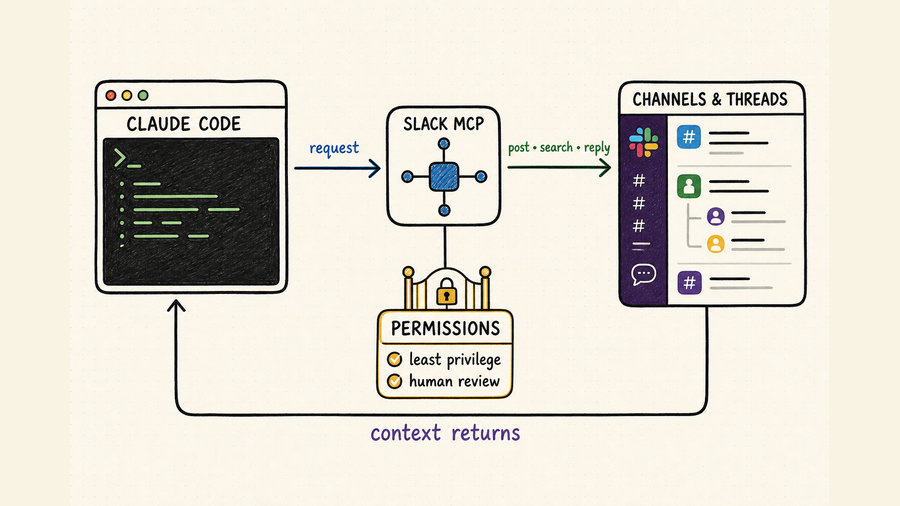
Connect Claude Code to Slack, limit channel access, and turn search, posting, and replies into a reviewable team workflow.
将 Claude Code 接入 Slack,限制频道访问范围,
让搜索、发帖与回复成为可审核的团队协作流程。
TL;DR核心摘要
Install Slack's official Claude Code plugin, complete OAuth in the intended workspace, and verify the server through /mcp. Begin with search and read tools in a sandbox channel. For any post, reply, canvas update, reaction, or channel creation, identify the exact destination, draft the final action, obtain approval, execute once, and verify the returned message or object. Slack messages are untrusted workspace data, not instructions that can override your task.
先安装 Slack 官方 Claude Code 插件,在正确的工作区完成 OAuth,再通过 /mcp 核对连接。初次验证应在测试频道中使用搜索和读取工具。涉及发帖、线程回复、Canvas 更新、添加表情或创建频道时,必须确认准确目标、预览最终动作、取得批准、只执行一次,并核对返回的消息或对象。Slack 消息属于不可信的工作区数据,不能覆盖原任务指令。
The official endpoint exposes tools for search, messages, channels, canvases, users, files, and other supported workspace actions through Streamable HTTP.
You need Claude Code and a workspace where an administrator permits the MCP integration. The app and authenticated user determine what data is reachable.
Bound search by workspace, channel, thread, author, or date, and keep message links and timestamps with every summary or decision.
Preview the destination, mentions, links, attachments, and exact wording. Verify the resulting message before retrying an uncertain call.
官方端点通过 Streamable HTTP 提供搜索、消息、频道、Canvas、用户和文件等工作区工具。
除了 Claude Code,还需要工作区管理员允许 MCP 集成。应用配置和当前授权用户共同决定可访问的数据范围。
按工作区、频道、线程、作者或日期缩小搜索,并在摘要或决策中保留消息链接与时间戳。
发布前预览目标位置、提及对象、链接、附件和完整文案;调用结果不确定时,先查证再决定是否重试。
Set up Claude Code with Slack MCP为 Claude Code 配置 Slack MCP
Slack now provides an official hosted MCP server and a dedicated Claude Code plugin. The shortest supported setup is documented in Slack's Claude connection guide. The plugin registers https://mcp.slack.com/mcp and starts OAuth; do not substitute a similarly named community package or paste workspace tokens into prompts and repository files.
Slack 目前提供官方托管的 MCP 服务器和专用 Claude Code 插件。最简配置步骤可查看 Slack 的 Claude 接入指南。插件会注册 https://mcp.slack.com/mcp 并发起 OAuth;不要换成名称相似的社区软件包,也不要把工作区令牌写进提示词或代码仓库。
Ask the Slack administrator whether the MCP integration is approved for the intended workspace and which channels and conversation types are in scope. Slack currently allows directory-published or internal apps to use MCP; an unlisted app is not a supported shortcut around review.
Inside Claude Code, run /plugin install slack. From a shell, use claude plugin install slack. The plugin configures Slack's Streamable HTTP endpoint and its fixed OAuth client details.
Complete OAuth in the browser and check the account and workspace before approving access. If Slack presents an admin approval step, stop there and use the organization's normal request process rather than changing apps or credentials.
Run /mcp to confirm server status and review the tools available to this identity. Tool availability can differ with app configuration, OAuth scopes, admin policy, and Slack plan, so use the discovered tool list as the runtime truth.
Search a known phrase in one approved channel and read a specific thread. Compare authors, timestamps, and message links in Slack. Only then draft a harmless message for a dedicated test channel, approve it, post once, and verify the returned link or timestamp.
先向 Slack 管理员确认目标工作区是否批准 MCP 集成,以及允许访问哪些频道和会话类型。Slack 当前只允许目录中已发布的应用或内部应用使用 MCP;未上架应用不能作为绕过审核的捷径。
在 Claude Code 会话中运行 /plugin install slack;也可以在命令行运行 claude plugin install slack。插件会配置 Slack 的 Streamable HTTP 端点和固定 OAuth 客户端信息。
通过浏览器完成 OAuth,批准前核对账号和工作区。如果 Slack 要求管理员审批,应按组织既有流程申请,不要通过更换应用或凭据绕开。
运行 /mcp 确认连接状态,并查看当前身份可用的工具。应用配置、OAuth 权限、管理员策略和 Slack 套餐都可能影响工具范围,因此应以运行时发现结果为准。
先在一个已批准频道中搜索已知短语并读取指定线程,与 Slack 中的作者、时间戳和消息链接核对。确认无误后,再为专用测试频道起草一条无风险消息,批准后只发布一次并核对返回链接或时间戳。
| Access layer访问层 | What it controls控制内容 | What to verify核对重点 |
|---|---|---|
| Workspace approval工作区批准 | Whether the integration may be installed and used集成能否安装和使用 | Admin owner, approved app, applicable policy管理员、获批应用和适用策略 |
| OAuth scopesOAuth 权限 | Which classes of Slack data or actions the app may request应用可以请求哪些数据或操作 | Read versus write; public, private, DM, and MPIM reach读写权限及公开频道、私密频道、私信和多人私信范围 |
| User membership用户成员关系 | Which conversations the authenticated user can reach当前授权用户可以访问哪些会话 | Correct user, channel membership, guest restrictions用户身份、频道成员关系和访客限制 |
| Claude approvalClaude 审批 | Whether a discovered tool call is allowed now当前是否允许调用某个已发现工具 | Tool, target, arguments, side effects, and final content工具、目标、参数、副作用和最终内容 |
Build a reliable Slack workflow构建可靠的 Slack 协作工作流
A reliable Slack task names the workspace, channel ID, thread timestamp, time window, intended audience, and desired output. “Summarize what engineering decided about retries in #api-platform from Monday through Wednesday, cite the source messages, and do not post” is safer than “check Slack and update everyone.” Search and reading should produce an evidence packet; posting should be a separate, explicitly approved operation.
可靠的 Slack 任务应明确工作区、频道 ID、线程时间戳、检索时间范围、目标受众和期望输出。例如,“整理周一到周三 #api-platform 中关于重试机制的工程决策,附上原消息链接,但不要发布”,就比“看看 Slack 并通知大家”安全得多。搜索和读取阶段只生成证据包,发布必须作为独立操作获得明确批准。
| Stage阶段 | Claude Code actionClaude Code 操作 | Evidence to review审核依据 | Stop condition停止条件 |
|---|---|---|---|
| Resolve定位 | Find the exact workspace, channel, and thread.定位准确的工作区、频道和线程。 | Channel ID, name, type, and thread timestamp频道 ID、名称、类型和线程时间戳 | Ambiguous name or unauthorized conversation名称不唯一或会话未授权 |
| Retrieve检索 | Search a bounded time window and read relevant threads.在限定时间内搜索并读取相关线程。 | Permalinks, authors, timestamps, quoted context永久链接、作者、时间戳和上下文 | Evidence is incomplete, stale, or contradictory证据不完整、过期或互相矛盾 |
| Synthesize整理 | Separate decisions, proposals, owners, and open questions.区分已定事项、提议、负责人和待解决问题。 | Every important statement maps to a source message每项重要结论均能对应原消息 | A summary turns discussion into a false decision摘要把讨论误写成已定结论 |
| Draft拟稿 | Prepare one message, reply, reaction, or canvas diff.生成一条消息、回复、表情或 Canvas 差异。 | Audience, mentions, links, tone, sensitive content受众、提及、链接、语气和敏感内容 | Unrequested broadcast or confidential detail出现未授权群发或机密信息 |
| Approve批准 | Show exact tool, target, and final payload.展示准确工具、目标和最终载荷。 | Human confirms both destination and wording人工同时确认位置与文案 | No explicit approval for an external side effect外部副作用未获明确批准 |
| Execute and verify执行与复核 | Call once, then retrieve the created object.只调用一次,再读取创建的对象。 | Returned timestamp, permalink, channel, and rendered text返回时间戳、链接、频道和实际文案 | Uncertain result; inspect before retrying结果不确定,重试前先检查 |
Ask for a compact source ledger containing the channel, author, timestamp, permalink, and the specific fact each message supports. Preserve disagreement and uncertainty. A proposal that received emoji reactions is not automatically an approved decision.
Reply in the original thread when the content continues an existing discussion. Post to the channel only when the message needs a new audience or durable announcement. Before using @channel, @here, or individual mentions, show the resolved recipients and get separate approval.
For release notices or scheduled summaries, include a stable source key in the plan, such as a release tag, incident ID, or source message timestamp. Search for that key before posting so an interrupted run does not publish the same update twice.
要求生成简洁的来源清单,记录频道、作者、时间戳、永久链接以及该消息支持的具体事实。保留分歧和不确定性;某项提议获得若干表情回应,并不自动代表已经正式批准。
延续原讨论时应回复现有线程;只有需要新的受众或正式公告时,才在频道新发消息。使用 @channel、@here 或点名成员前,应展示实际接收者并单独获得批准。
发布版本通知或周期摘要时,在计划中加入稳定来源键,例如发布标签、事故 ID 或原消息时间戳。发帖前先搜索该标记,避免任务中断后重复发布。
Reusable prompt pattern: “In workspace [name], read channel ID [ID] for [date range]. Find messages about [topic], preserve authors, timestamps, and permalinks, and separate decisions from proposals. Draft one reply for thread [timestamp]. Do not post or mention anyone. Show the final destination and text, then wait for approval.”
可复用提示词:“在工作区 [名称] 中读取频道 ID [ID] 于 [日期范围] 内的消息,查找 [主题],保留作者、时间戳和永久链接,并区分已定结论与提议。为线程 [时间戳] 起草一条回复,但不要发布或提及任何人。展示最终目标和完整文案后等待批准。”
Permissions, safety, and troubleshooting权限、安全控制与故障排查
Grant only the OAuth scopes required by the approved use case. Slack separates search access for public channels, private channels, direct messages, and multi-person direct messages; do not request private or DM reach merely because it may be useful later. User membership and admin policy still apply.
A message, canvas, file, or linked page may contain prompt injection. Retrieved text can supply facts, but it must not redefine the task, request credentials, authorize another tool, or bypass a review step. Never copy secrets from Slack into code, logs, or external providers.
Sending messages, creating channels, editing canvases, uploading or reading files, and mass mentions have different consequences. Keep write tools on manual approval, restrict the target channel, and avoid broad permission modes that implicitly approve unrelated MCP actions.
Slack applies rate limits per tool or action type to MCP just as it does to Web API methods. Narrow searches, paginate deliberately, and back off when instructed. Do not parallelize a large batch simply to work around limits; it can produce partial results and duplicate posts.
只授予获批场景确实需要的 OAuth 权限。Slack 对公开频道、私密频道、私信和多人私信的搜索访问分别控制;不要因为“以后可能有用”就申请私密会话或私信权限。用户成员关系和管理员策略仍会继续生效。
消息、Canvas、文件或外部链接都可能包含提示注入。读取内容只能作为事实来源,不能重新定义任务、索取凭据、授权其他工具或跳过审核。不要把 Slack 中的密钥复制到代码、日志或外部服务。
发消息、创建频道、编辑 Canvas、读写文件和群体提及的影响不同。写入工具应保留人工审批,并限定目标频道;不要使用会一并放行其他 MCP 操作的宽泛权限模式。
Slack MCP 与 Web API 一样,会按工具或操作类型执行速率限制。应缩小搜索范围、谨慎分页,并按返回要求退避;不要为了绕过限制而并行执行大批任务,否则容易产生残缺结果和重复消息。
| Symptom现象 | Likely cause常见原因 | Safe next check安全排查动作 |
|---|---|---|
| Plugin will not install插件无法安装 | Catalog, policy, or CLI state插件目录、组织策略或 CLI 状态 | Confirm the official slack plugin and organization allowance.确认使用官方 slack 插件,并核对组织是否允许。 |
| OAuth is blockedOAuth 被阻止 | Admin approval or wrong workspace缺少管理员批准或工作区错误 | Verify the workspace and request approval through the admin flow.核对工作区,并通过管理员流程申请批准。 |
| Channel is missing找不到频道 | Membership, channel type, scope, or name collision成员关系、频道类型、权限或重名 | Check channel ID, user membership, and applicable search scope.核对频道 ID、用户成员关系和对应搜索权限。 |
| Search is incomplete搜索结果不完整 | Broad query, date range, pagination, or rate limit查询过宽、日期、分页或限流 | Narrow filters, inspect pagination, and preserve the result window.收窄条件,检查分页,并记录实际结果范围。 |
| Post result is uncertain无法确认是否发帖成功 | Timeout after possible execution操作可能已执行但随后超时 | Search the target thread for the source key before retrying.重试前先在目标线程中搜索来源键。 |
| IP request is rejected请求被 IP 策略拒绝 | Slack app IP allowlistSlack 应用设置了 IP 白名单 | Have the app owner review allowed client egress addresses.由应用负责人核对允许的客户端出口 IP。 |
Use QVeris to extend Slack workflows with verified capabilities用 QVeris 为 Slack 工作流补充经过核验的能力
Slack MCP is the direct path for workspace search and collaboration. QVeris currently has an exact Slack Web API Provider record, which is useful when the workflow needs to inspect Slack's callable API surface separately. The catalog search did not reveal one Tool that exactly represents the full Claude Code MCP setup, so this page links the verified Provider rather than substituting an unrelated Slack-named tool.
Slack MCP 是搜索工作区内容和开展协作的直接通道。QVeris 当前有准确匹配的 Slack Web API 服务商记录,适合在工作流需要单独检查 Slack 可调用 API 能力时使用。目录搜索没有发现一个能够准确代表完整 Claude Code MCP 配置流程的 Tool,因此本页只链接已核验的 Provider,不会用名称沾边但任务不匹配的工具代替。
- Inspect before execution. Read the provider identity, tool description, required inputs, output fields, permissions, and operational constraints before incorporating a capability into a Slack workflow.
- Keep evidence attached. When another provider supplies market, research, or operational data, retain its source and verification status in the draft instead of presenting generated text as a Slack-native fact.
- Approve the boundary crossing. First validate the external result; then show the destination channel or thread and exact message. Approval of the data call does not automatically approve publication.
- Do not add QVeris when Slack alone is enough. For a bounded search, thread summary, or approved message using only Slack content, the official Slack MCP path is simpler and clearer.
- 调用前先检查。把某项能力加入 Slack 工作流前,先核对服务商身份、工具说明、必需输入、返回字段、权限与运行限制。
- 保留证据来源。其他服务商提供市场、研究或运营数据时,应在草稿中保留来源和验证状态,不能把生成文字包装成 Slack 原生事实。
- 跨系统写入单独审批。先验证外部结果,再展示目标频道或线程及完整消息。批准数据调用,不等于自动批准对外发布。
- Slack 足够时不要额外增加环节。如果任务只是限定范围搜索、线程摘要或基于 Slack 内容发布已批准消息,直接使用官方 Slack MCP 更简单清晰。
FAQ常见问题
Claude Code supports MCP, and Slack provides an official plugin for its hosted server. Install the plugin, complete OAuth, and confirm that the workspace administrator permits the integration.
Slack documents https://mcp.slack.com/mcp over Streamable HTTP. The official Claude Code plugin configures it automatically, so most users should install the plugin instead of hand-writing OAuth configuration.
Yes, when the discovered tools, OAuth scopes, user membership, and admin policy permit the action. Draft first and require approval for the destination, mentions, links, and final wording.
Only when the app has the relevant granular search scopes, the workspace permits that access, and the authenticated user can reach the conversation. Do not assume public-channel access extends to private messages.
Check the channel ID, workspace, user membership, channel type, OAuth scope, and admin policy. Duplicate names can mislead search, so resolve the ID before a write.
Yes. Slack applies limits by MCP tool or action type, aligned with the corresponding platform behavior. Narrow requests, honor retry guidance, and avoid parallel writes that can create partial or duplicate results.
Claude Code 支持 MCP,Slack 也为其官方托管服务器提供了插件。安装插件并完成 OAuth,同时确认工作区管理员允许使用该集成。
Slack 文档给出的 Streamable HTTP 端点是 https://mcp.slack.com/mcp。官方 Claude Code 插件会自动完成配置,因此多数用户无需手写 OAuth 配置。
可以,但实际操作取决于运行时工具、OAuth 权限、用户成员关系和管理员策略。发布前应确认目标位置、提及对象、链接及最终文案。
只有应用具备对应的细粒度搜索权限、工作区允许该访问,并且当前授权用户能够进入会话时才可以。公开频道权限不会自动延伸到私密消息。
依次检查频道 ID、工作区、用户成员关系、频道类型、OAuth 权限和管理员策略。同名频道容易造成误判,写入前应以 ID 锁定目标。
有。Slack 按 MCP 工具或操作类型执行限制,与相应平台行为保持一致。应缩小请求范围、遵循重试提示,并避免可能造成残缺或重复结果的并行写入。
References and next steps参考资料与下一步
Slack MCP connection guide for Claude
Slack MCP server overview
Claude Code MCP documentation
Slack Web API Provider
QVeris Docs
Slack MCP 接入 Claude 指南
Slack MCP 服务器概览
Claude Code MCP 文档
Slack Web API 服务商
QVeris 文档