
Context 7 MCP for
Claude Code在 Claude Code 中
接入 Context7 MCP
Connect Claude Code to current, version-aware library documentation and verify sources before using generated code.
让 Claude Code 获取与版本匹配的最新库文档,
并在使用生成代码前核验资料来源。
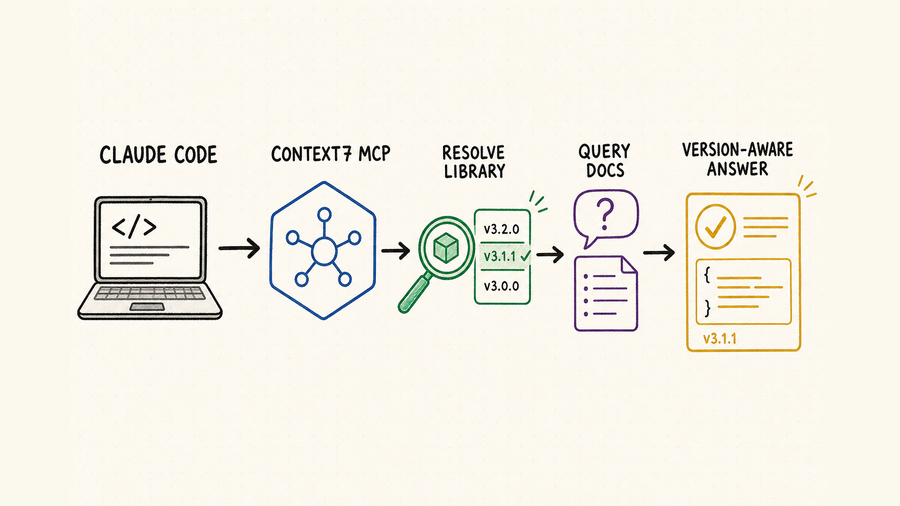
TL;DR核心摘要
Context7 gives Claude Code two focused documentation tools: resolve a library to its Context7 ID, then query current source material.
With Node.js 18 or newer, run npx ctx7 setup --claude and choose MCP mode, or register the remote HTTP endpoint manually.
Name the library, version, and task. Review the evidence before accepting code.
Accept an answer only when package identity, version coverage, focused source material, repository compatibility, and local tests all agree.
Context7 为 Claude Code 提供两项文档工具:先把库名称解析为 Context7 库标识,再查询最新文档资料。
在 Node.js 18 或更高版本中运行 npx ctx7 setup --claude 并选择 MCP 模式,也可以手动注册远程 HTTP 端点。
明确库名称、版本和任务,并在采用生成代码前检查文档依据。
只有包身份、版本覆盖、聚焦资料、仓库兼容性与本地测试相互一致时,才能接受答案。
The official product name is Context7; “Context 7 MCP Claude Code” is a spaced search phrase for the same integration. Context7 can improve documentation grounding by resolving a library and retrieving topic-specific source material, but retrieval quality depends on the selected library, indexed version, query scope, and repository evidence. Treat every result as a candidate source set that must be verified, not as automatic permission to edit code.
官方产品名是 Context7,“Context 7 MCP Claude Code”只是用户搜索同一集成时常见的分词写法。Context7 通过解析软件库并检索特定主题资料,让答案更有文档依据,但质量仍取决于所选库、索引版本、查询范围和仓库证据。每次返回都只是需要验证的候选资料集合,不能自动转化为修改代码的许可。
Set up Context7 MCP in Claude Code在 Claude Code 中配置 Context7 MCP
With Node.js 18 or newer, run npx ctx7 setup --claude, choose MCP mode, complete browser authorization, and restart Claude Code if the tools do not appear.
使用 Node.js 18 或更高版本运行 npx ctx7 setup --claude,选择 MCP 模式并完成浏览器授权;如果工具没有出现,请重启 Claude Code。
The guided setup can also install CLI + Skills instead of MCP. Context7's official Claude Code plugin adds a documentation lookup skill, a focused docs-researcher agent, and the /context7:docs command. Choose one primary path first; installing multiple modes without a reason can create duplicate behavior and make troubleshooting harder.
引导配置也可以选择 CLI + Skills,而不是 MCP。Context7 官方 Claude Code 插件还会加入文档检索 Skill、聚焦查询的 docs-researcher Agent 和 /context7:docs 命令。应先选择一条主要路径;无明确原因同时安装多种模式,容易产生重复行为并增加排错难度。
Use npx ctx7 setup --claude for the supported guided flow and choose CLI + Skills or MCP. For manual remote HTTP, use https://mcp.context7.com/mcp and pass an API key only through the client's documented secure header mechanism.
Inspect the installed skill, plugin, or MCP definition. Keep API keys out of committed files, shared URLs, prompts, screenshots, and shell history. For a headless machine, use a pre-created key because browser OAuth normally returns to localhost.
For MCP, inspect claude mcp list, claude mcp get context7, and /mcp. Confirm one healthy server and the expected documentation tools. For the plugin, verify the marketplace source, installed plugin, skill, agent, and command.
Choose a familiar dependency pinned in the lockfile, ask one narrow version-specific question, and require the resolved library identity plus source facts. Compare the answer with local types and the library's official documentation.
通过 npx ctx7 setup --claude 使用官方引导流程,并选择 CLI + Skills 或 MCP。手动远程 HTTP 使用 https://mcp.context7.com/mcp,API 密钥只能通过客户端文档规定的安全请求头传入。
检查已安装 Skill、插件或 MCP 定义。API 密钥不得进入提交文件、共享地址、提示词、截图和命令历史。无界面机器应使用预先创建的密钥,因为浏览器 OAuth 通常回调 localhost。
MCP 模式检查 claude mcp list、claude mcp get context7 与 /mcp,确认只有一个健康服务并提供预期文档工具。插件模式则检查 marketplace 来源、插件、Skill、Agent 与命令。
从锁定文件选择一个熟悉依赖,提出一个聚焦且与版本相关的问题,要求说明解析库身份和资料事实,再与本地类型及该库官方文档核对。
Prompt Context7 for precise documentation用明确提示词查询 Context7 文档
State the package, installed version, ecosystem, runtime, API surface, and desired artifact. If you know the Context7 library ID, include it to skip ambiguous matching. Ask Claude to show the resolved identity and version coverage before retrieving details. Then limit the query to one task, such as a middleware option, a method signature, or a migration step.
请说明软件包、安装版本、生态、运行环境、目标 API 范围和预期产物。若已知 Context7 库标识,可直接提供以跳过歧义匹配。检索细节前先让 Claude 展示解析身份与版本覆盖,再把查询限定到一个任务,例如中间件选项、方法签名或迁移步骤。
| Step步骤 | Claude Code taskClaude Code 任务 | Evidence证据 | Reject when拒绝条件 |
|---|---|---|---|
| Resolve解析库 | Match a package name and ecosystem to the most relevant Context7 library ID.把包名与生态匹配到最相关的 Context7 库标识。 | Resolved ID, project identity, description, and available versions.解析 ID、项目身份、说明与可用版本。 | A similarly named package, fork, or unrelated ecosystem wins.名称相似的包、分支或其他生态被选中。 |
| Constrain限定范围 | Name installed version, runtime, framework mode, feature, and compatibility limits.明确安装版本、运行环境、框架模式、功能和兼容限制。 | Lockfile, manifest, imports, config, and runtime target.锁定文件、清单、导入、配置与运行目标。 | The requested context assumes another major version or runtime.检索上下文假设了其他主版本或运行时。 |
| Query查询文档 | Ask one focused question instead of retrieving a broad documentation dump.围绕一个具体问题查询,避免无目标拉取大段文档。 | Relevant source sections, examples, limitations, and version notes.相关资料段落、示例、限制与版本说明。 | Results discuss adjacent concepts but not the requested API.结果只讨论相邻概念,没有覆盖目标 API。 |
| Triangulate交叉核对 | Compare retrieved facts with local types, source, configuration, and official release notes.把检索事实与本地类型、源码、配置和官方发行说明对照。 | Agreement on imports, signatures, defaults, and breaking changes.导入、签名、默认值与破坏性变化相互一致。 | Sources conflict or version coverage is unclear.来源冲突或版本覆盖不清晰。 |
| Implement实现 | Make the smallest change that satisfies the documented contract.按照已确认契约做满足需求的最小修改。 | Focused diff with no unrelated dependency or configuration churn.聚焦差异,不引入无关依赖或配置变化。 | Generated code expands scope beyond the reviewed plan.生成代码超出已审查计划范围。 |
| Verify验证 | Run types, lint, tests, build, and a targeted runtime check.运行类型、lint、测试、构建与聚焦运行检查。 | Repository results plus expected runtime behavior.仓库检查结果与预期运行行为。 | The code merely resembles the example but fails local evidence.代码只是看起来像示例,却未通过本地证据。 |
Prompt pattern: “Read the lockfile and identify the exact installed [package] version and runtime. Resolve the official Context7 library and show its identity before querying. Retrieve documentation only for [API/topic], including version notes and limitations. Compare it with this repository, propose a minimal change, and stop before editing if the sources conflict.”
提示词模板:“读取锁定文件,确认 [package] 的准确安装版本与运行环境。解析官方 Context7 软件库,并在查询前展示身份。只检索 [API/topic],包括版本说明与限制。与当前仓库对照,提出最小修改;若来源冲突,在编辑前停止。”
Troubleshoot Context7 MCP methodically按步骤排查 Context7 MCP 问题
Update Claude Code, inspect the installed mode and registration scope, and reload the session. For MCP, use claude mcp list, claude mcp get context7, /mcp, and claude mcp logs context7. For the plugin, confirm marketplace and plugin status.
For local stdio, verify Node.js, package startup, and environment variables. For remote HTTP, verify the official endpoint, secure header configuration, proxy, TLS policy, and API-key status.
Provide the exact package name, ecosystem, repository, or known Context7 library ID. Do not continue merely because the returned documentation discusses a similar framework.
Confirm the requested version is indexed, reduce the query to one API or configuration concern, and state the runtime. If coverage is still absent, use the library supplier's official documentation and changelog directly.
Use a securely stored Context7 key for higher limits. If tools appear twice, identify whether MCP, plugin, and CLI + Skills overlap, remove stale setup, and retain one intentional primary path.
更新 Claude Code,检查安装模式与注册作用域并重新加载。MCP 模式使用 claude mcp list、claude mcp get context7、/mcp 与 claude mcp logs context7;插件模式确认 marketplace 与插件状态。
本地 stdio 检查 Node.js、软件包启动和环境变量;远程 HTTP 检查官方端点、安全请求头配置、代理、TLS 策略与 API 密钥状态。
提供准确包名、生态、仓库或已知 Context7 库标识。即使返回文档讨论相似框架,也不能继续使用。
确认所需版本已经被索引,把查询缩小到一个 API 或配置问题,并说明运行环境。仍无覆盖时,直接使用该库供应方的官方文档与变更日志。
需要更高额度时使用安全保存的 Context7 密钥。工具重复时检查 MCP、插件与 CLI + Skills 是否重叠,移除旧配置,只保留一条有意选择的主路径。
Use QVeris beyond library documentation超出库文档范围时使用 QVeris
Context7 serves software documentation. Current QVeris Tool and Provider searches return no exact Context7 entry, so use QVeris Docs and the Playground only for a separate external capability discovered at runtime.
Context7 负责检索软件文档。当前 QVeris Tool 与 Provider 搜索没有返回完全对应的 Context7 条目。只有运行时还需要其他外部能力时,才需要查阅 QVeris 文档,并在 Playground 中继续寻找和调用合适工具。
- Use Context7 to verify the client library contract; use QVeris only to discover a separate live capability.
- Inspect the QVeris result's provider, schema, constraints, and cost before calling it.
- Record provider, timestamp, arguments, response, and approval, then validate the result before repository or data mutation.
- 使用 Context7 核验客户端库契约;只有发现独立实时能力时才使用 QVeris。
- 调用前检查 QVeris 结果中的供应商、参数结构、约束与成本。
- 记录供应商、时间戳、参数、响应和批准过程,结果通过校验后才能修改仓库或数据。
FAQ常见问题
The product name is Context7. “Context 7 MCP Claude Code” is a common spaced search phrase for the same integration.
Basic use can work without one, but Context7 recommends a free key for higher limits and requires one for private repositories. Treat it as a secret.
Use the guided setup to choose one primary mode. Remote HTTP reduces local startup work; other modes can offer tighter workflow integration.
Check the resolved project identity, ecosystem, description, available versions, and repository package. A similar name is insufficient.
Do not silently use another version. Consult the library supplier's official versioned docs, release notes, source, and local types, and state the coverage gap.
No. It improves the source context used for planning and code generation. Type checks, tests, builds, and focused runtime verification remain required.
官方产品名是 Context7。“Context 7 MCP Claude Code” 是用户搜索同一接入方式时常用的分词写法。
基础使用可以无需密钥,但 Context7 建议使用免费密钥提高额度,私有仓库则必须使用。应按密钥管理。
通过引导配置选择一条主路径。远程 HTTP 可减少本地启动工作,其他模式则可能提供更紧密的工作流集成。
检查解析项目身份、生态、说明、可用版本与仓库包。只有名称相似远远不够。
不要静默改用其他版本。应查询软件库供应方的官方版本文档、发行说明、源码与本地类型,并明确说明覆盖缺口。
不能。它改善方案和代码生成所用的资料上下文,但类型检查、测试、构建与聚焦运行验证仍然必不可少。
References and next steps参考资料与下一步
Context7 Claude Code guide
Context7 repository
Claude Code MCP documentation