
Context7 MCP Claude Code
Setup & UsageContext7 MCP Claude Code
配置与使用指南
Give Claude Code current, version-specific library documentation before it plans, explains, or changes your code.
在 Claude Code 制定方案、解释逻辑或修改代码前,
为它提供与当前版本相符的软件库文档。
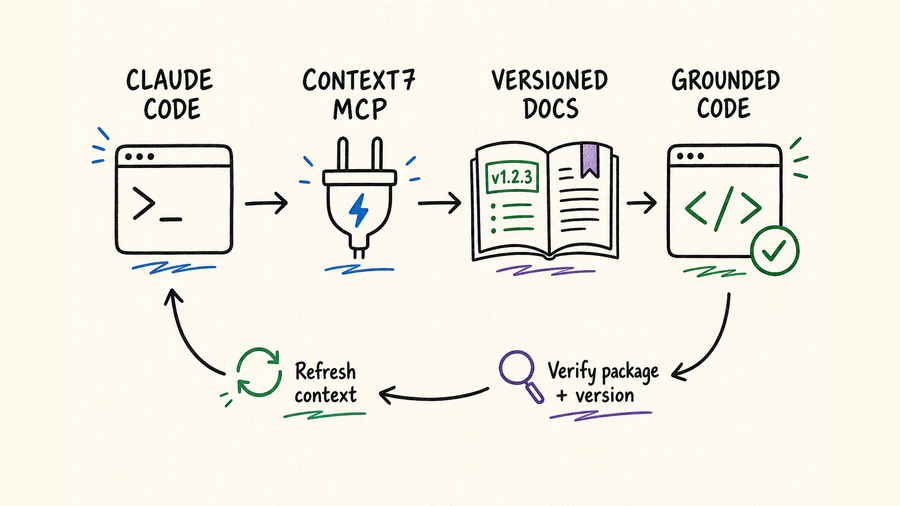
Context7 MCP in Claude Code, in briefClaude Code 使用 Context7 MCP 的核心摘要
Context7 retrieves current library documentation and examples so Claude Code does not rely only on model memory for fast-changing APIs.
Use it before implementing with a named package, especially when syntax, configuration, or behavior differs by version.
Confirm the resolved package, requested version, cited documentation, and the final code against your installed dependencies.
Retrieved documentation does not prove your repository assumptions, package resolution, generated code, compilation, tests, or runtime behavior.
Context7 检索当前软件库文档和示例,避免 Claude Code 仅凭模型记忆处理快速变化的 API。
使用指定软件包实现功能前应先调用,尤其是语法、配置或行为会随版本变化时。
确认解析出的软件包、目标版本、引用文档,并依据项目实际安装的依赖检查最终代码。
检索文档无法证明代码库假设、依赖解析、生成代码、编译、测试或运行时行为一定正确。
Context7 is a documentation-grounding layer, not a general web search engine or code validator. Claude Code can use it to resolve a library and retrieve focused, version-sensitive documentation before planning or editing. The reliable pattern is: identify the installed dependency, resolve the exact library, retrieve one narrow topic, cite the relevant guidance, make the smallest repository change, and verify locally. If the resolved project or version is wrong, stop and correct the lookup before generating code.
Context7 是面向软件库文档的依据层,不是通用网页搜索,也不是代码验证器。Claude Code 可以先解析软件库并检索与版本相关的聚焦文档,再制定方案或修改文件。可靠顺序是:识别项目实际依赖、解析准确库、只检索一个明确主题、说明相关依据、做最小代码修改,最后在本地验证。解析出的项目或版本不正确时,应先纠正检索,再生成代码。
How the documentation grounding loop works如何形成以文档为依据的闭环
Claude Code first inspects repository evidence such as package.json, lockfiles, manifests, imports, and existing configuration. Context7 then resolves the library identity and retrieves pages for one selected topic. Claude compares that context with the installed version, proposes a change, edits only approved files, and runs repository checks. This order prevents a broad documentation result from overriding facts already present in the codebase.
Claude Code 先检查 package.json、锁定文件、清单、导入和现有配置等仓库证据;Context7 再解析软件库身份,并围绕一个明确主题检索页面。随后 Claude 将文档上下文与实际安装版本对照,提出变更,只修改获批文件,再运行仓库检查。这个顺序可以避免宽泛文档结果覆盖代码库中的真实事实。
Name the dependency exactly and include the version from your lockfile when behavior may have changed. Ask Claude Code to report which documentation source Context7 resolved.
Request a short documentation-backed plan before file changes. The plan should separate facts found in docs from assumptions inferred from your repository.
Ask one concrete question about a method, configuration option, migration, or framework pattern. Include runtime, language, and target artifact. Avoid “give me everything about React” requests that dilute useful context.
Check package name, installed version, module format, framework mode, configuration conventions, and existing abstractions. Record where the docs match and where the repository imposes additional constraints.
Make the smallest approved change, then run type checking, linting, unit or integration tests, build checks, and a focused runtime test. Documentation grounding reduces guesswork; only repository evidence verifies the implementation.
准确写出依赖名称;若行为可能随版本变化,还应提供锁定文件中的版本。让 Claude Code 说明 Context7 最终解析到哪个文档源。
修改文件前,先索要一份以文档为依据的简短方案,并要求区分文档中的事实与根据代码库作出的推断。
围绕某个方法、配置项、迁移或框架模式提出一个具体问题,并说明运行环境、语言和目标产物。不要用“把 React 全部讲一遍”之类请求稀释有效上下文。
核对包名、安装版本、模块格式、框架模式、配置惯例与现有抽象,记录文档与项目一致之处,以及代码库额外施加的约束。
完成最小获批修改后,运行类型检查、lint、单元或集成测试、构建检查和聚焦运行测试。文档依据只能减少猜测,最终实现必须由仓库证据验证。
Choose the right task for Context7判断任务是否适合 Context7
| Task任务 | Use Context7 forContext7 用途 | Also inspect还要检查 | Stop condition停止条件 |
|---|---|---|---|
| API usageAPI 用法 | Current signatures, options, return types, and examples.当前签名、选项、返回类型与示例。 | Installed version, types, wrapper code, and tests.安装版本、类型、封装代码与测试。 | Resolved library or version does not match.解析库或版本不匹配时停止。 |
| Framework configuration框架配置 | Supported keys, file locations, modes, and migration notes.支持的配置键、文件位置、模式与迁移说明。 | Existing config, build tool, environment, and deployment target.现有配置、构建工具、环境与部署目标。 | Documentation assumes another router, runtime, or major version.文档假设了其他路由、运行时或主版本时停止。 |
| Version migration版本迁移 | Breaking changes, replacement APIs, and upgrade sequence.破坏性变化、替代 API 与升级顺序。 | Changelog, lockfile, peer dependencies, codemods, and CI.变更日志、锁定文件、对等依赖、codemod 与 CI。 | The source does not cover both current and target versions.资料未覆盖当前与目标版本时停止。 |
| Error diagnosis错误诊断 | Documented constraints and correct configuration patterns.已记录限制与正确配置模式。 | Exact stack trace, reproduction, source code, and runtime logs.准确堆栈、复现步骤、源码与运行日志。 | No evidence links the error to the retrieved topic.没有证据把错误与检索主题关联时停止。 |
| Repository-specific behavior仓库专属行为 | Only the external library contract.仅用于外部库契约。 | Local source, architecture decisions, tests, and git history.本地源码、架构决策、测试与 Git 历史。 | The answer depends mainly on private code rather than library docs.答案主要依赖私有代码而非库文档时停止。 |
Configure Context7 MCP and make requests precise配置 Context7 MCP,并准确提出请求
The current official route is npx ctx7 setup --claude. It authenticates through OAuth, creates or selects an API key, and lets you choose CLI + Skills or MCP mode. The Context7 CLI requires Node.js 18 or newer. For a remote server, headless VM, or SSH session where the browser cannot return to the same machine, pass an existing key with --api-key through a secure interactive or secret-managed process.
当前官方推荐命令是 npx ctx7 setup --claude。它会通过 OAuth 授权、创建或选择 API 密钥,并让用户在 CLI + Skills 与 MCP 模式之间选择。Context7 CLI 要求 Node.js 18 或更高版本。如果远程服务器、无界面虚拟机或 SSH 会话中的浏览器无法回到同一台机器,应通过安全交互或密钥系统向 --api-key 传入已有密钥。
| Step步骤 | Action操作 | Best for适合场景 | Boundary使用边界 |
|---|---|---|---|
| Set up配置 | Run npx ctx7 setup --claude, authenticate, and choose CLI + Skills or MCP.运行 npx ctx7 setup --claude,完成授权并选择 CLI + Skills 或 MCP。 | The supported guided route for Claude Code.Claude Code 的官方引导式路径。 | Review generated files and keep API keys out of version control.审查生成文件,不要把 API 密钥提交到版本控制。 |
| Plugin插件 | Add the Context7 marketplace and install context7-plugin@context7-marketplace.添加 Context7 marketplace,再安装 context7-plugin@context7-marketplace。 | Skills, a docs-researcher agent, and the /context7:docs command.Skill、docs-researcher Agent 与 /context7:docs 命令。 | Install only from the official Upstash marketplace source.只从 Upstash 官方 marketplace 来源安装。 |
| Manual MCP手动 MCP | Use https://mcp.context7.com/mcp with remote HTTP; add the API key through supported secure headers when needed.通过远程 HTTP 使用 https://mcp.context7.com/mcp;需要时通过客户端支持的安全请求头传入 API 密钥。 | Controlled manual configuration or clients outside the setup flow.受控的手动配置,或不在引导流程中的客户端。 | Do not embed keys in a shared URL or committed JSON.不要把密钥嵌入共享地址或已提交 JSON。 |
| Prompt提示词 | Name the package, version, question, and expected artifact; explicitly ask to use Context7.说明软件包、版本、问题和预期产物,并明确要求使用 Context7。 | API migrations, configuration, framework patterns, and unfamiliar SDK methods.API 迁移、配置、框架模式以及不熟悉的 SDK 方法。 | Broad prompts can retrieve irrelevant documentation or the wrong package.请求过于宽泛时,可能检索到无关文档或错误的软件包。 |
| Verify验证 | Compare the answer with package metadata, lockfiles, tests, and cited documentation.将答案与软件包元数据、锁定文件、测试和引用文档相互核对。 | Every code change that depends on version-specific behavior.所有依赖特定版本行为的代码变更。 | Retrieved context improves grounding but does not replace repository tests.检索到的上下文能让答案更有依据,但不能替代代码库测试。 |
Verify installation before relying on retrieved docs依赖检索结果前先验证安装
For MCP, inspect claude mcp list, claude mcp get context7, and /mcp. For the plugin, confirm the marketplace, plugin status, available skill, docs-researcher agent, and /context7:docs command.
Choose a dependency already pinned in the repository and ask one version-specific question. Require Claude to state the resolved Context7 library identity, requested topic, and the documentation facts used.
Confirm the installed version from the lockfile and types, then test a small example. A successful tool response is not enough if it resolved another package with a similar name.
If Context7 is registered but unavailable, inspect claude mcp logs context7, Node.js availability, proxy or TLS restrictions, API-key state, and the selected setup mode before reinstalling.
MCP 模式检查 claude mcp list、claude mcp get context7 与 /mcp;插件模式则确认 marketplace、插件状态、可用 Skill、docs-researcher Agent 和 /context7:docs 命令。
选择仓库中已经锁定的一个依赖,提出一个与版本相关的具体问题,并要求 Claude 说明解析到的 Context7 软件库身份、检索主题和实际使用的文档事实。
通过锁定文件与类型确认安装版本,再运行一个小型示例。即使工具成功返回,如果解析成了名称相似的其他软件包,也不能算验证通过。
Context7 已注册却不可用时,先检查 claude mcp logs context7、Node.js、代理或 TLS 限制、API 密钥状态与所选模式,再考虑重新安装。
Prompt pattern: “Inspect the lockfile and identify the exact installed version of [package]. Use Context7 to resolve that library and retrieve documentation only for [topic]. Report the resolved library, version coverage, documented facts, and any mismatch with this repository. Propose a minimal change, then stop before editing.”
提示词模板:“检查锁定文件,确认 [package] 的准确安装版本。使用 Context7 解析该软件库,并且只检索 [topic] 主题。报告解析结果、文档覆盖版本、文档事实,以及与当前仓库的任何不一致。提出最小变更,然后在编辑前停止。”
Where QVeris fits beside Context7 MCPQVeris 如何补充 Context7 MCP 工作流
Context7 specializes in library documentation. QVeris Tool and Provider searches currently return no exact Context7 record, so use QVeris Docs and the Playground only when a task extends into a separate external capability.
Context7 专注于软件库文档。当前 QVeris Tool 与 Provider 搜索均没有返回完全对应的 Context7 条目。只有任务还涉及其他外部能力时,才需要查阅 QVeris 文档,并在 Playground 中继续寻找合适工具。
- Use Context7 for current package documentation and version-sensitive examples.
- Use QVeris only for a separate capability returned by current discovery; inspect the provider, schema, constraints, and cost first.
- Preserve approval points between retrieved documentation, repository mutation, external calls, and any data written back.
- 使用 Context7 获取当前软件包文档和版本相关示例。
- 只有当前检索返回独立能力时才使用 QVeris,并先检查供应商、参数结构、约束与成本。
- 在文档检索、代码库修改、外部调用及结果回写之间保留明确的人工批准节点。
FAQ常见问题
No. It improves the documentation available to Claude Code, but package resolution, repository assumptions, compilation, tests, and runtime behavior still require verification.
Use user scope for your own recurring workflow. Prefer project scope when teammates need the same server definition, while keeping credentials outside committed files.
MCP gives Claude native documentation tools. CLI + Skills can keep the tool surface and context more focused. Use the guided setup to choose, then verify the installed mode.
Basic use may work without one, while a free key provides higher limits and is needed for private repositories. Store it outside version control and rotate it if exposed.
Provide the exact package name, ecosystem, version, and topic. Inspect the resolved library identity before accepting docs or generated code.
Check Claude MCP logs, Node.js, network and TLS rules, API-key state, server configuration, and session reload before reinstalling.
不能。它能改善 Claude Code 可用的文档依据,但仍需核对软件包解析、代码库假设、编译结果、测试和运行时行为。
个人经常使用时可选用户范围;团队需要相同服务器定义时宜选项目范围,但凭据必须保存在提交文件之外。
MCP 为 Claude 提供原生文档工具;CLI + Skills 可以让工具面和上下文更聚焦。通过引导配置选择,再验证实际安装模式。
基础使用可能无需密钥,免费密钥可获得更高额度,私有仓库则需要密钥。应保存在版本控制之外,泄露后立即轮换。
请提供准确包名、生态、版本与主题,并在接受文档或生成代码前检查解析出的软件库身份。
重新安装前先检查 Claude MCP 日志、Node.js、网络与 TLS 规则、API 密钥、服务器配置和会话重载。
References and next steps参考资料与下一步
Context7 Claude Code guide
Context7 repository
Claude Code MCP documentation