
Dify + Custom Model API
Configure, Verify, and Keep a Rollback
Dify + 自定义模型 API:配置、验证并保留回滚路径
Adding a custom provider creates a new credential and data boundary. Configure placeholders first, test every required capability and keep the previous provider available.
添加自定义供应商会创建新的凭证与数据边界。先配置占位符,测试每项必需能力,并保持旧供应商可用。
TL;DR
Do not share provider keys or logs across unrelated workspaces.
Test models, chat, streams, tools, schemas and errors.
Keep provider, model, request ID, usage and failure evidence.
Canary one app and retain the previous provider configuration.
不要在无关 Workspace 间共享供应商密钥或日志。
测试模型、Chat、流、工具、结构定义与错误。
保留供应商、模型、请求 ID、用量与故障证据。
灰度一个应用,并保留旧供应商配置。
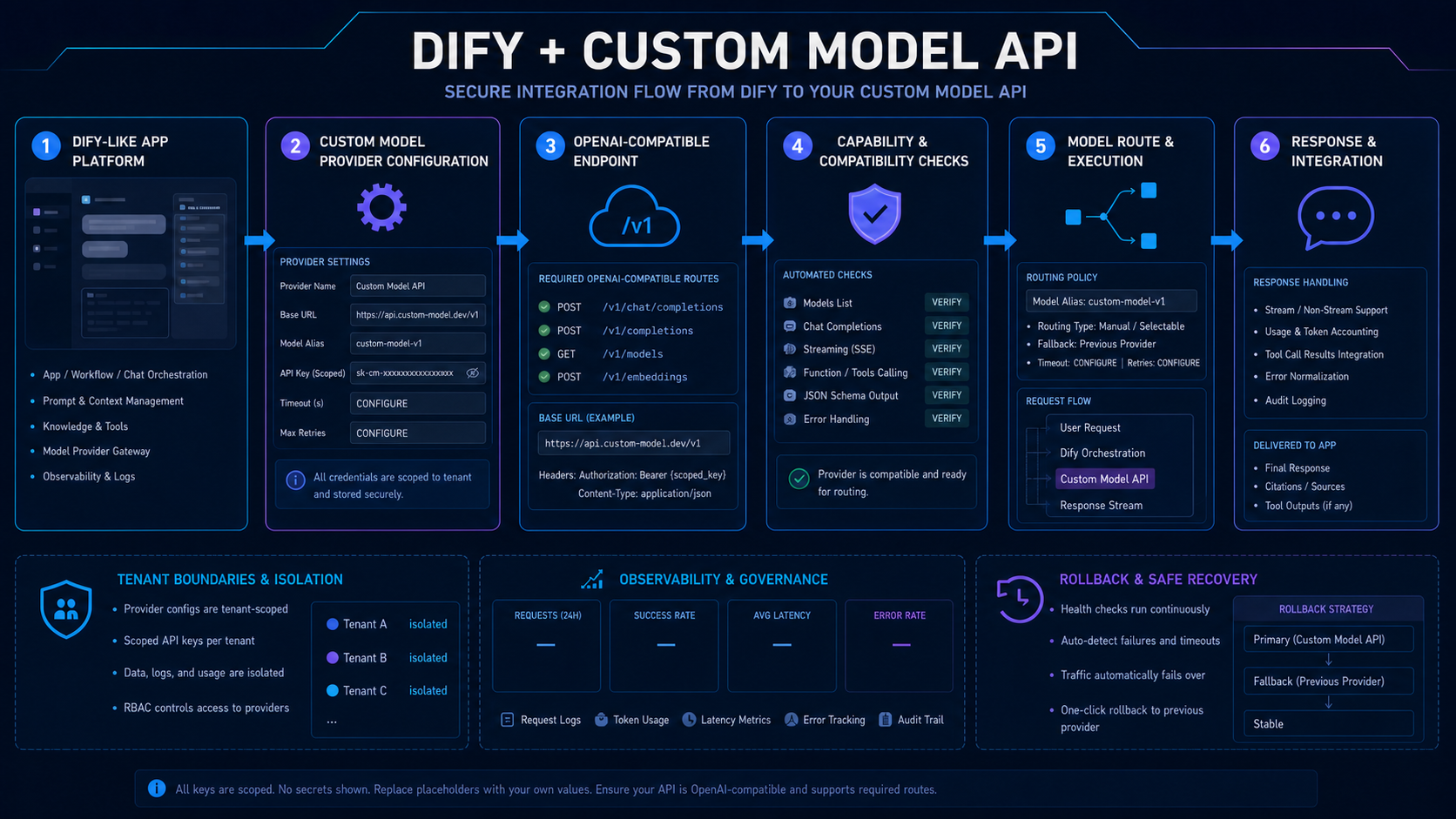
Custom provider setup flow 自定义供应商设置流程
Register an approved base URL, scoped key and model alias in the provider configuration. Verify the endpoint's actual routes and capabilities before exposing it to an app.
在供应商配置中注册批准基础地址(Base URL)、受限密钥与模型别名。向应用暴露前验证端点的实际路由与能力。
Promote through a test workspace, canary selected applications and watch native errors, usage and output quality. Roll back configuration without rewriting prompts.
通过测试 Workspace 推广、灰度选定应用,并观测原生错误、用量与输出质量。无需重写提示词即可回滚配置。
Configuration fields to govern 需要治理的配置字段
| Field 字段 | Best fit 最适合 | Verify before choosing 选择前验证 |
|---|---|---|
| Base URL 基础地址(Base URL) | Approved HTTPS compatible endpoint. 批准的 HTTPS 兼容端点。 | Validate operator, host, region and data terms. 验证运营者、主机地址、区域与数据条款。 |
| API key API 密钥 | Tenant-scoped least-privilege credential. 租户受限最小权限凭证。 | Store in secrets, rotate and audit access. 存入上游密钥、轮换并审计访问。 |
| Model alias 模型别名 | Stable app-facing workload name. 面向应用的稳定工作负载名称。 | Map to a versioned model and verified capabilities. 映射到版本化模型与已验证能力。 |
| Retries and timeout 重试与超时 | Bounded execution policy. 有界执行策略。 | Give one layer ownership and preserve idempotency. 由一层负责并保留幂等。 |
Capability verification 能力验证
Check model listing and each required inference path.
Test streams, tools, JSON schema, errors and usage.
Confirm keys, configs, logs and budgets remain tenant-scoped.
Version the provider config and test one-click rollback.
检查模型列表与每条必需推理路径。
测试流、工具、JSON 结构定义、错误与用量。
确认密钥、配置、日志与预算保持租户受限。
版本化供应商配置并测试一键回滚。
Promote one application at a time 一次推广一个应用
- Run provider contract tests outside production.
- Compare target and previous providers on representative app workflows.
- Canary one tenant and monitor errors, routes and accepted outputs.
- Exercise rollback and credential revocation.
- 在生产外运行供应商契约测试。
- 用代表性应用工作流比较目标与旧供应商。
- 灰度一个租户,并监控错误、路由与可接受输出。
- 演练回滚与凭证撤销。
Treat provider configuration as code 把供应商配置视为代码
Dify applications reference a stable alias. A tenant-scoped provider record holds the approved endpoint and secret. Capability tests gate promotion, telemetry preserves native evidence and configuration versions make rollback immediate.
Dify 应用引用稳定别名;租户受限供应商记录持有批准端点与上游密钥;能力测试控制推广,遥测保留原生证据,配置版本让回滚即时可用。
Production rule: never mark a capability supported until its production path has passed a contract test.
生产规则:生产路径通过契约测试前,绝不能把能力标记为已支持。
Add QVeris for external APIs and tools 用 QVeris 增加外部 API 与工具
The custom model API supplies inference. QVeris supplies external APIs, tools, services and live data through Discover → Inspect → Call. Keep their provider records, secrets and evidence separate.
自定义模型 API 提供推理;QVeris 通过 Discover → Inspect → 调用提供外部 API、工具、服务与实时数据。两者供应商记录、上游密钥与证据应分离。
Start with the provider contract Dify actually loads 从 Dify 实际加载的供应商契约开始
Dify's current plugin system separates provider metadata, credential fields, model-type code, invocation, token counting, and error mapping. A custom model is not only a URL field: package the contract, validate credentials with a lightweight call, and test both streaming and non-streaming paths.
当前 Dify Plugin 系统把供应商 Metadata、凭证字段、模型类型代码、调用、Token 计算与错误映射分开。Custom 模型不只是一个 URL 字段:应封装完整契约,用轻量调用验证凭证,并同时测试流式与非流式路径。
provider: company_gateway
label:
  en_US: Company LLM Gateway
  zh_Hans: 企业 LLM 网关
supported_model_types:
  - llm
configurate_methods:
  - customizable-model
provider_credential_schema:
  credential_form_schemas:
    - variable: server_url
      type: text-input
      required: true
    - variable: api_key
      type: secret-input
      required: true
extra:
  python:
    provider_source: provider/company_gateway.py
    model_sources:
      - models/llm/llm.py
- Implement validate_credentials and map auth, rate-limit, timeout, and provider errors.
- Return normalized text, finish reason, usage, and native request identifiers.
- Remote-debug the plugin, package it, and promote one Dify application before workspace-wide rollout.
- 实现 validate_credentials,并映射认证、限流、超时和供应商错误。
- 返回标准化文本、Finish Reason、用量与原生请求 Identifier。
- 远程调试并打包 Plugin,先推广一个 Dify Application,再扩到整个 Workspace。
Verified implementation reference: Dify custom model integration.
实施参考已根据官方资料核验:Dify custom model integration。
Production Acceptance Checklist for Dify custom model APIDify 自定义模型 API生产验收清单
For Dify Custom Model API, a successful hello-world call proves connectivity only. Production acceptance must prove that the framework contract, model behavior, failures, evidence, and rollback remain predictable under the application’s real workflows.
针对“Dify 自定义模型 API”,Hello World 调用成功只能证明连接。生产验收还必须证明,在应用真实工作流中,框架契约、模型行为、失败处理、证据和回滚都保持可预测。
Version provider plugin contract, credential fields, model schema, invocation parameters, streaming chunks, quota checks, validation, and workspace visibility. Keep environment-specific secrets outside code, use stable internal model aliases, and document which layer owns transformations, retries, fallbacks, and timeout policy.
版本化供应商插件契约、凭证字段、模型 Schema、调用参数、流式分块、配额检查、校验和工作区可见性。把环境专属密钥放在代码之外,使用稳定内部模型别名,并记录转换、重试、故障切换和超时策略分别由哪一层负责。
To validate Dify Custom Model API, cover system and user messages, long context, Unicode, streaming, structured output, tools, refusals, usage, cancellation, and provider errors. Store expected event order and required fields instead of checking text equality alone.
验证“Dify 自定义模型 API”时,覆盖系统与用户消息、长上下文、Unicode、流式、结构化输出、工具、拒绝、用量、取消和供应商错误,保存预期事件顺序与必需字段,而不只比较文本是否相同。
To validate Dify Custom Model API, test invalid credentials, unknown models, rate limits, slow first token, broken streams, malformed tool arguments, partial output, network loss, duplicate retries, and a provider outage. Confirm errors stay structured and side effects stay bounded.
验证“Dify 自定义模型 API”时,测试无效凭证、未知模型、限流、首 Token 过慢、流中断、工具参数畸形、部分输出、网络丢失、重复重试和供应商中断,确认错误保持结构化且副作用范围受控。
Before rolling out Dify Custom Model API, start with a reversible workflow, compare completion quality, latency, cost, and trace coverage, then expand by task class. Define rollback signals, preserve the previous configuration, and assign an owner for drift and incident review.
上线“Dify 自定义模型 API”前,先选择可逆工作流,比较完成质量、延迟、成本和追踪覆盖,再按任务类别扩大。定义回滚信号,保留原配置,并明确负责漂移与事故复盘的人员。
FAQ
Use the provider contract Dify supports and verify the current integration documentation.
Prefer scoped credentials and explicit isolation unless your governance permits sharing.
Restore the previous provider config and revoke the target credential if needed.
使用 Dify 当前支持的供应商契约,并验证最新集成文档。
除非治理允许,否则优先使用受限凭证与显式隔离。
恢复旧供应商配置,并在需要时撤销目标凭证。