
Figma MCP Claude Code
Design Handoff WorkflowFigma MCP Claude Code
设计交接工作流
Prepare a focused Figma handoff, send structured design context to Claude Code, map it to the existing codebase, and verify the result across states and breakpoints.
先把 Figma 交接范围整理清楚,再让 Claude Code 读取结构化设计上下文,
映射现有代码并核对状态与断点。
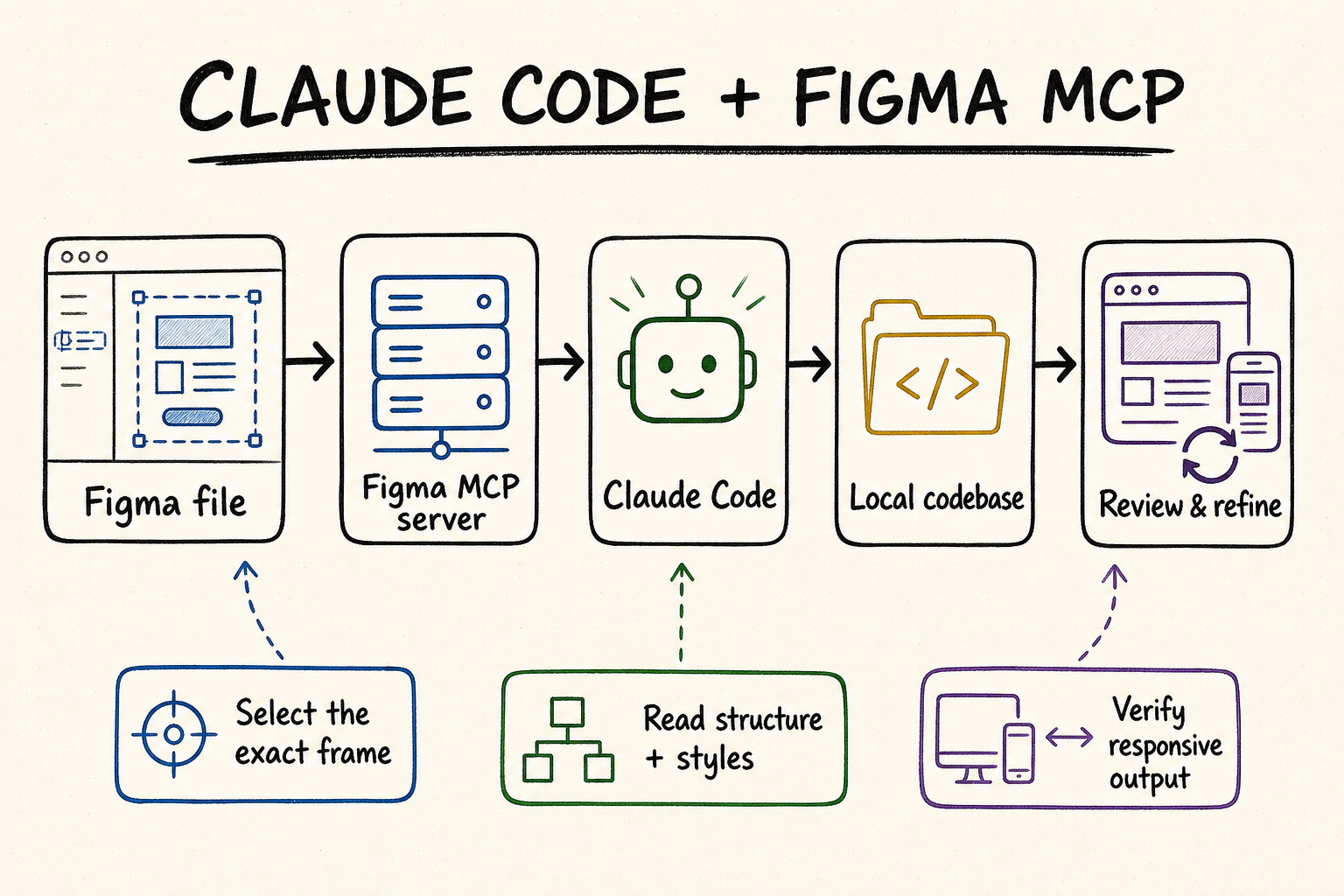
What Figma MCP changes in a Claude Code handoffFigma MCP 如何改变 Claude Code 设计交接
A screenshot shows pixels; Figma MCP can expose structure. Claude Code can receive information about frames, layers, components, variables, layout relationships, assets, and visual references, then compare that information with the repository it is editing. The practical benefit is not automatic perfection. It is a better evidence trail: the agent can explain which Figma element maps to which component, which token should be reused, and which parts remain ambiguous before it changes code.
截图只能展示像素,而 Figma MCP 能提供结构。Claude Code 可以读取画框、图层、组件、变量、布局关系、资源与视觉参考,再把这些信息与正在编辑的代码库逐项对照。它的价值并不是“一键生成完美代码”,而是建立更清楚的证据链:改代码之前,智能体可以说明某个 Figma 元素对应哪个现有组件、应复用哪个令牌,以及哪些地方仍然存在歧义。
Choose one reviewable frame, name important layers, expose relevant variants, and make the target state obvious. A clean scope produces cleaner context.
Ask Claude Code to summarize the design and inspect the repository before proposing edits. This catches duplicate-component and token-mapping mistakes early.
Approve the smallest coherent change: one component, one route section, or one state family. Keep unrelated refactors outside the handoff.
Compare the rendered implementation with the Figma frame and the repository's established conventions. Visual similarity alone is not enough.
选择一个能够独立验收的画框,给关键图层命名,展示相关变体,并把目标状态标清楚。范围越干净,返回的上下文越有用。
先让 Claude Code 概括设计并检查仓库,再提出修改方案。这样能提前发现重复造组件、错误映射令牌等问题。
每次只批准一个完整且可审查的改动,例如一个组件、一个路由区块或一组状态,不把无关重构混进设计交接。
既要对照 Figma 画框,也要遵守代码库既有约定。画面相似并不代表组件复用、语义和响应式行为都正确。
Prepare the Figma file for agent-readable context把 Figma 文件整理成智能体可读的上下文
Claude Code can only reason over the context the file makes available. A handoff frame should communicate intent without requiring the agent to infer which duplicate layer is current, whether hidden content is obsolete, or which breakpoint is canonical. This is design hygiene, not special formatting for an AI tool; the same preparation also makes human review faster.
Claude Code 只能基于文件实际提供的信息做判断。一个合格的交接画框,不应让智能体猜测“多个重复图层里哪个才是最新版”“隐藏内容是否已废弃”或“哪个断点才是基准”。这不是为了迎合 AI 而增加的特殊格式,而是基本的设计整理;做好之后,人类评审也会更快。
| Figma signalFigma 信号 | Prepare it this way建议做法 | Why Claude Code needs it为什么重要 |
|---|---|---|
| Scope范围 | Link the exact frame or component, not the file homepage.提供目标画框或组件直链,而不是文件首页。 | Reduces unrelated nodes and makes the requested output testable.减少无关节点,也让输出拥有明确验收对象。 |
| Components组件 | Use instances and variants for reusable UI; name states consistently.可复用界面使用实例与变体,并统一状态命名。 | Helps distinguish system components from one-off visual groups.便于区分设计系统组件与一次性视觉组合。 |
| Variables变量 | Bind colors, spacing, typography, and modes where the system defines them.在设计系统已有定义时绑定颜色、间距、字体和模式变量。 | Creates an explicit path from design decisions to code tokens.为设计决策映射到代码令牌提供明确路径。 |
| Layout布局 | Use meaningful Auto Layout and constraints instead of manual pixel placement.使用有意义的自动布局与约束,避免依赖手工像素摆放。 | Provides intent for resizing instead of a single frozen composition.表达尺寸变化时的布局意图,而不只是一张静态构图。 |
| Responsive states响应式状态 | Show representative desktop, tablet, and mobile behavior or annotate the rules.展示有代表性的桌面、平板和移动状态,或明确标注规则。 | Prevents the agent from inventing breakpoints from one viewport.避免智能体仅凭一个视口自行猜测断点。 |
| Assets and copy资源与文案 | Mark final assets and text; separate placeholders from production content.标明最终资源和文案,并把占位内容与正式内容区分开。 | Avoids shipping temporary icons, lorem ipsum, or stale imagery.避免把临时图标、占位文字或旧图片带进正式代码。 |
Define the handoff contract先写清交接约定
- Name the target route or component and list files that may change. If discovery is still required, ask for a plan before granting write permission.
- State whether visual fidelity, reuse of the existing design system, accessibility, performance, or speed is the highest priority.
- Call out states not visible in the primary frame: loading, empty, error, disabled, hover, focus, validation, and long-content behavior.
- Provide acceptance viewports and any browser constraints. “Responsive” is too vague to test without examples.
- 写明目标路由或组件,以及允许修改的文件范围。如果还需要先查仓库,应要求 Claude Code 先给方案,再开放写入。
- 明确优先级:视觉还原、复用现有设计系统、无障碍、性能和交付速度,哪一项最重要。
- 补充主画框里看不到的状态,例如加载、空数据、错误、禁用、悬停、键盘焦点、表单校验和长内容。
- 提供验收视口和浏览器约束。只说“需要响应式”过于模糊,无法形成可测试标准。
Run the Figma-to-Claude Code handoff in six stages用六个阶段完成 Figma 到 Claude Code 的交接
The best workflow separates interpretation from mutation. Claude Code should first prove that it retrieved the intended node, then explain its repository mapping, then implement a bounded slice. This gives the designer or engineer a useful checkpoint before each irreversible decision.
稳妥流程应把“理解设计”和“修改代码”分开。Claude Code 先证明自己读到了正确节点,再说明准备如何映射现有仓库,最后只实现一个范围明确的小单元。这样,设计师或工程师就能在每个关键决策前有效确认。
Use the official remote Figma MCP path for the normal workflow, authorize the account that owns file access, and send a direct node URL. Ask Claude Code to repeat the frame name and dimensions so a wrong selection is obvious.
For a complex frame, begin with structure and names. Confirm the relevant subtree, then request detailed design context and a screenshot only for that scope. This keeps large files from flooding the conversation.
Have Claude Code locate existing components, tokens, assets, route conventions, styling patterns, and tests. Require it to distinguish reuse, extension, and genuinely new code.
Review a short table that maps Figma components and variables to repository counterparts. Resolve uncertain icons, fonts, copy, breakpoints, and interactions before implementation.
Ask for minimal changes that preserve existing architecture. Avoid generated parallel design systems, broad dependency additions, and unrelated cleanup during the same pass.
Review the result at defined viewports and states. Compare spacing, type, colors, assets, overflow, keyboard behavior, and content resilience—not just a single desktop screenshot.
常规工作流使用官方远程 Figma MCP,并授权真正拥有文件权限的账号。发送节点直链后,让 Claude Code 先复述画框名称与尺寸,快速发现选错对象的问题。
面对复杂画框,先读取结构和名称,确认相关子树后,再只针对这部分请求详细设计上下文与截图,避免大文件把无关内容塞满对话。
让 Claude Code 查找已有组件、令牌、资源、路由约定、样式方案和测试,并明确区分“直接复用”“在现有基础上扩展”和“确实需要新建”。
先查看一份简短映射表,把 Figma 组件与变量对应到仓库实现。图标、字体、文案、断点和交互若有不确定,应在写代码前解决。
要求改动尽量小,并遵守现有架构。不要在同一轮里另造一套设计系统、大量增加依赖,或顺手清理无关代码。
在约定视口和状态下检查结果,核对间距、字体、颜色、资源、溢出、键盘操作和长内容适应性,而不是只看一张桌面截图。
Reusable handoff prompt: “Read the linked Figma node and inspect this repository without editing files. Return: design hierarchy, components and variants, variables, responsive rules, repository matches, missing states, and a minimal implementation plan. Flag every assumption. Wait for approval before writing.”
可复用交接提示词:“读取链接中的 Figma 节点并检查当前仓库,但暂时不要修改文件。请返回:设计层级、组件与变体、变量、响应式规则、仓库中的对应实现、缺失状态,以及最小改动方案。所有假设都要明确标出,等确认后再写入。”
Keep connection setup short and observable连接配置要短、要可验证
For most Claude Code users, install the official integration with claude plugin install figma@claude-plugins-official, restart Claude Code, complete Figma authorization, and verify the entry with /mcp. Figma's hosted endpoint is https://mcp.figma.com/mcp. The local desktop endpoint, http://127.0.0.1:3845/mcp, is a narrower option with desktop, plan, and seat requirements.
对多数 Claude Code 用户来说,配置只需要四步:运行 claude plugin install figma@claude-plugins-official 安装官方集成,重启 Claude Code,完成 Figma 授权,再用 /mcp 核对连接。Figma 托管端点是 https://mcp.figma.com/mcp。本地桌面端点 http://127.0.0.1:3845/mcp 的适用范围更窄,并受到桌面应用、套餐和席位条件限制。
Confirm installation completed and fully restart Claude Code. If Figma is not listed in /mcp, fix discovery before repeating authorization.
Check which Figma identity completed OAuth and whether that account can open the exact file. Transport success does not grant file permission.
Copy a fresh link after selecting the intended node. Reduce the scope and request metadata first if the frame is large or deeply nested.
Improve component names, variables, Auto Layout, and state coverage in Figma. MCP cannot manufacture semantics that the source file never expresses.
确认安装命令已经完成,并彻底重启 Claude Code。如果 /mcp 中没有 Figma,应先修复发现与加载问题,而不是重复授权。
确认哪个 Figma 账号完成了 OAuth,以及它是否能打开目标文件。传输连接成功不会自动赋予文件权限。
选中目标节点后重新复制直链。画框过大或嵌套很深时,先缩小范围并读取元数据。
改善 Figma 中的组件命名、变量、自动布局和状态覆盖。源文件没有表达的语义,MCP 也无法凭空补出。
Review implementation quality, not only visual similarity验收实现质量,而不只是“看起来像”
| Review area验收项 | What to compare核对内容 | Common failure常见问题 |
|---|---|---|
| Structure结构 | Component boundaries, variants, semantic HTML, repository conventions.组件边界、变体、语义化 HTML 与仓库约定。 | One giant component or duplicated primitives.出现巨型组件,或重复实现基础组件。 |
| Tokens令牌 | Color, typography, spacing, radius, elevation, modes.颜色、字体、间距、圆角、阴影和主题模式。 | Hard-coded values that bypass the existing system.硬编码数值,绕过现有设计系统。 |
| Responsive behavior响应式 | Reflow, stacking, wrapping, cropping, navigation, touch targets.重排、堆叠、换行、裁切、导航和触控区域。 | A desktop-perfect layout that breaks between supplied frames.桌面看似完美,但在两个给定画框之间崩坏。 |
| Interaction交互 | Hover, focus, pressed, disabled, loading, empty, error.悬停、焦点、按下、禁用、加载、空数据和错误。 | Only the default static state was implemented.只实现默认静态状态。 |
| Content resilience内容适应性 | Long labels, localization, missing images, variable data.长标签、本地化、图片缺失和动态数据。 | Layout depends on the exact sample copy.布局只能容纳示例文案。 |
| Accessibility无障碍 | Keyboard order, labels, contrast, landmarks, reduced motion.键盘顺序、标签、对比度、地标与减少动画。 | Visual fidelity achieved with inaccessible behavior.画面还原了,但交互无法无障碍使用。 |
Record discrepancies as observable statements: viewport, node, expected behavior, actual behavior, and evidence. “Spacing feels off” is hard to fix; “the card grid remains three columns at 760px while the approved tablet frame shows two” is actionable. After correction, rerun the same viewport and state rather than reviewing a different screenshot.
反馈应写成可观察事实:视口、节点、预期行为、实际行为和证据。“间距感觉不对”很难直接修;“760px 时卡片仍为三列,而确认过的平板画框是两列”就能行动。修正后应在同一视口、同一状态下复测,不要换一张截图就算通过。
Keep Figma MCP and QVeris responsibilities separate分清 Figma MCP 与 QVeris 的职责
Figma MCP is the direct supplier integration for Figma design context. A live QVeris catalog check did not identify an exact Figma Tool or Provider page, so this guide does not attach an unrelated result to its buttons. Use QVeris Docs when the surrounding agent workflow needs a documented path to other APIs, and evaluate those capabilities in the QVeris Playground.
Figma MCP 是读取 Figma 设计上下文的直接供应商集成。当前 QVeris 在线目录中没有准确的 Figma Tool 或 Provider 页面,因此本指南不会把无关结果硬塞进按钮。当外围智能体流程还需要其他 API 时,可以通过 QVeris 文档了解规范接入路径,再到 QVeris Playground 验证这些能力。
- Use Figma MCP for design nodes, variables, assets, screenshots, mappings, and permitted canvas operations.
- Use QVeris only for additional external capabilities that have been independently discovered and verified.
- Place an approval boundary between reading design context, mutating the repository, and calling outside systems.
- 设计节点、变量、资源、截图、映射以及允许的画布操作,交给 Figma MCP。
- 只有在外围能力经过独立检索和验证后,才用 QVeris 接入相应外部工具。
- 在读取设计上下文、修改仓库和调用外部系统之间设置清晰的批准边界。
Figma MCP Claude Code FAQFigma MCP Claude Code 常见问题
No. It can provide structured design information in addition to visual references. The workflow should use both semantics and screenshots, then adapt them to the repository.
Start with one coherent frame or component family. Large page selections add noise and make it harder to prove which node caused a mismatch.
Yes. Clear names, components, variables, Auto Layout, and documented states improve both MCP context and human maintainability.
Yes, if it inspects the repository and receives an explicit reuse requirement. Ask for a mapping report before implementation rather than assuming visual similarity is enough.
Available canvas tools and permissions can support Figma-native operations in eligible setups. Treat write access separately from read access and review every change.
Render the implementation at named viewports and states, compare it with the approved frames, and also verify semantics, accessibility, token reuse, and content resilience.
不是。除了视觉参考,它还能提供结构化设计信息。正确流程应同时使用语义信息和截图,再结合现有仓库完成实现。
从一个完整画框或一组相关组件开始。整页大选区会引入噪声,也更难判断具体哪个节点造成差异。
需要。清晰命名、组件、变量、自动布局和状态说明,既能改善 MCP 上下文,也能提升文件本身的可维护性。
可以,但前提是先检查仓库,并收到明确的复用要求。最好在实现前先审查映射报告,不要只凭画面相似就默认成功。
在符合条件的配置中,可用画布工具与权限可以支持 Figma 原生操作。写权限应与读权限分开管理,并逐项审查改动。
在指定视口和状态下渲染实现,对照确认过的画框,同时检查语义、无障碍、令牌复用和长内容适应性。
References and next steps参考资料与下一步
Figma Claude Code setup
Figma MCP server guide
Figma MCP tools and prompts
Figma file structure guidance
Figma MCP access and permissions
Claude Code MCP documentation
QVeris Docs
QVeris Playground
Figma Claude Code 配置
Figma MCP 服务器指南
Figma MCP 工具与提示词
Figma 文件结构指南
Figma MCP 访问权限与席位
Claude Code MCP 文档
QVeris 文档
QVeris Playground