
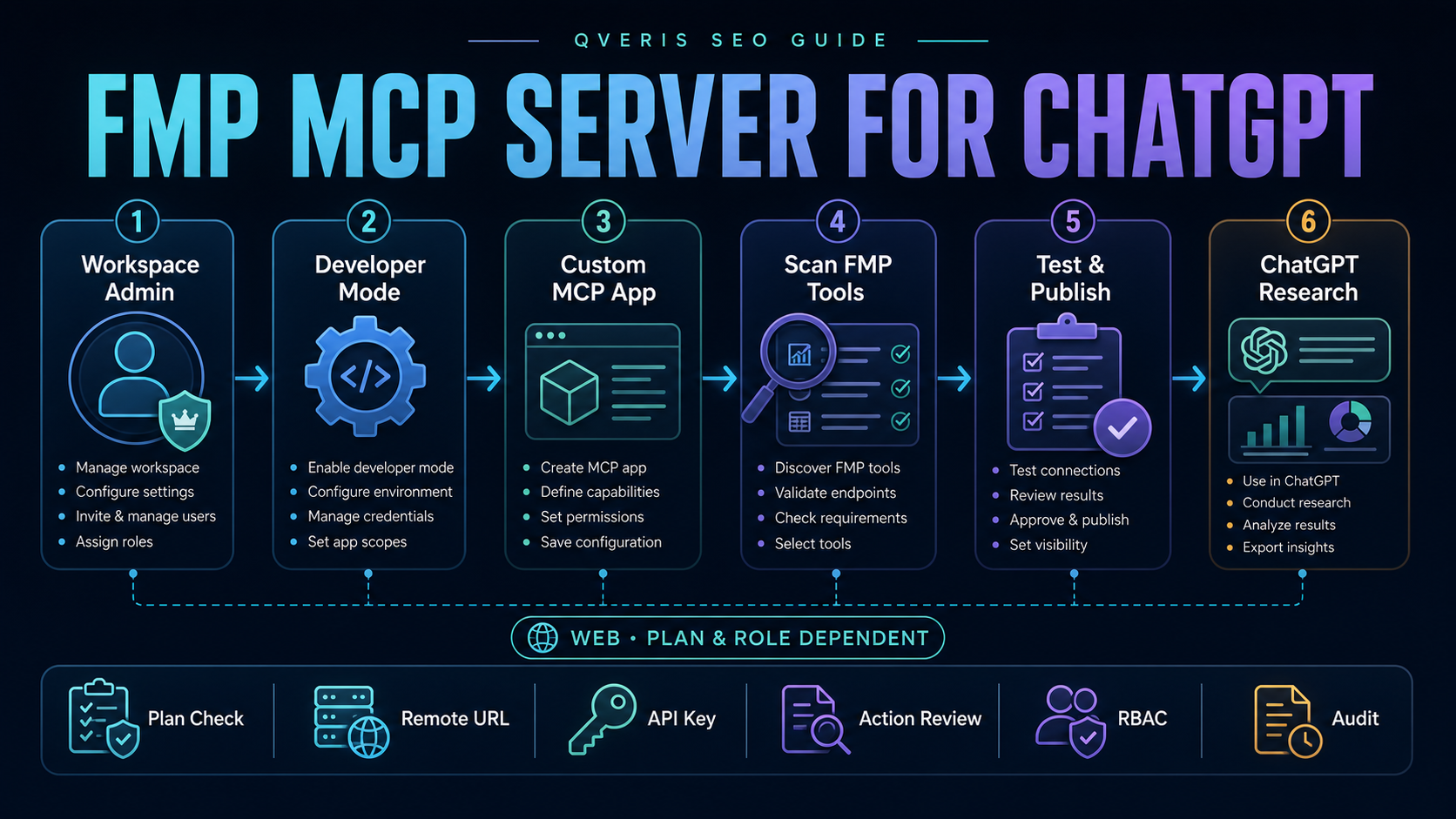
The FMP MCP server for ChatGPT requires the right surface and permissionsChatGPT连接FMP MCP Server需要正确产品面与权限
FMP publishes an official remote MCP endpoint that turns its API catalog into discoverable tools. ChatGPT can connect to remote MCP servers through custom apps, formerly called custom connectors. The important caveat is that ChatGPT availability depends on plan, user role, workspace policy and rollout—not only on whether the FMP URL works.
FMP公布官方远程MCP端点,把API目录转换为可发现工具。ChatGPT可通过自定义App(此前称自定义Connector)连接远程MCP Server。关键限制是:ChatGPT端可用性取决于套餐、用户角色、Workspace策略和功能发布进度,而不只取决于FMP URL是否可访问。
Business · Enterprise · Edu
OpenAI documents full MCP and developer mode on ChatGPT web for these workspace plans. Admin, owner, authorized-developer and RBAC rules differ by plan.
OpenAI记录这些Workspace套餐在ChatGPT Web端支持完整MCP与Developer Mode;管理员、所有者、授权开发者和RBAC规则按套餐不同。
Pro
OpenAI currently documents developer-mode custom apps with read/fetch permissions for Pro, not full write support. Recheck the current product before setup.
OpenAI当前记录Pro可在Developer Mode中连接具有read/fetch权限的自定义App,而非完整写入支持;配置前应复查当前产品。
Web and workflow limitsWeb端与工作流限制
Custom MCP apps are documented as web-only. Agent mode does not use custom apps; deep research can use read/fetch actions only.
自定义MCP App当前记录为仅Web端可用。Agent Mode不会使用自定义App;Deep Research只能使用read/fetch Action。
How to add the FMP MCP server to ChatGPT如何把FMP MCP Server添加到ChatGPT
Confirm plan, role and workspace policy确认套餐、角色与Workspace策略
Identify whether you are a Business admin/owner, an Enterprise/Edu admin or authorized developer, or an eligible Pro user. If developer mode is absent, do not treat that as an FMP server failure.
确认自己是Business管理员/所有者、Enterprise/Edu管理员或授权开发者,还是符合条件的Pro用户。若没有Developer Mode,不要误判为FMP服务器故障。
Enable developer mode启用Developer Mode
Use the current Settings → Apps → Advanced Settings or workspace app-creation path documented for your plan. Enterprise/Edu access can be granted with RBAC; Business administration is more centralized.
按照当前套餐文档使用Settings → Apps → Advanced Settings或Workspace创建App路径。Enterprise/Edu可通过RBAC授权;Business管理更集中。
Create a custom app创建自定义App
From user or workspace app settings, choose Create, enter clear metadata and provide the official FMP remote MCP endpoint. ChatGPT does not connect directly to a local MCP server.
在用户或Workspace App设置中选择Create,填写清晰元数据并提供FMP官方远程MCP端点。ChatGPT不会直接连接本地MCP Server。
Choose authentication and scan tools选择认证并扫描工具
FMP documents a URL with the API key in its query string. Treat the completed URL as a credential, choose the applicable authentication option, then use Scan Tools and review the discovered catalog.
FMP文档使用查询参数携带API Key的URL。把完整URL视为凭据,选择适用认证方式,然后执行Scan Tools并检查已发现目录。
Test as a draft以Draft状态测试
Use a low-risk, narrow read request. Inspect the proposed tool, symbol, dates, period, units, returned record and account usage. Do not publish merely because discovery succeeded.
使用低风险、窄范围只读请求。检查拟调用工具、标的、日期、期间、单位、返回记录与账户用量。工具发现成功不等于可以直接发布。
Publish with controlled access受控发布
Only admins/owners publish workspace apps. Review safety warnings, configure permitted actions and user access where supported, then document owner, approved use cases and revocation procedure.
只有管理员/所有者可发布Workspace App。检查安全警告,在支持时配置允许Action与用户访问,并记录负责人、批准场景与撤销流程。
https://financialmodelingprep.com/mcp?apikey=YOUR_FMP_API_KEYNever paste a completed URL into screenshots, tickets, prompts, analytics or source control. The placeholder is documentation; the completed URL is a secret.
不要把填入真实Key的URL放进截图、工单、Prompt、分析系统或代码仓库。占位形式是文档,完整URL是秘密。
Primary sources checked: FMP official MCP server guide, OpenAI developer mode and MCP apps, and OpenAI Apps in ChatGPT.
已核验FMP官方MCP Server指南、OpenAI Developer Mode与MCP Apps说明,以及OpenAI ChatGPT Apps说明。
Govern the app, the FMP key and the financial data separately分别治理App、FMP Key与金融数据
Developer access, app owner, draft/published state, action controls, RBAC groups and tester access.
开发者访问、App负责人、Draft/Published状态、Action控制、RBAC组与测试者访问。
Current app settings and workspace policy.
当前App设置与Workspace策略。
Dedicated key, plan entitlement, quotas, endpoint access, commercial use and rotation.
专用Key、套餐权限、额度、端点访问、商业使用与轮换。
Account dashboard, order form, usage and key inventory.
账户Dashboard、订单、用量与Key清单。
Discovered tool names, schemas, risk classification, expected arguments and approved use cases.
已发现工具名、结构、风险分类、预期参数与批准场景。
Tool scan snapshot and acceptance results.
工具扫描快照与验收结果。
Display, storage, derivation, redistribution, provenance, retention and deletion rules.
展示、存储、衍生、再分发、来源、保留与删除规则。
Applicable FMP agreement and product design record.
适用FMP协议与产品设计记录。
OpenAI notes that newly published or changed actions require administrative review. Enterprise/Edu admins can refresh actions, see changes and control access; Business update behavior can require recreating and republishing an app. That makes tool-catalog changes a release-management event, not an invisible server-side detail.
OpenAI说明新发布或变更的Action需要管理员审核。Enterprise/Edu管理员可以刷新Action、查看变化并控制访问;Business的更新流程可能要求重建和重新发布App。因此,工具目录变化应作为发布管理事件,而不是不可见的服务端细节。
Test the FMP app with a bounded research question用边界明确的研究问题测试FMP App
Expected tools only只出现预期工具
Record server identity, scan time, tool names, schemas and any unexpected or duplicated action.
记录服务器身份、扫描时间、工具名、结构以及异常或重复Action。
Explicit scope显式范围
Require symbol, statement type, period, date range, currency and maximum records; reject ambiguous requests.
要求标的、报表类型、期间、日期范围、币种与最大记录数;拒绝含糊请求。
Traceable facts可追溯事实
Keep tool, arguments, provider, retrieval time, record date, units and raw result separately from model interpretation.
把工具、参数、供应商、获取时间、记录日期、单位和原始结果与模型解释分开保留。
Visible limits限制可见
Exercise invalid keys, unavailable endpoints, 429 responses, empty history and partial results without unbounded retries.
测试Key无效、端点不可用、429、历史为空和部分结果,并禁止无预算重试。
Separate ChatGPT access failures from FMP data failures区分ChatGPT访问故障与FMP数据故障
Developer mode is missing没有Developer Mode
Check plan, web surface, admin enablement, user role, RBAC and workspace policy. This happens before FMP is contacted.
检查套餐、Web端、管理员启用、用户角色、RBAC与Workspace策略;此时可能尚未联系FMP。
Tool scan fails工具扫描失败
Check the remote URL, key exposure or invalidity, endpoint reachability, authentication selection and server compatibility.
检查远程URL、Key泄露或失效、端点可达性、认证选择与服务器兼容性。
Tool call fails工具调用失败
Check FMP plan entitlement, required parameters, symbol coverage, rate limit, account status and the actual error payload.
检查FMP套餐权限、必填参数、标的覆盖、速率限制、账户状态与实际错误载荷。
Answer is wrong回答错误
Inspect the tool arguments and raw result. Recheck period, units, currency, adjustments, revisions and whether model interpretation introduced the error.
检查工具参数和原始结果,重新核对期间、单位、币种、复权、修订,以及模型解释是否引入错误。
Only connect trusted MCP servers. OpenAI explicitly warns that unsafe or untrusted servers increase security risks, including prompt injection. Retrieved financial news, filings and text must be treated as untrusted content that cannot override application policy.
只连接可信MCP Server。OpenAI明确警告不安全或不可信服务器会增加包括提示注入在内的风险。返回的金融新闻、文件与文本必须视为不可信内容,不能覆盖应用策略。
Use QVeris as a provider-aware governance layer把QVeris作为供应商感知治理层
Policy before invocation调用前策略
QVeris can help expose authorized financial tools with user, environment and task boundaries; require dates and symbols; cap result size; separate test and production credentials; and preserve source metadata for downstream answers.
QVeris可按用户、环境和任务边界暴露已授权金融工具;要求日期与标的;限制结果规模;隔离测试和生产凭据;并为后续回答保留来源元数据。
Boundaries remain explicit边界仍需明确
QVeris does not enable ChatGPT developer mode, publish workspace apps, create FMP entitlements, grant redistribution rights or guarantee financial accuracy. Those remain OpenAI, workspace, FMP, contract and human-review responsibilities.
QVeris不会启用ChatGPT Developer Mode、发布Workspace App、创造FMP权限、授予再分发权或保证金融数据准确性。这些仍属于OpenAI、Workspace、FMP、合同与人工复核责任。
Related QVeris guides: FMP MCP server for Claude, financial RAG, and SEC filings for AI agents.
相关QVeris指南:Claude连接FMP MCP Server、金融RAG,以及面向AI Agent的SEC文件。
FMP MCP server for ChatGPT questionsChatGPT连接FMP MCP Server常见问题
Can ChatGPT connect to the FMP MCP server?ChatGPT能连接FMP MCP Server吗?
Eligible ChatGPT users can configure remote MCP servers as custom apps. Access depends on plan, role, workspace policy, web availability and current rollout.
符合条件的ChatGPT用户可把远程MCP Server配置为自定义App。访问取决于套餐、角色、Workspace策略、Web端与当前发布进度。
Which ChatGPT plans support custom MCP apps?哪些ChatGPT套餐支持自定义MCP App?
OpenAI currently documents full MCP for Business and Enterprise/Edu, while Pro developer mode is limited to read/fetch permissions. Verify current availability before rollout.
OpenAI当前记录Business和Enterprise/Edu支持完整MCP,Pro Developer Mode限于read/fetch权限。上线前应核验当前可用性。
Does ChatGPT connect to a local FMP MCP server?ChatGPT能直接连接本地FMP MCP Server吗?
Not directly. OpenAI says ChatGPT connects to remote MCP servers. For private or local infrastructure, use a supported secure tunnel architecture rather than exposing it casually.
不能直接连接。OpenAI说明ChatGPT连接远程MCP Server;私有或本地基础设施应使用受支持的安全隧道架构,不要随意暴露。
How do I add the FMP MCP server to ChatGPT?如何把FMP MCP Server添加到ChatGPT?
Confirm eligibility, enable developer mode, create a custom app, provide the official FMP remote endpoint, choose authentication, scan tools, test a draft and publish under workspace policy.
确认资格、启用Developer Mode、创建自定义App、填写FMP官方远程端点、选择认证、扫描工具、测试Draft,并按Workspace策略发布。
Is the FMP API key safe in a custom app URL?自定义App URL里的FMP API Key安全吗?
The completed URL is a credential that can leak through sharing, logs or screenshots. Use a dedicated key where possible, restrict visibility, monitor usage and rotate or revoke after exposure.
完整URL是凭据,可能通过分享、日志或截图泄露。尽量使用专用Key,限制可见性、监控用量,并在泄露后轮换或撤销。
Can QVeris govern FMP tools in ChatGPT workflows?QVeris能治理ChatGPT工作流里的FMP工具吗?
QVeris can add authorized discovery, parameter rules, quotas, provenance and review gates. It does not create ChatGPT access, publish the app or grant FMP data rights.
QVeris可增加授权发现、参数规则、额度、来源和复核闸门,但不会创造ChatGPT访问、发布App或授予FMP数据权利。