
Free Exchange Rate API
for Excel将免费汇率 API
接入 Excel
Connect a free exchange rate API to Excel, transform JSON with Power Query, and build a refreshable currency table.
用 Power Query 将免费汇率 API 接入 Excel,
转换 JSON 并建立可刷新的货币汇率表。
Quick answer快速结论
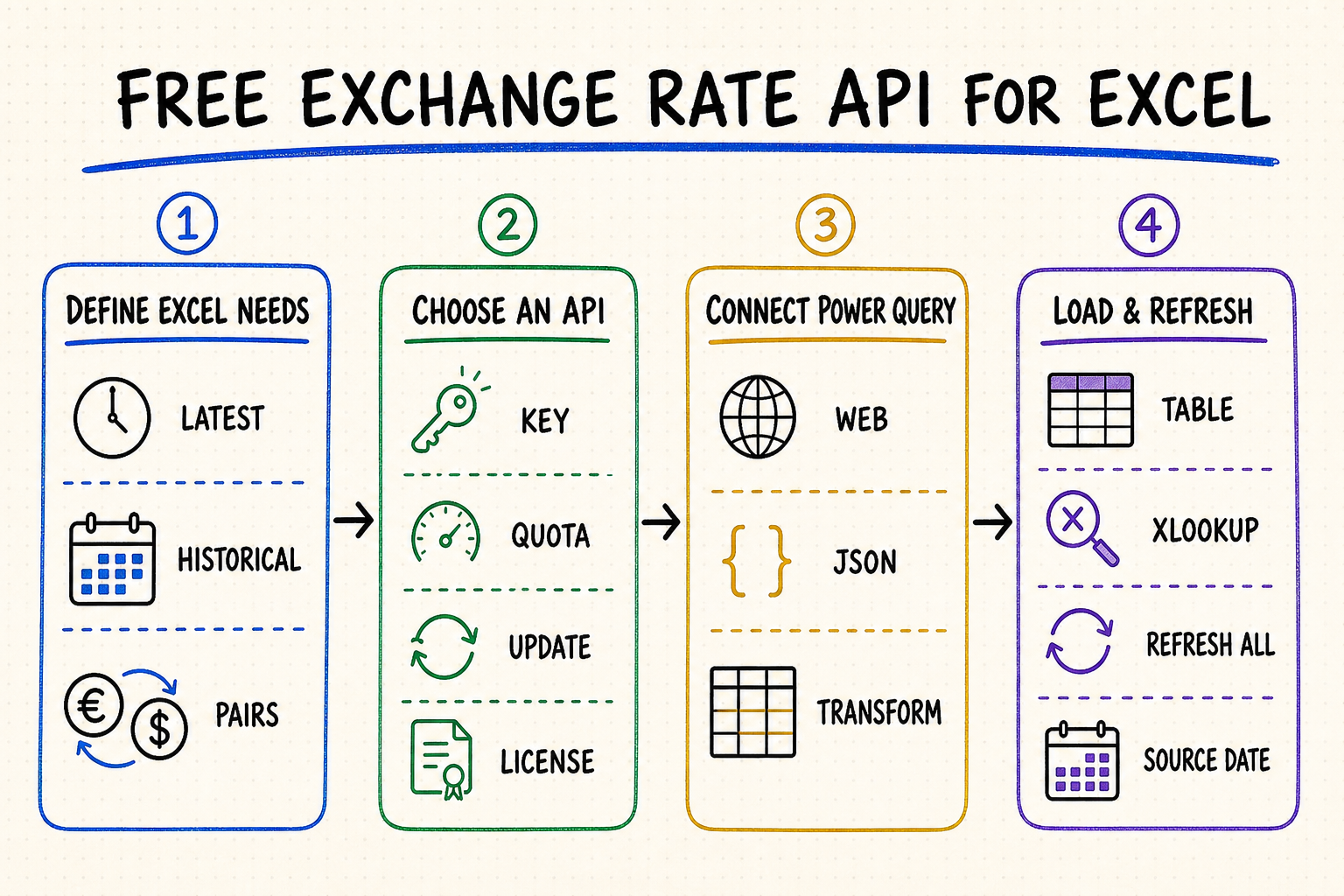
Use Power Query's Web connector to request JSON or CSV, shape the response, and load it as an Excel table.
Microsoft 365 can use the Currencies linked data type for supported pairs without a separate API workflow.
Check API keys, quotas, refresh frequency, attribution, historical coverage, and commercial-use terms.
Store the API's observation date and refresh timestamp so workbook users know what the rate represents.
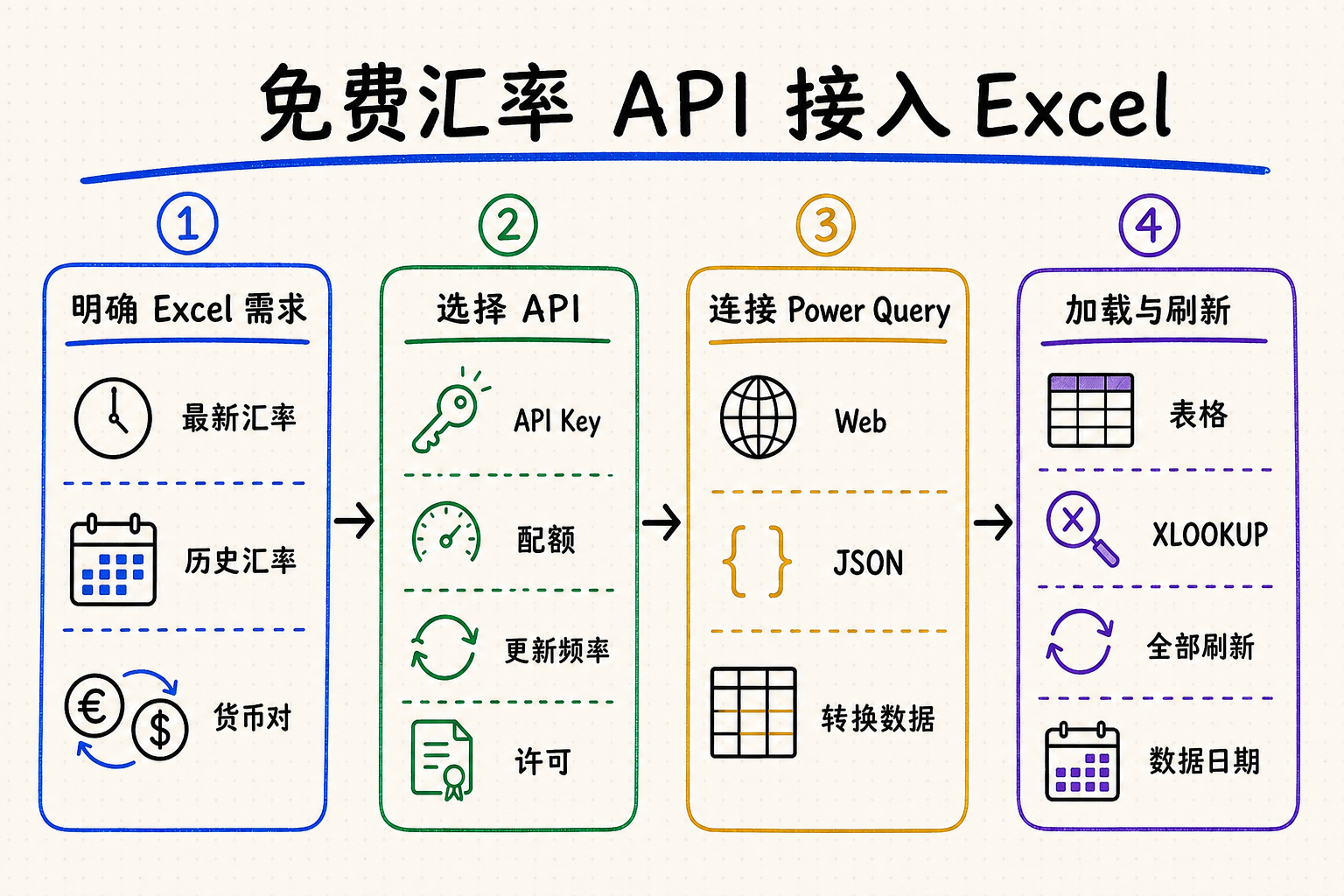
使用 Power Query 的 Web 连接器请求 JSON 或 CSV,整理字段后加载为 Excel 表格。
Microsoft 365 可对受支持的货币对使用“货币”链接数据类型,不必单独调用 API。
核对 API Key、配额、更新频率、署名要求、历史覆盖和商业使用条款。
保存观测日期与刷新时间,让工作簿用户知道汇率对应的时间点。
How to choose a free exchange rate API for Excel如何为 Excel 选择免费汇率 API
Start with the workbook's actual task: latest rates for a dashboard, historical exchange rates by date, or repeatable currency conversion for many rows. A provider that works for a daily budget sheet may not fit audited reporting or intraday pricing.
先明确工作簿任务:仪表板需要最新汇率、报表需要按日期查询历史汇率,还是大量行需要自动货币转换。适合每日预算表的免费接口,不一定适合审计报表或日内定价。
Confirm whether the free plan exposes both the current base/quote rate and dated or time-series queries.
A keyless URL is simple, but Power Query can also send API keys through headers or parameters. Never publish a private key in a shared workbook.
“Real time” is not a uniform promise. Check the provider's documented refresh schedule, contributing sources, timezone, and rate type.
Compare monthly requests, burst limits, attribution, commercial use, caching rules, uptime status, and a fallback source.
确认免费方案是否同时提供当前基准/报价汇率,以及按日期或时间序列查询。
免 Key URL 最简单,Power Query 也能通过请求头或参数发送密钥;不要把私密 Key 暴露在共享工作簿中。
“实时”并非统一标准,应核对刷新计划、来源、时区和汇率类型。
比较月度请求数、突发限制、署名、商业使用、缓存规则、状态页和备用数据源。
A practical evaluation checklist实用评估清单
| Requirement要求 | What to record需要记录 | Why it matters in Excel对 Excel 的影响 |
|---|---|---|
| Coverage覆盖范围 | Base currencies, quote currencies, metals or crypto, historical depth.基准货币、报价货币、贵金属或加密资产、历史深度。 | Missing pairs break lookups and downstream reports.缺少货币对会导致查找公式和下游报表失败。 |
| Freshness新鲜度 | Published update interval, observation timestamp, timezone.官方更新间隔、观测时间戳和时区。 | A five-minute workbook refresh cannot improve a daily source.数据源每日更新一次时,工作簿每五分钟刷新没有意义。 |
| Free tier免费额度 | Requests per month, burst limits, endpoint exclusions.月度请求量、突发限制和不包含的端点。 | Refresh on open can multiply calls across every workbook user.“打开时刷新”会让每个工作簿用户都产生调用。 |
| Terms使用条款 | Attribution, caching, redistribution and commercial use.署名、缓存、再分发和商业使用要求。 | A technically working query may still be unsuitable for shared reports.技术上可用的查询未必适合共享或商业报表。 |
Connect a free exchange rate API to Excel with Power Query用 Power Query 将免费汇率 API 接入 Excel
| Step步骤 | Excel actionExcel 操作 | What to verify需要核对 |
|---|---|---|
| 1 | Open Data → Get Data → From Web and enter the documented endpoint.打开“数据 → 获取数据 → 从 Web”,输入文档中的端点。 | HTTPS URL, authentication method, and allowed parameters.HTTPS URL、认证方式与可用参数。 |
| 2 | Preview the response and choose Transform Data.预览响应并选择“转换数据”。 | HTTP status, JSON/CSV shape, base currency, date, and timezone.HTTP 状态、JSON/CSV 结构、基准货币、日期与时区。 |
| 3 | Convert records to a table, expand rate fields, and set data types.将记录转为表格,展开汇率字段并设置数据类型。 | Currency codes remain text; rates become decimal numbers.货币代码保持文本,汇率设为小数。 |
| 4 | Close & Load, then configure query refresh properties.关闭并加载,再配置查询刷新属性。 | Refresh interval stays inside the provider's quota and terms.刷新间隔符合供应商配额与条款。 |
Example Power Query M patternPower Query M 示例结构
The exact field names depend on the provider, but the pattern is stable: request the endpoint, parse JSON, turn the rates record into a table, name the columns, and preserve the source date.
具体字段名取决于供应商,但流程基本一致:请求端点、解析 JSON、把 rates 记录转换为表格、命名列,并保留数据日期。
let
  Source = Json.Document(Web.Contents(ApiUrl)),
  Rates = Record.ToTable(Source[rates]),
  Renamed = Table.RenameColumns(Rates, {{"Name", "Currency"}, {"Value", "Rate"}}),
  WithDate = Table.AddColumn(Renamed, "SourceDate", each Source[date])
in
  WithDate
Security note: use Power Query credential settings or a controlled intermediary for private keys. Do not concatenate a secret into a workbook URL that will be emailed or published.
安全提示:私密 Key 应使用 Power Query 凭据设置或受控中间层保存,不要把密钥拼进可能被邮件发送或公开的工作簿 URL。
Three ways to get exchange rates into Excel将汇率导入 Excel 的三种方式
Power Query is the most flexible choice, but it is not the only one. Select the method according to Excel version, refresh requirements, historical-data needs, and who will maintain the workbook.
Power Query 最灵活,但并非唯一方案。应根据 Excel 版本、刷新要求、历史数据需求和工作簿维护人员选择接入方式。
| Method方式 | Best for适合场景 | Limitations局限 |
|---|---|---|
| Currencies data type“货币”数据类型 | Microsoft 365 users who need supported currency pairs with minimal setup.需要受支持货币对、希望最少设置的 Microsoft 365 用户。 | Availability and fields depend on Excel's linked-data coverage; Microsoft notes that information may be delayed.可用性与字段取决于 Excel 链接数据覆盖;Microsoft 提醒数据可能延迟。 |
| Power Query | Repeatable latest or historical API imports, transformations, tables, and controlled refresh.可重复导入最新或历史 API 数据、转换字段、加载表格和控制刷新。 | Requires a stable endpoint and some understanding of JSON, parameters, and credentials.需要稳定端点,并理解 JSON、参数和凭据设置。 |
| Formula or VBA公式或 VBA | Small custom workflows where a query table is not suitable.查询表不适用的小型定制流程。 | JSON parsing, security, error handling, and cross-platform support are harder to maintain.JSON 解析、安全、错误处理和跨平台兼容更难维护。 |
When to use Excel's built-in currency data type什么时候使用 Excel 内置货币数据类型
For Microsoft 365, enter a pair such as USD/EUR, convert the cell to the Currencies data type, insert the Price and Last Trade Time fields, and use Refresh All. Choose an API instead when you need explicit provider control, historical date parameters, a documented response, or automation outside Microsoft 365.
在 Microsoft 365 中,可输入 USD/EUR,将单元格转换为“货币”数据类型,再插入价格和最后交易时间字段,并使用“全部刷新”。如果需要指定供应商、传入历史日期、使用明确的 API 响应或在 Microsoft 365 之外自动化,则应选择 API。
Build an automatically refreshing currency converter in Excel在 Excel 中建立自动刷新的货币转换表
Create named cells for base currency, quote currency, and optional historical date. Read them in Power Query instead of editing the URL by hand.
Use XLOOKUP against the loaded rate table, then multiply the source amount by the matched rate. Keep calculation logic separate from the web request.
Use Refresh All for manual updates or query properties for controlled refresh. Do not schedule calls more often than the data itself updates.
Historical services may omit weekends or holidays. Define whether the workbook should use the previous available observation and surface API errors instead of silently retaining stale values.
Set dates, decimal separators, and numeric conversions explicitly in Power Query. A workbook opened under another regional setting must not reinterpret 1.234 as 1,234 or swap month and day.
Keep a small control table with provider, endpoint, requested base, observation date, refresh time, query version, and error status. Protect query cells and document who may change credentials or conversion rules.
为基准货币、报价货币和可选历史日期建立命名单元格,让 Power Query 读取参数,而不是手工改 URL。
用 XLOOKUP 匹配汇率表,再将原金额乘以汇率;把计算逻辑与 Web 请求分离。
手动使用“全部刷新”,或在查询属性中控制周期;不要比数据源更新频率更频繁地调用。
周末和节假日可能没有历史观测值。明确是否使用上一可用日期,并显示 API 错误,避免静默沿用旧数据。
在 Power Query 中显式设置日期、十进制分隔符和数值转换。工作簿在另一种区域设置下打开时,不能把 1.234 误读为 1,234,也不能交换月份与日期。
保留一张小型控制表,记录供应商、端点、请求基准币、观测日期、刷新时间、查询版本和错误状态;同时保护查询单元格,并写清谁可以修改凭据或换算规则。
Formula pattern for currency conversion货币转换公式结构
After Power Query loads a table named FxRates with Currency and Rate columns, a row-level conversion can use =[@Amount]*XLOOKUP([@TargetCurrency],FxRates[Currency],FxRates[Rate]). Confirm the API's quotation direction first: a USD-base rate is not interchangeable with its reciprocal.
当 Power Query 加载名为 FxRates、包含 Currency 与 Rate 列的表后,可使用 =[@Amount]*XLOOKUP([@TargetCurrency],FxRates[Currency],FxRates[Rate]) 逐行换算。使用前必须确认 API 的报价方向:以 USD 为基准的汇率不能直接当作其倒数使用。
Latest rates versus historical rates最新汇率与历史汇率的区别
Use latest rates for current dashboards, estimates, and operational views. Use dated observations for invoices, month-end reporting, backtesting, or reconciliation. Historical workbooks should store the requested date, returned observation date, source, and timezone rather than keeping only the numeric rate.
当前仪表板、估算和运营视图可使用最新汇率;发票、月末报表、回测或对账应使用指定日期的历史观测值。历史工作簿不应只保存数值,还应保存请求日期、返回的观测日期、来源和时区。
Troubleshoot exchange rate API errors in Excel排查 Excel 汇率 API 错误
Confirm whether the provider expects the API key in a header or query parameter. Clear stale Power Query permissions under Data Source Settings before reconnecting.
Reduce refresh frequency, cache one query table for all worksheet formulas, and avoid making a separate web request for every row or currency pair.
Set the rate column to Decimal Number with an explicit locale. Decimal separators can otherwise be interpreted differently across regional Excel installations.
Check weekends, market holidays, provider timezone, earliest available date, and whether the free tier excludes historical endpoints.
Expose SourceDate and RefreshedAt cells, inspect query errors, and decide whether failed refreshes should stop calculations instead of silently preserving old data.
确认供应商要求把 API Key 放在请求头还是查询参数中;重新连接前,可在“数据源设置”中清除失效的 Power Query 权限。
降低刷新频率,让所有工作表公式共用一张查询表,不要为每一行或每个货币对单独发送 Web 请求。
使用明确区域设置把汇率列转换为“小数”。不同地区的 Excel 可能使用不同的小数分隔符。
检查周末、市场节假日、供应商时区、最早可用日期,以及免费方案是否排除了历史端点。
显示 SourceDate 和 RefreshedAt 单元格,检查查询错误,并决定刷新失败时是否停止计算,而不是静默保留旧数据。
How QVeris helps find exchange rate toolsQVeris 如何帮助发现汇率工具
QVeris helps users and agents discover and inspect relevant financial-data capabilities. Use its QVeris tool details to compare candidate tools, then verify each provider's current documentation and terms before connecting Excel.
QVeris 帮助用户与 Agent 检查可调用的金融数据能力。可直接打开汇率工具详情查看输入输出,再核对供应商最新文档与条款后接入 Excel。
- Search by capability, such as exchange rates, historical FX data, or currency conversion.
- Inspect authentication, parameters, response format, and provider documentation.
- Test the selected endpoint in a small workbook before designing a scheduled refresh workflow.
- 按汇率、历史外汇数据或货币转换等能力搜索。
- 检查认证、参数、响应格式和供应商文档。
- 先在小型工作簿测试端点,再设计计划刷新流程。
FAQ
Use Microsoft 365's Currencies data type for supported pairs, or connect a documented API through Power Query and refresh the query.
Yes. Power Query can request a web endpoint, parse JSON or CSV, expand records, and load the output into a table.
Yes, some services provide keyless endpoints. Still verify attribution, quotas, update schedules, permitted uses, and service continuity.
Choose a date or time-series endpoint, pass the date from Power Query, and keep the returned observation date in the table.
可用 Microsoft 365 的“货币”数据类型,或通过 Power Query 接入有文档的汇率 API 并刷新查询。
可以。Power Query 能请求 Web 端点、解析 JSON 或 CSV、展开记录并加载到表格。
有些服务提供免 Key 端点,但仍需核对署名、配额、更新计划、允许用途和服务连续性。
选择按日期或时间序列端点,从 Power Query 传入日期,并在表中保留返回的观测日期。