
Free Financial Data API
for Excel用于 Excel 的
免费金融数据 API
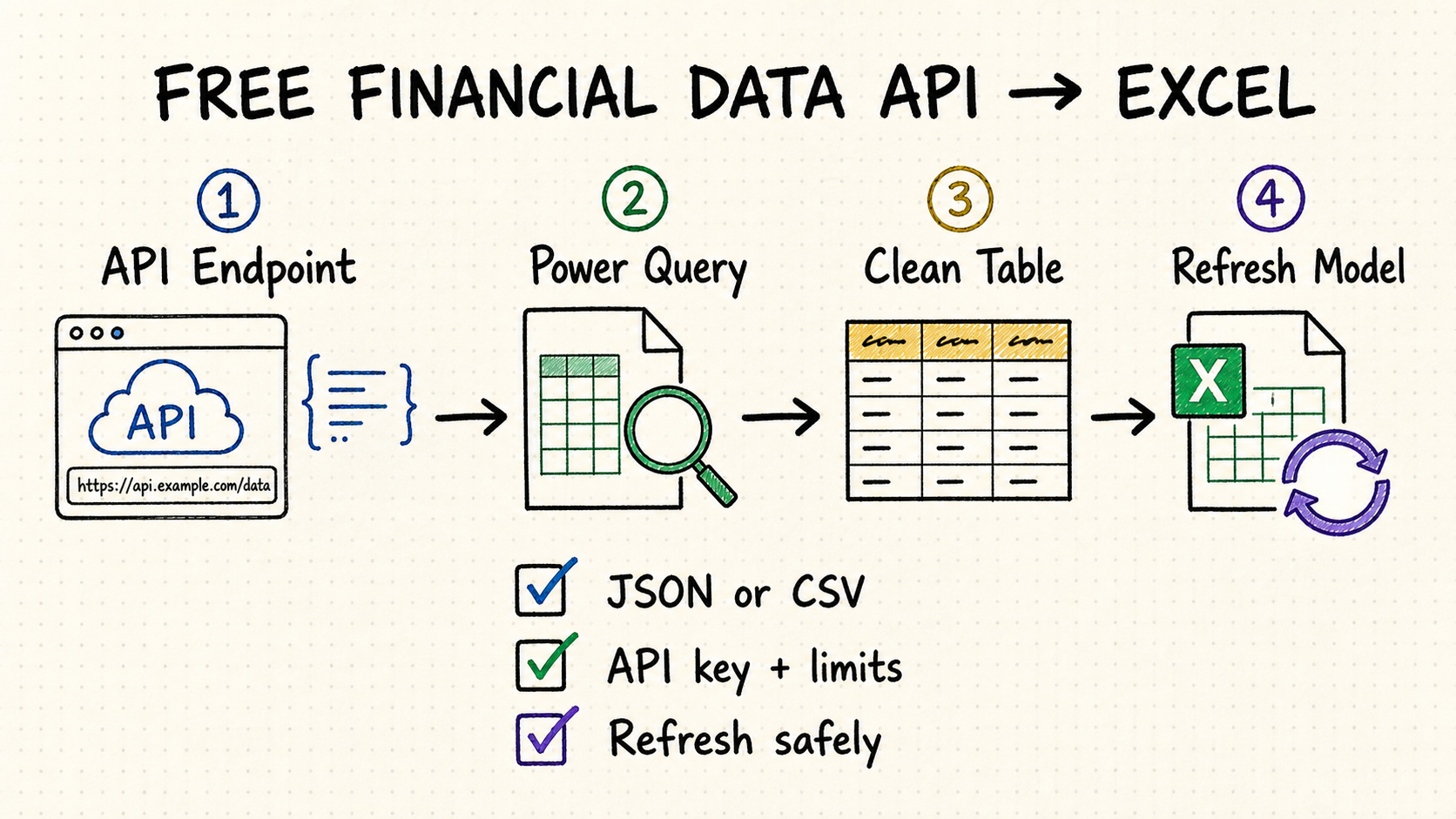
Connect market or economic data to Excel with Power Query, turn JSON into a clean table, and refresh within free API limits.
使用 Power Query 将市场或经济数据接入 Excel,
把 JSON 整理成表格,并在免费额度内安全刷新。
TL;DR快速摘要
Use Excel Power Query for a refreshable REST API connection without VBA or a custom add-in.
Prefer predictable JSON or CSV with stable field names, clear timestamps, and documented rate limits.
Check request quotas, delayed quotes, exchange coverage, history depth, licensing, and attribution.
Keep API keys out of shared cells, cache slow-changing data, and make refresh failures visible.
使用 Excel Power Query 建立可刷新的 REST API 连接,无需 VBA 或自定义加载项。
选择字段稳定、时间戳清晰、限流规则明确的 JSON 或 CSV 响应。
检查调用配额、延迟行情、交易所覆盖、历史深度、许可与署名要求。
不要把 API 密钥暴露在共享单元格中;缓存慢变数据,并让刷新失败可见。
How to choose a free financial data API for Excel如何选择适合 Excel 的免费金融数据 API
The right provider depends on the workbook, not the longest feature list. Define whether you need prices, fundamentals, forex, macro series, filings, or crypto; then test the exact symbols and dates your model uses.
合适的供应商取决于工作簿,而不是功能列表长度。先明确需要行情、基本面、外汇、宏观序列、监管文件还是加密资产,再用模型真实涉及的标的与日期测试。
Confirm exchanges, asset classes, corporate actions, currencies, reporting periods, and historical depth before optimizing the Excel connection.
A flat response is easier to load. Nested JSON still works, but it needs explicit record and list expansion in Power Query.
Estimate symbols × endpoints × refreshes × users. A small workbook can exhaust a free daily quota when every row triggers a separate request.
Check personal versus commercial use, redistribution, attribution, delayed data, and whether cached results may be shared.
在优化 Excel 接入前,确认交易所、资产类别、公司行为、币种、报告期与历史深度。
扁平响应最容易加载。嵌套 JSON 也可用,但需要在 Power Query 中明确展开记录与列表。
估算“标的 × 端点 × 刷新次数 × 用户数”。如果每一行都单独请求,小工作簿也会迅速用完免费日配额。
检查个人或商业用途、再分发、署名、数据延迟,以及缓存结果能否共享。
Connect the API with Excel Power Query使用 Excel Power Query 接入 API
In Excel, choose Data → Get Data → From Other Sources → Blank Query, open Advanced Editor, and adapt this reusable pattern. It keeps the base URL separate from query parameters so credentials and refresh behavior are easier to manage.
在 Excel 中选择“数据 → 获取数据 → 从其他源 → 空查询”,打开“高级编辑器”,再调整下面的通用模板。基础 URL 与查询参数分开后,凭据和刷新行为更容易管理。
let
  BaseUrl = "https://api.example.com/",
  Response = Json.Document(
    Web.Contents(
      BaseUrl,
      [
        RelativePath = "v1/quotes",
        Query = [symbol = "AAPL", apikey = ApiKey],
        Headers = [Accept = "application/json"]
      ]
    )
  ),
  Rows = if Value.Is(Response, type list) then Response else {Response},
  Table = Table.FromRecords(Rows)
in
  Table
Manage Parameters keeps a key out of ordinary worksheet cells and makes the query reusable, but a workbook is not a secure secret store. Never distribute a file with a working key embedded in M code or parameters.
Keep symbol, timestamp, currency, price, and provenance fields explicit. Stable columns make formulas and PivotTables more reliable.
Convert timestamps, decimals, currencies, and nulls before loading. Do not let locale-specific parsing silently change values.
“管理参数”能避免把密钥放进普通单元格,也便于复用查询,但工作簿并不是安全的密钥存储。只要文件需要外发,就不能在 M 代码或参数中保留有效密钥。
明确保留标的、时间戳、币种、价格与来源字段。稳定列结构会让公式和数据透视表更可靠。
加载前转换时间戳、小数、币种与空值,避免地区格式差异悄悄改变数据。
Turn financial API JSON into a dependable Excel table把金融 API 的 JSON 整理成可靠的 Excel 表格
A successful request is only the first step. Financial APIs commonly return a top-level status object, nested lists, paging metadata and observations in the same response. Separate those concerns before loading the model.
请求成功只是第一步。金融 API 常把状态信息、嵌套列表、分页信息和真实观测值放在同一个响应中。加载模型前,应先把这些内容拆开处理。
Use the Power Query preview to identify whether the root is a record or list. Expand the data node deliberately and retain response fields such as status, next cursor and provider timestamp when they affect completeness.
Keep symbols and identifiers as text; parse ISO dates explicitly; set decimal and currency types with the correct locale; and preserve nulls instead of converting them to zero.
Create a Power Query function that accepts a page or cursor, generate the required page list, and combine the returned tables. Do not let each worksheet row launch an unrelated web request.
Use validated named cells or Power Query parameters for symbols and dates. Reject blanks, unexpected symbols and inverted date ranges before building a URL.
在 Power Query 预览中先判断根节点是记录还是列表,再有选择地展开真实数据节点。状态、下一页游标和供应商时间戳如果影响完整性,也要保留下来。
证券代码和其他标识符按文本处理;ISO 日期明确解析;小数和币种按正确地区格式设定类型;缺失值要保留,不能顺手填成零。
可以把页码或游标封装成 Power Query 函数,生成需要请求的分页列表,再合并结果。不要让每个工作表行各自发起一次互不相关的 Web 请求。
证券代码和日期可来自经过校验的命名单元格或 Power Query 参数。拼接 URL 前先拒绝空值、异常代码和起止日期颠倒等输入。
| API fieldAPI 字段 | Excel typeExcel 类型 | Common mistake常见错误 | Safer rule更稳妥的规则 |
|---|---|---|---|
| Ticker / CIK / ISINTicker/CIK/ISIN | Text文本 | Leading zeros removed or values converted to dates.前导零被删除,或内容被转成日期。 | Set text type before load.加载前明确设为文本。 |
| Timestamp时间戳 | Date/time with explicit zone带明确时区的日期时间 | Venue time interpreted as local computer time.交易场所时间被当成本机时间。 | Retain source zone, then convert once.保留来源时区,再统一转换一次。 |
| Price / ratio价格/比率 | Decimal number十进制数 | Comma and period interpreted with the wrong locale.逗号与小数点按错误地区格式解析。 | Apply type using the source locale.按来源地区格式应用类型。 |
| Missing value缺失值 | Null空值 | Blank, “N/A” and zero treated as equivalent.空白、“N/A”和零被视为同一含义。 | Map provider markers to null; keep real zeros.把供应商缺失标记映射为空值,真实零值保留。 |
Excel connection options comparedExcel 接入方式对比
| Method方式 | Best for适合场景 | Strength优势 | Watch out注意事项 |
|---|---|---|---|
| Power Query | Refreshable tables and repeatable analysis.可刷新表格与重复分析。 | Built into modern Excel; good JSON shaping.现代 Excel 内置,适合整理 JSON。 | Nested responses need transformation.嵌套响应需要转换。 |
| CSV URL | Simple flat downloads.简单的扁平数据下载。 | Fastest setup and easy inspection.设置最快,也容易检查。 | Authentication and parameters may be limited.鉴权和参数能力可能有限。 |
| Excel Add-in | Cell formulas and analyst workflows.单元格公式与分析师工作流。 | Convenient formulas and guided setup.公式直观,设置有引导。 | Vendor lock-in and formula-level quotas.供应商绑定与公式级配额。 |
| VBA / Office Scripts | Custom workflows and write-back actions.定制流程与回写操作。 | Maximum control over requests.对请求控制最灵活。 | More code, security review, and maintenance.代码、安全审查与维护成本更高。 |
Refresh free financial data without breaking the model在免费额度内稳定刷新金融数据
One request for many symbols usually uses less quota and refreshes faster than one request per worksheet row.
Quotes may change quickly; fundamentals, filings, calendars, and macro series usually do not. Give each query its own sensible cadence.
A timeout or 429 response should not silently replace valid data with blanks. Surface the error and keep a refresh timestamp.
Load the API response into a staging query, then reference it from cleaned model tables. Schema changes become easier to diagnose.
如果 API 支持,一次请求多个标的通常比逐行请求更省配额、刷新更快。
行情变化快,但基本面、监管文件、交易日历与宏观序列通常较慢。为每个查询设置合理节奏。
超时或 429 响应不应悄悄把有效数据替换成空白。显示错误,并保留刷新时间戳。
先把 API 响应加载到暂存查询,再由清洗后的模型表引用它,更容易诊断字段结构变化。
Secure and troubleshoot an Excel financial API connectionExcel 金融 API 连接的安全与排错
A workbook often moves farther than its author expects—email, shared drives, version history and local backups. Treat it as a client document, not a trusted server, and make failure states visible to anyone using the model.
工作簿的传播范围经常超出作者预期,可能进入邮件、共享盘、版本历史和本地备份。因此应把它当客户端文档,而不是可信服务器,同时让模型使用者能看见刷新失败。
Use the connector’s credential flow where supported, restrict file access, rotate exposed keys, and never commit a workbook containing secrets to a public repository.
Prefer an organization-controlled proxy, gateway or approved data source that keeps provider credentials outside the file and enforces user access centrally.
Set Power Query source privacy levels deliberately. The Formula Firewall exists to reduce unintended data movement when queries combine sources.
Expose last successful refresh, source timestamp, row count and error state. A stale table should never look indistinguishable from a fresh one.
供应商支持时使用连接器凭据流程,限制文件访问,密钥泄露后及时轮换,也不要把含有密钥的工作簿提交到公开代码仓库。
优先通过组织控制的代理、网关或批准数据源,把供应商凭据留在文件之外,并集中管理用户权限。
为 Power Query 数据源主动设置合适的隐私级别。Formula Firewall 的作用,是在多个查询合并来源时降低数据被意外传出的风险。
展示最近一次成功刷新时间、来源时间戳、行数和错误状态。过期表格不能在界面上看起来与新数据完全一样。
Recheck authentication type, credential scope, key placement and base URL. Do not automatically change to anonymous access just to make the preview load.
Review privacy levels and query boundaries. Separate source retrieval from transformations instead of disabling privacy checks without understanding the data path.
Reduce refresh frequency, batch symbols, cache slow-changing tables and honor provider retry guidance. Preserve the last good table with a visible stale flag.
Inspect the raw response and applied steps. Providers may return error objects or empty lists that look like schema drift when a quota is exhausted.
检查鉴权类型、凭据适用范围、密钥放置位置和基础 URL。不要为了让预览暂时加载,就直接改成匿名访问。
检查隐私级别和查询边界,把数据获取与转换过程拆开。在没有弄清数据流向之前,不要简单关闭隐私检查。
降低刷新频率、批量请求证券、缓存慢变表,并遵守供应商的重试说明。保留最近一次有效表,同时明确标记数据已过期。
先检查原始响应和“应用的步骤”。额度耗尽时,供应商可能返回错误对象或空列表,看起来很像字段结构变化。
Use QVeris to find the right financial data capability使用 QVeris 查找合适的金融数据能力
Provider pages describe products differently. QVeris lets developers and agents search by capability, inspect inputs and outputs, and identify financial data tools that fit an Excel workflow.
不同供应商的产品描述方式并不一致。QVeris 让开发者与 Agent 按能力搜索、检查输入输出,并找到适合 Excel 工作流的金融数据工具。
- Search for quotes, fundamentals, forex, macro data, filings, or crypto by capability.
- Inspect authentication, parameters, response fields, and constraints before building the query.
- Keep provenance and provider-specific limits visible inside the workbook.
- 按行情、基本面、外汇、宏观数据、监管文件或加密资产等能力搜索。
- 构建查询前检查鉴权、参数、响应字段与限制条件。
- 在工作簿中保留数据来源与供应商特有的限制条件。
FAQ常见问题
Yes. Power Query can request JSON or CSV from a web API, transform the response, and load it into a refreshable table.
Usually not. Start with Power Query. Use VBA or Office Scripts only when you need custom actions beyond repeatable data import and transformation.
Use the connector credential flow where possible. A Power Query parameter improves reuse but is not a secret vault; never distribute a workbook containing a working key.
HTTP 429 means the provider is rate-limiting requests. Reduce frequency, batch symbols, cache results, or move to a higher quota.
可以。Power Query 能请求 Web API 的 JSON 或 CSV,转换响应,再加载为可刷新的表格。
通常不需要。先用 Power Query;只有在导入与转换之外还需要定制操作时,再考虑 VBA 或 Office Scripts。
优先使用连接器提供的凭据流程。Power Query 参数便于复用,但并不是密钥库;不要外发包含有效密钥的工作簿。
HTTP 429 表示供应商正在限流。降低频率、批量请求、缓存结果,或升级到更高配额。