
Free Stock API Key免费股票 API 密钥
Choose a provider, create a key, test a quote endpoint, and keep the credential out of browsers, apps, logs, and source control.
选择服务商、创建密钥并测试报价接口,
同时避免在浏览器、应用、日志或源码中泄露凭据。
TL;DR核心摘要
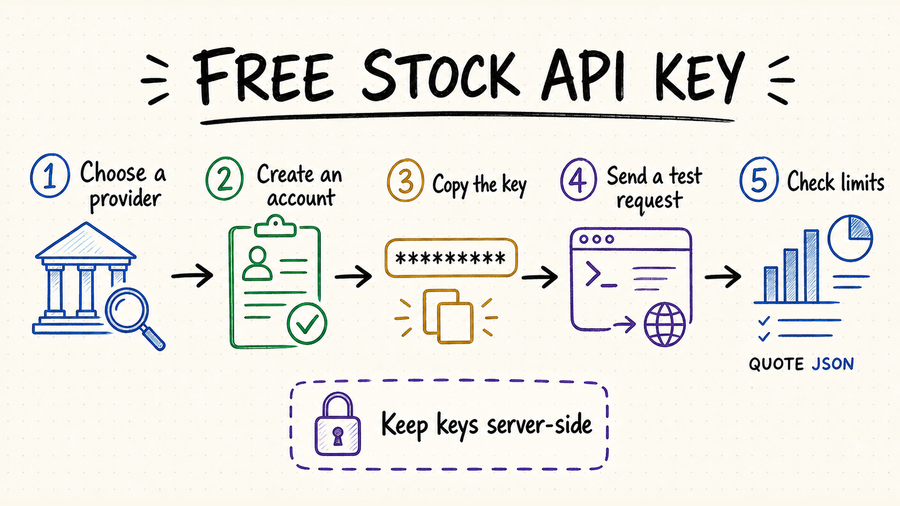
Create a provider account, verify your email, copy the generated key, and call one documented quote endpoint.
Check coverage, delay, request quotas, redistribution rights, and whether the free plan requires a card.
Keep the key in a server-side environment variable. Never commit it or expose it in client-side JavaScript.
注册服务商账户、验证邮箱、复制生成的 Key,然后调用一个文档中明确说明的报价接口。
检查市场覆盖、数据延迟、请求额度、再分发许可,以及免费方案是否要求绑定银行卡。
把 Key 放在服务端环境变量中,不要提交到代码仓库,也不要暴露在前端 JavaScript 里。
How to choose a free stock API key provider如何选择免费股票 API Key 服务商
The word “free” describes billing, not fitness for your use case. Start with the exact market, instrument, freshness, and usage rights your application needs, then compare the limits that apply to those endpoints.
“免费”只说明计费方式,并不代表一定适合你的场景。先明确应用需要的市场、资产类型、数据时效性和使用权,再比较这些接口实际适用的限制。
Confirm the provider supports your exchanges, symbols, ETFs, fundamentals, corporate actions, or historical candles—not just a single demo ticker.
A “quote” may be delayed, indicative, or end-of-day. Verify timestamps and exchange entitlements before using it in a live product.
Daily calls, per-minute bursts, rows per response, and endpoint credits can all become the real bottleneck.
Check whether you can create separate keys, revoke one without closing the account, restrict origins or IPs, and see recent usage. These controls matter as soon as a project leaves a local notebook.
Confirm how long responses may be cached and whether derived charts, alerts, or public displays are allowed. Authentication grants access; it does not replace a data license.
确认服务商支持你需要的交易所、代码、ETF、基本面、公司行动或历史 K 线,而不是只有一个演示代码。
“报价”可能是延迟、指示性或日终数据。用于在线产品前,要核对时间戳和交易所授权。
每日调用次数、每分钟突发限制、单次返回行数和接口积分,都可能成为真正的瓶颈。
确认能否创建多把 Key、单独撤销某一把 Key、限制来源域名或 IP,以及查看近期用量。项目一旦离开本地 Notebook,这些能力就会变得很重要。
核对响应可以缓存多久,以及衍生图表、提醒或公开展示是否被允许。Key 只解决访问身份,不等于获得了数据使用许可。
Make your first stock quote request发出第一次股票报价请求
| Step步骤 | What to do操作 | What to verify核对内容 | Common failure常见错误 |
|---|---|---|---|
| 1 | Create the key in the provider dashboard.在服务商控制台创建 Key。 | Key status is active and tied to the correct plan.Key 已激活并绑定正确套餐。 | Email verification is incomplete.邮箱验证尚未完成。 |
| 2 | Store it as STOCK_API_KEY on the server.把它作为 STOCK_API_KEY 存在服务端。 | The value is available to the runtime, not the browser.运行时可读取,但浏览器不可见。 | A placeholder or expired key is loaded.加载了占位符或过期 Key。 |
| 3 | Call the provider’s documented quote endpoint with a liquid symbol such as AAPL.使用 AAPL 等流动性较高的股票代码,调用文档中的报价接口。 | HTTP status, symbol, price, currency, and timestamp.HTTP 状态、代码、价格、币种和时间戳。 | Wrong auth header or query parameter.鉴权请求头或查询参数写错。 |
| 4 | Log quota headers and handle 401, 403, 429, and 5xx responses.记录额度响应头,并处理 401、403、429 和 5xx。 | Retries use backoff and never duplicate paid work.重试使用退避,并避免重复付费工作。 | Blind retry loops exhaust the free quota.无条件重试耗尽免费额度。 |
After the first successful response, repeat the test with an invalid symbol, a missing key, and enough calls to approach the documented burst limit. Record the provider’s status code, error body, quota headers, and retry guidance. Your adapter should distinguish bad credentials from an unsupported endpoint, exhausted quota, and a temporary provider failure.
第一次请求成功后,还应分别测试无效股票代码、缺少 Key,以及接近文档所述瞬时频率上限的情况。记录服务商返回的状态码、错误正文、额度响应头和重试提示。接入层需要区分密钥错误、接口不支持、额度耗尽和供应商临时故障,而不是统一报成“请求失败”。
Keep a free stock API key secure安全保管免费股票 API Key
Load the credential at runtime and keep separate keys for local, staging, and production environments.
Browser JavaScript, mobile bundles, public notebooks, screenshots, and analytics events can all expose credentials.
Mask query parameters and authorization headers before requests enter logs, traces, or support tickets.
Load keys from a secret store, accept a new and old credential during a short transition, verify the replacement, and revoke the exposed or retired key promptly.
Use separate keys per project and environment when the provider permits it. Apply endpoint, referrer, or IP restrictions rather than sharing one unrestricted account credential.
在运行时加载凭据,并为本地、预发布和生产环境分别创建 Key。
浏览器 JavaScript、移动端安装包、公开 Notebook、截图和分析事件都可能暴露凭据。
在请求进入日志、链路追踪或客服工单前,屏蔽查询参数和鉴权请求头。
从密钥管理服务加载凭据,在短暂过渡期同时接受新旧 Key;验证新 Key 可用后,及时撤销泄露或退役的旧 Key。
服务商允许时,为不同项目和环境使用独立 Key,并设置接口、来源域名或 IP 限制,避免所有系统共用一把无限制凭据。
Use QVeris to find the right stock data capability用 QVeris 查找合适的股票数据能力
A free API key belongs to its data provider; QVeris does not issue a universal stock-data key. Read the QVeris documentation for the execution model and use the Playground to inspect a candidate capability before supplying provider credentials.
免费 API Key 由具体数据供应商签发,QVeris 不提供一把通用的股票数据 Key。可以先阅读 QVeris 文档了解调用方式,再到 Playground 检查候选能力,确认后再配置供应商凭据。
- Search by capability—quote, historical candles, fundamentals, filings, or corporate actions—not only by provider name.
- Inspect authentication, input schema, response shape, freshness, and limits before an agent calls the tool.
- Keep one internal adapter so a provider or key can change without rewriting the whole application.
- 按报价、历史 K 线、基本面、公告或公司行动等能力搜索,而不是只看服务商名称。
- 让 Agent 调用前,先检查鉴权、输入结构、响应格式、数据时效性和限制。
- 保留统一的内部适配层,切换服务商或 Key 时无需重写整个应用。
FAQ常见问题
Some providers allow it, while others require billing details. Check the current signup and pricing terms before creating an account.
Usually not by default. Confirm exchange entitlements, latency, SLA, and redistribution rights before any trading use.
Revoke or rotate it immediately, inspect usage for unfamiliar calls, remove it from logs and repository history, and fix the path that leaked it.
The key may be inactive, tied to another environment, sent in the wrong header, or missing entitlement for that endpoint. Check the provider’s error body before retrying.
部分服务商可以,另一些会要求付款信息。注册前先查看当前申请流程和定价条款。
通常不能默认认为适合。用于交易前必须确认交易所授权、延迟、SLA 和再分发权。
立即撤销或轮换,检查近期是否出现异常调用,从日志和代码历史中清除凭据,并修复造成泄露的入口。
可能是 Key 尚未激活、绑定了其他环境、鉴权位置写错,或当前套餐没有该接口权限。重试前先查看服务商返回的错误正文。
References and next steps参考资料与下一步
Alpha Vantage API key
Finnhub API documentation
Twelve Data API documentation
Free stock data API guide
Best free stock APIs
QVeris Playground
Alpha Vantage API Key
Finnhub API 文档
Twelve Data API 文档
免费股票数据 API 指南
最佳免费股票 API
QVeris Playground