
GitHub MCP for Claude CodeGitHub MCP 接入 Claude Code
Give Claude Code verifiable GitHub context while keeping repository scope, credentials, write tools, and approval boundaries explicit.
让 Claude Code 获取可核验的 GitHub 上下文,
同时明确仓库范围、凭据、写入工具与批准边界。
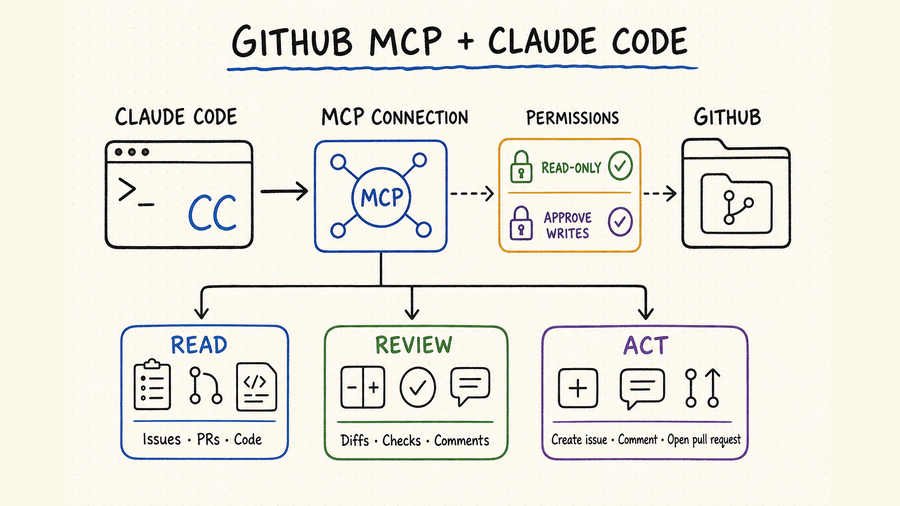
What GitHub MCP adds to Claude CodeGitHub MCP 为 Claude Code 增加了什么
Claude Code already understands a local working tree. GitHub MCP adds server-side collaboration context: repositories, branches, commits, issues, pull requests, review threads, checks, releases, and other capabilities exposed by the selected toolsets. That distinction matters. Local Git answers “what is on this machine?” GitHub answers “what is published, reviewed, discussed, or running remotely?” A reliable workflow states which source is authoritative for each decision and records the exact repository and revision used.
Claude Code 本身已经能理解本地工作区;GitHub MCP 补充的是服务器端协作上下文,例如仓库、分支、提交、Issue、Pull Request、审查讨论、检查结果、Release,以及所选工具集开放的其他能力。两者不能混为一谈:本地 Git 回答“这台机器上有什么”,GitHub 回答“远端已经发布、审查、讨论或运行了什么”。可靠流程应明确每项判断以哪一侧为准,并记录实际读取的仓库与修订版本。
Begin with repository metadata, a known file, issue, or pull request. Confirm identity and scope before exposing any mutation tool.
Branch names move. Retain the commit SHA or pull-request head SHA that supported the analysis so another reviewer can reproduce it.
Local edits, GitHub comments, branches, reviews, and merges have different consequences. Do not treat them as one generic “write” action.
Before a remote write, show the target, exact payload, expected result, checks, and rollback path. Approval should cover a concrete action.
先读取仓库元数据,以及一个已知文件、Issue 或 Pull Request,确认身份和范围后再考虑开放任何写入工具。
分支名会移动。应保留支撑分析的 commit SHA 或 Pull Request head SHA,让其他审查者可以复现。
本地改文件、发布评论、创建分支、提交审查和合并的后果不同,不能统称为一次普通“写入”。
远程写入前应展示目标、准确内容、预期结果、检查项和回退方式。批准应针对具体动作,而不是笼统授权。
Choose the official connection and credential model选择官方连接方式与凭据模型
GitHub maintains the official GitHub MCP Server and documents both a GitHub-hosted remote server and a local container. The remote route is simplest when the MCP client and organization policy support it. The local route is useful when your environment requires explicit container execution or a personal access token. In either case, the credential—not the prompt—determines which private resources and actions are possible.
GitHub 维护官方 GitHub MCP Server,并提供由 GitHub 托管的远程服务器与本地容器两种路径。MCP 客户端和组织策略支持时,远程方式通常最省事;需要显式运行容器或使用个人访问令牌时,可以选择本地方式。无论哪种方案,真正决定私有资源和可执行操作范围的是凭据,而不是提示词里的口头限制。
| Decision决策项 | Hosted remote托管远程 | Local container本地容器 | Review point审查重点 |
|---|---|---|---|
| Operation运行方式 | GitHub runs the server; Claude Code connects over supported remote transport.服务器由 GitHub 运行,Claude Code 通过支持的远程传输连接。 | Claude Code starts the official container through STDIO.Claude Code 通过 STDIO 启动官方容器。 | Client compatibility, network policy, container policy.客户端兼容性、网络策略和容器策略。 |
| Authentication身份验证 | Use the authentication flow supported by the hosted integration.使用托管集成支持的授权流程。 | Pass a narrowly scoped GitHub token through the environment.通过环境变量传入最小权限 GitHub 令牌。 | Identity, repository grants, expiry, rotation.账号身份、仓库授权、有效期和轮换。 |
| Updates更新 | GitHub manages the hosted service.托管服务由 GitHub 维护。 | Your environment selects and updates the container image.由你的环境选择并更新容器镜像。 | Change review, image provenance, rollback.变更审查、镜像来源和回退。 |
| Scope范围 | Controlled by account, organization policy, and exposed toolsets.由账号、组织策略和开放工具集共同控制。 | Controlled by token permissions, environment, and server options.由令牌权限、环境和服务器选项控制。 | Read versus write, named repositories, tool allowlist.只读或写入、指定仓库和工具白名单。 |
List the owner and repository names required for the task. Decide whether forks, private repositories, organization projects, and user-level resources are needed. A vague “all GitHub” scope is not a setup requirement.
The official server groups capabilities by domain. Enable the smallest set that supports the workflow—for example repository reading and pull requests—rather than exposing every available tool by default.
For a local server, keep the token in the environment or an approved secret manager. Never paste a live credential into MCP JSON that will be committed, a prompt transcript, an issue, or a shell-history example.
Follow the current command in the official server documentation for the chosen transport. Then use Claude Code's MCP view to confirm the server is connected and review the actual tools it exposes.
Read one public or approved private file at a named branch and compare its path and content with GitHub. Next retrieve one issue or pull request and confirm number, state, author, and URL.
列出任务真正需要的所有者与仓库名称,并决定是否需要访问 Fork、私有仓库、组织 Project 或用户级资源。“访问整个 GitHub”不是一个合格的配置需求。
官方服务器按领域组织能力。只启用当前流程需要的最小集合,例如仓库读取与 Pull Request,不要默认暴露所有可用工具。
本地服务器使用的令牌应放在环境变量或获批的密钥管理器中。不要把真实凭据写进可能提交的 MCP JSON、提示词记录、Issue 或命令示例。
根据所选传输方式,使用官方服务器文档里的最新命令。随后打开 Claude Code 的 MCP 视图,确认连接成功,并查看实际开放了哪些工具。
先按指定分支读取一个公开或获批私有文件,与 GitHub 页面核对路径和内容;再读取一个 Issue 或 Pull Request,确认编号、状态、作者和链接。
A reviewable GitHub workflow for Claude Code一套可审查的 Claude Code GitHub 工作流
A good request names four things: the repository, base revision, collaboration object, and deliverable. For example: inspect pull request 214 in owner/repo against its base SHA, compare unresolved review threads with the current diff, and return findings without posting comments. This is far safer and more reproducible than “review our latest PR.”
一个清楚的请求至少要写明四项:仓库、基准修订、协作对象和交付物。例如:“检查 owner/repo 的 Pull Request 214,以其 base SHA 为基准,把未解决审查讨论与当前 diff 对照,只返回发现,不发布评论。”这比“审查一下我们最新的 PR”安全得多,也更容易复现。
| Stage阶段 | Claude Code should doClaude Code 应执行 | Evidence to retain保留证据 | Approval gate批准节点 |
|---|---|---|---|
| Orient定位 | Resolve repository, default branch, PR head/base, issue state, and local remote.确认仓库、默认分支、PR head/base、Issue 状态和本地 remote。 | Owner/repo, URLs, branch names, SHAs.owner/repo、链接、分支名和 SHA。 | No remote write.不执行远程写入。 |
| Investigate调查 | Read files, commits, checks, reviews, linked issues, and relevant history.读取文件、提交、检查、审查、关联 Issue 与相关历史。 | Exact paths, lines, check names, timestamps.准确路径、代码行、检查名称和时间。 | No mutation tool.不调用变更工具。 |
| Plan方案 | Explain findings, proposed local changes, tests, and remote actions separately.分别说明发现、本地改动、测试和远程动作。 | Risk, assumptions, affected files, expected outcome.风险、假设、受影响文件和预期结果。 | Approve implementation scope.批准实现范围。 |
| Validate验证 | Apply local patch, run relevant checks, inspect diff, and re-read changed GitHub state.应用本地补丁、运行相关检查、审阅 diff,并重新读取 GitHub 状态。 | Test output, diff summary, remaining failures.测试结果、diff 摘要和剩余失败。 | Approve exact remote payload.批准准确远程内容。 |
| Publish发布 | Perform only the approved comment, branch, PR, review, label, or merge action.只执行获批的评论、分支、PR、审查、标签或合并动作。 | Result URL, new SHA or object ID, final state.结果链接、新 SHA 或对象 ID、最终状态。 | Stop after confirmed result.确认结果后停止。 |
Useful review prompt: “Read pull request 214 in owner/repo and its unresolved review threads. Compare the head SHA with the base SHA and inspect relevant local files. Return only evidence-backed findings with file paths and lines. Do not post, approve, request changes, merge, label, or modify the repository.”
可复用审查提示词:“读取 owner/repo 中的 Pull Request 214 及其未解决审查讨论,对比 head SHA 与 base SHA,并检查相关本地文件。只返回有证据支持的问题,注明文件路径与代码行;不要发布评论、批准、请求修改、合并、添加标签或变更仓库。”
Control risk at credential, tool, and action layers从凭据、工具与动作三层控制风险
A prompt saying “read only” is useful behavior guidance, but it is not an authorization boundary. Enforce least privilege in GitHub credentials and organization policy, reduce the MCP toolset, and require human confirmation for consequential calls. Also remember that read access is sensitive: source code, issue bodies, private review comments, Actions logs, and release artifacts may contain internal or regulated information.
提示词里写“只读”可以约束行为,但它不是权限边界。真正的最小权限应落实在 GitHub 凭据与组织策略中,同时缩减 MCP 工具集,并为高影响调用保留人工确认。还要注意,读取本身也可能敏感:源代码、Issue 正文、私有审查评论、Actions 日志和 Release 资源都可能包含内部或受监管信息。
Prefer fine-grained, expiring credentials or managed authorization with named repository grants. Rotate after suspected exposure and remove access when the workflow ends.
Expose read toolsets by default. Add issue, PR, release, workflow, or administration mutations only when the active task requires them.
Show the exact comment, title, body, branch, label, review state, or merge target before calling the write tool. Do not approve a placeholder.
Record the operator, time, repository, revision, tool, parameters, outcome, and resulting GitHub URL. Logs should support reconstruction without storing secrets.
优先使用细粒度、有有效期的凭据,或具有明确仓库授权的托管身份。疑似泄露时立即轮换,工作流结束后及时撤销。
默认只开放读取工具。只有当前任务确实需要时,才增加 Issue、PR、Release、Workflow 或管理类写入能力。
调用写工具前,应展示准确的评论、标题、正文、分支、标签、审查状态或合并目标,不要让用户批准一个占位描述。
记录操作者、时间、仓库、修订版本、工具、参数、结果和 GitHub 链接;日志应能重建过程,但不能保存密钥。
Common failure modes常见故障与误判
- Repository not found: distinguish a wrong owner/name from a private repository hidden by the credential. Test identity and a known accessible repository.
- Local and remote disagree: compare remotes, forks, branches, commit SHAs, shallow history, and unpushed commits before deciding either side is stale.
- PR data looks incomplete: check pagination, review-thread resolution, renamed files, generated files, and whether the tool returned the current head SHA.
- Action is forbidden: inspect token permissions, branch protection, rulesets, required reviews, organization policy, and toolset configuration. Do not broaden access blindly.
- 找不到仓库:要区分 owner/name 写错,还是凭据看不到私有仓库。先验证当前身份,再读取一个确认有权访问的仓库。
- 本地与远端不一致:先比较 remote、Fork、分支、commit SHA、浅克隆历史和未推送提交,再判断哪一侧过期。
- PR 数据不完整:检查分页、审查讨论是否解决、文件是否改名、生成文件,以及工具返回的是否为当前 head SHA。
- 操作被拒绝:检查令牌权限、分支保护、Ruleset、必需审查、组织策略和工具集配置,不要盲目扩大访问范围。
Use QVeris for capabilities outside GitHub用 QVeris 承接 GitHub 之外的能力
GitHub MCP should remain the direct source for GitHub repository and collaboration state. A live QVeris catalog search did not surface a trustworthy exact GitHub Tool or Provider profile—the guessed routes resolved to unrelated content—so this page does not use them. When the same Claude Code task needs other APIs or live data, consult QVeris Docs and evaluate the required capability in the QVeris Playground.
GitHub 仓库与协作状态仍应直接以 GitHub MCP 为来源。实时检索 QVeris 目录后,没有发现可信且准确的 GitHub Tool 或 Provider 页面;猜测路径实际返回了无关内容,因此本页不会使用。若同一个 Claude Code 任务还需要其他 API 或实时数据,可先查看 QVeris 文档,再到 QVeris Playground 验证所需能力。
- Keep GitHub as the provenance source for code collaboration objects.
- Validate any additional QVeris capability independently before composing it with GitHub writes.
- Preserve separate approvals and audit records for repository operations and outside-system actions.
- 代码协作对象的来源信息继续以 GitHub 为准。
- 任何额外 QVeris 能力都应先独立验证,再与 GitHub 写入组合。
- 仓库操作与外部系统动作应分别批准、分别留下审计记录。
GitHub MCP for Claude Code FAQGitHub MCP 接入 Claude Code 常见问题
No. Local Git manages the working tree and local history; GitHub MCP exposes hosted collaboration state and permitted remote actions. Many workflows need both.
Use GitHub's hosted server when client support and policy allow it. Choose the official local container when you need explicit runtime and token control.
Start with read-only toolsets and credentials. Add only the mutation needed for an approved task, then verify the exact payload before execution.
You may be looking at different forks, remotes, branches, or SHAs, or have unpushed local commits. Compare immutable revisions instead of branch names alone.
Yes. Ask it to inspect the base/head diff, checks, review threads, and relevant files, then return evidence-backed findings without posting until approved.
Pass secrets through approved environment or secret-management mechanisms, exclude local configuration where appropriate, and scan staged changes before committing.
不会。本地 Git 管理工作区和本地历史;GitHub MCP 提供托管协作状态与获准远程操作。很多流程需要两者配合。
客户端支持且组织策略允许时,优先使用 GitHub 托管服务器;需要明确控制运行环境与令牌时,选择官方本地容器。
先使用只读工具集与凭据。只有具体任务获批后才增加必要写入,并在执行前核对准确载荷。
两侧可能对应不同 Fork、remote、分支或 SHA,也可能存在未推送提交。应比较不可变修订版本,而不是只看分支名。
可以。让它检查 base/head diff、检查结果、审查讨论和相关文件,只返回有证据支持的发现,获批前不发布。
通过获批环境变量或密钥管理机制传递凭据,按需排除本地配置,并在提交前扫描暂存区。
References and next steps参考资料与下一步
GitHub MCP Server
GitHub MCP security guidance
GitHub token guidance
GitHub repository rulesets
Claude Code MCP documentation
QVeris Docs
QVeris Playground
GitHub MCP Server
GitHub MCP 安全指南
GitHub 令牌管理
GitHub 仓库 Ruleset
Claude Code MCP 文档
QVeris 文档
QVeris Playground