
Google Drive MCP Server
for Claude Code在 Claude Code 中配置
Google Drive MCP 服务器
Connect Claude Code to Drive files through MCP, with an OAuth setup that keeps credentials local and access intentionally narrow.
通过 MCP 让 Claude Code 访问云端硬盘文件,
同时将凭据保留在本地,并严格控制授权范围。
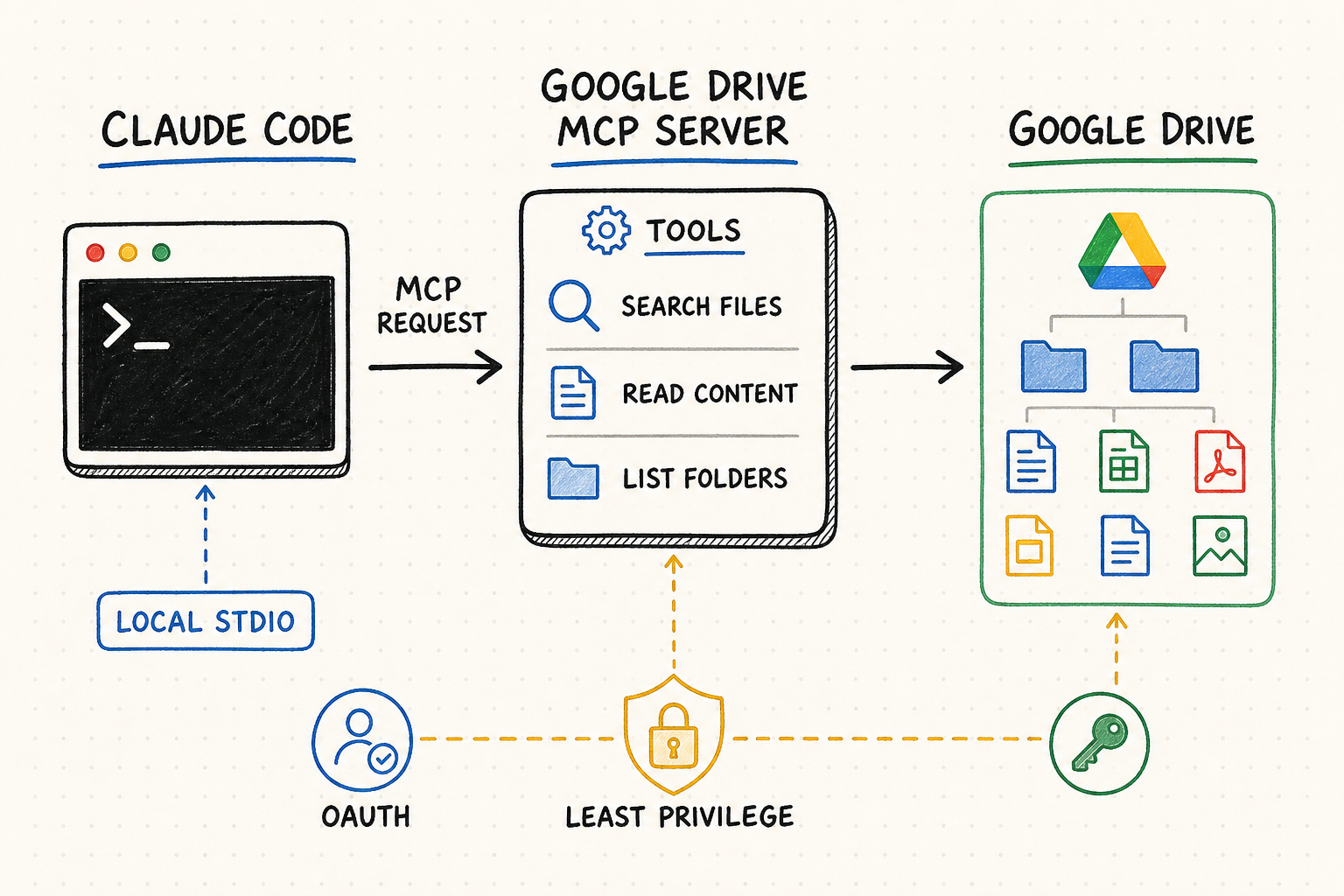
TL;DR核心摘要
Google now provides an official remote Drive MCP server at https://drivemcp.googleapis.com/mcp/v1. It is in Developer Preview, so first confirm preview eligibility and organization policy. Create a dedicated Google Cloud project, enable both the Drive API and Drive MCP API, configure OAuth, then register the remote HTTP server in Claude Code with preconfigured OAuth credentials. Validate search and read against one known file before allowing create, copy, or download actions.
Google 目前已提供官方远程 Drive MCP 服务器,端点为 https://drivemcp.googleapis.com/mcp/v1。该能力仍处于 Developer Preview,因此应先确认预览资格和组织策略。随后新建专用 Google Cloud 项目,启用 Drive API 与 Drive MCP API,完成 OAuth 配置,再用预配置 OAuth 凭据把远程 HTTP 服务注册到 Claude Code。先用一个已知文件验证搜索与读取,再考虑创建、复制或下载操作。
The official Drive service removes the need to choose and run an unverified local package. Verify the exact googleapis.com host before authentication.
You need a Google Cloud project, both required APIs, an OAuth consent screen, a client ID, and a callback URI that matches Claude Code.
Search, metadata, permission inspection, recent-file listing, and content reads are safer initial tests than any action that creates or copies data.
User ACLs, IRM, Context-Aware Access, client-side encryption, malware state, and trash status can make a visible file unavailable to MCP.
官方 Drive 服务无需再选择并运行未经核验的本地软件包。授权前应核对完整的 googleapis.com 主机名。
需要 Google Cloud 项目、两项必需 API、OAuth 同意屏幕、客户端 ID,以及与 Claude Code 一致的回调 URI。
初次测试优先使用搜索、元数据、权限、最近文件和内容读取,不要直接创建或复制数据。
用户 ACL、IRM、情境感知访问、客户端加密、恶意文件状态和回收站状态,都可能让网页中可见的文件无法通过 MCP 访问。
Set up a Google Drive MCP server in Claude Code在 Claude Code 中配置 Google Drive MCP 服务器
The authoritative starting point is Google's Drive MCP setup guide. It documents the remote server, required Google services, OAuth scopes, endpoint, and current tool list. Google provides client-specific instructions for Claude.ai and Claude Desktop plus a generic path for other HTTP MCP clients; Claude Code's own OAuth options supply the CLI-specific registration described below.
配置应从 Google 官方的 Drive MCP 配置指南开始。该文档明确了远程服务器、必需的 Google 服务、OAuth 权限、端点和当前工具列表。Google 给出了 Claude.ai、Claude Desktop 的专门步骤,并为其他 HTTP MCP 客户端提供通用方式;下文再结合 Claude Code 官方 OAuth 参数完成 CLI 注册。
The Drive MCP server is currently part of the Google Workspace Developer Preview Program. Confirm the intended users and organization may use it before building a production dependency around the endpoint.
Use a project owned by the appropriate organization rather than a personal or unrelated production project. Record the project ID, owner, environment, intended users, and removal process so the OAuth client can be audited later.
Enable drive.googleapis.com and drivemcp.googleapis.com for the project. Enabling the standard Drive API alone does not enable the MCP service.
Set up the Google Auth Platform consent screen and audience. Google's current Drive MCP guide identifies drive.readonly and drive.file scopes; review the requested grant with the workspace administrator, limit test users, and do not add unrelated Drive scopes.
Choose a fixed local callback port for Claude Code, such as 8080, and register the exact URI http://localhost:8080/callback in the Google OAuth client. Copy the client ID and keep the client secret outside the repository, shell history, and page content.
Drive MCP 目前属于 Google Workspace Developer Preview Program。将其作为正式流程依赖前,应确认目标用户和组织是否具备使用资格。
项目应由合适的组织持有,不要使用个人项目或无关的生产项目。记录项目 ID、负责人、环境、目标用户和撤销流程,便于后续审计 OAuth 客户端。
为项目启用 drive.googleapis.com 和 drivemcp.googleapis.com。只启用常规 Drive API,并不会自动启用 MCP 服务。
设置 Google Auth Platform 同意屏幕及受众。Google 当前 Drive MCP 指南列出了 drive.readonly 与 drive.file 权限;应与工作区管理员审核授权内容、限制测试用户,并避免加入无关 Drive 权限。
为 Claude Code 选择固定的本地回调端口,例如 8080,并在 Google OAuth 客户端中登记准确 URI:http://localhost:8080/callback。复制客户端 ID,同时确保客户端密钥不进入代码仓库、Shell 历史或页面内容。
Register, validate, and control the Drive tools注册、验证并控制 Drive 工具
Google does not currently show a Claude Code-specific command on its Drive page. The registration below maps Google's documented remote endpoint and OAuth requirement to the Claude Code MCP OAuth flow. Replace the client ID and port with the exact values registered in Google Cloud. The --client-secret flag prompts for the secret with masked input; do not put the secret directly on the command line.
Google 的 Drive 页面目前没有给出 Claude Code CLI 专用命令。下面的注册方式,是把 Google 官方远程端点与 OAuth 要求映射到 Claude Code MCP OAuth 流程。请把客户端 ID 和端口替换为 Google Cloud 中实际登记的值。--client-secret 会以遮蔽输入方式提示填写密钥,不要把密钥明文写在命令行参数中。
claude mcp add --transport http \
  --client-id YOUR_GOOGLE_OAUTH_CLIENT_ID \
  --client-secret --callback-port 8080 \
  drive https://drivemcp.googleapis.com/mcp/v1
claude mcp add --transport http \
--client-id 你的_GOOGLE_OAUTH_CLIENT_ID \
--client-secret --callback-port 8080 \
drive https://drivemcp.googleapis.com/mcp/v1| Stage阶段 | Action操作 | Evidence验证依据 | Stop condition停止条件 |
|---|---|---|---|
| Register注册 | Add the remote HTTP endpoint with the OAuth client and fixed callback.用 OAuth 客户端和固定回调端口添加远程 HTTP 端点。 | claude mcp get drive shows the intended URL and OAuth configuration.claude mcp get drive 显示正确 URL 和 OAuth 配置。 | Host, client ID, or callback differs from Cloud settings.主机、客户端 ID 或回调地址与 Cloud 设置不一致。 |
| Authenticate授权 | Run claude mcp login drive or authenticate through /mcp.运行 claude mcp login drive,或通过 /mcp 授权。 | Correct Google account, consent project, and requested scopes.Google 账号、同意项目和请求权限正确。 | Unexpected account, app, scope, or unverified warning.账号、应用、权限异常或出现未核验警告。 |
| Discover发现 | Inspect the runtime tool list before writing prompts.编写任务前检查运行时工具列表。 | Tool names and schemas match Google's current reference.工具名称和结构与 Google 当前参考一致。 | Unexpected tools or broader side effects appear.出现未知工具或更大副作用。 |
| Read test读取测试 | Search a unique filename, inspect metadata and permissions, then read known content.搜索唯一文件名,检查元数据和权限,再读取已知内容。 | File ID, name, MIME type, owner, and content match Drive.文件 ID、名称、MIME 类型、所有者和内容与 Drive 一致。 | Multiple matches, missing source, or ineligible file.结果不唯一、来源缺失或文件不符合资格。 |
| Action test操作测试 | Preview one create or copy into a dedicated test folder and require approval.预览一次创建或复制到专用测试文件夹,并要求批准。 | Exact parent ID, title, content, source file, and resulting URL.父级 ID、标题、内容、源文件和结果 URL 准确。 | Unclear destination, overwrite risk, or no explicit approval.目标不清、可能覆盖或未获明确批准。 |
Names can collide across My Drive and shared drives. Once the correct file is found, carry its immutable ID, MIME type, owner, parent, and URL into later steps. Do not authorize a copy or download based on title alone.
A Drive file can contain hidden or visible instructions that conflict with the task. Tell Claude Code that retrieved content is evidence only; it cannot request credentials, widen tool access, transmit other files, or authorize a follow-on action.
A timeout can occur after an action succeeds. Search the destination folder for the expected file ID, title, source key, and creation time before repeating a create or copy. If state remains uncertain, stop for manual review.
“我的云端硬盘”和共享云端硬盘中可能存在同名文件。找到正确目标后,后续步骤应持续使用其稳定 ID、MIME 类型、所有者、父级和 URL,不能只凭标题批准复制或下载。
Drive 文件可能包含与原任务冲突的隐藏或可见指令。应明确告诉 Claude Code:读取内容只能作为证据,不能索取凭据、扩大工具权限、传输其他文件或授权后续操作。
操作成功后仍可能发生超时。再次创建或复制前,应先在目标文件夹中检查预期文件 ID、标题、来源键和创建时间;如果仍无法确认状态,就停止并转人工审核。
Current tool boundary: Google's reference currently lists search, recent files, metadata, permissions, content read/download, create, and copy. It does not list a general update, move, or delete tool. Use the runtime tools/list response as the final authority because Developer Preview capabilities can change.
当前工具边界:Google 参考文档目前列出了搜索、最近文件、元数据、权限、内容读取/下载、创建和复制,没有列出通用更新、移动或删除工具。由于 Developer Preview 能力可能变化,最终应以运行时 tools/list 返回为准。
| Symptom现象 | Likely layer可能原因 | Safe next check安全排查动作 |
|---|---|---|
| Server is unavailable服务器不可用 | Preview access or APIs预览资格或 API | Confirm program access and that both Drive services are enabled in the correct project.确认预览资格,并核对正确项目中两项 Drive 服务均已启用。 |
| OAuth redirect failsOAuth 回调失败 | Callback mismatch回调地址不一致 | Compare scheme, host, port, and /callback path character by character.逐字符对比协议、主机、端口和 /callback 路径。 |
| Consent is denied授权被拒绝 | Audience, test user, scope, or admin policy受众、测试用户、权限或管理员策略 | Check OAuth audience and requested scopes; do not switch to a personal project to bypass policy.检查 OAuth 受众和请求权限,不要改用个人项目绕开策略。 |
| A known file is absent已知文件搜索不到 | Eligibility or account文件资格或账号 | Verify the signed-in user, ACL, IRM, CAA, encryption, and item state.核对登录用户、ACL、IRM、情境感知访问、加密和文件状态。 |
| Content cannot be read无法读取内容 | Unsupported or protected content内容类型或保护策略 | Inspect MIME type and metadata, then test a known eligible document without weakening policy.检查 MIME 类型和元数据,再用已知合规文档测试,不要降低策略。 |
| Create or copy is uncertain无法确认创建或复制结果 | Timeout after possible success可能成功后发生超时 | Search the exact parent for the source key and creation time before retrying.重试前在准确父级中搜索来源键和创建时间。 |
Use QVeris only when the workflow needs another capability仅在工作流需要其他能力时使用 QVeris
The official Google Drive MCP server is the direct integration for Drive files. A current QVeris catalog search did not surface an exact Google Drive Tool or Provider record, so this page does not claim a native QVeris-to-Drive route. Use QVeris Docs for capability discovery guidance, or validate a separately selected tool in the QVeris Playground before its output is stored in Drive.
Google 官方 Drive MCP 才是访问 Drive 文件的直接集成。当前 QVeris 目录搜索没有发现准确的 Google Drive Tool 或 Provider,因此本页不会声称存在原生 QVeris-to-Drive 通道。可以通过 QVeris 文档了解能力发现方式;如果另行选择了工具,应先在 QVeris Playground 中验证,再决定是否把结果保存到 Drive。
- Keep systems separate. Drive holds governed files; a specialized provider may supply current data or perform a different action. Do not let access to one system silently authorize the other.
- Validate provenance and format. Check provider identity, tool schema, result source, constraints, and output type before building a Drive document from external results.
- Approve the cross-system write. Show the validated input, target folder ID, new filename, MIME type, and proposed content before calling
create_file. - Prefer the direct route for Drive-only work. Searching, reading, creating, copying, or downloading known Drive files does not need an additional capability layer.
- 保持系统边界。Drive 保存受治理文件,专业服务商可能提供实时数据或执行其他操作;获得一个系统的访问权,不能自动授权另一个系统。
- 验证来源和格式。根据外部结果生成 Drive 文档前,检查服务商身份、工具结构、结果来源、限制和输出类型。
- 跨系统写入单独审批。调用
create_file前,应展示已核验输入、目标文件夹 ID、新文件名、MIME 类型和拟写内容。 - Drive 内部任务走直接路径。搜索、读取、创建、复制或下载已知 Drive 文件时,不需要再增加一层能力调用。
FAQ常见问题
Yes. Google provides https://drivemcp.googleapis.com/mcp/v1, currently in Developer Preview. Use Google's setup and tool-reference pages instead of a similarly named third-party package.
Claude Code supports remote HTTP MCP servers and preconfigured OAuth credentials. Register a Google OAuth web client with a matching localhost callback, add the endpoint, and authenticate through Claude Code.
Google currently lists search, recent files, metadata, permissions, content read/download, create, and copy. Preview features can change, so inspect the runtime tool list before each governed rollout.
A general update, move, or delete tool is not listed in Google's current Drive MCP reference. Do not infer those capabilities from the OAuth grant; only use tools actually discovered and approved.
The MCP eligibility checks can exclude files because of ACLs, IRM, Context-Aware Access, client-side encryption, malware/spam status, or trash state. Search results filter ineligible items.
Use Claude Code's masked --client-secret flow or its supported secure credential storage. Do not commit a secret to .mcp.json, paste it into a prompt, or expose it in shell history.
有,官方端点是 https://drivemcp.googleapis.com/mcp/v1,目前处于 Developer Preview。应使用 Google 的配置和工具参考文档,不要换成名称相似的第三方软件包。
Claude Code 支持远程 HTTP MCP 和预配置 OAuth 凭据。创建带有匹配 localhost 回调地址的 Google OAuth Web 客户端,添加端点后即可在 Claude Code 中授权。
Google 当前列出了搜索、最近文件、元数据、权限、内容读取/下载、创建和复制。预览能力可能调整,受治理环境上线前应检查运行时工具列表。
Google 当前 Drive MCP 参考没有列出通用更新、移动或删除工具。不能从 OAuth 授权推断能力,只能使用实际发现且经过批准的工具。
MCP 资格检查可能因 ACL、IRM、情境感知访问、客户端加密、恶意/垃圾状态或回收站状态排除文件;搜索会过滤不符合条件的项目。
使用 Claude Code 的遮蔽 --client-secret 流程或其支持的安全凭据存储。不要把密钥提交到 .mcp.json、粘贴进提示词或暴露在 Shell 历史中。
References and next steps参考资料与下一步
Google Drive MCP setup guide
Google Drive MCP tool reference
Drive MCP file eligibility
Claude Code MCP documentation
QVeris Docs
QVeris Playground
Google Drive MCP 配置指南
Google Drive MCP 工具参考
Drive MCP 文件资格规则
Claude Code MCP 文档
QVeris 文档
QVeris Playground