
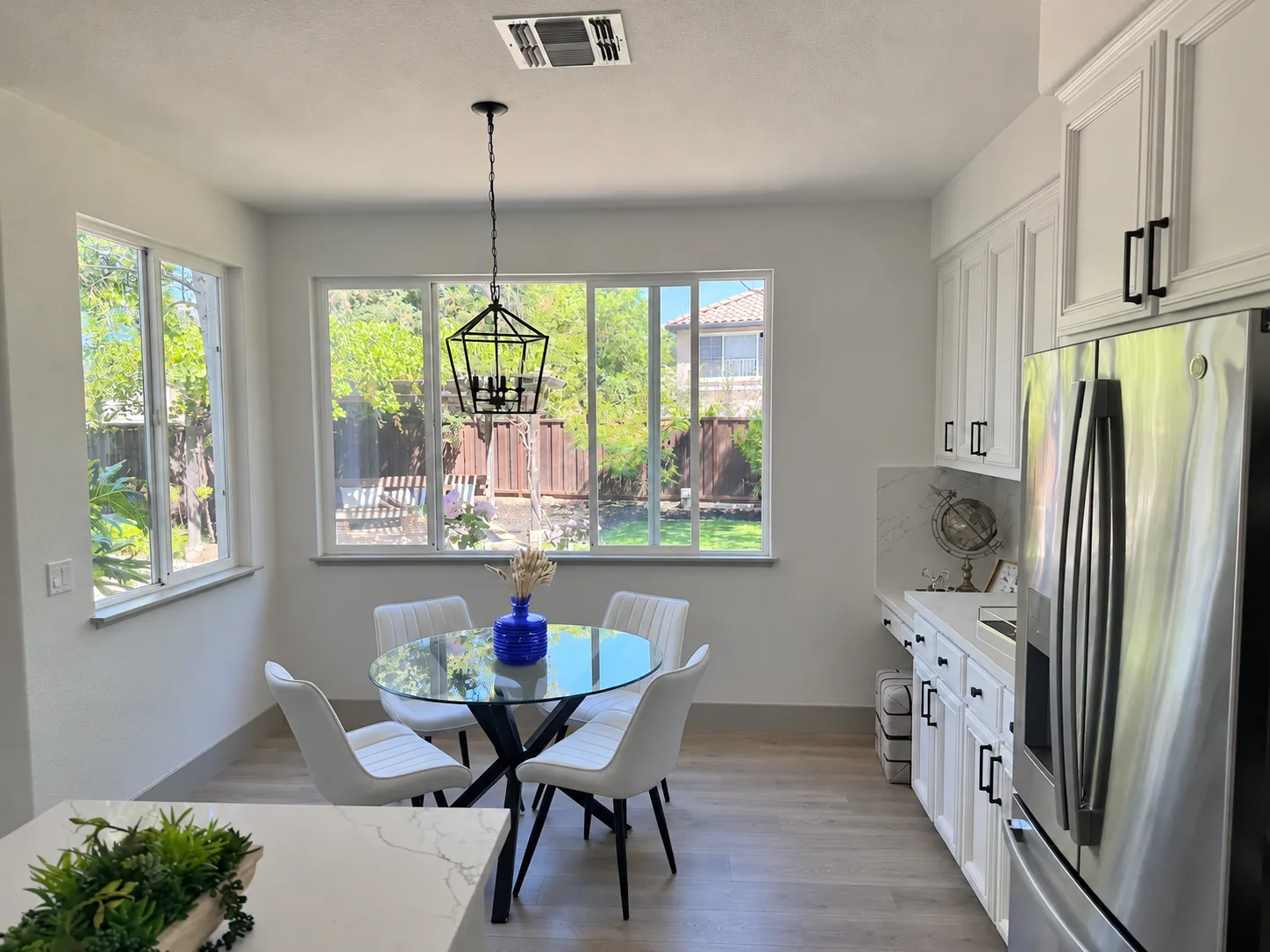
What is GPT Image 2.6 Flare?
A campaign rarely ends with the first image. Teams need alternate compositions, focused edits and a way to keep iteration costs visible. In this QVeris guide, we look at Flare through those production decisions: what to try first, what the official images show and how to compare the bill.
OpenAI introduced Images 2.6 on November 4, 2026, with two API models: Flare and Sunburst. Its announcement reports 50% faster image generation. Flare targets fast iteration; Sunburst emphasizes detail and edit consistency at medium or high quality. The speed claim is OpenAI’s release statement, not a measured QVeris response time. Read the announcement
Our starting point: use Flare to explore a direction, then judge whether your selected composition needs another detail pass. Measure success by usable assets, not by the number of images generated.
Generation, editing, SVG and GIF
The API ID is gpt-image-2.6-flare. It accepts text and images and produces images. OpenAI documents image generation and image editing, with SVG and animated GIF workflows described in the image guide. Model specification
Use quality and complexity for different decisions
Quality sets rendering detail; complexity controls planning. A simple background replacement does not need the same planning as a scene with several products, exact text and positional constraints. OpenAI recommends low complexity for most edits.
Choose the output for the deliverable
Use still images for product pages, SVG for scalable graphic assets, and GIF for short looping motion. GIF is documented for generation, not the edit endpoint. For reference edits, identify the target image and state which product features must remain unchanged. Formats and request guidance
Flare image comparison: a focused reference edit
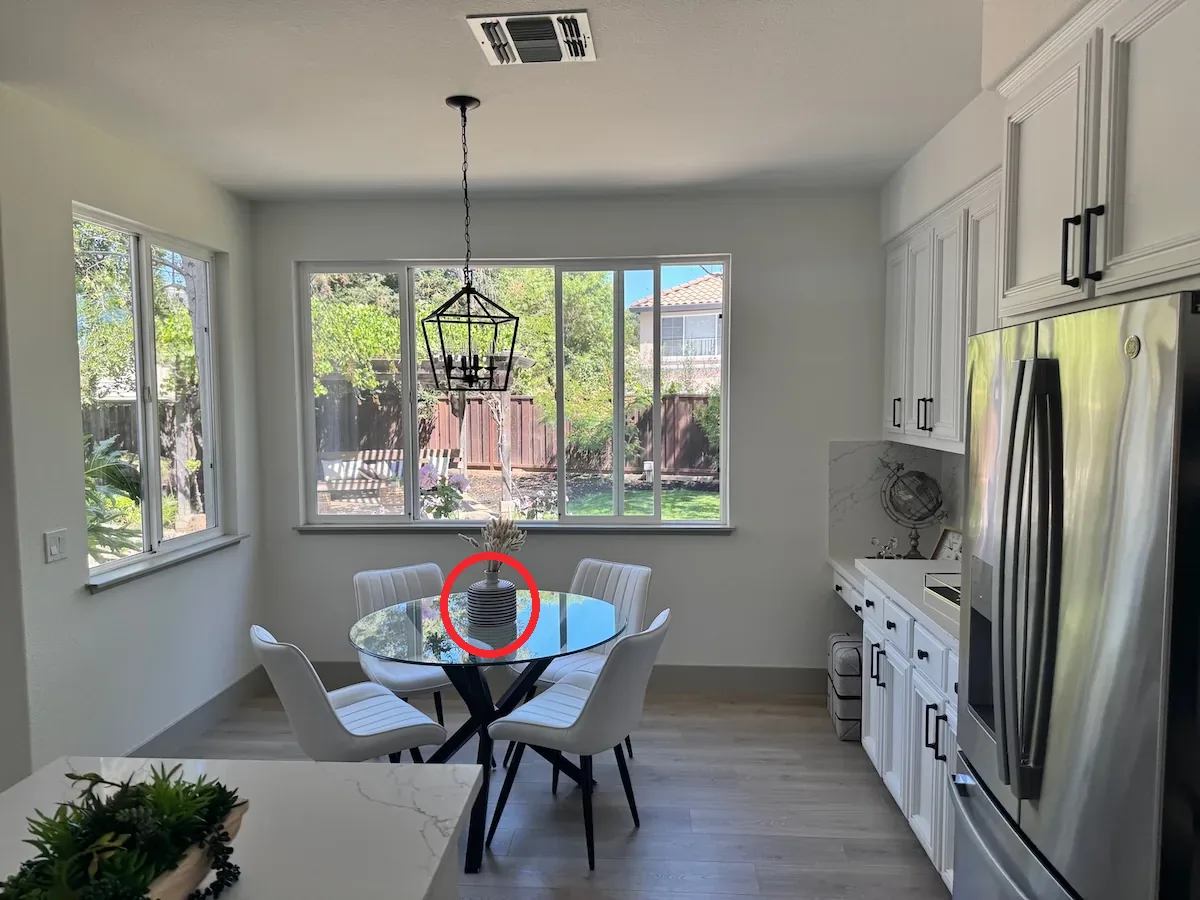
A useful editing model should change the requested object while keeping the scene recognizable. The official Flare example below replaces the marked vase: compare the shape and color of the vase, then check the table, chairs and window light. OpenAI official example
What this means for product content
For a seasonal campaign, this is a pattern for changing one part of an approved scene rather than recreating the whole image. Our review criteria are the target edit, preservation of the product and continuity of the lighting. One selected example cannot establish a success rate across other products.
Flare vs Sunburst: the same SVG brief
Both images below come from OpenAI’s bakery-logo example. Compare the treatment of the same brand brief: lettering, decorative elements and balance at a small display size. This is a visual comparison of two selected outputs, not a benchmark ranking. OpenAI official example


For Flare, make the first iteration answer a concrete question: does the layout work as a shop sign or a mobile avatar? Keep the approved typography and simplify ornament before producing more versions.
Flare vs Sunburst API cost comparison
Flare and Sunburst currently share the following OpenAI API rates, in USD per million tokens. The meaningful price comparison is therefore the actual workload and number of accepted images—not a difference in these list rates. Flare official pricing · Sunburst official pricing
| Billing item | Flare | Sunburst |
|---|---|---|
| Text input | $5.00 | $5.00 |
| Cached text input | $1.25 | $1.25 |
| Image input | $8.00 | $8.00 |
| Cached image input | $2.00 | $2.00 |
| Image output | $30.00 | $30.00 |
The same assumed usage, the same calculated cost
Assume 1,000 text-input tokens and 1,000 image-output tokens per request. For an edit, add 2,000 image-input tokens. The table below applies the listed rates to those assumptions; it is not an image quote or a recorded model bill.
| Assumed workload | Flare (USD) | Sunburst (USD) |
|---|---|---|
| 1 generation | $0.035 | $0.035 |
| 1 edit, uncached input | $0.051 | $0.051 |
| 100 edits, uncached input | $5.10 | $5.10 |
| 100 edits, all input billed at cached rates | $3.525 | $3.525 |
Uncached edit: (1,000 × $5 + 2,000 × $8 + 1,000 × $30) / 1,000,000 = $0.051.
Cached pricing only applies when the service reports eligible cached input. Output remains charged at the output rate. If 100 edit requests produce 50 accepted images, the uncached example becomes $5.10 / 50 = $0.102 per accepted image. Actual dimensions, quality and token usage can change the result.
QVeris settles model calls in Credits. Neither 2.6 model currently has a verified public QVeris price in our catalog snapshot. We therefore keep the USD comparison above separate from QVeris pricing. Check current models and prices
Build a repeatable creative workflow
Three useful starting briefs
Product campaign variants: change one visual variable at a time. Marketplace background edits: keep the product and camera fixed. Brand graphics: test whether an SVG remains readable at avatar size. Each task needs a clear pass/fail condition before you generate more options.
A QVeris brief you can adapt
Create a square product campaign for MORA, a fictional ceramic mug brand. Show one cobalt-blue mug on an ivory table. Keep the handle visible and reserve the upper quarter for the exact headline “A quieter morning”. No extra products or logos. Use soft window light.
Explore models and start with QVeris
At QVeris, we help you move from reading about a model to choosing a usable model and connection method. Explore our model catalog for current capabilities and pricing, use Playground to try available models, and consult the Model Gateway guide when your application is ready for API integration.
Bring your next AI workflow to QVeris
Explore the platform, or open the official experience page and choose an available model.
Questions before you choose
Is ChatGPT Images 2.6 an API model ID?
ChatGPT Images 2.6 is the product name. API requests use the exact Flare or Sunburst ID. A ChatGPT subscription and API usage are different purchases.
Is Flare cheaper than Sunburst?
Their published token rates match. Compare actual tokens, retries and accepted assets for the same brief before drawing a cost conclusion.
Are the images QVeris test results?
The labeled comparison images are original examples from OpenAI documentation. Our workflow recommendations are editorial guidance; we do not present those assets as QVeris test output.
Can I use these two models on QVeris today?
They are not present in the public catalog checked for this guide. You can explore QVeris and try currently supported models; check the live catalog for subsequent availability and prices.
Sources and related reading
Model and pricing sources checked November 5, 2026. Images retain their documented model labels; the banner uses OpenAI’s Flare reference-edit example.
OpenAI · Introducing Images 2.6
OpenAI · Flare specifications and pricing
OpenAI · Sunburst specifications and pricing
OpenAI · Image generation guide and examples