
Developer Platform
Unified API for AI Tools
A single integration layer that lets AI agents discover, route to, and execute actions across hundreds of tools — search APIs, CRMs, databases, browser automation, email platforms, and MCP servers — through one standardized interface. No per-tool integration code required.
What is a unified API for AI tools?
A unified API for AI tools is a single integration layer that lets AI agents connect to hundreds of external services — search engines, CRMs, databases, email platforms, browser automation tools, and MCP servers — through one standardized interface, eliminating the need to build and maintain separate integrations for every tool.
Why AI Tool Integrations Are Broken
AI agents are only as capable as the tools they can access. But the way teams connect agents to external services today creates more problems than it solves.
Fragmented APIs
Every SaaS platform, search engine, and database exposes a different API contract. One returns JSON with camelCase, another uses snake_case. One uses REST, another uses gRPC. Teams spend the majority of their development time learning these differences instead of building agent capabilities.
Authentication Complexity
Each service requires its own authentication mechanism — OAuth 2.0 with refresh tokens for one, API keys for another, service account JSON files for a third. Credential rotation, scope management, and token refresh logic multiply across every integration, creating an authentication management system spanning dozens of services.
Tool Sprawl
As agents grow in capability, the number of integrations grows exponentially. An agent that searches the web, reads documents, sends emails, queries databases, and updates CRMs touches five distinct integration surfaces — each adding authentication, error handling, retry logic, and monitoring to an already complex codebase.
Vendor Lock-in
Hard-coded integrations make tool switching expensive. Moving from one search API to another, or from one CRM to a competitor, requires updating, testing, and redeploying every agent that references the old integration. The integration code becomes the constraint on tool selection, rather than tool quality or cost.
Maintenance Burden
External APIs change — endpoints deprecate, response formats shift, rate limits adjust. Teams maintaining direct integrations spend an estimated 15-25% of engineering time per year on upkeep. This is work that produces zero new capability — it only prevents existing capability from breaking.
Slow Time-to-Value
A single integration takes 2-8 weeks from initial research to production. That timeline multiplies for every tool. Teams building agents that access 8-12 tools routinely spend 3-6 months on integrations alone — before delivering any agent functionality that creates business value.
What Is a Unified API for AI Tools?
A unified API is an abstraction layer between your AI agents and the external services they need. It replaces N separate integrations with one standardized interface.
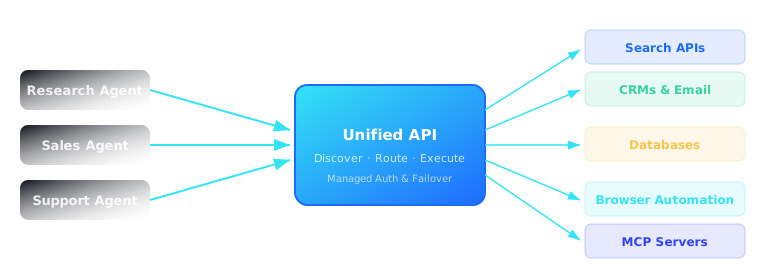
When an AI agent communicates through a unified API, it doesn't need to know which specific search engine will handle its query, which CRM will receive its lead data, or which email provider will deliver its message. The agent expresses intent — search for recent news, create a contact record, send a notification — and the unified API layer handles the rest.
This is fundamentally different from how tools like Zapier, n8n, or Pipedream approach the problem. Workflow platforms connect apps through predefined triggers and actions in a visual builder — excellent for business process automation, but not designed for the dynamic, intent-driven access patterns that AI agents require. Similarly, frameworks like LangChain and the OpenAI Agents SDK provide tool-calling abstractions within agent code, but they don't solve the underlying integration problem — developers still write and maintain the integration logic for every tool.
One Interface, Every Tool
A unified API exposes search, CRM, database, email, browser automation, knowledge base, and MCP server access through a single SDK and a single authentication flow. Agents make the same style of request regardless of which tool ultimately handles it.
Dynamic Capability Discovery
Agents don't hard-code tool references. They query the platform's capability registry at runtime to discover available tools, their supported actions, required parameters, and expected output formats. New tools are available to all agents immediately.
Managed Authentication
OAuth flows, API key management, token rotation, and credential storage are handled by the platform, not by each agent or integration. Configure authentication once per tool category; every agent inherits access automatically.
Tool Abstraction with Intelligent Routing
Agents request capabilities, not specific tools. The platform routes each request to the optimal tool based on capability match, current latency, cost, and reliability — with automatic failover if a tool becomes unavailable.
How QVeris Works
Four steps from agent intent to tool execution. No per-tool integration code. No authentication management. No maintenance.
Discover
QVeris maintains a dynamic capability registry where every connected tool registers its capabilities, input schemas, output formats, and constraints. AI agents query this registry at runtime to understand the full surface of available actions.
Inspect
Agents examine tool schemas to understand required parameters, expected inputs, and output structures. This schema-level inspection ensures agents compose valid requests before any API call is made, reducing runtime errors.
Route
The platform evaluates every available tool that matches the requested capability. It selects the optimal target based on quality scores, current latency, cost profile, and historical reliability — with automatic failover if the primary tool fails.
Execute
QVeris handles authentication, constructs the API request, manages rate limits, retries on transient failures, and formats the response into a consistent structure optimized for LLM consumption — the agent receives a clean, predictable result regardless of which tool handled the request.
Capability Routing Explained
Capability routing is the mechanism that makes a unified API more than just a proxy. It's the intelligence layer that matches agent intent to the best available tool in real time.
Capability Discovery
Every tool connected to the platform declares its capabilities in a standardized schema — not just its name, but what it does, what inputs it accepts, what outputs it produces, and what constraints apply. This registry is the source of truth that agents query at runtime.
Tool Discovery
When new tools join the platform, their capabilities are registered and immediately become available. Agents don't need code changes to use them — the discovery mechanism means that adding a new search API or database connector instantly expands what every agent can do.
Dynamic Routing
Routing decisions are made per-request based on live conditions. A search query that needs real-time news goes to one tool; a search query that needs academic papers goes to another. The router evaluates latency, cost, relevance, and reliability before selecting the target.
Intelligent Execution
Execution isn't fire-and-forget. The platform handles authentication, constructs properly formatted requests, manages rate limits, retries on failure with exponential backoff, and automatically fails over to alternative tools when the primary target is unavailable or returns errors.
Agent Orchestration
QVeris integrates with any orchestration framework — LangChain, CrewAI, AutoGen, OpenAI Agents SDK — by providing a consistent tool execution layer. The orchestration framework manages agent logic and conversation flow; QVeris handles every tool interaction beneath it.
Observability Built In
Every tool request is logged with latency, success/failure status, tool selected, and fallback events. Teams get a unified view of agent-tool interactions across all services — something that's nearly impossible to achieve with fragmented direct integrations.
Supported Integrations
One API. Every category of tool your AI agents need to access.
Includes Tavily, Exa, Brave Search, Firecrawl, Browserbase, Stagehand, Salesforce, HubSpot, Gmail, Outlook, PostgreSQL via Supabase and Neon, Notion, Confluence, Smithery MCP registry, n8n, Zapier, Slack, Teams, GitHub, GitLab, and more.
Unified API vs Direct Integrations
The difference between one integration and N separate integrations goes beyond setup time.
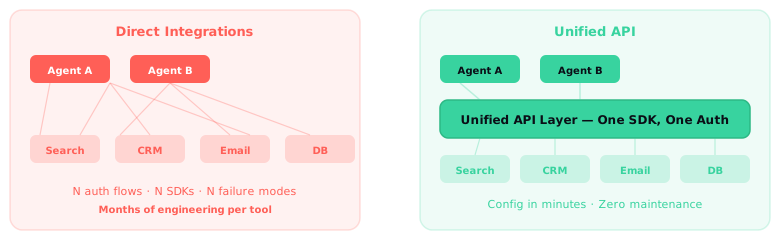
| Feature | Unified API | Direct Integrations |
|---|---|---|
| Setup Time | Minutes per tool | 2–8 weeks per tool |
| Authentication | Managed centrally — OAuth, keys, tokens handled by platform | Manual per service — separate auth flows, credential rotation, token management |
| API Consistency | Single request/response format across all tools | N different formats, pagination styles, error structures |
| Tool Discovery | Automatic — agents query capability registry at runtime | Manual — developers research, evaluate, and hard-code tool references |
| Failover | Automatic — platform routes to alternatives when primary tool fails | Manual — developers write fallback logic per integration |
| Maintenance | Zero — platform handles API changes centrally | 15–25% of engineering time per year |
| Tool Swapping | Configuration change — no agent code affected | Full reimplementation — every agent referencing the tool must be updated |
| Observability | Unified — all tool interactions logged in one place | Fragmented — separate logging and monitoring per integration |
| Scalability | Constant — adding 50 tools takes the same effort as adding 1 | Linear — each tool requires proportional engineering investment |
Use Cases
A unified API serves every type of AI agent — from research to sales to coding.
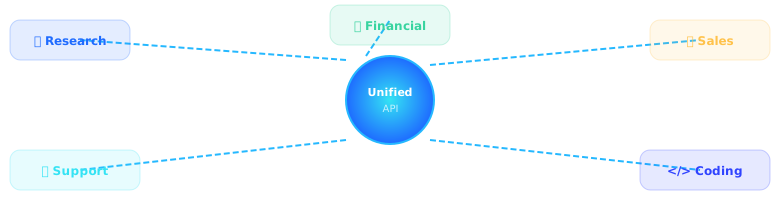
Research Agents
Research agents need search APIs for web queries, browser automation for content extraction, databases for storing findings, and knowledge bases for reference lookup. A unified API connects all of these through one interface, allowing the agent to focus on synthesis rather than integration plumbing.
Financial Agents
Financial analysis agents pull market data through search APIs, query internal databases for historical performance, generate reports, and distribute them via email. Each data source has its own API — a unified API makes them all accessible through the same interface, with managed compliance and audit logging.
Sales Agents
Sales agents research prospects through web search, enrich CRM records, compose personalized emails, and schedule follow-ups. Each action touches a different tool — web search, CRM API, email provider, calendar — all accessible through one unified interface with managed OAuth across every service.
Customer Support Agents
Support agents search knowledge bases for answers, query ticket systems for context, update CRM records, and escalate complex cases to human agents through Slack or email. A unified API connects Zendesk, Notion, Salesforce, and Slack without requiring separate authentication and integration logic for each platform.
Coding Agents
Coding agents search documentation sites, query codebases through vector databases, execute generated code in sandboxed environments, and open pull requests. A unified API abstracts the differences between documentation APIs, database connectors, code execution runtimes, and Git providers — so the agent focuses on code, not on connectivity.
Frequently Asked Questions
Common questions about unified APIs and how they simplify AI agent development.
What is a unified API for AI tools?
Why do AI agents need a unified API?
How does capability routing work?
What is the difference between a unified API and direct integrations?
How does QVeris handle tool authentication?
.env files across agent deployments.What tools can be connected through QVeris?
Can AI agents discover tools automatically with QVeris?
How does QVeris compare to building MCP servers directly?
What are the infrastructure requirements for running a unified API?
Is a unified API suitable for production AI agent deployments?
How does a unified API reduce engineering costs?
Related Articles
Build AI Agents Without Managing Dozens of Integrations
One API. Every tool your agents need. Zero integration maintenance.