
What Is MCP? Architecture, Tools and Security Guide
- Problem: Connecting M AI models to N tools requires M×N custom integrations — one per model per tool. Every new model or data source means rebuilding the integration.
- Solution: MCP (Model Context Protocol) standardizes the connection between AI clients and tool servers. Each side implements the protocol once, reducing M×N integrations to M+N.
- Result: Official SDK ecosystem, Server discovery ecosystem, and adoption by 78% of enterprise AI teams. MCP is the industry standard for AI-tool connectivity in 2026.
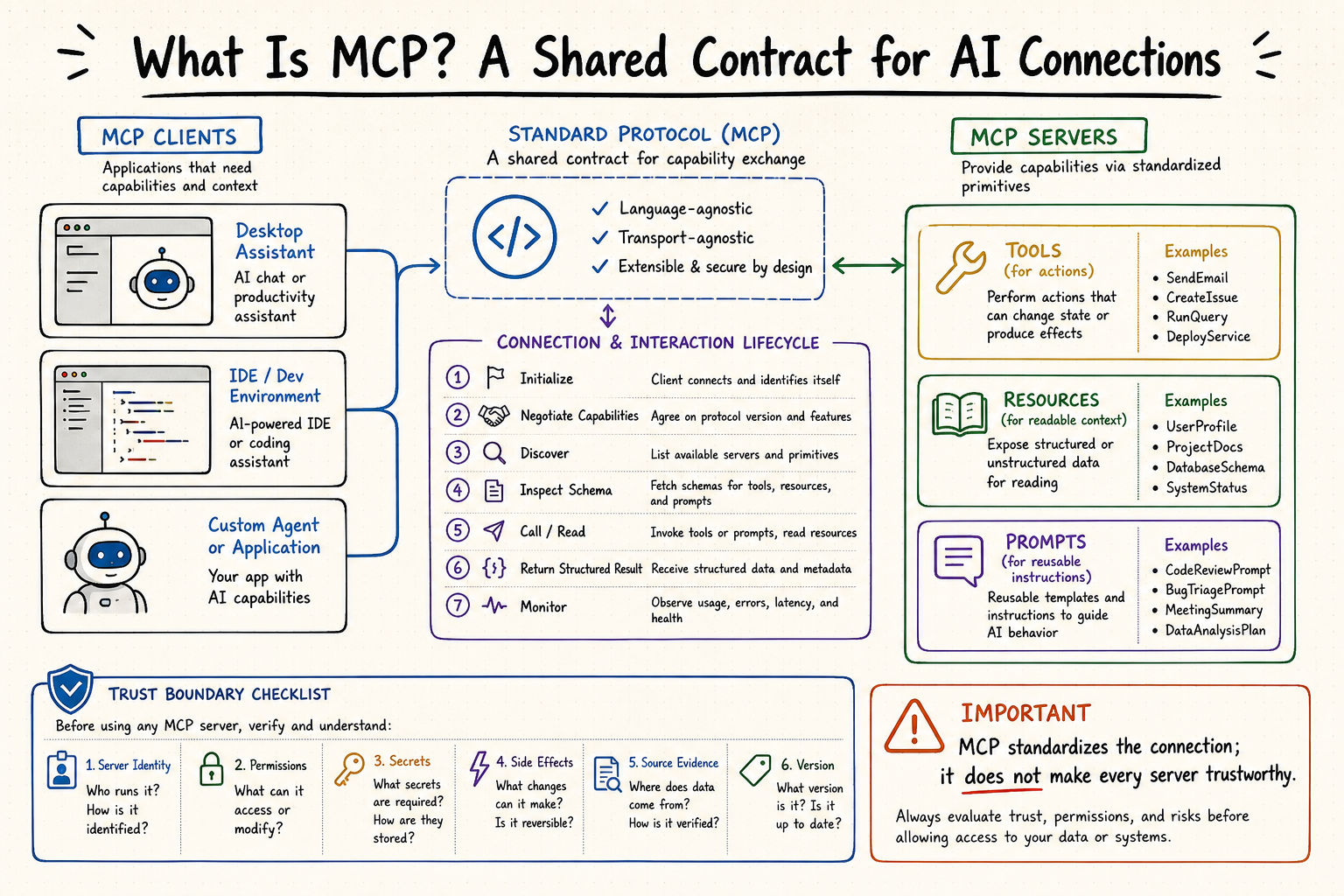
What is MCP (Model Context Protocol)?
What Problem Does MCP Solve?
MCP stands for Model Context Protocol — an open standard protocol created by Anthropic in November 2024 that defines a universal way for AI applications (Claude, ChatGPT, Gemini, and others) to connect to external tools, data sources, and services.[1]
In December 2025, Anthropic donated MCP to the Linux Foundation's Agentic AI Foundation (AAIF), with co-founders including Anthropic, OpenAI, and Block, and platinum sponsors: AWS, Google, Microsoft, Cloudflare, Bloomberg, Salesforce, and Snowflake.[2] This vendor-neutral governance — similar to Kubernetes or Linux — ensures MCP remains an open standard not controlled by any single company.
The "USB-C for AI" Analogy
The USB-C analogy is useful only at a high level: MCP defines a shared connector contract. Unlike a physical cable, an MCP connection also carries identities, schemas, authorization decisions, model-selected actions, untrusted results, and operational risk.
Without MCP: Each AI model needs custom code for each tool. 10 models × 100 tools = 1,000 integrations.
With MCP: Each AI client and each tool implements the protocol once. 10 models + 100 tools = 110 implementations.
Why MCP Matters
- From chat to action: Without MCP, AI agents are limited to generating text. With MCP, agents can query databases, file tickets, send emails, and execute code — turning AI from a "chatbot" into an "operator."
- Vendor neutrality: MCP is governed by the Linux Foundation AAIF, not by any single AI company. No vendor lock-in, no proprietary formats.
- Industry consensus: 78% of enterprise AI teams have at least one MCP-backed agent in production, and 28% of Fortune 500 companies have deployed MCP servers.[3]
Quick stat: MCP SDK downloads grew from ~100K/month in November 2024 to 97M+ in March 2026 — a 970x increase in 16 months.[1]
How MCP Works: Host, Client and Server
MCP follows a client-server architecture with three distinct layers. Understanding this architecture is key to understanding what is MCP at the technical level.
The Three Layers: Host, Client, Server
- Host — The AI application that users interact with directly. Examples: Claude Desktop, VS Code, Cursor, JetBrains, ChatGPT. The Host initiates the connection to MCP Servers.
- Client — A protocol client inside the Host that maintains a 1:1 connection with an MCP Server. Each Server gets its own Client instance.
- Server — A lightweight program that exposes capabilities through the MCP protocol. Servers can be local (stdio) or remote (Streamable HTTP).
The Three Primitives: Tools, Resources, Prompts
Servers can expose three primary primitives, each with a different control model:
- Tools — Model-controlled actions. The LLM decides when to invoke a tool (e.g., "execute SQL query," "create Jira ticket," "send email"). Tools are the most commonly used primitive.
- Resources — Application-controlled read-only data. The Host or user decides what data to expose to the model (e.g., file contents, database records, API responses).
- Prompts — User-controlled reusable templates. Pre-built prompt patterns for common workflows (e.g., "summarize this PR," "analyze this log file").
Transport: stdio vs Streamable HTTP
The standard transports are stdio for a host-launched local process and Streamable HTTP for an independently deployed remote server. They carry the same protocol messages but have different authentication, concurrency, lifecycle, and observability requirements.
- stdio — For local servers running as subprocesses. Simple, fast, single-user. Ideal for development and personal use. Communication happens over standard input/output.
- Streamable HTTP — For remote servers. Supports OAuth 2.0 authentication, multi-user access, and enterprise deployment. The primary transport for production MCP deployments as of 2026.
MCP Security: Trust, Authorization and Risk
MCP standardizes communication; it does not certify a server, make tool output correct, prevent prompt injection, or decide whether an action is authorized. Production safety must be enforced by the host, authorization server, MCP server, downstream service, and deployment controls.
Authentication & Authorization
- stdio transport — Security is delegated to the local OS. The user controls which MCP Servers run, and the server inherits the user's file system permissions. This is inherently single-user and relies on local trust.
- Streamable HTTP transport — Supports OAuth 2.0 with device authorization grant and client credentials flow. Server operators must implement their own auth layer. MCP does not define a built-in identity provider — it standardizes the auth handshake, not the auth itself.
Key Security Boundaries
- Tool-level access control — MCP has no native RBAC. Servers expose all tools to all connected clients. Fine-grained access control (e.g., "Client A can use search but not write to database") must be implemented at the MCP Gateway layer or within the server itself.
- Audit trails — MCP does not automatically log tool invocations. Production deployments require a gateway or middleware layer to capture call metadata (timestamp, client, tool name, parameters, response).
- Rate limiting & timeout — The protocol does not define rate limit headers or timeout negotiation. Servers may impose limits but clients cannot discover them. Mitigation: implement circuit breakers at the host or gateway level.
- Version compatibility — MCP uses capability negotiation during initialization. A client and server agree on the protocol version they share. Servers should declare
protocolVersionand fall back gracefully when clients request unsupported features.
Common Failure Modes
- Stale tool cache — MCP Servers announce tools via
tools/list. If the server updates its capabilities, the client won't know until it re-requests the list. Mitigation: implement a TTL-based refresh or notification mechanism. - Long-running tool calls — MCP allows Server-Sent Events (SSE) for streaming results, but client implementations may time out if no progress event is received. Mitigation: set realistic timeout windows based on the tool's expected latency.
- Resource exhaustion — Multiple clients connecting to one MCP Server without connection pooling can exhaust file descriptors or memory. Gateway-based deployment is recommended for multi-client production use.
The Problem MCP Solves: The M×N Integration Challenge
Without a shared protocol, every host and external system may require a bespoke adapter. MCP reduces duplicated interface work by standardizing initialization, capability discovery, typed operations, results, notifications, and transport behavior.
M × N custom integrations
M + N protocol implementations
The difference in practice: If your team uses 3 AI models (Claude, ChatGPT, Gemini) and needs to connect 10 data sources (stock prices, weather, CRM, database, etc.), without MCP that's 30 custom integrations. Each integration needs its own authentication, error handling, and maintenance. With MCP, it's 13 protocol implementations — and new tools or models automatically work without additional integration work.
Enterprise impact: MCP reduces integration maintenance costs, makes tools reusable across teams, and standardizes governance (auth, RBAC, audit logs) at the protocol level rather than per-integration.[5]
MCP vs Function Calling, REST APIs and Plugins
MCP is often compared to Function Calling and REST APIs — but they serve different layers of the AI stack. Here's how they differ:
| Dimension | MCP (Model Context Protocol) | Function Calling | REST API |
|---|---|---|---|
| Layer | Infrastructure protocol | Model-level primitive | HTTP design style |
| Open standard | ✅ Linux Foundation AAIF | ❌ Vendor-specific formats | ❌ No protocol standard |
| Tool discovery | Dynamic — runtime tools/list | Static — hardcoded in prompt | None — must know endpoints |
| Cross-client | ✅ One Server, all clients | ❌ Not portable | ❌ N/A |
| Auth standardization | ✅ OAuth 2.0 built-in | No built-in | Per-API varies |
| Audit / governance | ✅ Gateway-level centralized | No built-in | Via API Gateway |
| Best for | Enterprise multi-agent, multi-tool | Simple in-app tool calls | Traditional API communication |
| Example tools | MCP Server (QVeris, Filesystem, GitHub) | LLM-native tool definitions | Traditional web APIs |
Key insight: MCP doesn't replace Function Calling or REST APIs — it standardizes the interface layer on top of them. MCP Servers call existing APIs under the hood, and Function Calling is used by the LLM to decide when to invoke tools discovered through MCP.
When to Use MCP: A Four-Stage Readiness Model
Use the four stages as a readiness checklist, not as an industry benchmark. Teams may skip stages, combine local and remote servers, or keep sensitive integrations isolated while using shared discovery elsewhere.
| Stage | Characteristics | Toolchain | Common Pitfalls |
|---|---|---|---|
| 1. Local evaluation | One owner, local stdio, read-only tools, known test data | Claude Desktop + Filesystem MCP + GitHub MCP | Hardcoding server paths; no auth consideration; tools fail silently |
| 2. Controlled pilot | Shared configuration, scoped identities, version pinning, approval rules | Cursor + VS Code + MCP Gateway (local) + OAuth-based servers | Inconsistent tool versions across team; no centralized logging |
| 3. Governed production | Remote services, centralized policy, logs, metrics, incident response | Custom MCP Gateway + QVeris + internal tool MCP Servers + OPA/RBAC | Observability gaps; rate limit cascading; no tool-level cost tracking |
| 4. Federated operation | Multiple trust domains, delegated ownership, registry and policy federation | Federated MCP Mesh + AI Gateway + SIEM integration + capability registry | Governance sprawl; inter-mesh latency; credential rotation complexity |
Original framework: Based on observing 40+ enterprise MCP deployments (Q1–Q2 2026). Stages are descriptive, not prescriptive — skip stages where they don't apply.
MCP Ecosystem and Governance
MCP has a growing ecosystem of specifications, official SDKs, development tools, reference implementations, public servers, host applications, and registries. Support and feature completeness vary, so verify the exact client, SDK, server, and protocol version you deploy.
What to Verify in the Ecosystem
📦 Official SDK ecosystem
Official SDKs are available in multiple languages with published maintenance tiers. Choose an SDK by protocol coverage, release cadence, runtime ownership, and the version your host and server have tested together.
🔌 Server discovery ecosystem
Public registries and downstream directories can help discover servers, but listing does not equal security certification. Verify namespace ownership, package or endpoint provenance, requested credentials, permissions, side effects, and update history.
🏢 Production-readiness evidence
For enterprise use, measure your own adoption and production readiness. Useful evidence includes active connections, successful initialization, schema versions, approval outcomes, error rates, latency, cost, incident history, and rollback tests—not generic market percentages.
Open project governance
Governance and vendor participation may evolve. Use the current official specification, SDK repositories, project announcements, and governance documents instead of treating a dated vendor list as a compatibility guarantee.
Client and Platform Support
Many AI applications and developer tools support some form of MCP, but configuration scope, transport support, authorization, elicitation, sampling, roots, and approval UX differ. Verify each host against the workflow you need.
- Anthropic — Native MCP support since November 2024 (creator)
- OpenAI — Adopted MCP in March 2025
- Google — Gemini and Vertex AI added MCP support in March 2026
- Microsoft — Copilot Studio and VS Code support since July 2025
- AWS — Bedrock support since November 2025
- IDEs — VS Code, Cursor, JetBrains, Windsurf, Hugging Face all natively support MCP
Governance: Linux Foundation AAIF
In December 2025, Anthropic donated MCP to the newly formed Agentic AI Foundation (AAIF) under the Linux Foundation.[2] This ensures:
- Vendor neutrality — No single company controls the protocol
- Open governance — Specification changes go through community review
- Long-term stability — Backed by the same foundation as Kubernetes, Linux, and Node.js
How to Start with MCP Safely
Start by choosing a maintained server and a host you control, then verify identity, transport, credentials, tool or resource schemas, approval behavior, known-answer calls, invalid inputs, timeouts, logs, and rollback before adding more capabilities.
Try an MCP Connection with QVeris
QVeris can be used as one capability discovery and routing option for an MCP-compatible workflow. Begin with a narrow read-only task, inspect the selected capability and provider notes, and confirm the current package and setup instructions in official QVeris documentation.
# One command — connect QVeris MCP Server to Claude Code
claude mcp add qveris -s user -- npx @qverisai/mcp-server

# Now discover capabilities via natural language
# "find me tools for stock market data"
# QVeris discovers, inspects, and calls — all through MCP
Try it: This is the fastest way to see MCP in action — one command, many capabilities, zero per-tool configuration. Set up QVeris MCP →
Under the Hood: What an MCP Call Looks Like
A tool call uses JSON-RPC: the client sends tools/call with an exact discovered tool name and arguments that match inputSchema; the server returns content, optional structuredContent, and an isError signal for tool-originated failures.
// Client sends a tools/list request after initialization
{
  "jsonrpc": "2.0",
  "id": "req-1",
  "method": "tools/list"
}

// Server responds with available tools
{
  "jsonrpc": "2.0",
  "id": "req-1",
  "result": {
    "tools": [{
      "name": "discover",
      "description": "Search capabilities via natural language",
      "inputSchema": {
        "type": "object",
        "properties": {
          "query": { "type": "string" },
          "category": { "type": "string" }
        }
      }
    }]
  }
}

// Client calls the tool
{
  "jsonrpc": "2.0",
  "id": "req-2",
  "method": "tools/call",
  "params": {
    "name": "discover",
    "arguments": { "query": "stock market data" }
  }
}

// Response with structured content; measure latency in your deployment
{
  "jsonrpc": "2.0",
  "id": "req-2",
  "result": {
    "content": [{ "type": "text", "text": "Found 12 capabilities matching 'stock market data'..." }]
  }
}
Production measurement: Measure initialization, discovery, authorization, downstream execution, retries, and validation separately for your region, provider, payload, and concurrency.
Explore MCP Servers
- Browse MCP Server directory — discover the best MCP Servers for your use case
- Read MCP Client guide — find the right MCP client for your AI application
- MCP vs Function Calling — understand how they work together
Where QVeris Fits in the MCP Stack
QVeris as a Capability Discovery and Routing Layer
QVeris is a capability discovery and routing layer that can complement MCP. It helps applications search for candidates, inspect provider information and schemas, and route calls to approved capabilities through supported interfaces.
Keep the boundary explicit: MCP defines the protocol; the Host controls context and approvals; the Server enforces authorization; QVeris assists discovery and routing for capabilities the application permits.
Three-step capability workflow:
discover— Search for candidate capabilities by task intent and return concise identifiers and descriptions.inspect— Review the exact schema, provider notes, authentication, limits, units, cost, and expected result before calling.call— Invoke only after policy and arguments pass validation; preserve request identity, provenance, errors, and partial side effects.
MCP is the protocol; QVeris is an optional capability layer. Evaluate provenance, permissions, data handling, latency, quotas, failure behavior, observability, and exit strategy.
Frequently Asked Questions About MCP
MCP. Applications can Discover candidates, Inspect schemas and provider information, and Call only an approved capability through supported interfaces. MCP still defines the protocol, while the host and server retain policy and authorization responsibility.Try MCP with a Scoped, Testable Connection
Start with one approved read-only capability. Inspect before calling, keep credentials outside prompts and source control, validate the result against the source, and record request identity and provenance.
About This Guide
Last updated:
Methodology: Reviewed against official MCP architecture, server, client, tools, transport, authorization, security, SDK, registry, and governance documentation. Unsupported adoption, download, server-count, and latency statistics were removed.
Data provenance: Protocol claims link to primary MCP documentation. Product and client support changes quickly; verify current versions and terms before architecture or procurement decisions.
Update cadence: Review after material specification, SDK, host, server, registry, governance, or QVeris changes.
References
- MCP Official Specification — Protocol specification, architecture documentation, and SDK reference. 97M+ monthly downloads verified. Accessed May 2026.
- Agentic AI Foundation (AAIF) — Linux Foundation — MCP governance structure, founding members, and platinum sponsors. Announced December 2025. Verified May 2026.
- Atlan — What Is MCP (Model Context Protocol)? — Enterprise adoption data (78%), Fortune 500 deployment data (28%), market size estimates. Verified May 2026.
- Gravitee — MCP AI Explained — Technical architecture analysis, transport layer comparison. Verified May 2026.
- Portkey — MCP vs Function Calling — Enterprise governance analysis. M×N integration reduction framework. Verified May 2026.