MCP Registry Guide:
Find, Verify & Publish Servers
- What: The MCP Registry is the official centralized metadata repository for publicly accessible MCP servers; it does not host the underlying packages or code.
- Use: Query standardized installation metadata through the REST API, or publish a package or remote endpoint with server.json and the mcp-publisher CLI.
- Trust: A Registry listing proves neither security nor production quality. Verify publisher ownership, package provenance, permissions, transport, and version before use.
What Is the MCP Registry?
The MCP Registry is the official centralized metadata repository for publicly accessible Model Context Protocol servers. It standardizes names, versions, packages, remote endpoints, installation instructions, and configuration data, then exposes that metadata through a REST API.
server.json metadata.
Preview status matters in production: breaking changes or data
resets can occur, and a listing does not by itself prove
security, uptime, licensing, or tool quality. Mirror the exact
server version and verify its package, transport, publisher
identity, permissions, and protocol-version support before
allowing an agent to use it.
server.json 元数据。生产环境必须正视 Preview 状态:
服务可能出现破坏性变更或数据重置,而且“已收录”本身并不证明安全性、
可用性、授权或工具质量。允许 Agent 使用前,应固定服务器版本,并核验
软件包、传输方式、发布者身份、权限与协议版本支持。
The Registry solves a distribution problem: clients need one predictable way to locate an MCP server, determine whether it is a package or remote endpoint, and learn which configuration values are required. It does not replace the MCP protocol handshake, the server's runtime tool list, or your own security review.
Do not treat the Registry as npm for MCP code. npm, PyPI, NuGet, Docker Hub, and other package registries host artifacts; the MCP Registry hosts metadata that points to those artifacts. Remote servers can instead publish a public Streamable HTTP endpoint in the same metadata contract.
The official Registry is designed primarily as an upstream source for clients and downstream aggregators. A downstream directory can enrich the source metadata with search, rankings, usage signals, organizational policy, or security scanning. QVeris can add task-oriented capability discovery, but the selected server's current contract and permissions still require inspection.
How the MCP Server Directory Works
The MCP Registry works through three contracts: versioned server.json metadata, namespace and package ownership checks, and a REST API consumed by clients and downstream registries. These boundaries matter because publishing metadata is not the same as approving a server for production use.
Registry role and ecosystem boundaries
The official Registry is an open, centralized metadata service in the Model Context Protocol ecosystem. It is supported by major ecosystem contributors and documented at the official MCP Registry site. Its role is deliberately narrow: authenticate namespaces, host standardized metadata, and expose an API. Artifact hosting, installation security, and production approval remain separate concerns.
The server.json Schema
Every published version uses a server.json manifest
that identifies the server, version, package or remote endpoint,
transport, and required configuration. It is a distribution
contract; runtime tools, resources, and prompts are discovered
from the MCP server after connection.
// server.json - package-backed MCP server
{
  "$schema": "https://static.modelcontextprotocol.io/schemas/2025-12-11/server.schema.json",
  "name": "io.github.example/market-data",
  "title": "Market Data",
  "description": "Historical and real-time market data",
  "repository": {
    "url": "https://github.com/example/mcp-market-data",
    "source": "github"
  },
  "version": "1.0.0",
  "packages": [{
    "registryType": "npm",
    "identifier": "@example/mcp-market-data",
    "version": "1.0.0",
    "transport": {
      "type": "stdio"
    },
    "environmentVariables": [{
      "name": "MARKET_DATA_API_KEY",
      "description": "Provider API key",
      "isRequired": true,
      "isSecret": true
    }]
  }],
  "_meta": { "category": "finance" }
}
The manifest answers deployment questions: where the package or remote server lives, how a client starts or connects to it, and which environment variables or URL variables are required. Tool input schemas do not belong in this publication manifest; the client discovers them from the running MCP server.
Validation, ownership, and moderation
Publishing validates the manifest and checks that the publisher controls the declared namespace and underlying package metadata. That is not a manual security audit. The official moderation policy says the Registry largely relies on upstream package registries and downstream registries for deeper moderation.
The official Registry may remove malware, spam, illegal content, or non-functioning servers, but it generally does not remove a server merely for low quality, bugs, duplication, or known vulnerabilities. Consumers must still inspect provenance, pin a version, review requested secrets and permissions, and sandbox untrusted local servers.
How to Use the MCP Registry: Discover and Publish
The Registry supports two distinct workflows: consumers query versioned installation metadata, while publishers register a public package or remote endpoint. Keep discovery, installation, runtime inspection, and trust evaluation as separate steps.
Discovering MCP Servers
Use one of these three paths depending on whether you need source metadata, enriched discovery, or production approval:
Path 1: Official Registry API
Visit registry.modelcontextprotocol.io to search the official source or call its REST API. Results expose names, versions, package or remote locations, repository metadata, transports, and required configuration. They do not replace a live MCP connection for discovering current tools, resources, and prompts.
Path 2: Community Directories
Community directories like Smithery.ai and Glama.ai can ingest official metadata and add filters, rankings, reviews, policy, security signals, or additional sources. Treat each directory's enrichment as a separate claim: verify freshness, provenance, and moderation rather than assuming broader coverage means safer results.
Path 3: Task-oriented capability discovery
When an agent starts with a task rather than a server name, use a capability discovery layer such as QVeris to identify candidates. Then inspect the selected capability's current contract, provider, cost signals, secrets, and permissions before calling it. The official Registry remains the source for MCP publication metadata:
# Search the official Registry API
curl "https://registry.modelcontextprotocol.io/v0.1/servers?search=market%20data"

# Inspect one server version before installation
curl "https://registry.modelcontextprotocol.io/v0.1/servers/io.github.example%2Fmarket-data/versions/1.0.0"

# Publisher workflow from the server project
mcp-publisher init
# Authenticate the matching namespace
mcp-publisher login github
# Publish the current server.json version
mcp-publisher publish

# Verify the published metadata through the API
curl "https://registry.modelcontextprotocol.io/v0.1/servers?search=io.github.example%2Fmarket-data"
# Expected result includes the exact server name
"name": "io.github.example/market-data"
{ ... }
QVeris and the official Registry solve different layers of the workflow. QVeris can help an agent discover a capability by task; the Registry describes how a published MCP server version is located and configured. Neither layer removes the need to validate the actual runtime response and enforce least privilege.
How to Publish Your MCP Server: Step-by-Step
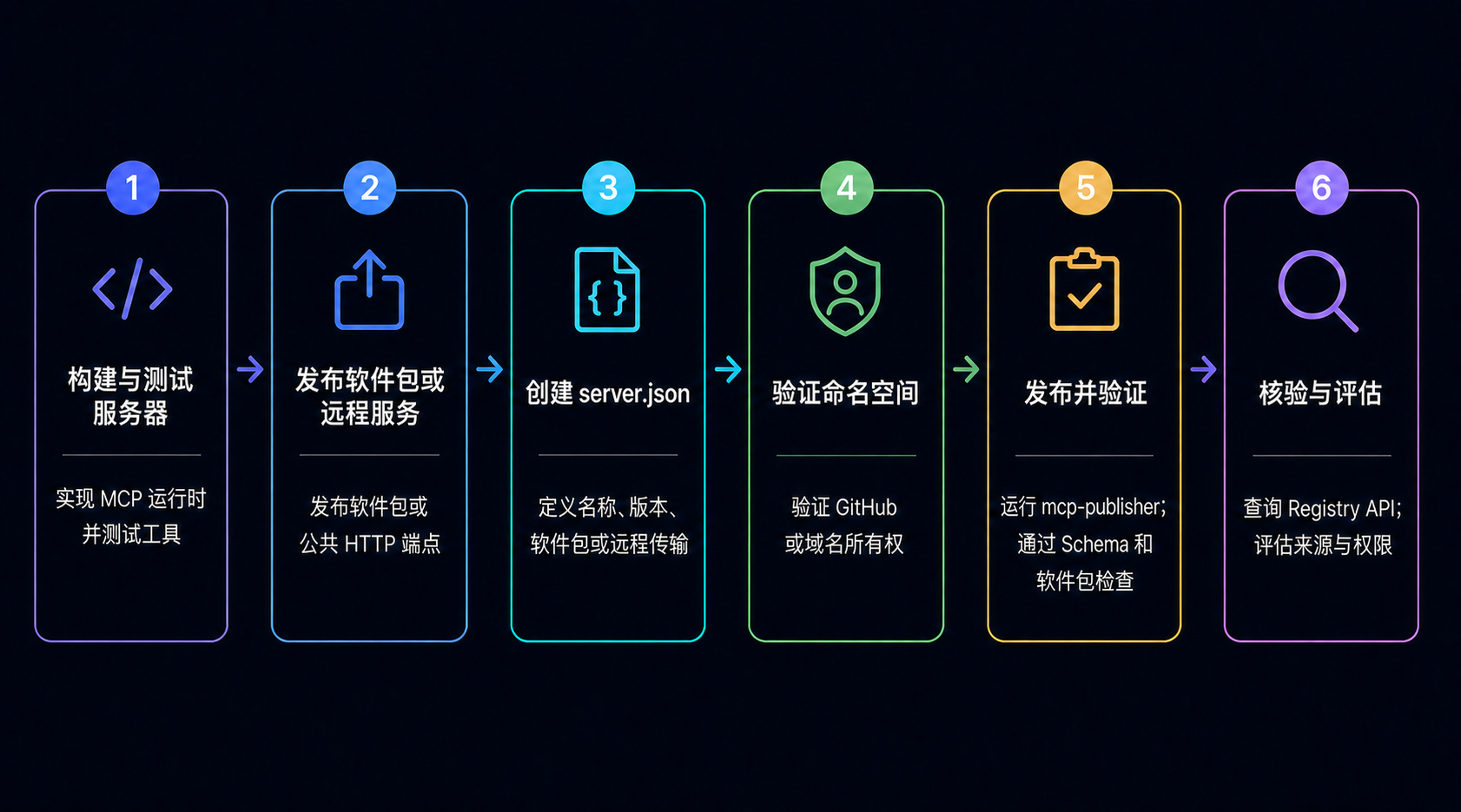
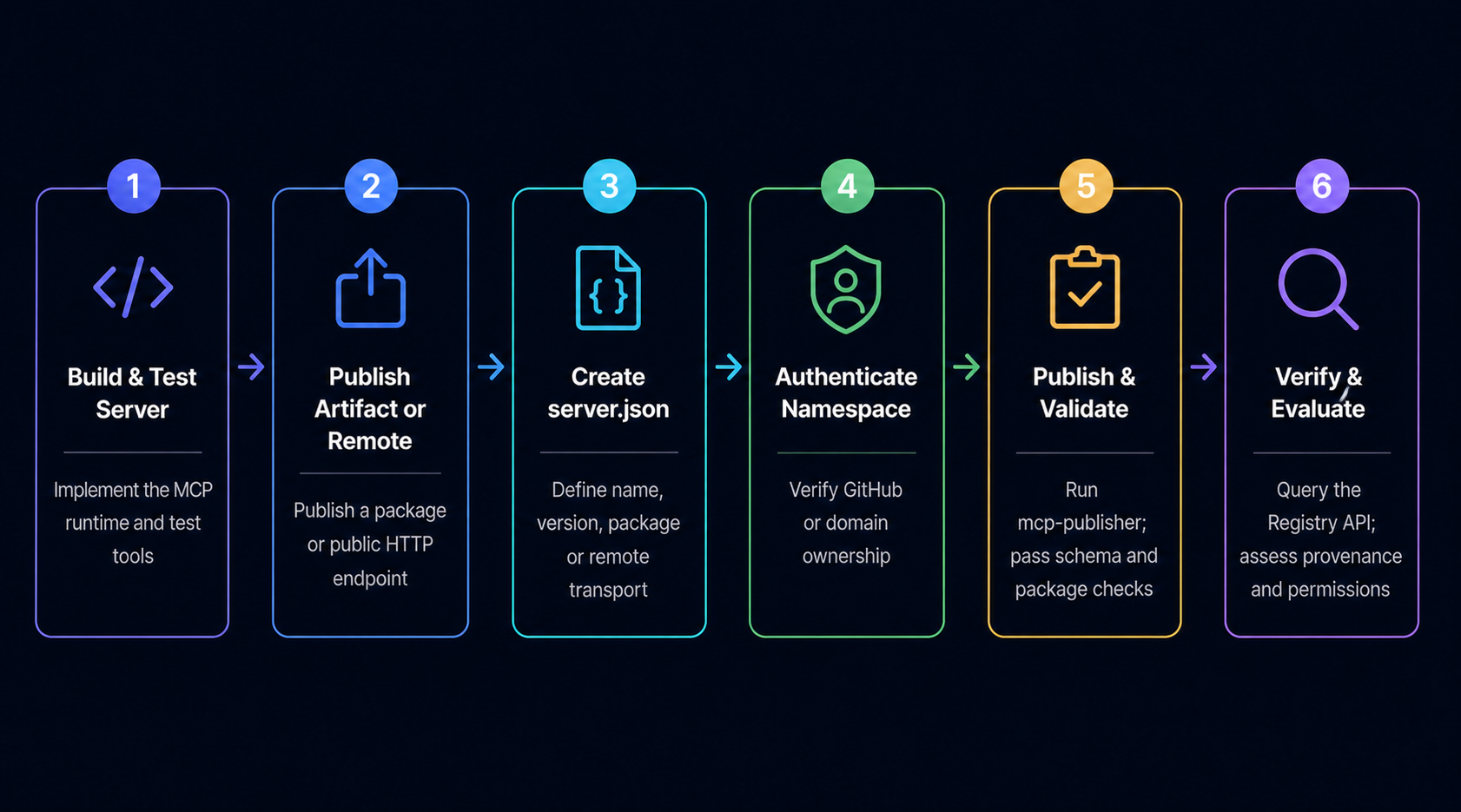
Publishing requires a public artifact or remote endpoint, a valid server.json, ownership evidence, and an authenticated namespace. The official quickstart uses this four-step production sequence:
Build and publish the underlying npm, PyPI, NuGet, OCI, or MCPB artifact, or expose a publicly reachable remote MCP endpoint. The official Registry stores metadata, not the artifact itself.
Install the official CLI, run mcp-publisher init, and check the generated name, version, package identifier, transport, and environment variables. Package ownership metadata must match the server name.
Run mcp-publisher login with GitHub or a supported domain-based method. The authentication identity must control the namespace; for GitHub, the name begins with io.github.your-username/.
Run mcp-publisher publish and query the API to confirm the exact name and version. Published version metadata is immutable; submit a new unique version when configuration or package metadata changes.
There is no documented 1–3 day manual approval queue in the official quickstart. Publication succeeds after authentication and validation, or returns a concrete error such as package validation failure, expired credentials, or a namespace permission mismatch.
MCP Registry vs Sub-Registries: When to Use Which
The official Registry is an upstream metadata service. Downstream registries and directories consume that source and may add search, moderation, security signals, organizational policy, or task-level routing. Choose the layer that matches the decision you are making.
You need source metadata for an exact server version
You are publishing a public package or remote endpoint
You are building a client, aggregator, or Registry API integration
You need namespace and package ownership verification
You want standardized installation and configuration metadata
You need semantic or category-based discovery
You want rankings, reviews, scans, or usage signals
You must enforce organization-specific allowlists and policy
You are operating a private registry for internal servers
You need task-oriented capability routing for agents
The Architecture Distinction
The official MCP Registry is a metadata repository — it stores versioned server.json records and exposes names, package or remote locations, transports, repository information, and configuration requirements. Package registries still host the actual artifacts.
Sub-registries like QVeris are capability routing layers — they can ingest source metadata, add their own evidence and policy, and expose a task-level interface to agents. Their rankings, reviews, tests, and coverage are downstream claims and should be evaluated independently.
A useful mental model is software supply-chain layers: the package registry stores an artifact, the official MCP Registry publishes a standardized pointer and configuration contract, and a downstream directory helps decide whether that server is relevant or acceptable.
Which Should You Use?
Use the official Registry when publishing, querying exact source metadata, or implementing the Registry API. Use a downstream layer when your primary problem is relevance, security enrichment, enterprise policy, or dynamic task-to-capability matching.
Many production systems use both layers: source metadata from the official API, enrichment from one or more downstream services, and an internal approval gate before installation or execution. QVeris can support capability discovery, while your application remains responsible for trust and runtime controls.
Top MCP Server Directories Compared
Compare ecosystem layers by responsibility rather than volatile server counts. A larger index is not automatically safer, fresher, or more useful for a particular agent.
| Feature | Official Registry | Package Registry | Downstream Registry | QVeris |
|---|---|---|---|---|
| Primary role | Standardized MCP metadata | Artifact hosting and distribution | Discovery, enrichment, and policy | Task-oriented capability discovery |
| Stored object | server.json versions | Packages, images, or binaries | Indexed and enriched server records | Capabilities and execution contracts |
| Trust signal | Namespace and package ownership | Package provenance and integrity controls | Provider-specific reviews, scans, or policy | Inspect provider, schema, cost, and permissions |
| Discovery model | REST API and exact metadata search | Package name and ecosystem search | Filters, ranking, and enrichment | Natural-language capability search |
| Agent integration | Client or aggregator implements API | Installer resolves the artifact | Directory-specific API or SDK | Discover, inspect, then call |
| Security responsibility | Not a production certification | Artifact controls vary by registry | Depends on downstream policy | Application must enforce least privilege |
| Publishing path | mcp-publisher CLI | Registry-native publish tooling | Ingests or separately accepts metadata | Uses available capability providers |
The layers complement one another. Publish the artifact first, publish MCP metadata second, enrich or approve the record third, and only then allow an agent to install or call the server under explicit permissions and observability.
How We Evaluated These Directories
We evaluate Registry workflows across six production dimensions. Source authority: Does the record come from the official API, an upstream package registry, or another index? Version integrity: Can the exact server and artifact version be pinned and reproduced? Ownership evidence: Does the namespace match the authenticated publisher and package metadata? Discovery quality: Are search results explainable, fresh, and traceable to source metadata? Runtime fit: Does the actual server expose the expected tools, transport, authentication, and error behavior? Security controls: Can the application sandbox execution, restrict secrets and permissions, and revoke access?
This comparison uses official Registry documentation reviewed August 3, 2026. The service remains in preview, so API behavior, schema versions, supported package types, and moderation rules can change. Verify the current official contract before deployment.
Production Evaluation: Three Questions to Ask
Before production use, answer three questions. First: Can we verify and reproduce this exact version? Trace server.json to the package or remote endpoint, repository, publisher namespace, and immutable version. Second: What authority will the server receive? Review every secret, filesystem path, network destination, OAuth scope, and user-confirmation boundary. Third: What happens when it fails or changes? Test startup, authentication, timeouts, rate limits, malformed responses, concurrency, rollback, and revocation before enabling agent access.
A Registry listing is the start of evaluation, not the final approval. Keep an internal allowlist that records the approved version, evidence, permissions, owner, review date, and rollback path. If QVeris is used for discovery, preserve the selected provider and inspection result in the execution audit trail.
Discover MCP Capabilities with QVeris
Use QVeris to discover candidate capabilities by task, inspect the current provider contract and cost signals, and call only after the capability passes your security and operational checks.
Try Registry Discovery in QVeris →在 QVeris 中体验 Registry 发现 → Browse MCP Tools →浏览 MCP 工具 → Read the MCP Server Documentation →阅读 MCP Server 文档 →