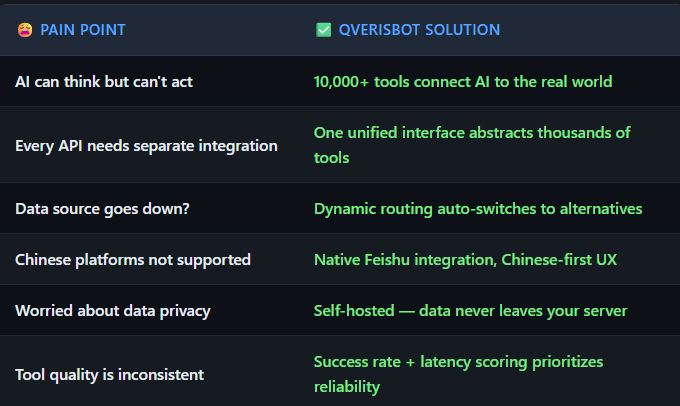
QVerisBot: The AI Assistant with 10,000+ Tools at Its Fingertips
Built on OpenClaw's local-first architecture, powered by QVeris Universal Toolbox, connected across Feishu, Telegram, Discord, and more
The One-Liner
QVerisBot = OpenClaw's local-first architecture + QVeris's 10,000+ tool ecosystem + multi-platform messaging
If OpenClaw is "an AI that actually does things," QVerisBot is that same AI with a universal toolbox — one that can see, reach, and act on the real world.
First, What Is OpenClaw?
OpenClaw is the open-source personal AI assistant framework created by Peter Steinberger. Since its launch in January 2026, it has become one of the fastest-growing open-source projects in the AI space. Its core philosophy is local-first:
- Runs on your own machine: Mac, Windows, or Linux. Your data stays local.
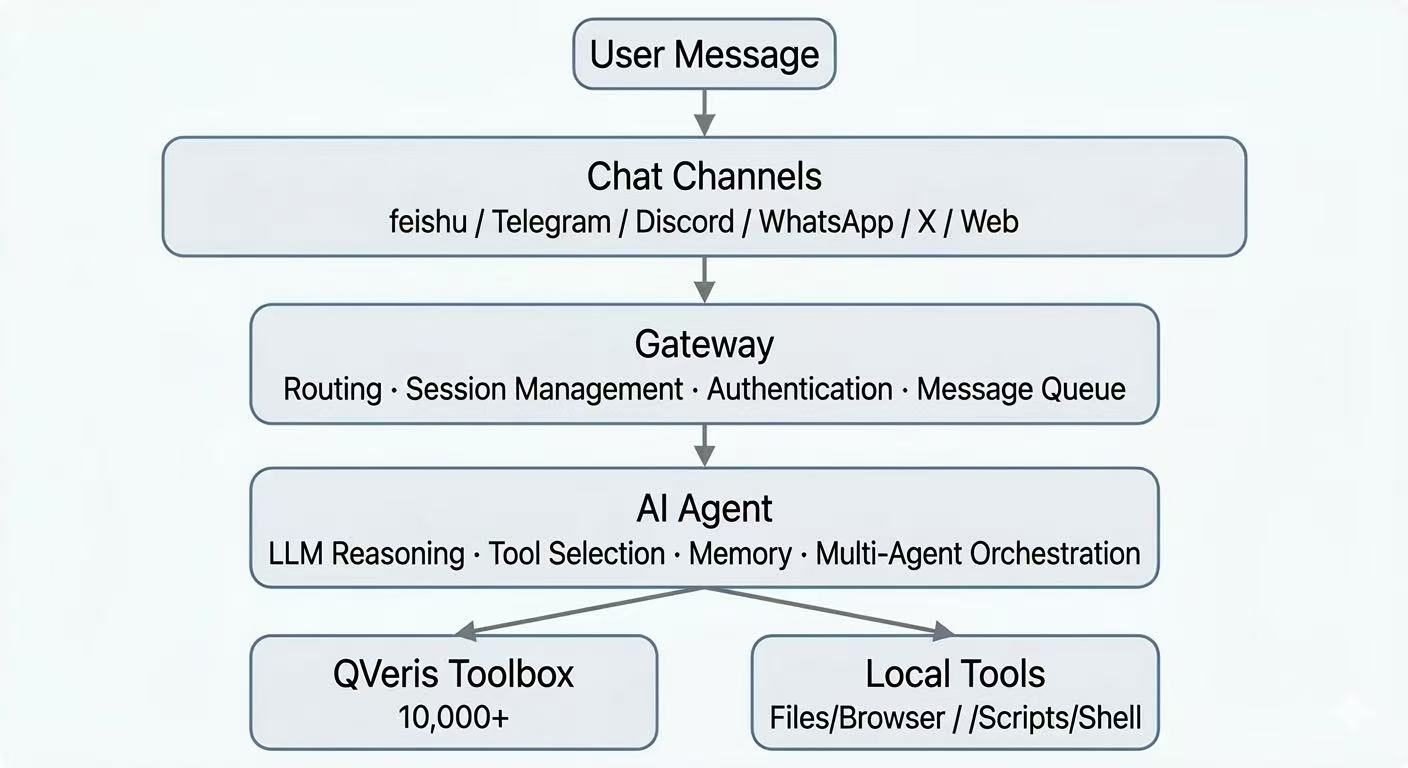
- Multi-channel gateway: One process connects WhatsApp, Telegram, Discord, Slack, Google Chat, Signal, iMessage, BlueBubbles, Microsoft Teams, Matrix, Zalo, Zalo Personal, WebChat, Feishu, X — simultaneously.
- Agent-native: Built-in tool use, session management, persistent memory, multi-agent routing.
- Open source: MIT licensed, community-driven, extensible via Skills.
Users consistently say things like: "It's running my company","This is the first software in ages I constantly check for new releases", and***"After years of AI hype, nothing fazed me. Then I installed OpenClaw."***
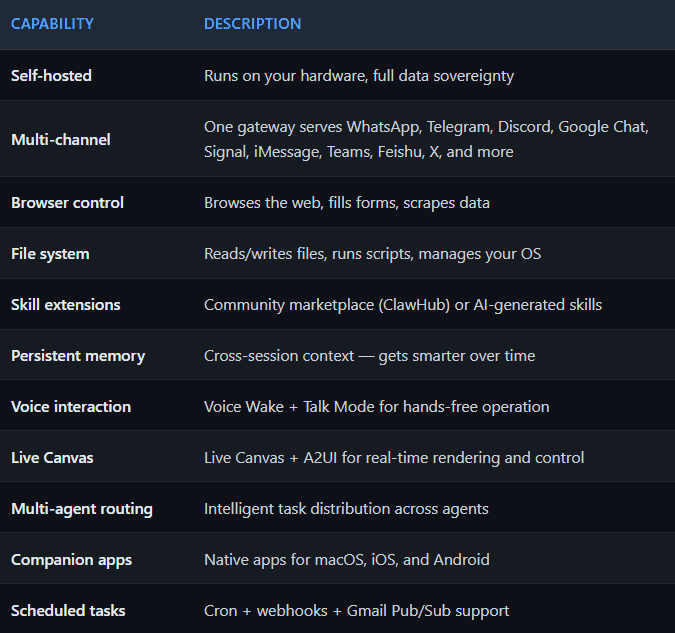
OpenClaw Core Capabilities
So What Is QVerisBot?
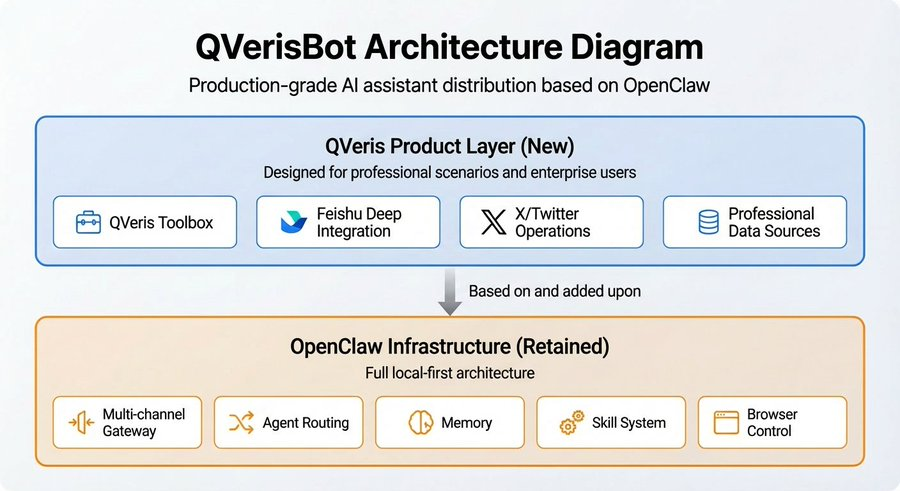
QVerisBot is a production-focused distribution built by the QVeris AI team on top of OpenClaw.It keeps OpenClaw's entire local-first architecture and adds a QVeris-first product layer designed for professional and enterprise use cases:
What Makes QVerisBot Different
QVeris Universal Toolbox: 10,000+ Tools, Search-and-Execute
This is the single biggest differentiator.
A typical AI assistant needs developers to manually find APIs, read docs, write adapters, and handle authentication — each tool integration takes 5-30 minutes. QVerisBot has the QVeris search-and-execute engine built in:
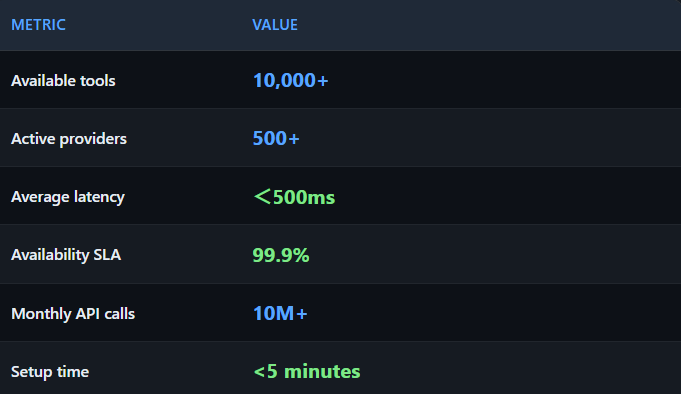
- Semantic search: Describe what you need in natural language (e.g., "get Beijing weather"), and the system finds the best tool from 10,000+ options across 500+ providers
- Unified execution: One standard interface dispatches to thousands of heterogeneous tools
- Dynamic routing: When a tool goes down, automatically switches to an equivalent alternative
- Quality scoring: Every tool has success rate and latency stats; the system prioritizes reliable options
- Real-world results: In testing with the Kimi LLM, adding QVeris improved complex task completion from 33% to 68%, while reducing failure rate from 18% to 0%.
Feishu (Lark) Deep Integration: The Gateway for Chinese Teams
QVerisBot provides first-class Feishu support:
- WebSocket long-polling: Real-time message delivery, zero-lag responses
- Group + DM support: Trigger via
- @mention
- in groups, or chat privately
- Rich media: Images, files, interactive cards
- Granular permissions: Independent group and DM policies
- Chinese-optimized: Configurable
promptSuffixfor automatic Chinese prompting
This means teams in China can have a 7×24 AI assistant living inside their Feishu workspace — querying data, writing reports, monitoring markets, managing calendars — with all data on their own servers.
Full X/Twitter Operations
QVerisBot includes a complete X (Twitter) operations suite:
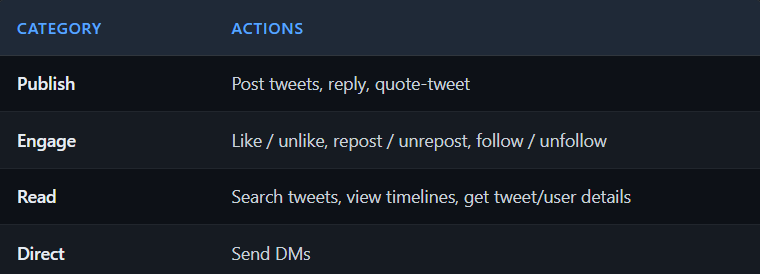
The key feature: cross-channel operations. You can tell QVerisBot in Feishu "Reply to
's latest tweet," and it executes directly via X API — no platform switching needed.
Production-Grade Developer Experience
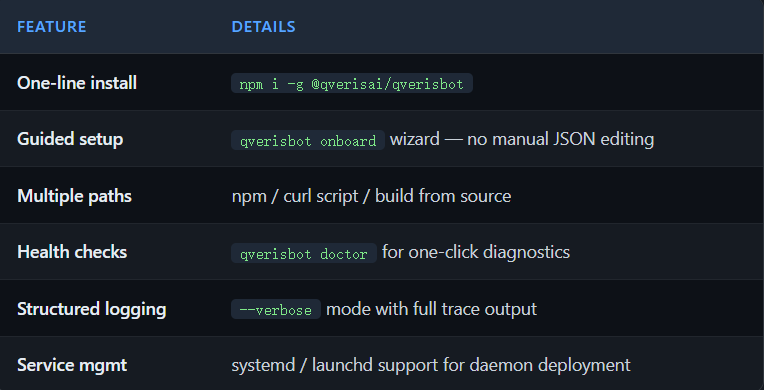
Bot Migration: Seamless Cross-OS Transfer
QVerisBot's unique qverisbot migrate command enables migrating your bot's complete state across operating systems:
bash

qverisbot migrate export # Export knowledge, memory, and skills (credentials automatically stripped)

qverisbot migrate import # Import to new environment

qverisbot migrate doctor # Diagnose migration compatibility
Key features:
- Secure stripping:Automatically removes all sensitive credentials and API keys during export
- Complete preservation: Knowledge base, skill configurations, memory, and scheduled tasks are all retained
- Cross-platform: Seamless switching between Mac → Linux → Windows
- Enterprise-grade: Supports backup strategies and version management
This is a QVerisBot-exclusive feature; OpenClaw does not support this migration mechanism.
LLM Proxy Support
QVerisBot natively supports HTTP Proxy configuration for network-restricted environments:
bash

export HTTP_PROXY=http://proxy.example.com:8080

export HTTPS_PROXY=http://proxy.example.com:8080

qverisbot gateway
Ideal for corporate intranets and international teams.
OpenClaw vs QVerisBot: Which Should You Choose?
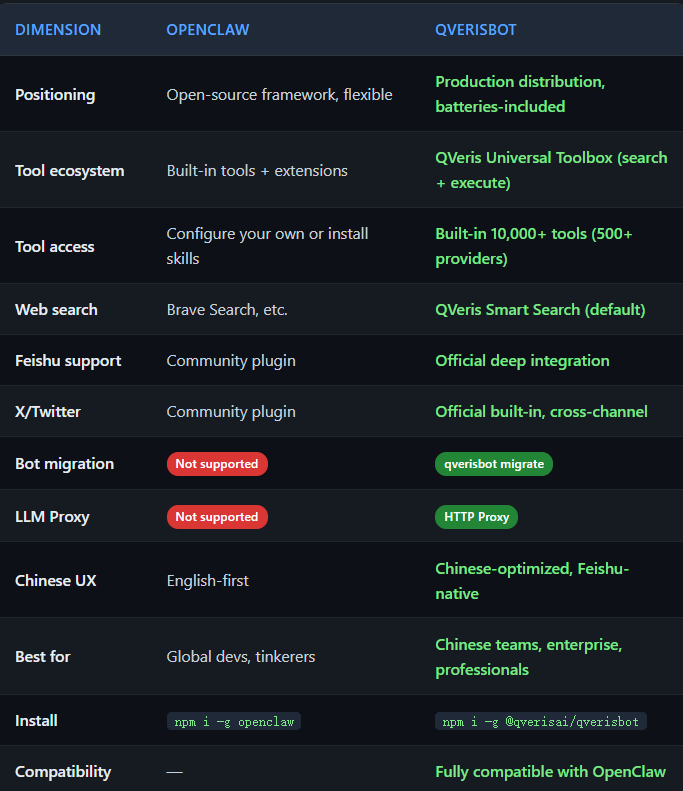
The short version: OpenClaw is the framework; QVerisBot is the product. If you want to deeply customize, choose OpenClaw. If you want a professional AI assistant that works out of the box, choose QVerisBot.
Use Cases
Use Case 1: 24/7 Financial Analyst
Deploy QVerisBot in a Feishu group:
Monitor A-share stocks with significant price movements every 15 minutes and recommend high-growth-potential picks
It automatically creates a scheduled task, connects to financial data sources (TongHuaShun, EastMoney, etc.), and pushes analysis reports in real time. When one data source goes down, dynamic routing switches to a backup — that's QVeris resilience in action.
Use Case 2: Content Creation & Social Media Operations
- Tell QVerisBot in Feishu: "Search for the latest AI Agent news and draft an English tweet"
- It searches via QVeris, writes the tweet, and publishes directly via X API
- Set up scheduled scans of key accounts with engagement recommendations
Use Case 3: Multi-Source Data Hub
QVerisBot integrates data from 500+ providers covering finance, research, travel, social media, and more:
- Financial Data: Binance, iFinD, CoinGecko, Etherscan, ...
- Search & Content: Brave Search, Firecrawl, NewsAPI, arXiv, PubMed, ...
- Business Intelligence: Crunchbase, LinkedIn, Notion, ...
- Lifestyle Services: OpenWeather, Amadeus, Google Maps, World Bank, ...
You: What's the current Bitcoin price? And what's the latest Fed rate decision?
QVerisBot:
- Fetches real-time BTC price via CoinGecko/Binance
- Pulls latest Fed news via Bloomberg/NewsAPI
- Synthesizes multiple sources into a comprehensive analysis
Use Case 4: Enterprise Workflow Automation
- Email management: Connect Gmail/Outlook, auto-classify, prioritize, draft replies
- Calendar: View schedules, create meetings, send reminders
- Project management: Integrate GitHub/Jira, track progress, generate reports
- Knowledge management: Connect Feishu Wiki, search docs, organize notes
Use Case 5: Developer's Swiss Army Knife
- Query any API data via natural language (weather, exchange rates, stocks, geocoding...)
- Auto-generate charts and visual reports
- Monitor service health, alert on anomalies
- Manage multiple servers, batch operations tasks
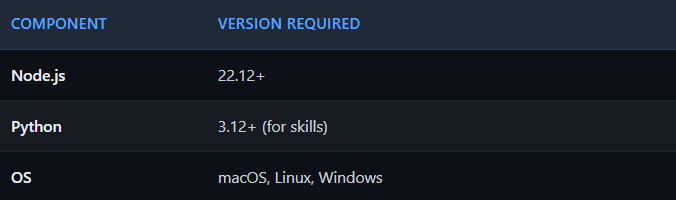
System Requirements
Architecture
Key Metrics
Quick Start
Option 1: npm Install (Recommended)
bash

npm i -g @qverisai/qverisbot

qverisbot onboard
Note: qverisbot is the primary command; openclaw is available as a compatibility alias.
Option 2: One-Line Script
macOS/Linux:
bash

curl -fsSL https://qveris.ai/qverisbot/install.sh | bash
Windows PowerShell:
powershell

irm https://qveris.ai/qverisbot/install.ps1 | iex
Option 3: Build from Source
bash

git clone https://github.com/QVerisAI/QVerisBot.git

cd QVerisBot

pnpm install && pnpm build

pnpm qverisbot onboard
After qverisbot onboard, the wizard guides you through:
- Model configuration (Claude, GPT, Kimi, DeepSeek, and more)
- QVeris API key setup
- Channel configuration (Feishu / Telegram / Discord / etc.)
- Gateway launch
bash

qverisbot gateway --port 18789
Then send a message to your bot in Feishu/Telegram/Discord — and you're live.
Why QVerisBot?