
AI Agent Tool Routing: How Agents Choose the Right Tool for Every Task
A practical guide to AI agent tool routing — covering tool discovery, capability selection, schema inspection, function calling, MCP tools, validation, fallback, and QVeris-supported routing workflows.
Discover · Inspect · Call · Validate · Route
What Is AI Agent Tool Routing?
AI Agent Tool Routing is the process by which an AI agent selects the most appropriate tool, API, or capability for a given task — based on task intent, tool schema, required inputs, output format, cost, latency, authentication, and provider reliability. It moves the agent from "I know how to call a function" to "I know which function to call for this specific task."
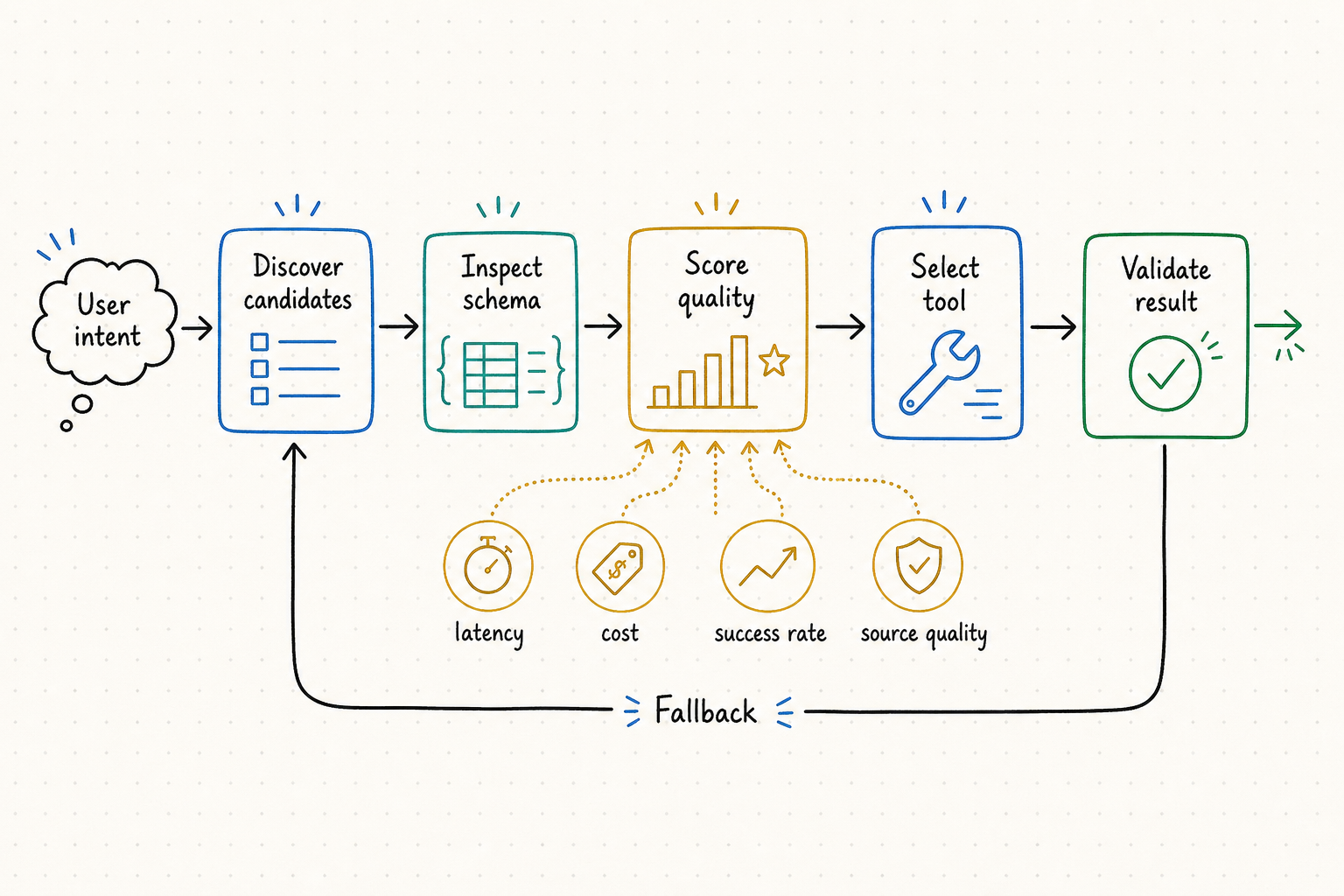
Function calling answers "how does the model invoke a function?". Tool routing answers "given ten candidate tools that could satisfy this task, which one should the agent actually use?". Consider an agent asked "Find recent SEC filings for Nvidia and summarize risk factors." The agent should not blindly call the first search tool it finds. It should: (1) recognize the task requires a company filing capability, (2) discover candidate filing tools, (3) inspect each tool's input schema to verify ticker/CIK support and filing-type coverage, (4) select the tool that supports 10-K/10-Q/8-K retrieval with source URLs, (5) call it, (6) validate the filing date, accession number, and output format, then (7) generate a source-backed summary.
Function Calling vs Tool Calling vs Tool Routing
| Concept | What It Means | Main Question |
|---|---|---|
| Function Calling | LLM outputs structured function arguments in a specific format | How does the model invoke a function? |
| Tool Calling | Agent invokes an external tool, API, or MCP server | How does the agent execute a tool? |
| Tool Routing | Agent selects the best tool from multiple candidates | Which tool should the agent use? |
| MCP | Standard protocol for exposing tools to models and agents | How are tools connected? |
| QVeris Capability Routing | Agent-native discovery, inspection, and routing across capabilities | How can agents find and call the right capability? |
Key insight: Function calling is necessary but not sufficient for complex agents. Once an agent has access to 10, 50, or 100+ tools, the hard problem shifts from "how to call a function" to "which function to call." Tool routing is the layer that solves this — and it is the layer where most production agent failures happen.
Why Agents Need Tool Routing
1. Tool Lists Grow Too Large
A production agent may have 50+ MCP servers, each with multiple tools. Sending every tool schema in every prompt burns context and degrades model performance. Routing narrows the candidate set before the model even sees it.
2. Similar Tools Overlap
Three different "stock price" tools may exist — one returns bid/ask, one returns last price only, one requires a paid API key. The agent must choose, not guess.
3. Names Are Not Enough
A tool called get_market_data could return crypto prices, stock quotes, or macroeconomic indicators. The name reveals nothing about the schema. Inspection is required.
4. Schema Mismatch Causes Failed Calls
An agent calling a tool that expects cik as input but the agent only has a ticker will fail. Routing with schema inspection catches this before execution.
5. Some Tools Are Expensive or Slow
One tool costs $0.001 per call with 50ms latency. Another costs $0.05 with 2s latency. For high-volume agents, routing by cost and latency matters.
6. Agents Need Fallback When Tools Fail
If the primary tool returns a 429 rate limit error, the agent should route to a fallback — not return "I couldn't complete the task." Routing includes failure recovery.
The AI Agent Tool Routing Workflow
1. Intent Understanding
What does the user actually need? Data lookup? Action execution? Document analysis? The intent determines which category of tools is relevant — not just which keyword matches.
2. Capability Discovery
Search for candidate tools matching the task intent. This may involve an MCP registry, a tool directory, a QVeris Discover call, or a vector search across tool descriptions and schemas.
3. Schema Inspection
For each candidate, inspect input parameters, required fields, output format, authentication method, cost, latency, provider notes, and constraints. Eliminate tools that do not match the task requirements.
4. Tool Selection
Rank remaining candidates by accuracy, cost, latency, source quality, and availability. Select the best tool. If multiple tools are equally suitable, prefer the one with lower cost or better source attribution.
5. Tool Call
Execute the selected tool with validated inputs. Handle authentication, timeouts, and error responses. If the call fails, route to the next-ranked fallback.
6. Output Validation
Check the response: Are required fields present? Is the timestamp valid? Is the source URL included? Are there missing values? Does the schema match expectations?
7. Agent Response
Generate the final answer — a research brief, JSON payload, alert, chart, summary, or next workflow step — with source traceability and clear separation of extracted facts from model interpretation.
Tool Routing Decision Factors
| Factor | Why It Matters in Routing |
|---|---|
| Task Intent | Determines which category of capability is needed — price data vs filing data vs news vs action execution |
| Tool Schema | Prevents invalid or unsafe calls — the agent must confirm inputs, outputs, and constraints before calling |
| Required Inputs | Determines whether the agent has enough information — missing a required field means the call will fail |
| Output Format | Determines whether downstream steps can consume the result — JSON, plain text, structured data, or raw document |
| Cost | Helps avoid unnecessarily expensive calls — route to free tier tools for low-stakes tasks, paid tools for production data |
| Latency | Critical for real-time workflows — a 2-second tool call may be unacceptable for alert agents but fine for research agents |
| Authentication | Determines whether the tool can be called — the agent must verify auth availability before attempting execution |
| Source Quality | Critical for research and compliance — agents should prefer tools that return source URLs, timestamps, and provenance metadata |
| Fallback Options | Helps the agent recover from errors — routing should always include a ranked fallback list, not a single point of failure |
Tool Routing vs Capability Routing: Keep the Best Fit Clear工具路由与能力路由:明确两类适用场景
This guide focuses on the per-request decision loop: given a user task and several callable candidates, how should an agent select, invoke, validate, and recover? A capability routing network is the broader infrastructure that makes capabilities discoverable across agents, providers, protocols, and environments. The concepts overlap, but they answer different design questions.
本文聚焦单次请求的决策循环:面对用户任务和多个可调用候选项,Agent 如何选择、调用、验证并在失败后恢复?能力路由网络则是更广泛的基础设施,使能力可以跨 Agent、provider、协议与环境被发现。两者有重叠,但回答的是不同架构问题。
| Layer层级 | Primary question核心问题 | Typical responsibility典型职责 |
|---|---|---|
| Function calling函数调用 | How is one declared function invoked?如何调用一个已声明函数? | Structured arguments, schema-constrained generation, invocation mechanics结构化参数、受 schema 约束的生成与调用机制 |
| Tool routing工具路由 | Which available tool should handle this request now?当前请求应该由哪个可用工具处理? | Candidate retrieval, ranking, permission check, call, validation and fallback候选检索、排序、权限检查、调用、验证与回退 |
| Capability routing network能力路由网络 | How are capabilities indexed, governed and reached across an ecosystem?如何在生态中索引、治理并访问能力? | Registry, metadata, provider abstraction, quality signals, policy and shared access注册表、元数据、provider 抽象、质量信号、政策与共享访问 |
A practical routing score is a filter first, score second实用路由应“先过滤,再评分”
Do not let a weighted score compensate for a mandatory failure. First eliminate candidates that lack authorization, required coverage, compatible inputs, safe side-effect behavior, data freshness, or a consumable output. Only then rank eligible candidates. A simple score can combine task fit, historical success on the same task class, source quality, freshness, latency, and cost, but the weights should reflect the workflow rather than one global formula.
不能让加权分数抵消强制条件失败。先排除没有权限、覆盖不足、输入不兼容、副作用不安全、数据过期或输出无法被下游消费的候选项;再对合格候选排序。评分可以综合任务匹配、同类任务历史成功率、来源质量、时效、延迟与成本,但权重应针对具体工作流,而不是使用一个全局公式。
Hard eligibility gates硬性准入条件
- User and service identity are authorized用户与服务身份均已授权
- Provider covers the entity, geography and time rangeprovider 覆盖实体、地域与时间范围
- Required inputs are present without guessing必需输入已具备且不需要猜测
- Side effects and data use match policy副作用与数据用途符合政策
- Output contract is compatible with the next step输出契约与下一步兼容
Ranking signals among eligible tools合格工具之间的排序信号
- Semantic and schema fit for this task class对当前任务类别的语义与 schema 匹配
- Validated success, completeness and freshness经过验证的成功率、完整度与时效
- Source provenance and provider reliability来源血缘与 provider 可靠性
- Expected latency, rate limits and cost预计延迟、限流与成本
- Equivalent fallback availability是否存在等价回退能力
Log a selection trace, not private chain-of-thought记录选择轨迹,而不是私有思维链
For each route, store task class, candidate IDs, gate results, normalized signals, selected tool and version, brief machine-readable reason codes, permission decision, arguments after validation, call outcome, fallback reason, output-validation status, latency, and cost. This is enough to debug routing behavior without requiring hidden model reasoning. It also allows offline replay when schemas, models, or provider quality change.
每次路由应记录任务类别、候选 ID、准入结果、标准化信号、所选工具与版本、简短机器可读原因码、权限决定、校验后参数、调用结果、回退原因、输出验证状态、延迟与成本。这足以调试路由行为,不需要收集模型的私有思维链;当 schema、模型或 provider 质量变化时,也可以离线重放。
Tool Routing Examples
Market Data Agent
Task: "Get the latest price and historical context for AAPL."
Candidates: stock_quote, real_time_price, historical_prices, financial_news
Routing: stock_quote for latest price, historical_prices for context, news only if explanation requested.
QVeris: Discover market data → inspect schema → call → validate timestamps.
SEC Filing Agent
Task: "Summarize risk factors from the latest 10-K."
Candidates: company_filings, SEC parser, document analysis, summarization
Routing: filing tool first → validate date/source → extract risk section → summarize.
QVeris: Discover filing capabilities → inspect coverage → call → validate accession number.
Email Agent
Task: "Draft an email about the shipment delay."
Candidates: contact search, CRM lookup, email draft, template generator
Routing: Do not send directly. Draft first. Confirm before sending.
QVeris: Discover communication capabilities → inspect → draft → validate before action.
Data Analysis Agent
Task: "Analyze this CSV and create a chart."
Candidates: file reader, spreadsheet parser, chart generator, report writer
Routing: Read file → inspect columns → validate data → create chart → write report.
QVeris: Discover file + analysis capabilities → inspect → call in sequence → validate each step.
MCP Tool Agent
Task: "Find an MCP server that can query PostgreSQL."
Candidates: MCP registry, MCP directory, GitHub search, QVeris discover
Routing: Use directory for browsing → inspect schema → verify auth → test before production.
QVeris: Discover database MCP capabilities → inspect → evaluate → select best match.
Common Tool Routing Failure Modes
Wrong Tool Selected
Agent picks a tool whose name sounds relevant but whose schema reveals it is the wrong capability. Always inspect schema, not just names.
Schema Misunderstood
Agent calls a tool with symbol when it expects ticker. Parameter name mismatch is the most common preventable failure.
Expensive Tool Called Unnecessarily
A high-cost premium API is called for a task that a free-tier tool could handle. Route by cost awareness, not just capability match.
No Fallback When Primary Fails
The selected tool returns 429 or 503. The agent has no fallback configured and returns "I couldn't complete the task." Always rank fallbacks.
Search Result vs Executable Capability
Agent confuses a directory listing result with an executable tool. Finding a tool is not the same as being able to call it.
Over-Calling Tools
Agent calls tools for tasks that simple reasoning could handle. Not every user message requires external API access.
MCP and Tool Routing
| Layer | Role |
|---|---|
| Function Calling | Model outputs structured arguments to invoke a function |
| MCP Server | Exposes tools, resources, and prompts to agents |
| MCP Registry / Directory | Helps developers find and browse available MCP servers |
| Tool Routing | Chooses the right tool for the task from multiple candidates |
| QVeris | Adds agent-native discovery, inspection, and capability routing on top of tool ecosystems |
MCP standardizes how tools are exposed. It does not solve which tool an agent should pick from a large and overlapping set. MCP makes tools easier to connect. Tool routing makes tools easier to choose. The two layers are complementary — production agents typically use MCP for tool connectivity and a routing layer like QVeris for capability selection, schema inspection, and fallback handling.
QVeris Support for Capability Routing
QVeris is designed around Discover → Inspect → Call → Validate → Route. This makes it useful for agents that need to route tasks across external capabilities instead of hardcoding one provider per workflow.
Discover
Find candidate capabilities based on task intent — not server names. Semantic search across tools, APIs, and MCP servers.
Inspect
Review schema, inputs, cost, latency, auth, provider notes, and output examples. Eliminate unsuitable candidates before calling.
Call
Execute the selected capability through a unified interface. Consistent handling regardless of which provider answers.
Validate & Route
Check output fields, timestamps, source metadata. Route to fallback if needed. Return structured result with traceability.
QVeris is a capability routing layer — it does not own every external tool or replace every MCP server. It helps agents discover, inspect, and call relevant capabilities through a unified workflow. Read the docs → or view pricing →.
Getting Started Checklist
QVeris is a capability routing layer. Always verify tool schemas, terms, and availability independently.
Route Your Agent's Tools Intelligently
QVeris gives your AI agent a unified Discover → Inspect → Call workflow for routing tasks across external capabilities. No more hardcoding every provider. Discover and Inspect are free forever.
Build Tool-Routing Agent →Explore QVeris Docs