
What Is a Capability Routing Network?
An agent-native infrastructure layer that lets AI agents discover, inspect, and call verified real-world capabilities — tools, APIs, live data, and external services — through one unified protocol. Reduce per-provider integration work through one unified protocol.
In short
A capability routing network is an agent-native infrastructure layer that routes AI agents to the right external capabilities — tools, APIs, live data, and services — based on the task, parameters, provider availability, cost, latency, and quality signals. It replaces manual per-API integration with a unified Discover → Inspect → Call workflow that agents use dynamically at runtime.
Why AI agents need capability routing
Modern AI agents need to interact with the real world — but connecting them to external tools and data remains the hardest part of building agentic systems.
Manual API wiring does not scale
Each external tool or data source requires separate authentication, error handling, rate limit management, and ongoing maintenance. A single agent might need dozens of integrations — each one hand-coded and fragile.
Static tool directories lack context
A list of available tools tells an agent what exists — but not which tool is best for a specific task, what it costs, how reliable it is, or what parameters it expects. Agents need execution context, not just a catalog.
Agents need dynamic discovery
Agent tasks are unpredictable by nature. Hardcoding which tools to use for which queries breaks when the agent encounters a new scenario. Capability routing lets agents discover the right tool at runtime based on intent.
Production requires structure
Production AI workflows need structured execution with unique execution IDs, session-level tracing, audit trails, and consistent output formats. Direct API calls offer none of these guarantees out of the box.
How a capability routing network works
Five steps from agent intent to structured execution — with discovery and inspection always free.
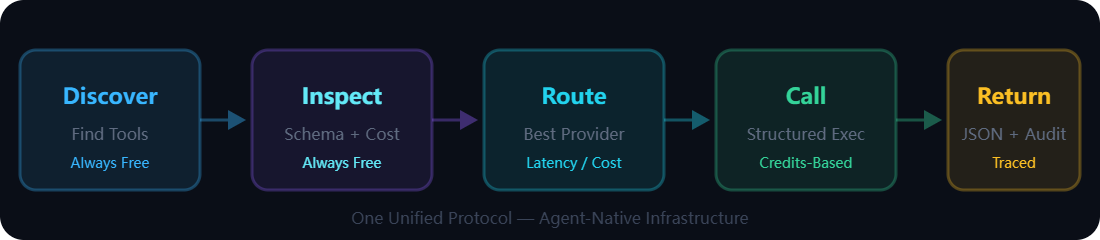
Discover — find the right capability
The agent describes what it needs in natural language. The routing network searches across its verified capability catalog and returns ranked matches with tool IDs, expected costs, latency estimates, and success rates. Discovery is always free.
Inspect — review before committing
The agent reviews the full parameter schema, billing rules, example usage, and quality metrics for candidate capabilities. This is a zero-cost decision point — the agent can compare multiple options before committing credits.
Route — select the best provider
Based on task requirements, provider availability, cost, latency, and quality signals, the network routes the request to the best-matching capability provider. Routing logic abstracts provider selection away from the agent.
Call — execute with structure
The agent submits structured parameters. The network executes the call in a sandboxed environment, enforcing parameter validation, authentication, and rate limiting. Credits are consumed only on successful execution.
Return — structured output and audit trail
The network returns a structured JSON response containing the result data, a unique execution ID, billing details, and remaining credit balance. Every call is traceable through session-level identifiers for full auditability.
Core components of a capability routing network
The building blocks that make capability routing work for AI agents at scale.
Capability discovery
Natural language search across the verified capability catalog. Returns ranked matches with relevance scores, costs, and performance metrics — no pre-coded endpoints needed.
Schema inspection
Full parameter schema, billing rules, and quality metrics available before every call. Agents make informed decisions at zero cost — always free to inspect.
Routing and selection
Dynamic provider selection based on task requirements, availability, cost, latency, success rate, and regional considerations. The agent asks; the network routes.
Structured tool calling
Sandboxed execution with parameter validation, authentication handling, rate limiting, and consistent JSON response formatting. One protocol for all capabilities.
Auditability and observability
Unique execution IDs, session-level tracing, and full call records for debugging, cost tracking, and compliance. Every interaction leaves a traceable record.
Integration layer
Multiple integration paths — MCP Server, REST API, Python SDK, CLI — so agents can connect through their preferred protocol without changing how capabilities work.
Verified capability catalog
Pre-verified capabilities with quality signals (success rate, latency, cost) from multiple providers. Not a static list — a dynamic, quality-scored catalog that agents can trust.
Provider and execution context
Transparent provider attribution, execution sandboxing, and session-scoped configuration. Agents know which provider executed each call and can track performance over time.
Capability routing network vs related concepts
How capability routing differs from other approaches to connecting AI agents with external tools and data.
| Dimension | Capability Routing Network | API Marketplace | Static Tool Directory | Manual API Integration | MCP Server Alone |
|---|---|---|---|---|---|
| Discovery | ✓ Natural language, dynamic | ◐ Keyword search, human-driven | ◐ Browse by category | ✗ Must know endpoints in advance | ◐ Protocol-level connection only |
| Pre-call inspection | ✓ Schema, cost, quality — always free | ✗ Pricing page only | ✗ Unverified listings | ✗ No preview | ✗ Not included |
| Provider routing | ✓ Dynamic, quality-based | ✗ Manual selection | ✗ No routing | ✗ Hardcoded | ✗ Not included |
| Protocol | ✓ One unified protocol | ✗ Many different APIs | ✗ No protocol | ✗ One per API | ✓ Standard MCP protocol |
| Audit trail | ✓ execution_id, session tracing | ✗ Provider-dependent | ✗ None | ✗ Self-built | ✗ Not included |
| Designed for | ✓ AI agents (agent-native) | ✗ Human developers | ✗ Human developers | ✗ Human developers | ✓ AI agents (protocol layer) |
| Quality signals | ✓ Success rate, latency, cost | ✗ Provider claims only | ✗ Unverified | ✗ Self-monitored | ✗ Not included |
MCP provides the connection protocol. A capability routing network adds discovery, inspection, routing, quality signals, and audit trails on top. Learn about QVeris MCP Server →
Where QVeris fits
QVeris applies the capability routing network concept to real-world AI agent workflows — with verified capabilities, multiple integration paths, and production-grade infrastructure.
Discover. Inspect. Call.
The core QVeris workflow embodies capability routing: agents discover capabilities with natural language, inspect schemas and costs for free, and call with structured execution and audit trails.
10,000+ verified capabilities
15+ categories spanning finance, compliance, crypto, research, document processing, and developer tools — all with quality signals (success rate, latency, cost) visible before every call.
Multiple integration paths
Connect through MCP Server, REST API, Python SDK, or CLI. All paths provide the same capability routing functionality — choose what fits your agent stack.
Finance and beyond
Deep finance domain coverage: quantitative trading, macro/fixed income, risk/compliance, investment research, crypto/digital assets, and alternative signals. Explore finance capabilities →
Production infrastructure
99.99% uptime, sub-500ms p95 latency, RBAC access controls, sandboxed execution, and full audit trails — built for production AI agent workflows from day one.
Agent-native design
Not an adapted API gateway. QVeris was built for how AI agents actually work — discover-by-intent, inspect-before-commit, and call-with-structure across all capabilities.
Example use cases
Where capability routing networks add the most value for AI agent workflows.
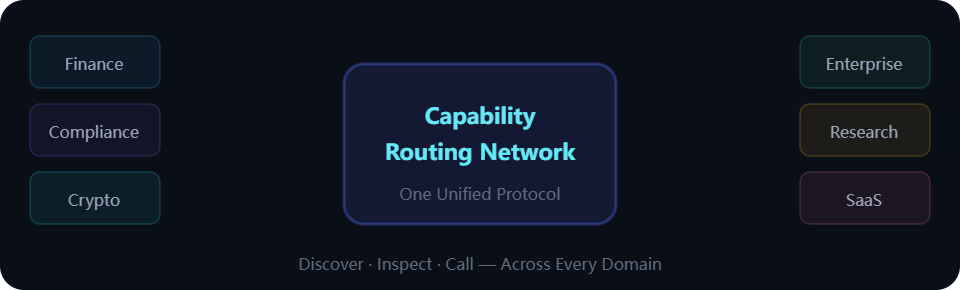
Finance AI agents
Access market data, earnings, fundamentals, and macro indicators through verified financial capabilities instead of managing dozens of data provider integrations.
Investment research agents
Automate earnings analysis, valuation model data retrieval, and market intelligence — with structured JSON responses ready for downstream analysis and modeling.
Compliance and risk workflows
KYC verification, sanctions screening, and regulatory data lookups with full audit trails. Every compliance call produces a unique execution ID for traceability.
Crypto and on-chain analysis
Blockchain data, DeFi metrics, stablecoin flows, and crypto and on-chain signals — the same unified protocol used for traditional financial data, enabling cross-asset workflows.
Internal enterprise agents
Connect internal AI agents to external data and services for document processing, data enrichment, and compliance checks with RBAC and session-level audit trails.
Agentic SaaS products
Build products where AI agents need dynamic access to external capabilities. One integration point instead of maintaining dozens of third-party API connections.
Best practices for adopting capability routing
Recommendations for integrating capability routing into your AI agent workflow effectively and safely.
Start with a defined workflow
Identify the specific tasks your agent needs external capabilities for. Start with 2-3 capability categories that map directly to agent workflows before expanding.
Map the capabilities your agent needs
Understand which categories your agent will query most frequently. Finance agents may need market data and research; compliance agents may need KYC and sanctions data.
Inspect schemas before calling tools
Always use the inspection step to review parameter schemas, billing rules, and quality metrics. Inspection is free and prevents costly parameter mismatches.
Use structured outputs consistently
Design your agent to parse structured JSON responses and use execution IDs for logging. Consistent output handling makes debugging and audit trails far more effective.
Track execution behavior
Log execution IDs, session IDs, costs, and latencies for every call. This data helps optimize capability selection, manage credit budgets, and debug production issues.
Separate testing and production
Use separate sessions or API keys for test and production workflows. Test new capability categories and parameter patterns before deploying to production agent workflows.
Avoid unsupported assumptions
Do not assume a capability exists without discovering it first. Capability availability, schemas, and costs can change — let the agent discover and inspect dynamically rather than hardcoding expectations.
Validate high-risk outputs
For finance, compliance, or other regulated workflows, validate structured outputs before using them in downstream decisions. The routing network provides the data — your agent logic should verify results.