
CoinGecko vs CoinMarketCap
vs CryptoCompare APICoinGecko、CoinMarketCap
与 CryptoCompare API 对比
Compare coverage, pricing boundaries, freshness, normalization, and production tradeoffs before choosing a crypto market data API.
从覆盖范围、定价边界、数据新鲜度、标准化与生产风险出发,选择适合你的加密货币市场数据 API。
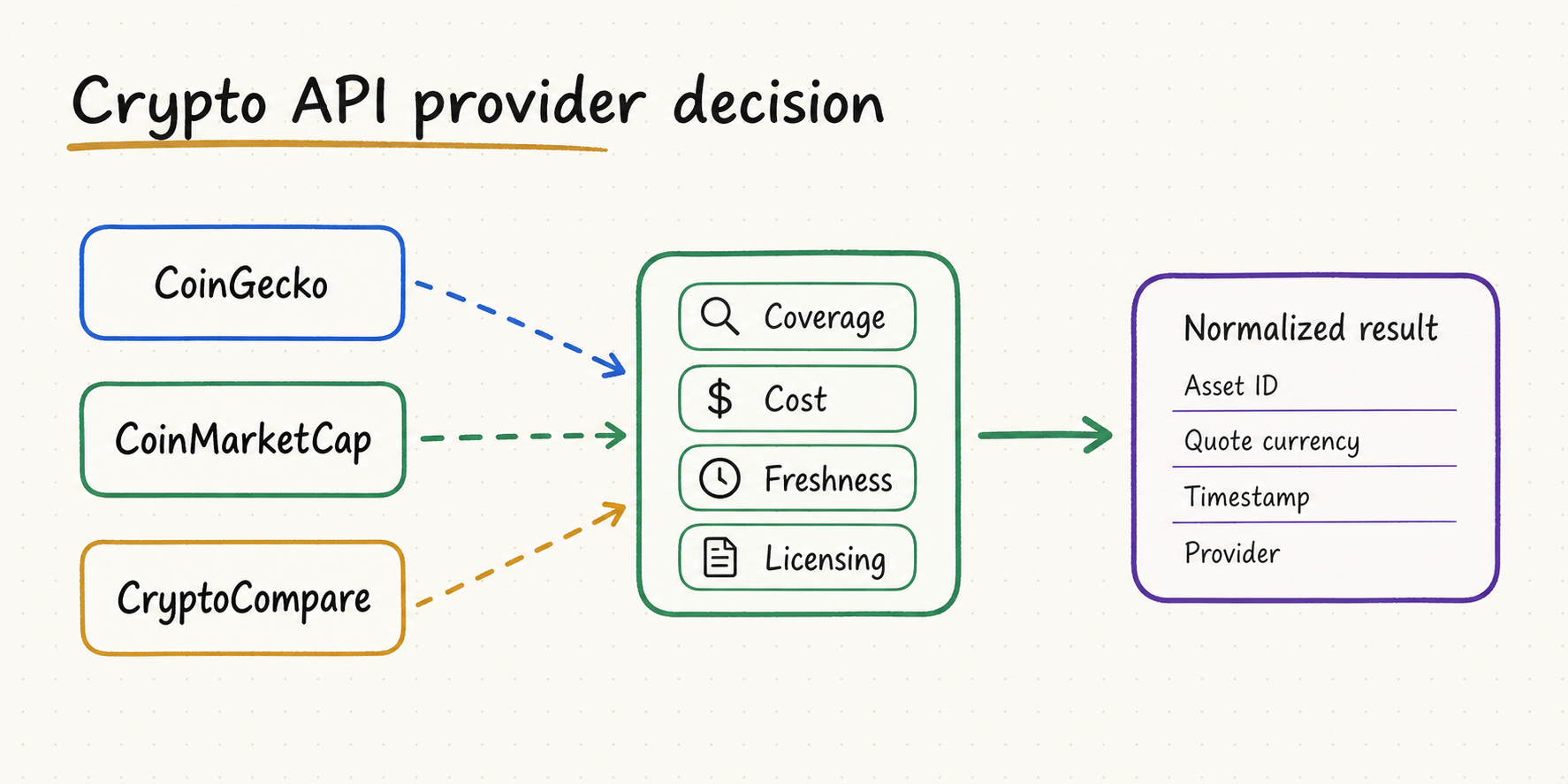
TL;DR
You need broad asset discovery, token metadata, simple price lookups, and a fast prototype path. It is a sensible default for research and portfolio context, subject to current plan limits.
Your product benefits from CoinMarketCap's asset taxonomy, rankings, market-pair context, or an existing workflow built around its identifiers and ecosystem.
You need exchange-aware market data, historical workflows, or provider-specific endpoints that align more closely with trading and venue analysis.
Do not choose from the homepage feature list alone. Test your exact assets, venues, timestamps, quotas, commercial rights, and failure behavior with a representative workload.
你需要广泛的资产发现、代币元数据、简单价格查询和快速原型开发。它适合作为研究与投资组合上下文的默认起点,但要以当前套餐限制为准。
产品重视 CoinMarketCap 的资产分类、排名、市场交易对信息,或者已经围绕其资产 ID 与生态构建了工作流。
你需要区分交易所的市场数据、历史数据工作流,或更贴近交易与市场场所分析的接口。
不要只看官网功能列表做决定。必须用代表性负载测试真实资产、交易场所、时间戳、配额、商业使用权和故障行为。
Bottom line: there is no universal winner. CoinGecko is often the easiest general-purpose starting point; CoinMarketCap is attractive for taxonomy and ranking-oriented products; CryptoCompare deserves closer evaluation for venue-aware and historical market-data use cases.
结论:三者没有绝对赢家。CoinGecko 通常是最容易开始的通用方案;CoinMarketCap 更适合依赖分类与排名的产品;CryptoCompare 在交易场所感知和历史市场数据场景中值得重点评估。
Who this crypto API comparison is for这份加密货币 API 对比适合谁
This guide is for developers building dashboards, research assistants, portfolio trackers, price-alert systems, and AI agents. It assumes you need structured market data, not an exchange account for order execution. If you need millisecond-level order-book events, an exchange-native WebSocket feed is usually a separate requirement.
本指南面向构建行情看板、研究助手、投资组合跟踪、价格提醒和 AI Agent 的开发者,讨论的是结构化市场数据,而不是下单交易账户。如果需要毫秒级订单簿事件,通常还要单独接入交易所原生 WebSocket。
Prioritize time to first response, understandable identifiers, useful metadata, and a free or low-cost evaluation path.
Prioritize service reliability, contractual limits, licensing, predictable costs, observability, and change management.
Prioritize schema clarity, source attribution, timestamp semantics, tool discoverability, validation, and safe fallback behavior.
优先考虑首次拿到数据的速度、易理解的资产 ID、可用元数据,以及免费或低成本试用路径。
优先考虑服务可靠性、合同配额、许可、可预测成本、可观测性和变更管理。
优先考虑 Schema 清晰度、来源归属、时间戳语义、工具可发现性、验证和安全回退。
CoinGecko vs CoinMarketCap vs CryptoCompare APICoinGecko、CoinMarketCap 与 CryptoCompare API 核心对比
The table describes product positioning and engineering questions, not permanent plan promises. Pricing, quotas, endpoint access, and licensing change; verify the linked official documentation before procurement or deployment.
下表描述的是产品定位和工程评估问题,不代表永久套餐承诺。价格、配额、接口访问权与许可都会变化,采购或上线前必须核对官方文档。
| Criterion维度 | CoinGecko | CoinMarketCap | CryptoCompare |
|---|---|---|---|
| Typical strength常见优势 | Broad discovery, token metadata, accessible market summaries广泛资产发现、代币元数据、易用的市场概览 | Asset taxonomy, rankings, market-pair ecosystem资产分类、排名和市场交易对生态 | Exchange-aware market data and historical workflows交易所感知的市场数据与历史工作流 |
| Prototype fit原型适配度 | Often straightforward for general market-data prototypes通常适合通用市场数据原型 | Useful when CMC identifiers and rankings match the product产品依赖 CMC ID 与排名时较合适 | Useful when venue and historical detail are central重视场所与历史细节时更合适 |
| Identity model资产身份模型 | Provider coin IDs plus chain and contract data where available服务商 coin ID,并在可用时结合链与合约地址 | Provider cryptocurrency map and numeric IDs服务商资产映射与数字 ID | Provider symbols, instruments, exchanges, and market pairs服务商代码、工具、交易所与市场交易对 |
| Freshness question新鲜度问题 | Ask whether timestamps describe provider refresh, exchange observation, candle close, or your own retrieval. Plan level and endpoint can change the answer.必须确认时间戳表示服务商刷新、交易所观察、K 线收盘还是本次获取;不同套餐与接口的答案可能不同。 | ||
| Free access免费访问 | Treat free access as evaluation capacity, not guaranteed production capacity. Check rate windows, daily or monthly quotas, historical depth, attribution, and commercial-use terms.把免费额度视为评估能力,而不是生产容量。核对限流窗口、每日或每月配额、历史深度、署名要求和商业使用条款。 | ||
| Best proof test最佳验证方式 | Long-tail assets, metadata completeness, ID mapping长尾资产、元数据完整性、ID 映射 | Rankings, map coverage, market-pair context排名、资产映射覆盖、交易对上下文 | Venue coverage, candle consistency, historical queries交易所覆盖、K 线一致性、历史查询 |
How to compare free tiers without using stale numbers如何比较免费套餐,而不依赖过期数字
A table of hardcoded request counts ages quickly and can mislead purchasing decisions. Convert your workload into requests, then evaluate each provider's current plan against the same model.
固定写死的请求次数很快会过期,并可能误导采购。应先把实际工作负载换算成请求,再使用同一模型对照每家服务商的当前套餐。
Assets × refreshes per hour × active hours × environments. Then subtract savings from batching and cache hits.
A daily quota can look sufficient while a per-minute ceiling still breaks morning dashboards or alert fan-out.
Historical depth, granularity, market-pair data, metadata, and commercial rights may live on different plan levels.
Know whether the system rejects, queues, returns stale cache, falls back, or incurs variable cost when capacity is exhausted.
资产数 × 每小时刷新次数 × 活跃小时数 × 环境数,再减去批量请求与缓存命中的节省量。
每日总配额看似足够,但每分钟上限仍可能让早盘看板或大量提醒同时失败。
历史深度、粒度、市场交易对、元数据和商业权利可能分别属于不同套餐。
容量耗尽时,系统是拒绝、排队、返回旧缓存、切换服务商,还是产生浮动成本,必须提前明确。
Normalize crypto assets before comparing prices比较价格前,先标准化加密资产身份
Ticker symbols are not stable primary keys. The same symbol may represent different contracts, bridged assets, or instruments across chains and venues. Preserve provider-native IDs and map them into your own canonical identity.
Ticker 代码不是稳定主键。同一代码可能对应不同合约、跨链资产或不同交易场所工具。应保留服务商原生 ID,并映射到自己的标准化身份。
| Field字段 | Why preserve it为什么必须保留 | Validation rule验证规则 |
|---|---|---|
| canonical_asset_id | Stable internal identity across providers跨服务商使用的稳定内部身份 | Never derive from symbol alone不能只根据 symbol 生成 |
| provider_asset_id | Reconstructs and debugs the original request用于重建和排查原始请求 | Store provider name and version together同时保存服务商与版本 |
| chain / contract | Disambiguates tokens and bridged variants区分代币与跨链版本 | Normalize address case according to chain rules按链规则标准化地址大小写 |
| venue / market_pair | Separates aggregated price from exchange-specific observation区分聚合价格与交易所特定观察 | Do not label an aggregate as an executable quote不能把聚合价标成可成交报价 |
| observed_at / retrieved_at | Separates market time from collection time区分市场观察时间与获取时间 | Reject or flag values outside the freshness budget超出新鲜度预算时拒绝或警告 |
| quote_currency / unit | Prevents silent USD, USDT, BTC, and unit mismatches防止静默混用 USD、USDT、BTC 与不同单位 | Convert only with a cited FX or market source转换时必须记录汇率或市场来源 |
{
  "canonical_asset_id": "crypto:ethereum:ETH",
  "provider": "coingecko",
  "provider_asset_id": "ethereum",
  "chain": "ethereum",
  "contract_address": null,
  "quote_currency": "usd",
  "price": 0000.00,
  "observed_at": "2026-08-03T08:00:00Z",
  "retrieved_at": "2026-08-03T08:00:04Z",
  "freshness_status": "accepted",
  "source_url": "provider-endpoint-reference"
}
The numeric value is intentionally illustrative. In production, store the raw response or content hash beside the normalized record so an alert or agent answer can be audited later.
示例数值仅用于说明。生产环境应在标准化记录旁保存原始响应或内容哈希,以便后续审计提醒与 Agent 回答。
A production pattern for crypto data apps and AI agents适用于加密数据应用与 AI Agent 的生产模式
Define assets, venues, quote currencies, timestamps, historical granularity, freshness budget, and required provenance before evaluating vendors.
Include BTC and ETH, a stablecoin, a long-tail token, a contract-address lookup, a delisted or renamed asset, and at least two exchanges.
Capture status, latency, response schema, provider timestamp, missing fields, rate-limit headers, and response hash for the same requests.
Map into your canonical schema while retaining provider IDs, raw fields, source URL, retrieval time, and transformation version.
Use different TTLs for metadata, spot prices, rankings, and historical candles. Never serve stale data without a visible status.
Specify when to retry, use cache, switch provider, reduce asset scope, pause alerts, or request human review.
评估服务商前,先明确资产、交易场所、计价货币、时间戳、历史粒度、新鲜度预算和来源链要求。
至少包含 BTC、ETH、稳定币、长尾代币、合约地址查询、已下线或更名资产,以及两个交易所。
针对同一请求记录状态、延迟、响应 Schema、服务商时间戳、缺失字段、限流 Header 和响应哈希。
映射到统一 Schema,同时保留服务商 ID、原始字段、来源 URL、获取时间和转换版本。
元数据、现货价格、排名和历史 K 线应使用不同 TTL,不能在没有状态提示的情况下返回旧数据。
明确何时重试、读取缓存、切换服务商、缩小资产范围、暂停提醒或请求人工复核。
What to verify before production上线生产前要验证什么
Common failure modes in crypto API integrations加密货币 API 集成的常见失败模式
Check aggregation method, included exchanges, quote currency, timestamp, volume weighting, outlier filtering, and whether the value is an executable venue quote or a market aggregate.
A ticker-only lookup collided with another asset. Resolve by provider ID, chain, and contract address before requesting market data.
Separate provider observation time from retrieval time, deduplicate on asset and observation window, and verify that polling cadence is compatible with the plan's refresh cadence.
The secondary provider was switched in before identity, timestamps, units, or aggregation methods were normalized. Reject incompatible fallback data instead of silently merging it.
检查聚合方法、纳入的交易所、计价货币、时间戳、成交量加权、异常值过滤,以及该数值是可成交场所报价还是市场聚合价。
只用代码查询导致资产冲突。请求行情前,应先通过服务商 ID、链与合约地址解析身份。
区分服务商观察时间与获取时间,按资产和观察窗口去重,并确认轮询频率与套餐刷新频率兼容。
备用服务商接入前没有统一身份、时间戳、单位或聚合方法。应拒绝不兼容数据,而不是静默合并。
Use provider routing only after inspection先检查能力,再做服务商路由
QVeris does not make CoinGecko, CoinMarketCap, and CryptoCompare interchangeable by itself. It can help an agent discover and inspect relevant capabilities before calling them; your application still owns asset identity, normalized schema, cache policy, licensing checks, freshness rules, and acceptance tests.
QVeris 不会自动让 CoinGecko、CoinMarketCap 与 CryptoCompare 完全互换。它可以帮助 Agent 在调用前发现并检查相关能力;资产身份、统一 Schema、缓存策略、许可检查、新鲜度规则和验收测试仍由应用负责。
Search for crypto price, token metadata, historical candle, exchange market, or streaming capabilities based on the task—not a hardcoded provider name alone.
Review input schema, supported assets, provider notes, cost, latency, and limits before execution.
Execute the selected capability and retain request parameters, raw response, provider, status, retrieval time, and trace ID.
Map provider identity into the canonical contract; reject stale, ambiguous, incomplete, or incompatible observations.
根据任务搜索加密价格、代币元数据、历史 K 线、交易所市场或流式能力,而不是只写死某个服务商名称。
执行前检查输入 Schema、支持资产、服务商说明、成本、延迟和限制。
执行所选能力,并保留请求参数、原始响应、服务商、状态、获取时间与追踪 ID。
把服务商身份映射到统一契约,拒绝过期、歧义、不完整或不兼容的观察值。
CoinGecko vs CoinMarketCap vs CryptoCompare FAQCoinGecko、CoinMarketCap 与 CryptoCompare 常见问题
CoinGecko is a practical default for broad discovery and prototypes, CoinMarketCap suits taxonomy and ranking-oriented products, and CryptoCompare is worth evaluating for exchange-aware and historical workflows. Verify current plans and licensing.
There is no permanent winner because quotas and terms change. Compare requests, refresh cadence, historical depth, attribution, commercial use, and overage behavior against your workload.
It can support polling-based monitoring when plan freshness and limits meet the requirement. For exchange-level alerts, validate timestamp semantics and consider an exchange-native WebSocket source.
Store provider asset ID, symbol, chain and contract address where applicable, quote currency, venue, timestamp, freshness class, source, and retrieval time. Never join assets on symbol alone.
One provider may fit a narrow workload, but production must define caching, retry, stale-data, rate-limit, and outage behavior. Add fallback only after schemas and licensing are normalized.
CoinGecko 适合作为广泛发现与原型的默认起点;CoinMarketCap 适合分类与排名型产品;CryptoCompare 值得用于交易所感知与历史数据工作流。最终要核对当前套餐与许可。
没有永久赢家,因为配额与条款会变化。应根据真实负载比较请求量、刷新频率、历史深度、署名、商业使用和超额行为。
当套餐新鲜度与限制满足要求时,可以用于轮询型监控。若需要交易所级提醒,应验证时间戳语义,并考虑交易所原生 WebSocket。
保存服务商资产 ID、代码、链与合约地址、计价货币、交易场所、时间戳、新鲜度状态、来源和获取时间,不能只按代码关联资产。
窄场景可能只需一家,但生产系统必须定义缓存、重试、旧数据、限流和故障行为。只有统一 Schema 与许可后,回退才真正安全。
Verify current plans, endpoints, and terms核对当前套餐、接口与条款
Use official documentation as the source of truth for quotas, pricing, endpoint availability, attribution, and commercial-use rights. Re-run your provider test when a plan, API version, or response schema changes.
配额、价格、接口可用性、署名与商业使用权应以官方文档为准。套餐、API 版本或响应 Schema 变化后,要重新运行服务商测试。