
Cursor MCP Tools for AI Agent Workflows
Use Cursor MCP to connect QVeris, discover financial capabilities, inspect tool schemas and call external APIs in a reliable workflow.
Why Cursor MCP Tools Matter
Cursor is already where many developers plan, edit, and debug agent code. The missing layer is often tool access. An AI coding assistant can draft an integration, but it still needs a reliable way to discover available tools, understand input schemas, and call external services safely.
That is why the keyword Cursor MCP tools has strong intent. The searcher is not only learning a concept. They are trying to connect Cursor to real capabilities such as market data, SEC filings, news, pricing, and internal workflows.
What Are Cursor MCP Tools?
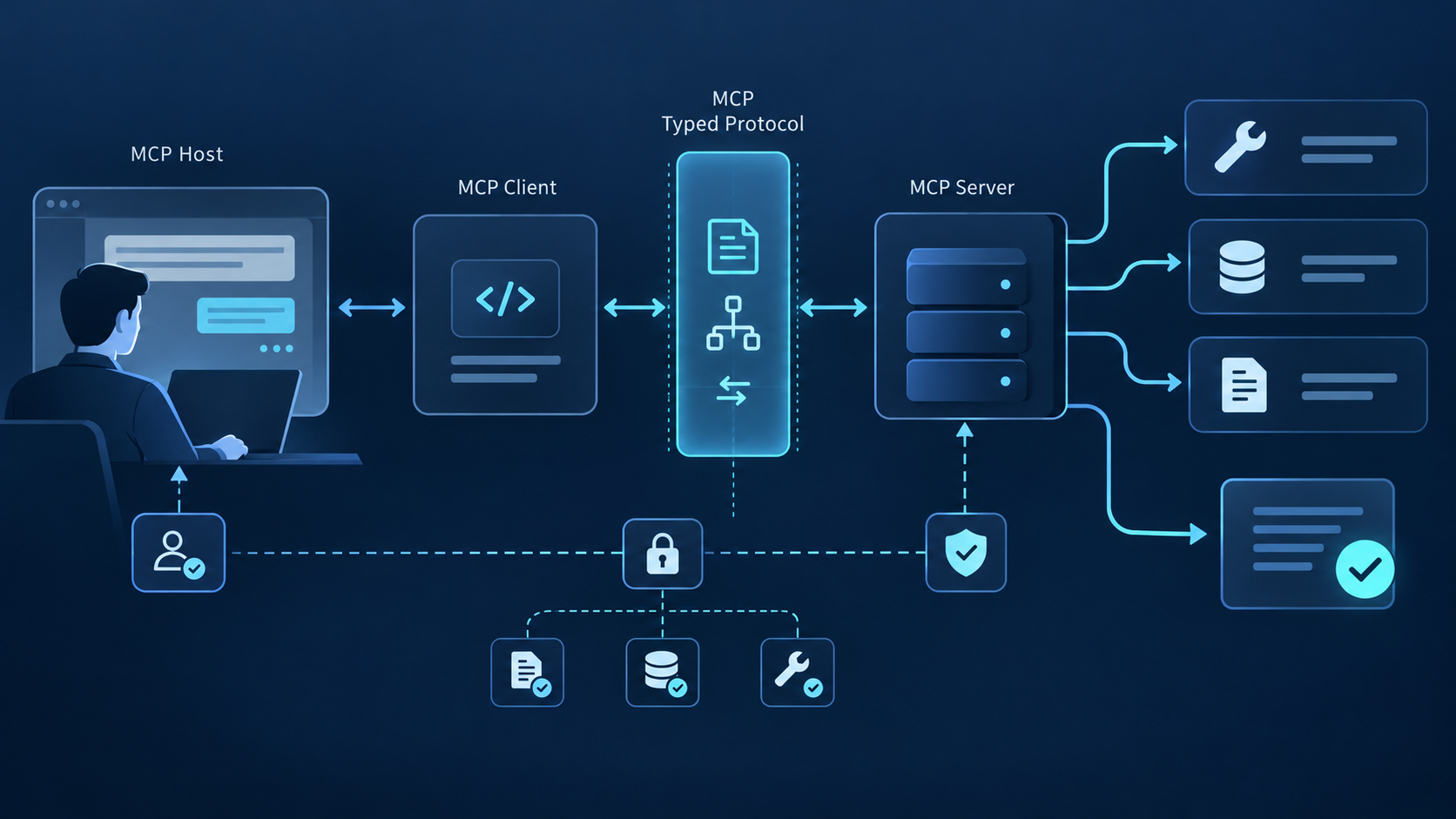
Cursor MCP tools are capabilities exposed to Cursor through the Model Context Protocol. A developer can configure an MCP server, then let Cursor use that server as a bridge to tools, resources, and structured actions. In practice, this turns the coding environment into an agent workspace.
Cursor can reach external tools through a standard MCP layer instead of custom scripts for every data source.
The agent can inspect parameters and return formats before attempting a tool call.
A shared tool layer makes auth, cost, fallback, and observability easier to manage.
How QVeris Fits Cursor MCP Workflows
QVeris acts as a capability routing layer for AI agents. Instead of asking Cursor to remember every finance API, developers can expose QVeris as an MCP server and let the workflow follow a simple pattern: Discover the right capability, Inspect its schema, then Call it with structured parameters.
This is especially useful for finance agents. A single research task may require live prices, historical prices, SEC filings, earnings data, and news sentiment. QVeris keeps those capabilities discoverable from one protocol rather than scattering logic across several provider SDKs.
Cursor MCP Configuration Example
A typical Cursor MCP setup starts with a server entry. The exact file location depends on your Cursor setup, but the pattern is simple: run the QVeris MCP package, then ask Cursor to discover and call finance capabilities from the configured server.
{
  "mcpServers": {
    "qveris": {
      "command": "npx",
      "args": ["-y", "@qverisai/mcp"]
    }
  }
}

# Agent task in Cursor
discover: "latest AAPL earnings and analyst estimates"
inspect: market.earnings_snapshot
call: market.earnings_snapshot({ "symbol": "AAPL" })
Use Cases for Cursor MCP Tools
Use Cursor to build agents that retrieve quotes, filings, earnings, and news through one tool layer.
Inspect schemas directly while editing code so mismatched fields are caught earlier.
Let a team route requests through approved capabilities instead of ad hoc API calls.
Cursor MCP Tools vs Hardcoded API Integrations
| Dimension | Hardcoded APIs | Cursor MCP + QVeris |
|---|---|---|
| Discovery | Developer reads docs manually. | Agent can search for capabilities by intent. |
| Schema checks | Usually maintained in local code. | Inspect reveals inputs, outputs, latency, and cost. |
| Provider changes | Each change requires code maintenance. | Routing layer reduces direct provider coupling. |
| Finance coverage | Depends on each API integration. | Market data, filings, news, crypto, macro, and more. |
Best Practices for Cursor MCP Tools
Start with read-only workflows before adding write actions. Finance agents should prefer source-aware results, timestamps, and clear failure handling. Use Inspect before Call whenever the task involves unfamiliar capabilities, required parameters, or expensive providers.
For prompt design, keep global rules separate from provider rules and exact tool rules. The QVeris post on prompt layering for tool calling explains why a single giant prompt becomes fragile as tool coverage grows.
Safe Tool Selection and Permissions in Cursor MCP Workflows
Connecting a server is only the beginning. A useful Cursor MCP setup limits context, exposes understandable capabilities, and makes the boundary between research, code changes, and external side effects obvious to both the developer and the agent.
Group tools by project and workflow instead of attaching every available server to every conversation. A smaller catalog reduces name collisions, unnecessary prompt context, accidental calls, and the chance that a general-purpose tool outranks a domain-specific one.
Begin with read-only repository and data access. Require explicit confirmation, narrower credentials, or a review gate for file deletion, deployment, database mutation, outbound messages, purchases, and other actions that can affect users or external systems.
When several tools overlap, inspect the selected capability’s schema, required values, units, limits, provider, and freshness signals. This step is especially valuable for financial data, long-running jobs, metered services, and tools whose names hide important constraints.
Check exit status, changed files, timestamps, source metadata, and postconditions before claiming success. Keep citations or command results close to the conclusion, and ask for review when outputs conflict or a task crosses a permission boundary.
A Practical Cursor MCP Workflow and Evaluation Checklist
Evaluate an MCP setup with real project tasks from discovery through verification. The goal is not the largest tool count; it is a workflow that stays understandable as repositories, providers, and team permissions change.
| Stage | What to check | Healthy outcome |
|---|---|---|
| Discover | Can the agent find the right capability from a natural-language task without loading an oversized catalog? | Relevant candidates are ranked with understandable names, scope, and provider metadata |
| Inspect | Are required parameters, examples, limits, permissions, and cost or latency signals visible before execution? | The model can construct valid arguments or recognize that clarification is required |
| Call | Do confirmations, timeouts, retries, structured errors, and cancellation work as designed? | Failures remain bounded and side effects never occur silently or twice |
| Verify | Can a developer see what was selected, what changed, and which evidence supports the answer? | The result is reproducible, reviewable, and easy to diagnose when expectations are not met |
Cursor MCP Tools FAQ
They let an AI coding workflow reach capabilities outside the model’s built-in context, such as repository operations, documentation, databases, analytics, browser tasks, or domain data. The exact value depends on clear schemas, appropriate permissions, and how reliably the result can be verified.
There is no useful universal number. Connect the smallest set that covers the project’s recurring tasks, then measure selection accuracy and context cost. Add a server when it closes a real capability gap, not simply because it is available.
Usually yes when a call can delete data, deploy code, mutate production state, contact another person, or create financial impact. Low-risk reversible edits may use lighter review, but the permission policy should be explicit and testable.
QVeris can act as a capability discovery and routing layer for MCP workflows. It helps an agent search for a suitable capability, inspect the selected schema and provider signals, and call it without hardcoding every possible integration into the project.
External References for Cursor MCP Tools
For implementation context, review the official Cursor MCP documentation, the Model Context Protocol site, and Anthropic's tool use documentation. These references help teams separate the general protocol from the domain-specific capability layer that QVeris provides.