
Add Playwright MCP
to Claude CodeClaude Code 接入
Playwright MCP
Install Playwright MCP in Claude Code with the official command, confirm the server is connected, and start a controlled browser automation workflow.
使用官方命令为 Claude Code 安装 Playwright MCP,确认服务器连接正常,并开始可控的浏览器自动化工作流程。
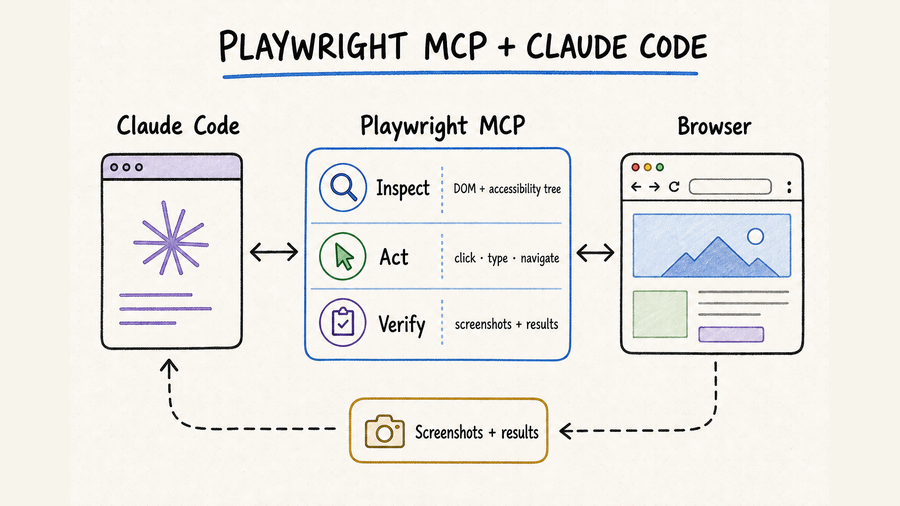
TL;DR核心摘要
Register the official package as a local stdio server and use -- to separate Claude Code options from the npx command.
Use local scope for one project, project scope for a reviewed team configuration, or user scope only when every project should see the server.
Check claude mcp list, inspect the server with claude mcp get playwright, then confirm the in-session /mcp status.
Open a public page, read its URL and heading, make one reversible navigation, and verify the changed state before using accounts.
把官方软件包注册为本地 stdio 服务器,并用 -- 分隔 Claude Code 参数与 npx 命令。
单个项目用 local;团队共享且经过审查的配置用 project;只有所有项目都需要时才用 user。
依次运行 claude mcp list、claude mcp get playwright,并在会话内通过 /mcp 确认状态。
先打开公开页面,读取网址和标题,执行一次可逆跳转并验证新状态,再考虑接入账号。
The shortest reliable setup is: confirm Node.js is available, add Playwright MCP with an explicit stdio command, verify the server reports connected, and run a read-only smoke test. Do not add persistent profiles, unrestricted file access, broad origins, or production credentials until that basic path succeeds.
最稳妥的最短路径是:确认 Node.js 可用,通过明确的 stdio 命令添加 Playwright MCP,检查服务器显示为已连接,再完成一次只读冒烟测试。基本流程跑通前,不要加入持久化浏览器配置、无限制文件访问、宽泛的来源范围或生产环境凭据。
Add Playwright MCP to Claude Code为 Claude Code 添加 Playwright MCP
Check the prerequisites先检查运行条件
The official Playwright MCP repository currently lists Node.js 18 or newer as a requirement. Confirm that node --version, npx --version, and claude --version all work in the same terminal where you will add the server. This catches a common Windows and macOS problem: Node.js is installed, but the shell or Claude Code process has not inherited the updated PATH. Update Claude Code before troubleshooting an old command format or status display.
官方 Playwright MCP 仓库当前要求 Node.js 18 或更高版本。请在准备添加服务器的同一个终端中依次确认 node --version、npx --version 和 claude --version 都能正常运行。这样可以提前发现 Windows 或 macOS 上常见的 PATH 问题:Node.js 虽已安装,但当前终端或 Claude Code 进程尚未读取新的环境变量。遇到旧命令格式或状态显示异常时,也应先更新 Claude Code。
Register the stdio server注册本地 stdio 服务器
Run claude mcp add --transport stdio playwright -- npx @playwright/mcp@latest from the project where you want to use the server. The name playwright is the label Claude Code displays; npx launches the Microsoft package. The double dash matters in the current Claude Code syntax because everything after it belongs to the server command rather than the Claude CLI. The shorter command shown in the Playwright repository may still work in compatible releases, but the explicit transport and separator make ownership of every argument clear.
在需要使用该服务器的项目目录中运行 claude mcp add --transport stdio playwright -- npx @playwright/mcp@latest。其中 playwright 是 Claude Code 显示的服务器名称,npx 负责启动 Microsoft 的软件包。按照当前 Claude Code 语法,双横线后的内容全部传给服务器命令,因此这个分隔符很重要。Playwright 仓库中的简写命令在兼容版本中可能仍然可用,但明确写出传输方式和分隔符,更容易判断每个参数由谁处理。
Choose local, project, or user scope deliberately有意识地选择 local、project 或 user
Local scope is the default and stores a private configuration associated with the current project in your user configuration. It is a sensible starting point because it does not add a shared file to the repository. Project scope writes a team-shareable .mcp.json at the project root; Claude Code asks users to approve project-scoped servers, so review the command and package before committing it. User scope exposes the server across projects and is convenient for a personal development utility, but it also broadens where browser tools are available.
local 是默认作用域,它会在用户配置中保存一份与当前项目关联的私有设置,不会向代码仓库新增共享文件,因此最适合作为首次配置。project 会在项目根目录生成团队可共享的 .mcp.json;Claude Code 会要求用户批准项目级服务器,所以提交前应审查命令和软件包来源。user 会让多个项目都能看到该服务器,适合个人长期使用的开发工具,但也扩大了浏览器工具的可用范围。
--scope local: use for one developer and one project; this is the safest first setup.--scope project: use when the team has reviewed the server definition and wants it versioned in.mcp.json.--scope user: use only when the same browser server should be available in every project for that user.
--scope local:仅供一个开发者在当前项目使用,适合第一次安装。--scope project:团队已经审查服务器定义,并希望把.mcp.json纳入版本管理时使用。--scope user:只有同一用户的所有项目都需要这项浏览器能力时才使用。
Verify configuration and connection separately分别验证“已写入配置”和“连接成功”
An “Added” message proves only that Claude Code wrote the configuration. Run claude mcp list and look for Connected; use claude mcp get playwright to inspect the stored command and scope. Then open Claude Code in the intended project and run /mcp. A project-scoped server can show pending approval until the workspace is trusted and the server is approved. A failed connection means the process did not start or complete the MCP handshake, even though registration succeeded.
命令返回“Added”只说明配置已经写入,并不代表服务器已成功启动。接着运行 claude mcp list,确认状态为 Connected;再用 claude mcp get playwright 检查保存的命令与作用域。随后在目标项目中打开 Claude Code,通过 /mcp 查看会话内状态。project 作用域的服务器在工作区获得信任并完成批准前,可能显示为等待审批;连接失败则说明进程启动或 MCP 握手没有完成,即使注册本身已经成功。
Use an inspect, act, and verify workflow采用“检查—执行—验证”工作流程
Prove the tool surface with a read-only test用只读测试确认工具可用
Do not begin with login or form submission. Ask Claude Code to open a public URL, report the final URL and page title, identify one visible heading, and list one named link without clicking it. Then permit one navigation and ask for the new URL and heading. This small test verifies browser startup, navigation, accessibility snapshots, tool results, and state refresh while keeping the consequences near zero.
不要一上来就登录或提交表单。先让 Claude Code 打开一个公开网址,报告最终网址和页面标题,识别一个可见标题,并列出一个具名链接但不点击;随后只允许一次页面跳转,再报告新网址和标题。这个小测试可以同时验证浏览器启动、导航、无障碍快照、工具返回值和状态刷新,而且几乎不会产生实际影响。
Write requests as task contracts把请求写成任务约定
A useful browser request states the starting URL, desired outcome, allowed domains, permitted actions, prohibited actions, review checkpoints, and evidence of success. Tell the agent what result to achieve rather than dictating unverified click coordinates. For example: inspect the staging settings page, identify the webhook form, populate the listed values, report every field, and stop before saving. The goal remains stable even if the page layout changes.
有效的浏览器请求应包含起始网址、目标结果、允许访问的域名、可执行动作、禁止事项、人工检查点和成功证据。应描述最终要实现什么,而不是指定未经验证的点击坐标。例如:检查测试环境的设置页,找到 Webhook 表单,填写给定内容,报告所有字段,并在保存前停止。即使页面布局发生变化,这个任务目标仍然清晰。
- Inspect the current URL and accessible page structure before the first action.
- Locate controls by role, visible label, name, or stable test ID rather than coordinates.
- Perform one bounded action and wait for the expected state transition.
- Reinspect after navigation, refresh, modal changes, frame changes, or dynamic updates.
- Return the final URL and page evidence that directly proves the requested result.
- 第一次操作前,先检查当前网址和页面的可访问结构。
- 通过角色、可见标签、名称或稳定的测试 ID 定位控件,不依赖坐标。
- 一次只执行一个边界明确的动作,并等待预期状态变化。
- 导航、刷新、弹窗、iframe 或动态内容变化后,重新检查页面。
- 返回最终网址,以及能够直接证明任务结果的页面证据。
Add configuration only when the task needs it只在任务需要时增加配置
Playwright MCP supports options for browser choice, headless mode, isolated sessions, persistent user data, storage state, output files, timeouts, device emulation, and additional capabilities. Start with the default browser and profile behavior. Add --isolated for disposable sessions, --browser when a specific engine matters, or --output-dir when screenshots and traces need a controlled destination. Treat --user-data-dir and stored authentication state as sensitive configuration because they can retain cookies and account access.
Playwright MCP 支持浏览器类型、无头模式、隔离会话、持久化用户数据、存储状态、输出目录、超时、设备模拟和附加能力等选项。首次运行应保留默认浏览器与会话行为;需要一次性环境时加入 --isolated,必须验证特定浏览器引擎时使用 --browser,截图和跟踪文件需要固定位置时再设置 --output-dir。--user-data-dir 和已保存的登录状态可能保留 Cookie 与账号访问权限,必须作为敏感配置管理。
Move stable checks into committed tests把稳定检查沉淀为正式测试
MCP is well suited to exploration, debugging, and tasks whose exact path changes. Once the same assertion is needed on every build, convert it to a normal Playwright test with explicit fixtures, selectors, assertions, retries, and CI reporting. The MCP run can help discover the workflow, but the committed test becomes the reproducible artifact. If you are still choosing between browser MCP designs, the related browser MCP guide covers the decision criteria without duplicating this installation path.
MCP 适合探索、调试和执行路径经常变化的任务。当同一项断言需要在每次构建中重复运行时,应把它改写为标准 Playwright 测试,明确测试夹具、定位方式、断言、重试和 CI 报告。MCP 可以帮助摸清流程,但纳入代码库的测试才是可重复的交付物。如果还在比较不同浏览器 MCP 方案,可阅读相关的 浏览器 MCP 选择指南;该页面讨论选型,不重复这里的安装步骤。
Safety and debugging practices安全与调试实践
Troubleshoot the failing layer, not the whole stack按故障层排查,不要反复重装
- Command not found: confirm Node.js,
npx, and Claude Code are available in the same shell and restart the terminal after PATH changes. - Failed to connect: inspect
claude mcp get playwright, run the storednpxcommand directly, and read the first process error. - Pending approval: open the project interactively, trust the workspace, and review the project-scoped server definition.
- Browser will not start: check browser installation, executable permissions, sandbox restrictions, proxy settings, and profile conflicts.
- Element disappeared: reacquire the page snapshot after navigation or dynamic updates instead of reusing a stale reference.
- Repeated submission: inspect for a confirmation message, changed URL, or duplicate record before retrying.
- 找不到命令:确认 Node.js、
npx和 Claude Code 在同一终端中可用;PATH 修改后重新打开终端。 - 连接失败:用
claude mcp get playwright检查保存的配置,单独运行其中的npx命令,并从第一条进程错误开始排查。 - 等待审批:以交互方式打开项目,确认信任工作区,并审查 project 作用域的服务器定义。
- 浏览器无法启动:检查浏览器安装、可执行权限、沙箱限制、代理设置和配置文件冲突。
- 元素突然消失:导航或动态更新后重新获取页面快照,不要继续使用旧引用。
- 疑似重复提交:重试前先检查确认提示、网址变化和重复记录。
Keep browser access narrower than the task让浏览器权限小于等于任务范围
Use a test account or dedicated browser profile whenever possible. Keep passwords, API keys, recovery codes, and raw cookies out of prompts and retained logs. Playwright MCP documents origin filters, but it also warns that allowed origins are not a security boundary and do not control redirects. Do not treat a filter as a substitute for account isolation, least privilege, and human approval. Avoid unrestricted file access unless the workflow genuinely needs local files, and review every upload by exact path and destination.
尽量使用测试账号或专用浏览器配置文件。密码、API Key、恢复码和原始 Cookie 不应出现在提示词或长期日志中。Playwright MCP 提供来源过滤选项,但官方同时说明,允许来源并不构成安全边界,也不能约束重定向。因此,过滤规则不能替代账号隔离、最小权限和人工审批。除非任务确实需要读取本地文件,否则不要开放无限制文件访问;每次上传都要核对准确路径和目标站点。
Pause immediately before consequential actions在高影响操作前即时暂停
Read-only inspection can usually proceed inside the approved domain. Drafting text or filling an unsent form should stop at a review checkpoint. Sending messages, accepting legal terms, purchasing, publishing, changing permissions, uploading private data, or deleting records requires explicit approval immediately before the final action. The approval request should identify the target and payload so the person knows exactly what will change.
在获准域名内进行只读检查通常可以直接继续;起草文字或填写尚未提交的表单,应在复核点暂停;发送消息、接受法律条款、购买、发布、修改权限、上传私密数据或删除记录,则必须在最后一步执行前取得明确授权。授权提示应写清目标对象和具体内容,让审批者准确知道将发生什么变化。
Where QVeris fits beside Playwright MCPQVeris 如何与 Playwright MCP 协同
The live QVeris catalog did not return an exact Playwright MCP or Claude Code configuration capability, so this page uses QVeris Docs and the QVeris Playground instead of placing a weakly related Tool or Provider on the CTA buttons.
实时检索 QVeris 目录后,没有发现能够直接完成 Playwright MCP 或 Claude Code 配置的精确能力,因此本页使用 QVeris 文档与 QVeris Playground 作为后续入口,不把弱相关 Tool 或 Provider 放到按钮上。
Use each layer for the work it handles best让每一层承担最适合的工作
- Use Playwright MCP when Claude Code must inspect rendered state, operate UI-only controls, or explore a changing web workflow.
- Use QVeris to discover and invoke a structured API or tool when typed inputs and predictable outputs can replace browser interaction.
- Combine them when an API prepares or validates structured data and Playwright MCP completes the interface-only step.
- Keep deterministic, repeated browser assertions in committed Playwright tests rather than rebuilding them as agent prompts.
- Claude Code 必须读取渲染状态、操作界面专属控件或探索变化中的网页流程时,使用 Playwright MCP。
- 如果类型明确的输入和可预测输出能够替代浏览器交互,可通过 QVeris 发现并调用结构化 API 或工具。
- 也可以让 API 先准备或校验结构化数据,再由 Playwright MCP 完成只有界面才能执行的步骤。
- 需要稳定重复运行的浏览器断言,应写入正式 Playwright 测试,而不是每次重新组织智能体提示词。
QVeris does not install the local MCP server, manage its Node.js process, or approve Claude Code permissions. Its value begins when the broader agent workflow needs verified structured capabilities alongside browser automation. If the whole task is simply “install Playwright MCP locally,” stay with the Microsoft and Anthropic instructions above.
QVeris 不负责安装本地 MCP 服务器,也不会管理 Node.js 进程或代替用户批准 Claude Code 权限。只有当更完整的智能体流程需要在浏览器自动化之外调用经过核验的结构化能力时,QVeris 才开始发挥作用。如果任务只是“在本地安装 Playwright MCP”,直接按照上面的 Microsoft 与 Anthropic 官方说明操作即可。
FAQ常见问题
It separates Claude Code options from the command and arguments passed to the stdio server. This prevents server flags from being parsed as Claude CLI flags.
Start with local. Choose project only for a reviewed team configuration, and user only when you intentionally want the server in every project.
“Added” confirms the configuration was written. Use mcp list, mcp get, and /mcp to verify the process starts and connects.
No. Use MCP for exploration and variable tasks. Convert stable, repeated checks into committed Playwright tests for deterministic CI execution.
Yes, through persistent profile or storage-state options, but isolate the account, protect stored state, and avoid sharing personal browser profiles.
Run claude mcp remove playwright in the relevant scope, then confirm it no longer appears in the list or in-session MCP panel.
它把 Claude Code 自身参数与传给 stdio 服务器的命令和参数分开,避免服务器选项被 Claude CLI 错误解析。
首次安装选 local;团队已经审查并希望共享配置时选 project;明确需要所有项目可用时才选 user。
Added 只证明配置已写入。还要通过 mcp list、mcp get 和 /mcp 确认进程已启动并完成连接。
不会。MCP 适合探索和变化较大的任务;稳定且重复的检查应写成 Playwright 测试,在 CI 中确定性运行。
可以使用持久化配置文件或 storage state,但必须隔离账号、保护保存状态,并避免共享个人日常浏览器配置。
在对应作用域运行 claude mcp remove playwright,再确认列表和会话内 MCP 面板中都不再显示该服务器。