Use QVeris to help AI agents discover, inspect, and call verified developer capabilities for API lookup, documentation search, issue triage, error research, and workflow automation.
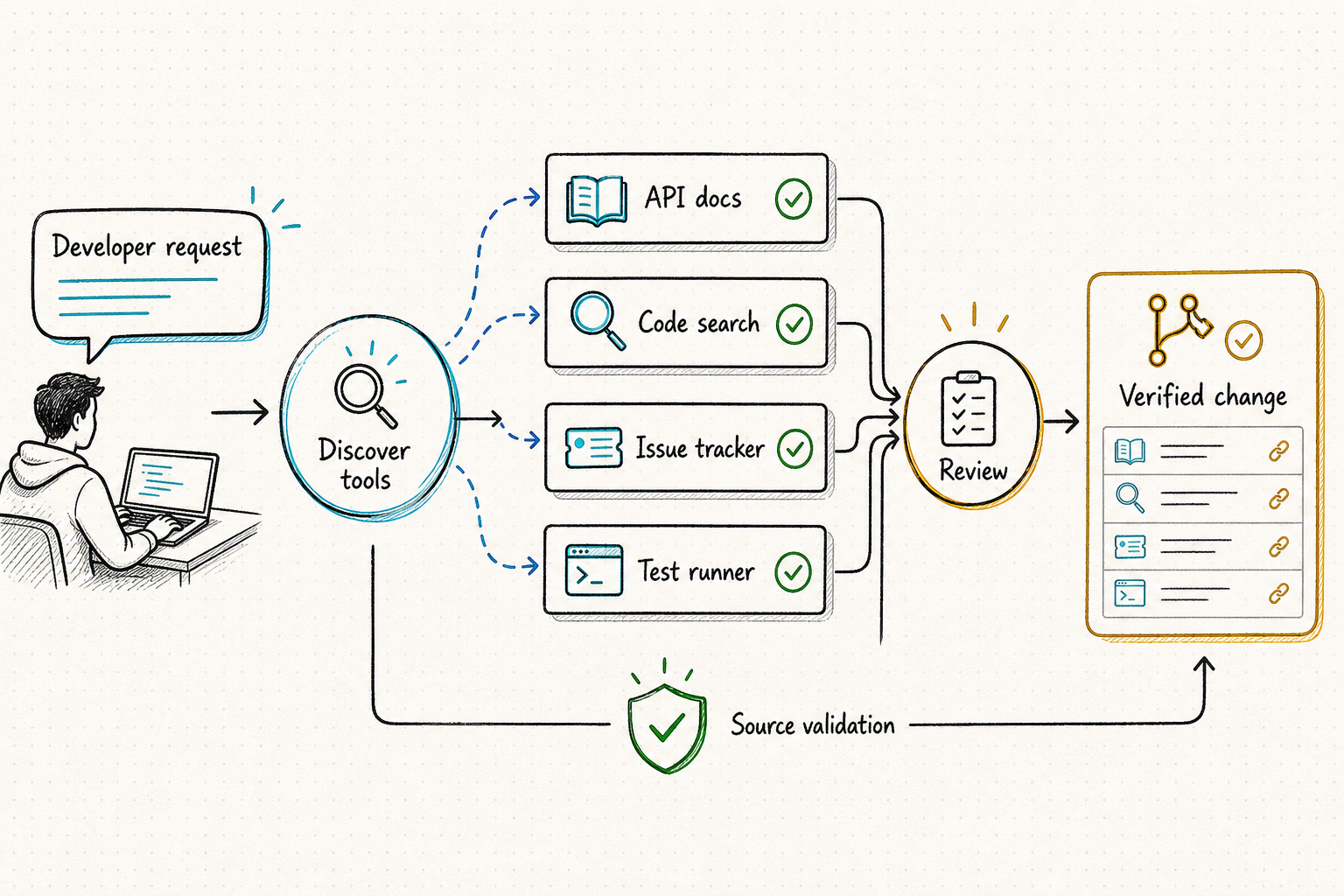
AI coding agents can generate code, explain errors, and reason over local context. But useful developer automation workflows often require external capabilities: API reference lookup, documentation search, package research, monitoring lookup, issue context, web research, file parsing, status checks, notification routing, and structured handoff notes.
QVeris gives agents one capability layer for discovering, inspecting, and calling relevant developer tools without hardcoding every documentation source, API endpoint, monitoring system, or notification provider.
How QVeris connects a developer task to an action plan through discoverable, inspectable capabilities.
Four core challenges that make developer automation agent development slow and fragile.
Code, API docs, tickets, logs, package information, monitoring systems, public references, and internal notes often live in different places — each requiring separate access paths.
Before calling a developer capability, agents need to understand required inputs, response format, provider behavior, cost signals, and output limitations — not guess at runtime.
Manually wiring every documentation source, API lookup, status check, or notification provider creates brittle wrappers and compounding maintenance overhead.
Agent-generated debugging plans, issue triage notes, and implementation suggestions should be reviewed, tested, and validated by developers before being applied.
“Developer automation” covers everything from reading documentation to deploying production code. Those actions must not share one permission envelope. The agent should know the exact repository, revision, environment, credential scope, and allowed side effects before it acts.
“开发者自动化”既包括阅读文档,也可能包括部署生产代码,这些动作不能共享同一套权限。Agent 执行前必须明确仓库、版本、环境、凭据范围以及被允许产生的副作用。
The agent searches QVeris for relevant capabilities such as API lookup, documentation search, web research, package research, monitoring lookup, structured summaries, or notifications.
The agent inspects schema, required inputs, response format, cost signals, and provider information before execution — no blind calls to unknown tools.
The agent calls selected capabilities and turns returned outputs into debugging plans, issue triage summaries, implementation checklists, release notes, or handoff notes.
Eight concrete developer automation recipes organized by workflow phase.
Illustrative example of a triage summary generated through QVeris capabilities. Not data from a real repository or private issue.
This is an illustrative example. It does not represent real repository data, private issues, or customer engineering projects. No guaranteed fix is implied. Developers should review, test, and validate all changes before applying them.
A credible coding agent does not jump from an issue to a deployment. It leaves a reviewable chain from task interpretation through tests, risk notes, and the exact proposed diff.
Identify repository and base revision, reproduce the problem, state assumptions, define what “done” means, and flag missing information that could change the implementation.
List the files and interfaces likely to change, preserve unrelated user work, establish rollback, and keep generated edits inside the approved workspace.
Run the narrowest relevant tests first, then broader regression, lint, type, security, and build checks. Preserve commands, exit codes, failures, retries, and any skipped validation.
Summarize cause, change, test evidence, residual risk, migration or rollback steps, and external effects. The reviewer approves the current artifact—not a vague future action.
可信的编码 Agent 不会从 Issue 直接跳到部署,而是留下从任务理解、测试证据、风险说明到精确 diff 的完整复核链。
识别仓库与基准版本,复现问题,说明假设,定义完成标准,并指出哪些缺失信息可能改变实现方案。
列出可能修改的文件和接口,保护无关的用户改动,预先确定回滚方式,并把生成编辑限制在批准工作区内。
先运行最相关的小范围测试,再执行回归、lint、类型、安全和构建检查;保留命令、退出码、失败、重试及任何跳过的验证。
说明根因、改动、测试证据、剩余风险、迁移或回滚步骤以及外部影响。审查者批准的是当前制品,不是模糊的未来操作。
QVeris helps agents discover and call developer capabilities, but automation outputs still need developer review.
Approval is strongest when it names exactly what may happen and automatically expires when the context changes. A general “go ahead” should never authorize a different repository, environment, command, or artifact.
Repository, organization, branch, commit SHA, environment, service, package, and destination are resolved and displayed.
Allowed files and resources, command policy, network access, credentials, runtime, cost, and write scope are enforced outside the model.
Required tests and checks passed on the current diff; known failures, flaky tests, skipped checks, and dependency changes are visible.
A named reviewer sees the artifact and impact, and a tested rollback or recovery path exists before merge, publish, migration, or deploy.
Correlate request, repository and commit identity, selected capability, parameter summary, permissions, diff, commands, exit codes, test results, approvals, writes, cost, and rollback under one task ID. Redact secrets and sensitive source.
Test real repository tasks with hidden acceptance criteria. Measure issue understanding, file selection, functional correctness, regression safety, unrelated edits, security findings, reviewer effort, latency, and cost. Permission leaks or dangerous side effects fail the gate even when average accuracy is high.
只有当批准明确说明允许发生什么,并在上下文变化时自动失效,它才真正可靠。笼统的“继续”绝不能授权另一个仓库、环境、命令或制品。
仓库、组织、分支、commit SHA、环境、服务、软件包和目标位置均已解析并展示。
允许的文件与资源、命令策略、网络访问、凭据、运行时间、成本与写入范围在模型外部强制执行。
要求的测试与检查已针对当前 diff 通过;已知失败、不稳定测试、跳过项目和依赖变化清晰可见。
指定审查者看到了制品和影响,并在合并、发布、迁移或部署前准备好经过验证的回滚或恢复路径。
用同一任务 ID 关联请求、仓库与 commit、能力、参数摘要、权限、diff、命令、退出码、测试结果、批准、外部写入、成本和回滚,并对密钥与敏感源码脱敏。
使用带隐藏验收标准的真实仓库任务,测量 Issue 理解、文件选择、功能正确性、回归安全、无关修改、安全发现、审查工作量、时延与成本。权限泄漏或危险副作用即使在平均准确率很高时也应直接阻断。
| Requirement | Manual developer workflow | Hardcoded developer tools | QVeris for developer automation |
|---|---|---|---|
| Tool discovery | Developers manually search docs, issues, logs, and references | Fixed integrations are chosen in advance | ✓Agents can discover relevant developer capabilities based on the task |
| Workflow repeatability | Flexible but slow and inconsistent | Repeatable but limited to predefined integrations | ✓Reusable Discover, Inspect, Call pattern across developer capabilities |
| Schema understanding | No structured schema for agent workflows | Developers maintain provider-specific documentation | ✓Agents inspect schema, parameters, and cost signals before execution |
| Output structure | Often scattered notes, copied links, and ad hoc checklists | Structured only where integrations are designed | ✓Structured outputs can be routed into checklists, handoffs, issues, or workflows |
| Review and visibility | Hard to track what tools were used and when | Usage spread across provider dashboards | ✓Usage can be reviewed through QVeris usage history and credits ledger |
Developers building coding agents that need external tools, documentation, APIs, and structured task execution beyond local context.
Teams automating internal developer workflows such as issue triage, docs lookup, debugging support, and workflow handoffs.
Small teams that want faster research, debugging, and implementation loops without wiring every provider manually.
Teams building developer assistants, internal platforms, workflow bots, or agent-powered engineering products.
Browse the complete catalog of AI agent tools, platforms, and developer capabilities.
Discover top MCP platforms for connecting agents to developer tools and services.
Explore source discovery, public information lookup, and structured research briefs.
Explore PDF parsing, OCR, extraction, and document automation workflows.
Use QVeris to give AI agents access to developer capabilities for API lookup, documentation search, issue triage, debugging research, and workflow automation.
